-
正则表达式——3.更多种搜寻比对模式
换一种与之前不同的号码
02-28350000 # 可用xx-xxxxxxxx使用小括号分组
使用正则表达式表达上述电话号码。
r'\d\d-\d\d\d\d\d\d\d\d'
所谓括号分组是以连字符“-”区别,然后用小括号隔开群组,可以用下列方式重新规划:
r'(\d\d)-(\d\d\d\d\d\d\d\d)'
简化为:r'(\d{2})-(\d{8})'
1.使用小括号分组的概念,将分组内容输出。
- import re
- msg = 'Please call my secretary using 02-26669999'
- pattern = r'(\d{2})-(\d{8})'
- phoneNum = re.search(pattern, msg)
- print(f"完整号码是:{phoneNum.group()}") # 显示完整号码
- print(f"完整号码是:{phoneNum.group(0)}") # 显示完整号码
- print(f"区域号码是:{phoneNum.group(1)}") # 显示区域号码
- print(f"电话号码是:{phoneNum.group(2)}") # 显示完整号码

如果所搜寻比对的正则表达式字符串有用小括号分组,若使用findall()方法处理,会回传元组的列表,元组内的每个元素就是搜寻的分组内容。
2.使用findall()方法重新设计上述程序,这个实例会多增加一组电话号码。
- import re
- msg = 'Please call my secretary using 02-26669999 or 02-11112222'
- pattern = r'(\d{2})-(\d{8})'
- phoneNum = re.findall(pattern, msg)
- print(phoneNum)

groups()
与之前的group()不同,这里是groups(),当我们使用re.search()搜寻字符串时,可以使用这个方法取得分组的内容.这时还可以使用多重指定的概念,我们可以使用下列多重指定获得区域号码和当地电话号码。
areaNUm, localNUm = phoneNum.groups() # 多重指定3.重新设计程序,分别列出区域号码与电话号码。
- import re
- msg = 'Please call my secretary using 02-26669999'
- pattern = r'(\d{2})-(\d{8})'
- phoneNum = re.search(pattern, msg) # 回传搜寻结果
- areaNUm, localNum = phoneNum.groups() # 留意是groups()
- print(f"区域号码是: {areaNUm}") # 显示区域号码
- print(f"电话号码是: {localNum}") # 显示电话号码

区域号码是在小括号内
在一般电话号码的使用中,常看到区域号码是用小括号包夹的:
(02)-26669999
在处理小括号时,方式是
和 4.区域号码是(02)
- import re
- msg = 'Please call my secretary using (02)-26669999'
- pattern = r'(\(\d{2}\))-(\d{8})'
- phoneNum = re.search(pattern, msg) # 回传搜寻结果
- areaNUm, localNum = phoneNum.groups() # 留意是groups()
- print(f"区域号码是: {areaNUm}") # 显示区域号码
- print(f"电话号码是: {localNum}") # 显示电话号码

这里要注意:
pattern = r'(\(\d{2}\))-(\d{8})'使用通道 |
|(pipe) 在正规表示法称通道,使用通道我们可以同时搜寻比对多个字符串,例如,想要搜寻Mary和Tom字符串,可以使用下列表示。
pattern = 'Mary|Tom'5.通道搜寻多个字符串的实例。
- import re
- msg = 'John and Tom will attend my party tonight, John is my best friend.'
- pattern = 'John|Tom'
- txt = re.findall(pattern, msg)
- print(txt)
- pattern = 'Mary|Tom'
- txt = re.findall(pattern, msg)
- print(txt)

多个分组的通道搜寻
假设有一个字符串内容如下:
Johnson, Johnnason and Johnnathan will attend my party tonight.
如果想要搜寻以上字符串,比对John后面可以是son、nason、nathan任一个字符串的组合,可以使用下列正则表达式格式:
pattern = 'John(son|nason|nathan'
6.搜寻以上任一字符串,然后列出结果,这个程序将只列出第一个搜寻比对到的字符串。
- import re
- msg = 'Johnson, Johnnason and Johnnathan will attend my party tonight.'
- pattern = 'John(son|nason|nathan)'
- txt = re.search(pattern, msg)
- print(txt.group())
- print(txt.group(1))

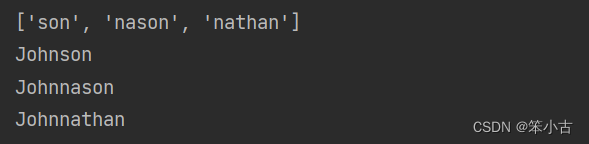
同样的正则表达式若是使用findall()方法处理,将只回传各分组搜寻到的字符串,如果要列出完整的内容,可以用循环同时为每个分组字符串加上前导字符串John。
7.使用findall()重新设计实例6.
- import re
- msg = 'Johnson, Johnnason and Johnnathan will attend my party tonight.'
- pattern = 'John(son|nason|nathan)'
- txts = re.findall(pattern, msg)
- print(txts)
- for txt in txts:
- print('John' + txt)
搜寻时忽略大小写
搜寻时若是在search()或findall()内增加第三个参数re.I或re.IGNORECASE,搜寻时就会忽略大小写,至于打印输出时将以原字符串的格式显示。
8.以忽略大小写方式执行寻找相符字符串。
- import re
- msg = 'John and ToM will attend my party tonight, JohN is my best friend.'
- pattern = 'John|Tom'
- txt = re.findall(pattern, msg, re.I)
- print(txt)
- pattern = 'Mary|tom'
- txt = re.findall(pattern, msg, re.I)
- print(txt)

除了以上介绍的搜寻模式,还有
使用?号做搜寻;(某些字符串或正则表达式可有可无时可用)
使用+号做搜寻;(某些字符串或正则表达式可从0次到多次时可用)
使用*号做搜寻;(某些字符串或正则表达式可从1次到多次时可用)
-
相关阅读:
pdf文档转word文档
Vue基础3
Scala003--Scala中的运算符及注释
STM32入门F4
U盘复制错误0x80071ac3如何解决?
java 调用 wkhtmltopdf
Pr 入门系列之十:添加图形和标题
C#实现QQ窗体的步骤和总结
vs code 好用的插件
网站日志采集和分析流程
- 原文地址:https://blog.csdn.net/weixin_51995147/article/details/126222108