-
Android学习笔记 9. PopupWindow
Android学习笔记
Android基础开发——控件
9. PopupWindow
9.1 常用方法
方法 含义 setContentView 设置PopupWindow显示的View showAsDropDown(View anchor) 相对某个控件的位置(正左下方),无偏移 showAsDropDown(View anchor,int xoff , int yoff) 相对某个控件的位置,有偏移 setFocusable 设置是否获取焦点 setBackgroundDrawable 设置背景 dismiss 关闭弹窗 setAnimationStyle 设置加载动画 setTouchable 设置触摸使能 setOutsideTouchable 设置PopupWindow外面的触摸使能 9.2 演示
<LinearLayout xmlns:android="http://schemas.android.com/apk/res/android" android:layout_width="match_parent" android:layout_height="match_parent" android:orientation="vertical" > <Button android:id="@+id/btn" android:layout_width="wrap_content" android:layout_height="wrap_content" android:text="弹出PopupWindow" /> LinearLayout>- 1
- 2
- 3
- 4
- 5
- 6
- 7
- 8
- 9
- 10
- 11
- 12
- 13
- 14
- 15

popup_view.xml
<LinearLayout xmlns:android="http://schemas.android.com/apk/res/android" android:layout_width="match_parent" android:layout_height="match_parent" android:orientation="vertical" android:background="@mipmap/ic_launcher" > <Button android:layout_width="wrap_content" android:layout_height="wrap_content" android:id="@+id/btn1" android:padding="5dp" android:text="上海" android:textSize="18sp" /> <Button android:layout_width="wrap_content" android:layout_height="wrap_content" android:id="@+id/btn2" android:padding="5dp" android:text="北京" android:textSize="18sp" /> LinearLayout>- 1
- 2
- 3
- 4
- 5
- 6
- 7
- 8
- 9
- 10
- 11
- 12
- 13
- 14
- 15
- 16
- 17
- 18
- 19
- 20
- 21
- 22
- 23
- 24
- 25
- 26
- 27
Button btn = findViewById(R.id.btn); btn.setOnClickListener(new View.OnClickListener() { @Override public void onClick(View view) { View popupView = getLayoutInflater().inflate(R.layout.popup_view,null); PopupWindow popupWindow = new PopupWindow(popupView, ViewGroup.LayoutParams.WRAP_CONTENT, ViewGroup.LayoutParams.WRAP_CONTENT); popupWindow.showAsDropDown(view); //显示在按钮下方 } });- 1
- 2
- 3
- 4
- 5
- 6
- 7
- 8
- 9
- 10

有偏移的popupwindow

这个时候点击空白处,window不会消失
→ 设置可获取焦点

这下点击空白处,就会关闭window了
设置背景
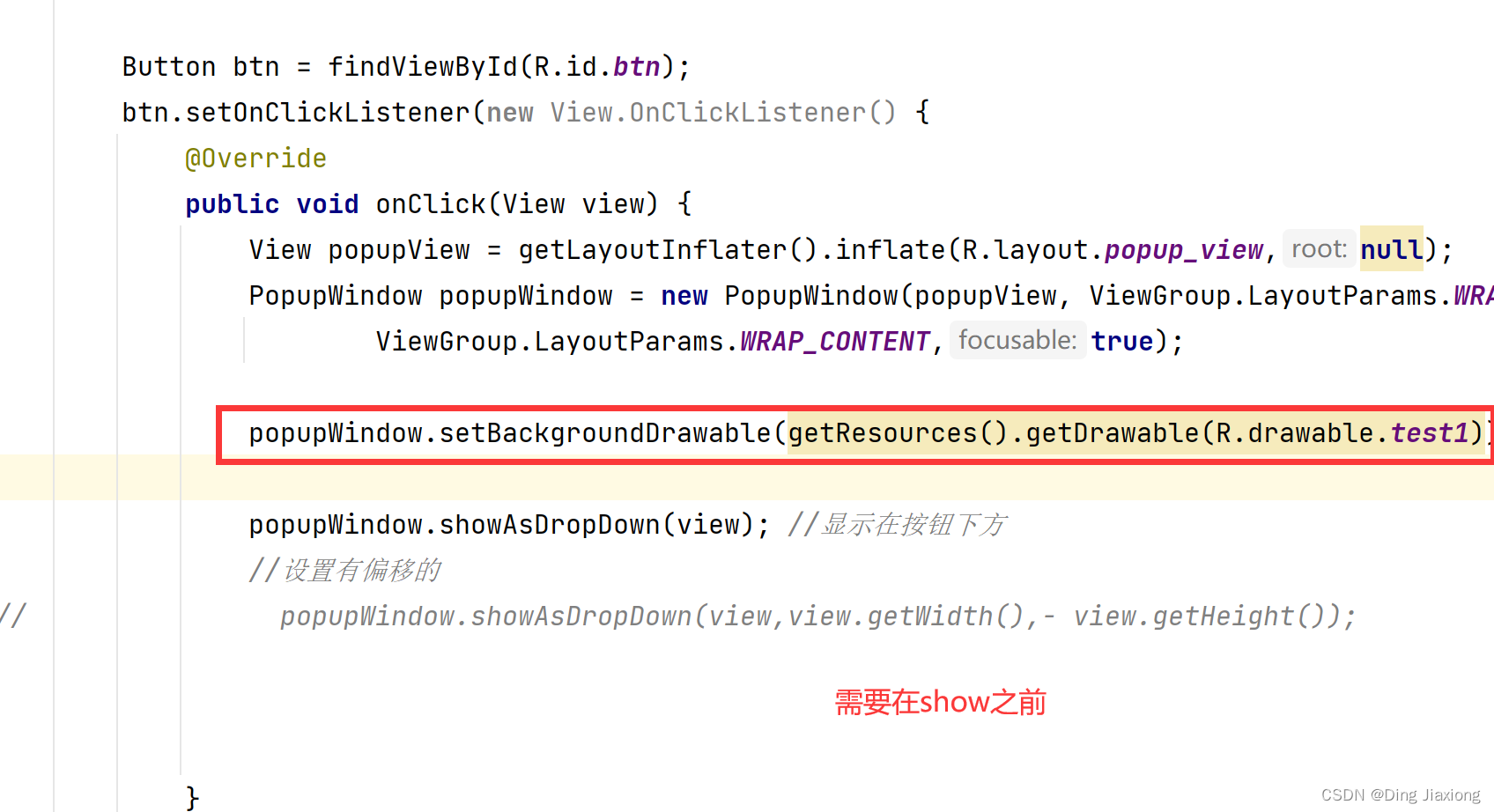

设置popupwindow中按钮的监听事件
Button btn1 = popupView.findViewById(R.id.btn1); Button btn2 = popupView.findViewById(R.id.btn2); btn1.setOnClickListener(new View.OnClickListener() { @Override public void onClick(View view) { System.out.println("上海"); } }); btn2.setOnClickListener(new View.OnClickListener() { @Override public void onClick(View view) { System.out.println("北京"); } });- 1
- 2
- 3
- 4
- 5
- 6
- 7
- 8
- 9
- 10
- 11
- 12
- 13
- 14
- 15
- 16

点击后设置关闭弹窗
dismiss()

-
相关阅读:
柯桥外语学习|考级英语|四六级和高考英语的差距
Java:如何去优雅地优化接口
系统架构设计师备考经验分享:如何有效备考
【VS Code 与 Qt6】运用事件过滤器批量操作子级组件
美摄科技对抗网络数字人解决方案
目标检测文献
MSVCR100.dll丢失修复方法,MSVCR100.dll丢失的解决方法
Redis主从模式(二)---拓扑结构及复制过程
Web 智能代码编辑器 WeBuilder 2022
Debian环境下搭建STM32开发环境
- 原文地址:https://blog.csdn.net/weixin_44226181/article/details/126220588
