-
Kafka请求发送分析
随便写写T_T,本来是想分析Conenct是如何组建集群的,但是写着写着发现分析了请求是如何发送的和回收的。后面也不打算改,就当作是从Connect出发分析Kafka请求是如何发送。
顺带一句,本文只是一篇源码分析┑( ̄Д  ̄)┍,只完成了一部分!!!
KafkaConnect在分布式情况下的主要实现类是DistributedHerder,其生命周期基本都是在tick()里度过。
- // DistributedHerder.java
- public void tick() {
- try {
- if (!canReadConfigs) {
- if (readConfigToEnd(workerSyncTimeoutMs)) {
- canReadConfigs = true;
- } else {
- return; // Safe to return and tick immediately because readConfigToEnd will do the backoff for us
- }
- }
- // 这里会确定集群情况
- member.ensureActive();
- if (!handleRebalanceCompleted()) return;
- } catch (WakeupException e) {
- log.trace("Woken up while ensure group membership is still active");
- return;
- }
- ...
- // WorkerGroupMember.java
- public void ensureActive() {
- coordinator.poll(0);
- }
DistributedHerder.tick内部会先确认coordinator和集群的情况,毕竟coonnect不和集群中的leader交互,不像zookeeper那样需要在配置文件里把节点都配置起来。member.ensuerActiver()具体会调用WorkerCoordinator.poll()向coordinator主动发起一次消息查询poll请求。
- // WorkerCoordinator.java
- public void poll(long timeout) {
- // poll for io until the timeout expires
- final long start = time.milliseconds();
- long now = start;
- long remaining;
- do {
- // 第一次加入或者和coordiantor的心跳响应超时,都会设置内存中的coordinator为null
- if (coordinatorUnknown()) {
- log.debug("Broker coordinator is marked unknown. Attempting discovery with a timeout of {}ms",
- coordinatorDiscoveryTimeoutMs);
- // 请求负责member.id指定集群的coordinator
- if (ensureCoordinatorReady(time.timer(coordinatorDiscoveryTimeoutMs))) {
- log.debug("Broker coordinator is ready");
- } else {
- // 连接coordinator失败,假如前面已经加入过集群了,立即清除
- // 前面分配的任务,避免coordiantor认为当前connect节点挂了
- // 导致把任务分配给其他connect节点,导致任务重复
- final ExtendedAssignment localAssignmentSnapshot = assignmentSnapshot;
- if (localAssignmentSnapshot != null && !localAssignmentSnapshot.failed()) {
- // 清除分配给当前connect节点的任务
- listener.onRevoked(localAssignmentSnapshot.leader(), localAssignmentSnapshot.connectors(), localAssignmentSnapshot.tasks());
- assignmentSnapshot = null;
- }
- }
- now = time.milliseconds();
- }
- // 前面是检测coordiantor是否准备好了
- // 这里是检测是否需要重新加入到group.id指定的集群中
- if (rejoinNeededOrPending()) {
- ensureActiveGroup();
- now = time.milliseconds();
- }
- pollHeartbeat(now);
- long elapsed = now - start;
- remaining = timeout - elapsed;
- // 如果从开始请求coordiantor到加入集群结束,还没超时,则可以先尝试获取下
- // 是否当前有网络请求过来处理,并没长时间阻塞在coordinator.poll这里
- long pollTimeout = Math.min(Math.max(0, remaining), timeToNextHeartbeat(now));
- client.poll(time.timer(pollTimeout));
- now = time.milliseconds();
- elapsed = now - start;
- remaining = timeout - elapsed;
- } while (remaining > 0);
- }
connect内部通过调用AbstractCoordinator.coordinatorUnknown()来判断coordiantor是否就
当connect第一次加入,或者和coordinator连接断开时,需要重新请求coordiantor状态。这里通过调用WorkerCoordinator.ensureCoordiantorReady(timer)完成。
- protected synchronized boolean ensureCoordinatorReady(final Timer timer) {
- // 重新判断当前coordinator是否已经就绪,可能因为是网络波动问题
- // 导致coordiantor只是瞬间断开后又立即恢复
- if (!coordinatorUnknown())
- return true;
- // 当coordiantor未知,以及当前判断未超时时,需要不断轮询
- do {
- // 上一次轮询遇到严重无法恢复的异常,就及时抛出并退出
- if (fatalFindCoordinatorException != null) {
- final RuntimeException fatalException = fatalFindCoordinatorException;
- fatalFindCoordinatorException = null;
- throw fatalException;
- }
- // 这里是构建FindCoordinatorRequest
- final RequestFuture
future = lookupCoordinator(); - // 将请求交给NetworkClient去发发送
- client.poll(future, timer);
- if (!future.isDone()) {
- // ran out of time
- break;
- }
- RuntimeException fatalException = null;
- // 校验请求结果
- if (future.failed()) {
- if (future.isRetriable()) {
- log.debug("Coordinator discovery failed, refreshing metadata");
- client.awaitMetadataUpdate(timer);
- } else {
- fatalException = future.exception();
- log.info("FindCoordinator request hit fatal exception", fatalException);
- }
- } else if (coordinator != null && client.isUnavailable(coordinator)) {
- // 这里虽然找到了coordiantor,但是isUnavailable返回失败,说明
- // 请求连接失败,可以过一会再请求
- markCoordinatorUnknown();
- timer.sleep(rebalanceConfig.retryBackoffMs);
- }
- clearFindCoordinatorFuture();
- if (fatalException != null)
- throw fatalException;
- } while (coordinatorUnknown() && timer.notExpired());
- return !coordinatorUnknown();
- }
lookupCoordinator()负责获取负责当前集群的coordiantor信息
- // AbstractCoordinator
- protected synchronized RequestFuture
lookupCoordinator() { - if (findCoordinatorFuture == null) {
- // 这里是从broker中选择一个节点发送请求,要求是当前具有最少请求的节点
- // 不涉及当前的分析所以先跳过
- Node node = this.client.leastLoadedNode();
- if (node == null) {
- log.debug("No broker available to send FindCoordinator request");
- return RequestFuture.noBrokersAvailable();
- } else {
- // 往该节点发送FindCoordinatorRequest
- findCoordinatorFuture = sendFindCoordinatorRequest(node);
- }
- }
- return findCoordinatorFuture;
- }
- // AbstraceCoordinator
- private RequestFuture
sendFindCoordinatorRequest(Node node) { - // 构建FindCoordinatorRequest请求
- FindCoordinatorRequest.Builder requestBuilder =
- new FindCoordinatorRequest.Builder(
- new FindCoordinatorRequestData()
- // 这里设置Coordinator的类型,有事务和组管理,这里选组管理
- .setKeyType(CoordinatorType.GROUP.id())
- // 对应的值是在connect中配置的group.id
- .setKey(this.rebalanceConfig.groupId));
- return client.send(node, requestBuilder)
- .compose(new FindCoordinatorResponseHandler());
- }
由上面的逻辑可以分析出,connect需要查询对应group.id负责的coordinator,只需要往任意的broker发送FindCoordinatorRequest即可,该请求会附带上当前connect的group.id信息,随即调用ConsumerNetworkClient.send()发送请求,而且注意看这里往send()传递并不是requet,而是半成品的requestBuilder,说明当前请求除了group.id外还有其他信息需要组装。其余的client.send()发送完之后,还会调用compose组装请求发送完成后如何处理,这里因为是FindCoordinatorReuqest,所以将完成的请求交给FindCoordinatorResponseHandler
- public
RequestFuturecompose(final RequestFutureAdapter - final RequestFuture
adapted = new RequestFuture<>(); - addListener(new RequestFutureListener
() { - @Override
- public void onSuccess(T value) {
- adapter.onSuccess(value, adapted);
- }
- @Override
- public void onFailure(RuntimeException e) {
- adapter.onFailure(e, adapted);
- }
- });
- return adapted;
- }
- private class FindCoordinatorResponseHandler extends RequestFutureAdapter
- @Override
- public void onSuccess(ClientResponse resp, RequestFuture
future) { - log.debug("Received FindCoordinator response {}", resp);
- FindCoordinatorResponse findCoordinatorResponse = (FindCoordinatorResponse) resp.responseBody();
- Errors error = findCoordinatorResponse.error();
- // 没有发送失败
- if (error == Errors.NONE) {
- synchronized (AbstractCoordinator.this) {
- // use MAX_VALUE - node.id as the coordinator id to allow separate connections
- // for the coordinator in the underlying network client layer
- int coordinatorConnectionId = Integer.MAX_VALUE - findCoordinatorResponse.data().nodeId();
- // 获取coordinator信息
- AbstractCoordinator.this.coordinator = new Node(
- coordinatorConnectionId,
- findCoordinatorResponse.data().host(),
- findCoordinatorResponse.data().port());
- log.info("Discovered group coordinator {}", coordinator);
- // 连接coordinator
- client.tryConnect(coordinator);
- heartbeat.resetSessionTimeout();
- }
- future.complete(null);
- } else if (error == Errors.GROUP_AUTHORIZATION_FAILED) {
- future.raise(GroupAuthorizationException.forGroupId(rebalanceConfig.groupId));
- } else {
- log.debug("Group coordinator lookup failed: {}", findCoordinatorResponse.data().errorMessage());
- future.raise(error);
- }
- }
- ...
- }
我们来看下ConsumerNetworkClient.send()逻辑。
- // ConsumerNetworkClient
- public RequestFuture
send(Node node, AbstractRequest.Builder requestBuilder) { - return send(node, requestBuilder, requestTimeoutMs);
- }
- // ConsumerNetworkClient
- public RequestFuture
send(Node node, - AbstractRequest.Builder requestBuilder,
- int requestTimeoutMs) {
- long now = time.milliseconds();
- // 请求完成时处理器
- RequestFutureCompletionHandler completionHandler = new RequestFutureCompletionHandler();
- // 将发送目的地Node、半成品的requestBuilder、当前时间以及
- // RequestFutureCompletionHandler 转化成统一的ClientRequest
- ClientRequest clientRequest = client.newClientRequest(node.idString(), requestBuilder, now, true,
- requestTimeoutMs, completionHandler);
- // 将请求放入到unsent中
- unsent.put(node, clientRequest);
- // 唤醒client发送线程,这里对应KafkaClient
- client.wakeup();
- // 将处理结果Future返回
- return completionHandler.future;
- }
ConsumerNetworkClient主要做了两件事,第一就是将当前请求、发送的目的地节点以及请求完成时处理器RequestFutureCompletionHandler组装成统一的发送对象ClientRequest。
第二件事就把生成的ClientRequesr塞入到unsent这个待发送请求的队列中。关于unset的结构如下:
- private final static class UnsentRequests {
- // UnsentRequest核心时ConcurrentMap,其中key时Node节点,
- // value时待发送请求队列ConcurrentLinkedQueue
- private final ConcurrentMap
- public void put(Node node, ClientRequest request) {
- // 这里需要加上synchronized,因为对ConcurrentMap是先取值ConcurrentLinkedQueue
- // 再往里面添加对象,这里有可能ConcurrentLinkedQueue本身被修改
- // 例如设置为null,亦或者设置为新的ConcurrentLinkedQueue
- // 为了避免找个情况所以加上synchronized
- synchronized (unsent) {
- ConcurrentLinkedQueue
requests = unsent.get(node); - if (requests == null) {
- requests = new ConcurrentLinkedQueue<>();
- unsent.put(node, requests);
- }
- requests.add(request);
- }
- }
- ...
所以总结下,调用ConsumerNetworkClient.send()就是把请求塞入到UnsentRequest中,然后就返回了,实际并没有将请求真正的发送给服务端。那究竟如何才能把请求发送出去呢?回到AbstractCoordinator.ensureCoordinatorReady(),在调用完lookupCoordinator()之后,会立即调用ConsumerNetworkClient.poll()方法处理Future。
- // AbstractCoordinator
- protected synchronized boolean ensureCoordinatorReady(final Timer timer) {
- ...
- final RequestFuture
future = lookupCoordinator(); - client.poll(future, timer);
下面看下ConsumerNetworkClient.poll()
- // ConsumerNetworkClient 轮询网络IO
- public void poll(Timer timer, PollCondition pollCondition, boolean disableWakeup) {
- // pendingCompletion这里是把pendingCompletion队列中的请求完成
- firePendingCompletedRequests();
- // 自旋锁,避免多线程同时调用该方法时出现线程安全
- lock.lock();
- try {
- // 对请求做失败处理。客户端断开与指定节点的连接。
- handlePendingDisconnects();
- // 尝试发送当前可以发送的请求
- long pollDelayMs = trySend(timer.currentTimeMs());
- // 开始轮询IO请求
- if (pendingCompletion.isEmpty() && (pollCondition == null || pollCondition.shouldBlock())) {
- long pollTimeout = Math.min(timer.remainingMs(), pollDelayMs);
- if (client.inFlightRequestCount() == 0)
- pollTimeout = Math.min(pollTimeout, retryBackoffMs);
- client.poll(pollTimeout, timer.currentTimeMs());
- } else {
- client.poll(0, timer.currentTimeMs());
- }
- timer.update();
- checkDisconnects(timer.currentTimeMs());
- if (!disableWakeup) {
- // trigger wakeups after checking for disconnects so that the callbacks will be ready
- // to be fired on the next call to poll()
- maybeTriggerWakeup();
- }
- // throw InterruptException if this thread is interrupted
- maybeThrowInterruptException();
- // try again to send requests since buffer space may have been
- // cleared or a connect finished in the poll
- trySend(timer.currentTimeMs());
- // fail requests that couldn't be sent if they have expired
- failExpiredRequests(timer.currentTimeMs());
- // clean unsent requests collection to keep the map from growing indefinitely
- unsent.clean();
- } finally {
- lock.unlock();
- }
- // called without the lock to avoid deadlock potential if handlers need to acquire locks
- firePendingCompletedRequests();
- metadata.maybeThrowAnyException();
- }
ConsumerNetworkClient.poll()做的事情比较多,先来看下trySend()的逻辑
- // ConsumerNetworkClient.java
- long trySend(long now) {
- long pollDelayMs = maxPollTimeoutMs;
- // unsent我们上面分析了,就是存储待发送给各个节点的请求
- // 这里开始遍历每个节点
- for (Node node : unsent.nodes()) {
- Iterator
iterator = unsent.requestIterator(node); - if (iterator.hasNext())
- pollDelayMs = Math.min(pollDelayMs, client.pollDelayMs(node, now));
- // 遍历每个节点,拿出ClientRequest
- while (iterator.hasNext()) {
- ClientRequest request = iterator.next();
- // 检查当前待发送的节点是否就绪
- if (client.ready(node, now)) {
- client.send(request, now);
- // 发送完立马删除当前请求
- iterator.remove();
- } else {
- // 如果当前节点没有待发送的请求,或者没有就绪就退出当前节点的遍历
- // 开始下一个节点
- break;
- }
- }
- }
- return pollDelayMs;
- }
trySend()内部会调用KafkaClient.ready()判断待发送请求的节点是否就绪
- // NetworkClient.java
- public boolean ready(Node node, long now) {
- // 判断节点的host和port是否为空
- if (node.isEmpty())
- throw new IllegalArgumentException("Cannot connect to empty node " + node);
- // 判断当前节点是否准备好接收请求了
- if (isReady(node, now))
- return true;
- if (connectionStates.canConnect(node.idString(), now))
- // if we are interested in sending to a node and we don't have a connection to it, initiate one
- initiateConnect(node, now);
- return false;
- }
- // NetworkClient.java
- public boolean isReady(Node node, long now) {
- // 节点的元数据是否没有及时更新(元数据包括topic、partition信息)
- return !metadataUpdater.isUpdateDue(now) && canSendRequest(node.idString(), now);
- }
- // NetworkClient.java
- private boolean canSendRequest(String node, long now) {
- return connectionStates.isReady(node, now) && selector.isChannelReady(node) &&
- inFlightRequests.canSendMore(node);
- }
- // Selector
- public boolean isChannelReady(String id) {
- KafkaChannel channel = this.channels.get(id);
- return channel != null && channel.ready();
- }
- // InFlightRequests
- public boolean canSendMore(String node) {
- Deque
queue = requests.get(node); - return queue == null || queue.isEmpty() ||
- (queue.peekFirst().send.completed() && queue.size() < this.maxInFlightRequestsPerConnection);
- }
根据上面的逻辑可以看出,Kafka内部判断对应Node是否可以发送请求会依照以下:
- 配置文件中的broker节点,host和port是否为空,也就是配置参数是否合法;
- broker的元数据(metadata)距离上一次更新时间没有超时;
- Kafka内部封装了Java的NIO模型,设计了自己的Selector和KafkaChannel(可以参照原生的NIO Selector和SocketChnnael),KafkaChannel表示和目标的连接通道,并且该通道需要开启;
- InFlightRequest在Kafka表示发送给对应节点的请求,但是还未收到响应,内部用了一个Map
一旦判断对应的节点可以发送请求了,就可以调用KafkaClient.send()发送,其实现是放在NetworkClient.send()。
- // NetworkClient
- public void send(ClientRequest request, long now) {
- doSend(request, false, now);
- }
- // NetworkClient
- private void doSend(ClientRequest clientRequest, boolean isInternalRequest, long now) {
- ensureActive();
- // 获取目的节点
- String nodeId = clientRequest.destination();
- if (!isInternalRequest) {
- if (!canSendRequest(nodeId, now))
- throw new IllegalStateException("Attempt to send a request to node " + nodeId + " which is not ready.");
- }
- // 前面说了构建ClientRequest时候传递的是一个半成品的Builder,这里要加上请求header和版本信息
- AbstractRequest.Builder builder = clientRequest.requestBuilder();
- try {
- // 获取对应broker节点的版本信息
- NodeApiVersions versionInfo = apiVersions.get(nodeId);
- short version;
- // 如果版本信息为空,则按照当前客户端的最新的版本发送,无法获取服务端版本号的原因可能时
- // discoverBrokerVersions设置为false
- if (versionInfo == null) {
- version = builder.latestAllowedVersion();
- if (discoverBrokerVersions && log.isTraceEnabled())
- log.trace("No version information found when sending {} with correlation id {} to node {}. " +
- "Assuming version {}.", clientRequest.apiKey(), clientRequest.correlationId(), nodeId, version);
- } else {
- // 根据客户端版本和服务端版本进行比较,选择一个合适的版本
- version = versionInfo.latestUsableVersion(clientRequest.apiKey(), builder.oldestAllowedVersion(),
- builder.latestAllowedVersion());
- }
- // 实际发送调用,注意这里builder.build将version传递过去,生成实际发送的Request,也就是消息的payload部分
- doSend(clientRequest, isInternalRequest, now, builder.build(version));
- } catch (UnsupportedVersionException unsupportedVersionException) {
- log.debug("Version mismatch when attempting to send {} with correlation id {} to {}", builder,
- clientRequest.correlationId(), clientRequest.destination(), unsupportedVersionException);
- ClientResponse clientResponse = new ClientResponse(clientRequest.makeHeader(builder.latestAllowedVersion()),
- clientRequest.callback(), clientRequest.destination(), now, now,
- false, unsupportedVersionException, null, null);
- if (!isInternalRequest)
- abortedSends.add(clientResponse);
- else if (clientRequest.apiKey() == ApiKeys.METADATA)
- metadataUpdater.handleFailedRequest(now, Optional.of(unsupportedVersionException));
- }
- }
在发生前,kafka需要获取对应broker可以接受的api版本信息(Kafka支持不同版本的客户端和服务端进行通信,只需要适当对消息进行处理即可);并在获取到broker的api版本后,根据当前客户端的最新的api版本latestAllowedVersion,和最老的版本oldestAllowedVersion进行比较:
- version = versionInfo.latestUsableVersion(clientRequest.apiKey(), builder.oldestAllowedVersion(),
- builder.latestAllowedVersion());
- // NodeApiVersions
- public short latestUsableVersion(ApiKeys apiKey, short oldestAllowedVersion, short latestAllowedVersion) {
- ApiVersion usableVersion = supportedVersions.get(apiKey);
- if (usableVersion == null)
- throw new UnsupportedVersionException("The broker does not support " + apiKey);
- return latestUsableVersion(apiKey, usableVersion, oldestAllowedVersion, latestAllowedVersion);
- }
- // NodeApiVersions
- private short latestUsableVersion(ApiKeys apiKey, ApiVersion supportedVersions,
- short minAllowedVersion, short maxAllowedVersion) {
- // 下面的比较就是取两个区间的交集的右边界
- short minVersion = (short) Math.max(minAllowedVersion, supportedVersions.minVersion);
- short maxVersion = (short) Math.min(maxAllowedVersion, supportedVersions.maxVersion);
- if (minVersion > maxVersion)
- throw new UnsupportedVersionException("The broker does not support " + apiKey +
- " with version in range [" + minAllowedVersion + "," + maxAllowedVersion + "]. The supported" +
- " range is [" + supportedVersions.minVersion + "," + supportedVersions.maxVersion + "].");
- return maxVersion;
- }
得到两边可以接受的版本之后,调用doSend进行实际发送。
- // NetworkClient
- private void doSend(ClientRequest clientRequest, boolean isInternalRequest, long now, AbstractRequest request) {
- String destination = clientRequest.destination();
- // 请求头
- RequestHeader header = clientRequest.makeHeader(request.version());
- if (log.isDebugEnabled()) {
- log.debug("Sending {} request with header {} and timeout {} to node {}: {}",
- clientRequest.apiKey(), header, clientRequest.requestTimeoutMs(), destination, request);
- }
- // 将header、payload和发送目标组合成实际发送的消息Send
- // 而且这里toSend方法会将header和payload进行序列化
- Send send = request.toSend(destination, header);
- InFlightRequest inFlightRequest = new InFlightRequest(
- clientRequest,
- header,
- isInternalRequest,
- request,
- send,
- now);
- // 将请求塞入到InFlightRequest的队列中
- this.inFlightRequests.add(inFlightRequest);
- // 调用Selector发送请求
- selector.send(send);
- }
- // AbstractRequest
- public Send toSend(String destination, RequestHeader header) {
- return new NetworkSend(destination, serialize(header));
- }
- // RequestUtils
- public static ByteBuffer serialize(Struct headerStruct, Struct bodyStruct) {
- ByteBuffer buffer = ByteBuffer.allocate(headerStruct.sizeOf() + bodyStruct.sizeOf());
- headerStruct.writeTo(buffer);
- bodyStruct.writeTo(buffer);
- buffer.rewind();
- return buffer;
- }
NetworkClient.doSend()会将请求封装成实际发送的消息结构Send,交给Selector.send()发送
- public void send(Send send) {
- String connectionId = send.destination();
- // 获取对应节点Node的KafkaChannel
- KafkaChannel channel = openOrClosingChannelOrFail(connectionId);
- // 当前节点对应的KafkaChannel已经被关闭了,则需要提示发送失败
- if (closingChannels.containsKey(connectionId)) {
- // ensure notification via `disconnected`, leave channel in the state in which closing was triggered
- this.failedSends.add(connectionId);
- } else {
- try {
- // 将Send设置在KafkaChannel中
- channel.setSend(send);
- } catch (Exception e) {
- channel.state(ChannelState.FAILED_SEND);
- this.failedSends.add(connectionId);
- close(channel, CloseMode.DISCARD_NO_NOTIFY);
- if (!(e instanceof CancelledKeyException)) {
- log.error("Unexpected exception during send, closing connection {} and rethrowing exception {}",
- connectionId, e);
- throw e;
- }
- }
- }
- }
由上面的分析可以看到,实际调用ConsumerNetworkClient.send() 发送请求时候,会将请求加上对应的版本封装之后,交给底层的Selector去发送,但是Selector也并没有将请求直接发送过去,而是将请求设置为KafkaChannel的属性上。
- public void setSend(Send send) {
- // 当前KafkaChannel的Send不为空时,说明当前通道有请求发送中,需要抛出异常
- if (this.send != null)
- throw new IllegalStateException("Attempt to begin a send operation with prior send operation still in progress, connection id is " + id);
- this.send = send;
- // 设置当前SelectionKey可写,触发write事件
- this.transportLayer.addInterestOps(SelectionKey.OP_WRITE);
- }
这里需要注意,一个KafkaChannel只能允许当前由一个Send请求,当Send请求不为空时,会直接抛出异常。
直到现在我们都没看到请求时如何发送出去的,所以需要回到ConsumerNetworkClient.poll的方法,这里处理调用KafkaClient.send()之外,还会调用KafkaClient.poll()
- // ConsumerNetworkClient
- if (pendingCompletion.isEmpty() && (pollCondition == null || pollCondition.shouldBlock())) {
- // if there are no requests in flight, do not block longer than the retry backoff
- long pollTimeout = Math.min(timer.remainingMs(), pollDelayMs);
- if (client.inFlightRequestCount() == 0)
- pollTimeout = Math.min(pollTimeout, retryBackoffMs);
- client.poll(pollTimeout, timer.currentTimeMs());
- } else {
- client.poll(0, timer.currentTimeMs());
- }
KafkaClient.pol()的实现是NetworkClient.poll()
- public List
poll(long timeout, long now) { - ensureActive();
- if (!abortedSends.isEmpty()) {
- // 如果部分请求因为版本不支持或者是连接断开,立即处理而不用等poll
- List
responses = new ArrayList<>(); - handleAbortedSends(responses);
- completeResponses(responses);
- return responses;
- }
- // 更新集群元数据
- long metadataTimeout = metadataUpdater.maybeUpdate(now);
- try {
- // 调用Selector.poll
- this.selector.poll(Utils.min(timeout, metadataTimeout, defaultRequestTimeoutMs));
- } catch (IOException e) {
- log.error("Unexpected error during I/O", e);
- }
- // process completed actions
- long updatedNow = this.time.milliseconds();
- List
responses = new ArrayList<>(); - handleCompletedSends(responses, updatedNow);
- handleCompletedReceives(responses, updatedNow);
- handleDisconnections(responses, updatedNow);
- handleConnections();
- handleInitiateApiVersionRequests(updatedNow);
- handleTimedOutRequests(responses, updatedNow);
- completeResponses(responses);
- return responses;
- }
NetworkClient.poll()转而去调用Selector.poll(),Selector底层也是Java的NIO,当用到Java的原生Selector时,下面统称为NioSelector。
- public void poll(long timeout) throws IOException {
- if (timeout < 0)
- throw new IllegalArgumentException("timeout should be >= 0");
- boolean madeReadProgressLastCall = madeReadProgressLastPoll;
- clear();
- boolean dataInBuffers = !keysWithBufferedRead.isEmpty();
- if (!immediatelyConnectedKeys.isEmpty() || (madeReadProgressLastCall && dataInBuffers))
- timeout = 0;
- // 这部分是处理内存溢出吗,可以先跳过
- if (!memoryPool.isOutOfMemory() && outOfMemory) {
- //we have recovered from memory pressure. unmute any channel not explicitly muted for other reasons
- log.trace("Broker no longer low on memory - unmuting incoming sockets");
- for (KafkaChannel channel : channels.values()) {
- if (channel.isInMutableState() && !explicitlyMutedChannels.contains(channel)) {
- channel.maybeUnmute();
- }
- }
- outOfMemory = false;
- }
- /* check ready keys */
- long startSelect = time.nanoseconds();
- // 调用NIO的select,获取触发的读、写或者连接事件
- int numReadyKeys = select(timeout);
- long endSelect = time.nanoseconds();
- this.sensors.selectTime.record(endSelect - startSelect, time.milliseconds());
- if (numReadyKeys > 0 || !immediatelyConnectedKeys.isEmpty() || dataInBuffers) {
- // 获取触发的SelectionKey,前面我们在调用KafkaChannel.setSend()的时候
- // 将KafkaChannel对应的原生Channel的SelectionKey设置为可写。所以这里会被检索到
- Set
readyKeys = this.nioSelector.selectedKeys(); - // Poll from channels that have buffered data (but nothing more from the underlying socket)
- if (dataInBuffers) {
- keysWithBufferedRead.removeAll(readyKeys); //so no channel gets polled twice
- Set
toPoll = keysWithBufferedRead; - keysWithBufferedRead = new HashSet<>(); //poll() calls will repopulate if needed
- pollSelectionKeys(toPoll, false, endSelect);
- }
- // 处理SelectionKey
- pollSelectionKeys(readyKeys, false, endSelect);
- // Clear all selected keys so that they are included in the ready count for the next select
- readyKeys.clear();
- // 注意这里第二个参数的区别,这里isImmediatelyConnected为true
- pollSelectionKeys(immediatelyConnectedKeys, true, endSelect);
- immediatelyConnectedKeys.clear();
- } else {
- madeReadProgressLastPoll = true; //no work is also "progress"
- }
- long endIo = time.nanoseconds();
- this.sensors.ioTime.record(endIo - endSelect, time.milliseconds());
- // Close channels that were delayed and are now ready to be closed
- completeDelayedChannelClose(endIo);
- // we use the time at the end of select to ensure that we don't close any connections that
- // have just been processed in pollSelectionKeys
- maybeCloseOldestConnection(endSelect);
- }
Selector.poll()内部也会调用NioSelector.poll()获取到触发事件的SelectionKey,然后调用pollSelectionKeys()对各个SelectionKey进行遍历,这种做法和原生的NIO一样。
- // Selector
- void pollSelectionKeys(Set
selectionKeys, - boolean isImmediatelyConnected,
- long currentTimeNanos) {
- for (SelectionKey key : determineHandlingOrder(selectionKeys)) {
- KafkaChannel channel = channel(key);
- long channelStartTimeNanos = recordTimePerConnection ? time.nanoseconds() : 0;
- boolean sendFailed = false;
- String nodeId = channel.id();
- try {
- if (channel.ready() && (key.isReadable() || channel.hasBytesBuffered()) && !hasCompletedReceive(channel)
- && !explicitlyMutedChannels.contains(channel)) {
- attemptRead(channel);
- }
- try {
- attemptWrite(key, channel, nowNanos);
- } catch (Exception e) {
- sendFailed = true;
- throw e;
- }
- ...
- }
- // Selector
- private KafkaChannel channel(SelectionKey key) {
- return (KafkaChannel) key.attachment();
- }
这里pollSelectionKeys我只抽取了关于读写的处理部分,当SelectionKey有事件触发时,可以通过SelectionKey.attachment()获取到跟原生Channel绑定的对象,在Kafka或者Netty中,也即是通过这种方式获取到自定义的Channel。
当触发了可读事件的时候,Selector会调用attempedRead(),将NioChannel中的数据读取到KafkaChannel中。
- // Selector
- private void attemptRead(KafkaChannel channel) throws IOException {
- String nodeId = channel.id();
- // 从Channel中读取数据
- long bytesReceived = channel.read();
- // 如果读取到的数据不为空,则对监控数据进行更新
- if (bytesReceived != 0) {
- long currentTimeMs = time.milliseconds();
- sensors.recordBytesReceived(nodeId, bytesReceived, currentTimeMs);
- madeReadProgressLastPoll = true;
- NetworkReceive receive = channel.maybeCompleteReceive();
- // 当数据已经读取完全时,需要将channel、NetworkReceive也就是读取到的数据放入到completedReceives中
- // 等待处理
- if (receive != null) {
- addToCompletedReceives(channel, receive, currentTimeMs);
- }
- }
- if (channel.isMuted()) {
- outOfMemory = true; //channel has muted itself due to memory pressure.
- } else {
- madeReadProgressLastPoll = true;
- }
- }
- public long read() throws IOException {
- if (receive == null) {
- // 初始化NetworkReceive,负责存储接受到的数据
- // NetworkReceive底层是一个默认大小为4个字节的ByteBuffer
- receive = new NetworkReceive(maxReceiveSize, id, memoryPool);
- }
- // 从NioChannel中获取数据
- long bytesReceived = receive(this.receive);
- if (this.receive.requiredMemoryAmountKnown() && !this.receive.memoryAllocated() && isInMutableState()) {
- //pool must be out of memory, mute ourselves.
- mute();
- }
- return bytesReceived;
- }
- public long readFrom(ScatteringByteChannel channel) throws IOException {
- int read = 0;
- // Kafka请求的数据,前4个字节表示整个payload的大小,所以默认的ByteBuffer大小为4个字节
- if (size.hasRemaining()) {
- int bytesRead = channel.read(size);
- if (bytesRead < 0)
- throw new EOFException();
- read += bytesRead;
- if (!size.hasRemaining()) {
- size.rewind();
- // 获取到payload的消息大小
- int receiveSize = size.getInt();
- if (receiveSize < 0)
- throw new InvalidReceiveException("Invalid receive (size = " + receiveSize + ")");
- if (maxSize != UNLIMITED && receiveSize > maxSize)
- throw new InvalidReceiveException("Invalid receive (size = " + receiveSize + " larger than " + maxSize + ")");
- requestedBufferSize = receiveSize; //may be 0 for some payloads (SASL)
- if (receiveSize == 0) {
- buffer = EMPTY_BUFFER;
- }
- }
- }
- // buffer是另外一个ByteBuffer,负责存储payload
- // buffer会根据前面收到的大小来进行初始化
- if (buffer == null && requestedBufferSize != -1) { //we know the size we want but havent been able to allocate it yet
- buffer = memoryPool.tryAllocate(requestedBufferSize);
- if (buffer == null)
- log.trace("Broker low on memory - could not allocate buffer of size {} for source {}", requestedBufferSize, source);
- }
- if (buffer != null) {
- // 从Channel中读取数据写入到buffer中
- int bytesRead = channel.read(buffer);
- if (bytesRead < 0)
- throw new EOFException();
- read += bytesRead;
- }
- return read;
- }
attempedRead()也是调用底层的channel.read()将请求读取到ByteBuffer中,值得注意的是,Kafka这里设计了每个消息的前4个字节表示payload的大小,所以在读取时需要根据前面4个字节初始化用于存储后续payload的ByteBuffer。
读取完成后需要调用maybeCompleteReceive触发读取完毕事件
- public NetworkReceive maybeCompleteReceive() {
- if (receive != null && receive.complete()) {
- receive.payload().rewind();
- NetworkReceive result = receive;
- receive = null;
- return result;
- }
- return null;
- }
再回来看下attemptWrite()的逻辑
- // Selector
- private void attemptWrite(SelectionKey key, KafkaChannel channel, long nowNanos) throws IOException {
- // 再次对KafkaChannel是否可以发送请求做一次判断。保证一个KafkaChannel只能有一个请求发送
- if (channel.hasSend()
- && channel.ready()
- && key.isWritable()
- && !channel.maybeBeginClientReauthentication(() -> nowNanos)) {
- write(channel);
- }
- }
- void write(KafkaChannel channel) throws IOException {
- String nodeId = channel.id();
- long bytesSent = channel.write();
- // 发送完成,触发发送完成事件
- Send send = channel.maybeCompleteSend();
- // We may complete the send with bytesSent < 1 if `TransportLayer.hasPendingWrites` was true and `channel.write()`
- // caused the pending writes to be written to the socket channel buffer
- if (bytesSent > 0 || send != null) {
- long currentTimeMs = time.milliseconds();
- if (bytesSent > 0)
- this.sensors.recordBytesSent(nodeId, bytesSent, currentTimeMs);
- if (send != null) {
- // 注意这里,对于发送完成的事件我们会放入到completedSends队列中
- this.completedSends.add(send);
- this.sensors.recordCompletedSend(nodeId, send.size(), currentTimeMs);
- }
- }
- }
- public long write() throws IOException {
- // send就是我们要发送的请求,如果为空则返回0表示此次发送的数据大小为0
- if (send == null)
- return 0;
- midWrite = true;
- return send.writeTo(transportLayer);
- }
- // ByteBufferSend
- public long writeTo(GatheringByteChannel channel) throws IOException {
- // 直接调用底层的NioChannel发送请求
- long written = channel.write(buffers);
- if (written < 0)
- throw new EOFException("Wrote negative bytes to channel. This shouldn't happen.");
- remaining -= written;
- pending = TransportLayers.hasPendingWrites(channel);
- return written;
- }
write事件执行比较简单,因为在将ClientRequest封装为Send的时候,就已经将消息的header和payload序列话为ByteBuffer,所以仅需要调用底层的NioChannel发送请求即可。
这里代码展示的时候提到发送成功后需要触发完成事件,也就是KafkaChannel.maybeCompleteSend(),作用时对发送完的请求进行清理,腾出空间发送下一个请求(注意读事件只要NioChannel读取完毕后,自然会清理SelectionKey的读事件)
- // KafkaChannel
- public Send maybeCompleteSend() {
- // Send发送完毕,也即是ByteBuffer中remaining小于0
- if (send != null && send.completed()) {
- midWrite = false;
- // 移除SelectionKey中的写事件
- transportLayer.removeInterestOps(SelectionKey.OP_WRITE);
- Send result = send;
- // 将Send设置为null,让下一个请求可以发送
- send = null;
- return result;
- }
- return null;
- }
其实这里也可以看出,在KafkaChannel的Send不为空,也就是没有发送完成之前,是无法发送下一个请求的。
现在我们知道读写事件如何监听和发送的,回过头来看下一旦这两个事件执行完毕后时如何通知到上层调用方的,来看下NetworkClient.poll()的后半部分
- // NetworkClient
- public List
poll(long timeout, long now) { - ...
- long updatedNow = this.time.milliseconds();
- List
responses = new ArrayList<>(); - // 处理发送完成事件
- handleCompletedSends(responses, updatedNow);
- // 处理读取完成事件
- handleCompletedReceives(responses, updatedNow);
- handleDisconnections(responses, updatedNow);
- handleConnections();
- handleInitiateApiVersionRequests(updatedNow);
- handleTimedOutRequests(responses, updatedNow);
- completeResponses(responses);
- }
来先看下如何处理读取完成事件,前面我们看到对于读取完成的事件,会放入到Selector.completedReceives队列中,在handleCompletedReceives()就是遍历这一队列
- private void handleCompletedReceives(List
responses, long now ) { - for (NetworkReceive receive : this.selector.completedReceives()) {
- // 获取请求来源的broker
- String source = receive.source();
- // 从InflightRequest中根据broker获取请求,同时因为收到响应了
- // 需要从InFlightRequest将最老的请求踢出去
- InFlightRequest req = inFlightRequests.completeNext(source);
- // 获取响应
- Struct responseStruct = parseStructMaybeUpdateThrottleTimeMetrics(receive.payload(), req.header,
- throttleTimeSensor, now);
- // 根据broker返回的信息生成响应
- AbstractResponse response = AbstractResponse.
- parseResponse(req.header.apiKey(), responseStruct, req.header.apiVersion());
- if (log.isDebugEnabled()) {
- log.debug("Received {} response from node {} for request with header {}: {}",
- req.header.apiKey(), req.destination, req.header, response);
- }
- // If the received response includes a throttle delay, throttle the connection.
- maybeThrottle(response, req.header.apiVersion(), req.destination, now);
- if (req.isInternalRequest && response instanceof MetadataResponse)
- metadataUpdater.handleSuccessfulResponse(req.header, now, (MetadataResponse) response);
- else if (req.isInternalRequest && response instanceof ApiVersionsResponse)
- handleApiVersionsResponse(responses, req, now, (ApiVersionsResponse) response);
- else
- responses.add(req.completed(response, now));
- }
- }
handleCompletedSends()的作用是根据Send的目标,清除在InFlightRequest中最老的元素,然后返回ClientResponse,并在NetworkClient.poll()中交给completeResponse()处理。
- private void completeResponses(List
responses) { - for (ClientResponse response : responses) {
- try {
- response.onComplete();
- } catch (Exception e) {
- log.error("Uncaught error in request completion:", e);
- }
- }
- }
- public void onComplete() {
- if (callback != null)
- callback.onComplete(this);
- }
- // RequestFutureCompletionHandler
- public void onComplete(ClientResponse response) {
- this.response = response;
- pendingCompletion.add(this);
- }
ClientResponse中的回调时RequestCompletionHandler类型,也就是我们在创建请求时传递给ClienRequest中的参数,RequestCompletionHandler.onComplete()的逻辑是将自身塞入到pendCompletion队列中,这也对应ConsumerNetworkClient.poll()在方法的第一部分所调用的方法
- // ConsumerNetworkClient
- public void poll(Timer timer, PollCondition pollCondition, boolean disableWakeup) {
- firePendingCompletedRequests();
- ...
- }
- // ConsumerNetworkClient
- private void firePendingCompletedRequests() {
- boolean completedRequestsFired = false;
- for (;;) {
- RequestFutureCompletionHandler completionHandler = pendingCompletion.poll();
- if (completionHandler == null)
- break;
- // 触发完成事件
- completionHandler.fireCompletion();
- completedRequestsFired = true;
- }
- // wakeup the client in case it is blocking in poll for this future's completion
- if (completedRequestsFired)
- client.wakeup();
- }
- // ConsumerNetworkClient.RequestFutureCompletionHandler
- public void fireCompletion() {
- if (e != null) {
- future.raise(e);
- } else if (response.authenticationException() != null) {
- future.raise(response.authenticationException());
- } else if (response.wasDisconnected()) {
- log.debug("Cancelled request with header {} due to node {} being disconnected",
- response.requestHeader(), response.destination());
- future.raise(DisconnectException.INSTANCE);
- } else if (response.versionMismatch() != null) {
- future.raise(response.versionMismatch());
- } else {
- future.complete(response);
- }
- }
- // ReuqestFuture
- public void complete(T value) {
- try {
- if (value instanceof RuntimeException)
- throw new IllegalArgumentException("The argument to complete can not be an instance of RuntimeException");
- if (!result.compareAndSet(INCOMPLETE_SENTINEL, value))
- throw new IllegalStateException("Invalid attempt to complete a request future which is already complete");
- fireSuccess();
- } finally {
- completedLatch.countDown();
- }
- }
- // RequestFuture
- private void fireSuccess() {
- T value = value();
- while (true) {
- //
- RequestFutureListener
listener = listeners.poll(); - if (listener == null)
- break;
- listener.onSuccess(value);
- }
- }
这里RequestFutureListener就是调用我们前面通过compose()组装的对应请求完成。Kafka内部应该是认为当从KafkaChannel收到一个响应的时候,一定是对应InFlightRequest中最老的那个请求(mumumu,感觉怪怪的)。
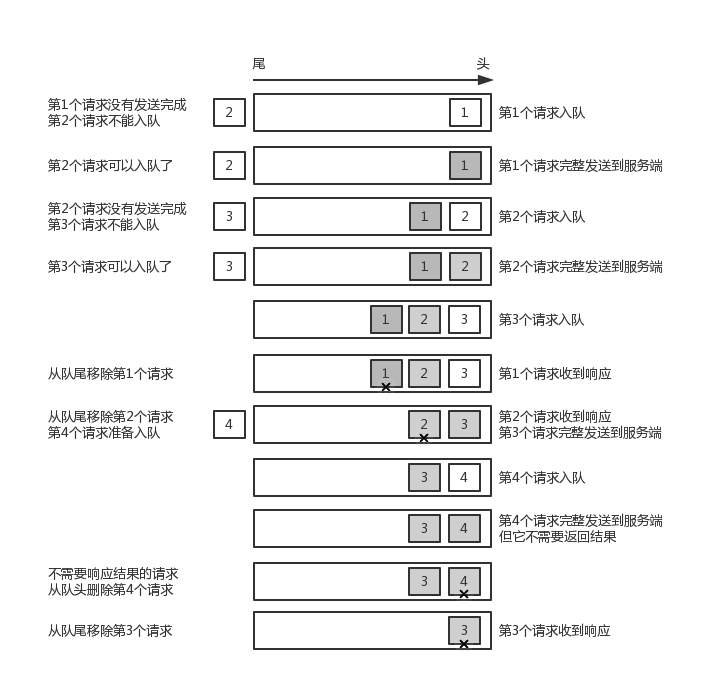
最后关于InFlightRequest:
InFlightRequest负责存储的是已经发送过去请求,但是还没收到响应的。底层是一个Map
-
相关阅读:
mysql锁
句法引导的机器阅读理解
数字集成电路设计(五、仿真验证与 Testbench 编写)(五)
春秋云境靶场CVE-2021-41402漏洞复现(任意代码执行漏洞)
【HTML】HTML基础4(超链接标签)
远程桌面管理软件,如何使用远程桌面管理软件来远程控制服务器
使用CNI网络插件(calico)实现docker容器跨主机互联
用DBCC checkcatalog(数据库)检测出结构异常
UNI-APP_开发支付宝小程序注意事项与解决方法,支付宝小程序图片显示问题
java学习集合二 Set集合 Map集合
- 原文地址:https://blog.csdn.net/NerverSimply/article/details/125964565
