-
21-关键帧动画
一、animation和transition区别
相同点:
都是随着时间改变元素的属性值
区别:
transition需要触发一个事件(hover或click事件等)才会改变css属性,而animation在不需要触发任何事件的情况下也可以显示的随着时间变化来改变元素属性值,从而达到动画效果二、animation
1、复合属性

使用方法:<style> div{ //引入 animation: demo 2s linear infinite; } //声明动画 @keyframs demo{ from{ width:200px; height:200px; background:red; } to{ width:400px; height:400px; background:green; } style>- 1
- 2
- 3
- 4
- 5
- 6
- 7
- 8
- 9
- 10
- 11
- 12
- 13
- 14
- 15
- 16
- 17
- 18
- 19
定义多种变化状态:
<style> div{ //引入 animation: demo 2s linear infinite; } //声明动画 @keyframs demo{ 0%{ width:200px; height:200px; background:red; } 30%{ width:400px; height:400px; background:green; } 60%{ width:500px; height:400px; background:blue; } style>- 1
- 2
- 3
- 4
- 5
- 6
- 7
- 8
- 9
- 10
- 11
- 12
- 13
- 14
- 15
- 16
- 17
- 18
- 19
- 20
- 21
- 22
- 23
- 24
2、animation单一属性
//检索或设置对象所应用的动画名称 animation-name:demo; //检索或设置对象动画的持续时间 animation-duration: 2s; //检索或设置动画的过渡类型 animation-timing-function:linear linear:线性过渡 ease:平滑过渡 ease-in:由慢到快 ease-out:由快到慢 ease-in-out:由慢到快再到慢 //检索或设置对象动画开始的延迟的时间 animation-delay:0.5s //检索或设置对象动画的循环次数 animation-iteration-count:5 //检索或设置对象动画再循环中是否反向运动 animation-direction:normal normal:正常,从from到to reverse:反方向,从to到from alternate 正常方向交替 从from到to,从to到from alternate-reverse 反方向交替,从to到from,从from到to //检索或设置对象动画的状态 animation-play-state:running|paused; running:运动 paused:暂停 //设置动画填充模式,当动画执行完成后页面展示的效果 animation-fill-mode:none/forwards/backwards forwards 保留动画最后一帧,to backwards 动画初始状态,from- 1
- 2
- 3
- 4
- 5
- 6
- 7
- 8
- 9
- 10
- 11
- 12
- 13
- 14
- 15
- 16
- 17
- 18
- 19
- 20
- 21
- 22
- 23
- 24
- 25
- 26
- 27
- 28
- 29

三、steps快速进行关键帧跳跃
1代表一帧切换,图片直接切换,数值越大动画越细腻
animation:run 5s steps(1,start) animation:run 5s steps(1,end) //1代表一帧切换,图片直接切换,无过渡效果,数值越大动画越细腻 //end保留当前帧,看不到最后一帧,动画结束,不显示黄色 //start保留下一帧,看不到第一帧,从第一帧很快跳到下一帧,不显示红色背景 @keyframs run { 0%{ background:red; } 50%{ background:green; } 100%{ background:yellow; } }- 1
- 2
- 3
- 4
- 5
- 6
- 7
- 8
- 9
- 10
- 11
- 12
- 13
- 14
- 15
- 16
- 17
- 18
注意:end值看不到最后一帧,start看不到第一帧
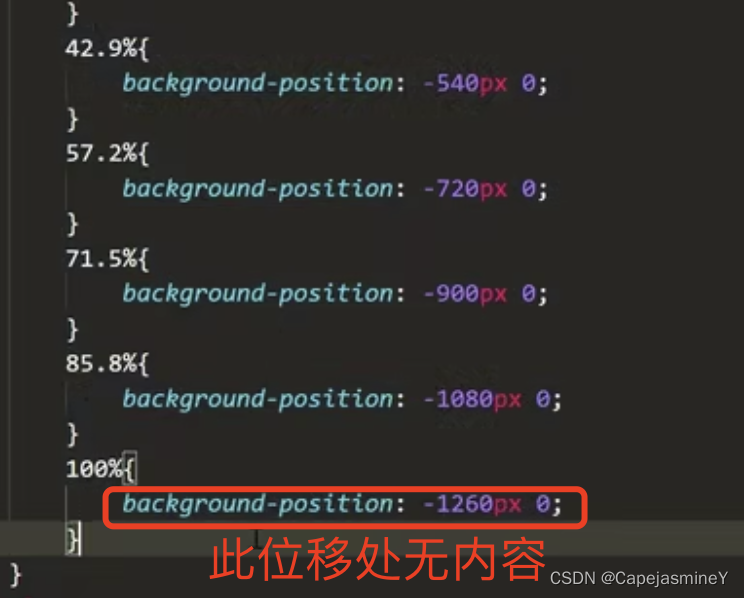
在设置图片快速切换时,由于动画到100%时才展示最后一帧图片,但是此时需要快速过渡到0%,100%到0%之间没有过渡时间,就会将100%处的图片给默认覆盖掉不展示。将动画100%时切换内容设置为一个同等大小的空白图片,保证最后一帧正常显示。
例如:
用法:
常用于轮播图、连续播放图片达到动态效果时。四、animate动画库
http://www.dowebok.com/demo/2014/98/
可以使用现成的已经写好的动画效果,引入我们的项目中
css动画库可以使用远端的,也可以下载到本地使用


-
相关阅读:
正点原子嵌入式linux驱动开发——Busybox根文件系统构建
第二周:计算机网络概述(下)
PyTorch学习(三)
QProcess类
如何才能让用例自动运行完之后,生成一张直观可看易懂的测试报告呢?
cmake简单使用
python3使用mutagen进行音频元数据处理
C++纯虚函数和抽象类 & 制作饮品案例(涉及知识点:继承,多态,实例化继承抽象类的子类,多文件实现项目)
C++11标准模板(STL)- 算法(std::partition_point)
Bugku sql注入
- 原文地址:https://blog.csdn.net/CapejasmineY/article/details/126218926
