-
数据库_JDBC
一、第一个JDBC程序
JDBC:jdbc API是一个java API,可以访问任何类型表列数据,jdbc代表java数据库连接
1.连接到数据库
2.创建sql或mysql语句
3.在数据库中执行sql或mysql查询
4.查看和修改数据库中的数据记录1.导入数据库编程所需类,
import java.sql.*;- 1
2.注册jdbc驱动程序
Class.forName(`com.mysql.jdbc.Driver`)- 1
3.打开一个连接,使用DriverManger.getConnerction()
为了简便运算,通过创建一个工具类,后续引用工具类来简便过程
1.创建资源类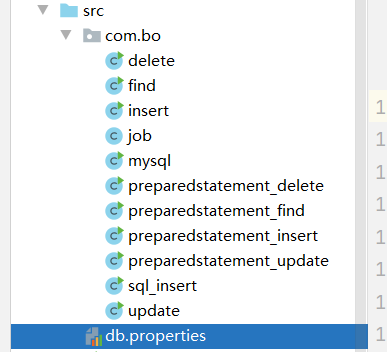
资源类中详细:
2.创建工具类
import java.io.InputStream; import java.sql.*; import java.util.Properties; public class job { private static String driver = null; private static String url = null; private static String username = null; private static String password = null; static { try { //引用资源类 InputStream in = job.class.getClassLoader().getResourceAsStream("db.properties"); Properties properties = new Properties(); properties.load(in); driver = properties.getProperty("driver"); url = properties.getProperty("url"); username = properties.getProperty("username"); password = properties.getProperty("password"); //驱动只加载一次 Class.forName(driver); } catch (Exception e) { e.printStackTrace(); } } public static Connection getConnection() throws SQLException{ return DriverManager.getConnection(url,username,password); } //释放连接资源 public static void release(Connection connection, Statement statement, ResultSet resultSet) { if (connection != null) { try { connection.close(); } catch (SQLException throwables) { throwables.printStackTrace(); } } if (statement != null) { try { statement.close(); } catch (SQLException throwables) { throwables.printStackTrace(); } } if (resultSet != null) { try { resultSet.close(); } catch (SQLException throwables) { throwables.printStackTrace(); } } } }- 1
- 2
- 3
- 4
- 5
- 6
- 7
- 8
- 9
- 10
- 11
- 12
- 13
- 14
- 15
- 16
- 17
- 18
- 19
- 20
- 21
- 22
- 23
- 24
- 25
- 26
- 27
- 28
- 29
- 30
- 31
- 32
- 33
- 34
- 35
- 36
- 37
- 38
- 39
- 40
- 41
- 42
- 43
- 44
- 45
- 46
- 47
- 48
- 49
- 50
- 51
- 52
- 53
- 54
- 55
- 56
- 57
- 58
4…执行一个查询,类型分为statement和prepared Statement对象,并提交一个sql语句到数据库执行查询
以statement为例:
增:package com.bo; import java.sql.Connection; import java.sql.ResultSet; import java.sql.SQLException; import java.sql.Statement; public class insert { public static void main(String[] args) { Connection connection = null; Statement statement = null; ResultSet resultSet = null; try { //1.获取数据库连接 connection = job.getConnection(); //2.创建SQL的执行对象 statement = connection.createStatement(); //3.执行SQL String sql = "insert into users(id,name,password,birthday) values(5,'lintao','123',null) "; int num = statement.executeUpdate(sql); if (num > 0) { System.out.println("插入成功"); } } catch (SQLException throwables) { throwables.printStackTrace(); } finally { job.release(connection, statement, resultSet); } } }- 1
- 2
- 3
- 4
- 5
- 6
- 7
- 8
- 9
- 10
- 11
- 12
- 13
- 14
- 15
- 16
- 17
- 18
- 19
- 20
- 21
- 22
- 23
- 24
- 25
- 26
- 27
- 28
- 29
- 30
删:
package com.bo; import java.sql.Connection; import java.sql.ResultSet; import java.sql.SQLException; import java.sql.Statement; public class insert { public static void main(String[] args) { Connection connection = null; Statement statement = null; ResultSet resultSet = null; try { //1.获取数据库连接 connection = job.getConnection(); //2.创建SQL的执行对象 statement = connection.createStatement(); //3.执行SQL String sql = "insert into users(id,name,password,birthday) values(5,'lintao','123',null) "; int num = statement.executeUpdate(sql); if (num > 0) { System.out.println("插入成功"); } } catch (SQLException throwables) { throwables.printStackTrace(); } finally { job.release(connection, statement, resultSet); } } }- 1
- 2
- 3
- 4
- 5
- 6
- 7
- 8
- 9
- 10
- 11
- 12
- 13
- 14
- 15
- 16
- 17
- 18
- 19
- 20
- 21
- 22
- 23
- 24
- 25
- 26
- 27
- 28
- 29
改:
package com.bo; import java.sql.Connection; import java.sql.ResultSet; import java.sql.SQLException; import java.sql.Statement; public class update { public static void main(String[]args){ Connection connection = null; Statement statement = null; ResultSet resultSet = null; try{ //1.获取数据库连接 connection = job.getConnection(); //2.删除sql的执行对象 statement = connection.createStatement(); //3.执行sql String sql = "update users set name='aha' where id = 2"; int num = statement.executeUpdate(sql); if(num>0){ System.out.println("修改成功"); } }catch (SQLException e){ e.printStackTrace(); }finally { job.release(connection,statement,resultSet); } } }- 1
- 2
- 3
- 4
- 5
- 6
- 7
- 8
- 9
- 10
- 11
- 12
- 13
- 14
- 15
- 16
- 17
- 18
- 19
- 20
- 21
- 22
- 23
- 24
- 25
- 26
- 27
- 28
- 29
查:
package com.bo; import java.sql.Connection; import java.sql.ResultSet; import java.sql.SQLException; import java.sql.Statement; public class find { public static void main(String[]args){ Connection connection = null; Statement statement = null; ResultSet resultSet = null; try{ //1.获取数据库连接 connection = job.getConnection(); //2.创建sql的执行对象 statement = connection.createStatement(); //3.执行sql String sql = "select * from users"; //4.遍历结果集 resultSet = statement.executeQuery(sql); while (resultSet.next()) { System.out.println(resultSet.getString(2)); } }catch (SQLException e){ e.printStackTrace(); }finally { job.release(connection,statement,resultSet); } } }- 1
- 2
- 3
- 4
- 5
- 6
- 7
- 8
- 9
- 10
- 11
- 12
- 13
- 14
- 15
- 16
- 17
- 18
- 19
- 20
- 21
- 22
- 23
- 24
- 25
- 26
- 27
- 28
- 29
- 30
以preparedstatement为例:
增:package com.bo; import java.sql.Connection; import java.sql.PreparedStatement; import java.sql.SQLException; public class preparedstatement_insert { public static void main(String[] args) { Connection con = null; PreparedStatement pst = null; try { con = job.getConnection(); String sql = "insert into users(id,name,password,birthday) values(?,?,?,?)"; pst = con.prepareStatement(sql); pst.setInt(1, 7); pst.setString(2, "蠢货"); pst.setString(3, "sajkdflj"); pst.setDate(4, new java.sql.Date(new java.util.Date().getTime()) ); int i = pst.executeUpdate(); if (i == 1) { System.out.println("插进去了"); } } catch (SQLException e) { e.printStackTrace(); } finally { if (pst != null) { try { pst.close(); } catch (SQLException e) { e.printStackTrace(); } } if (con != null) { try { con.close(); } catch (SQLException e) { e.printStackTrace(); } } } } }- 1
- 2
- 3
- 4
- 5
- 6
- 7
- 8
- 9
- 10
- 11
- 12
- 13
- 14
- 15
- 16
- 17
- 18
- 19
- 20
- 21
- 22
- 23
- 24
- 25
- 26
- 27
- 28
- 29
- 30
- 31
- 32
- 33
- 34
- 35
- 36
- 37
- 38
- 39
- 40
- 41
删:
package com.bo; import java.sql.Connection; import java.sql.PreparedStatement; import java.sql.SQLException; public class preparedstatement_delete { public static void main(String[]args) { Connection con =null; PreparedStatement pst = null; try{ con = job.getConnection(); String sql = "delete from users where id= ?"; pst=con.prepareStatement(sql); pst.setInt(1,1); int i = pst.executeUpdate(); if(i == 1 ){ System.out.println("删除了"); } }catch (SQLException e){ e.printStackTrace(); } } }- 1
- 2
- 3
- 4
- 5
- 6
- 7
- 8
- 9
- 10
- 11
- 12
- 13
- 14
- 15
- 16
- 17
- 18
- 19
- 20
- 21
- 22
- 23
- 24
- 25
改:
package com.bo; import java.sql.Connection; import java.sql.PreparedStatement; import java.sql.SQLException; public class preparedstatement_update { public static void main(String[]args){ Connection con = null; PreparedStatement pst = null; try{ con= job.getConnection(); String sql = "update users set `name`='bo' where `id`=?"; pst=con.prepareStatement(sql); pst.setInt(1,5); int i = pst.executeUpdate(); if(i==1){ System.out.print("成功了,你妈"); } }catch (SQLException e){ e.printStackTrace(); } } }- 1
- 2
- 3
- 4
- 5
- 6
- 7
- 8
- 9
- 10
- 11
- 12
- 13
- 14
- 15
- 16
- 17
- 18
- 19
- 20
- 21
- 22
- 23
- 24
查:
package com.bo; import java.sql.Connection; import java.sql.PreparedStatement; import java.sql.ResultSet; import java.sql.SQLException; public class preparedstatement_find { public static void main(String[] args) { Connection con = null; PreparedStatement pst = null; ResultSet rs = null; try { con = job.getConnection(); String sql = "select * from `users` where id=?"; pst = con.prepareStatement(sql); pst.setInt(1, 2); rs = pst.executeQuery(); while (rs.next()) { System.out.print("查找成功"); System.out.println(rs.getInt("id")); System.out.println(rs.getString("name")); System.out.println(rs.getString("password")); System.out.println(rs.getInt("birthday")); } }catch (SQLException e){ e.printStackTrace(); } } }- 1
- 2
- 3
- 4
- 5
- 6
- 7
- 8
- 9
- 10
- 11
- 12
- 13
- 14
- 15
- 16
- 17
- 18
- 19
- 20
- 21
- 22
- 23
- 24
- 25
- 26
- 27
- 28
- 29
二、事务
1.关闭自动提交
conn.setAutoCommit(false)- 1
2.业务完毕,开启提交
conn.commit()- 1
3.未提交,事务回滚
comm.rollback()- 1
-
相关阅读:
数据分析报告常见步骤
驱动开发:内核字符串拷贝与比较
ElementPlus· tab切换/标签切换 + 分页
SpringCloud-Eureka服务注册与发现
一文了解 DataLeap 中的 Notebook
Linux内核汇编代码分析
广义回归神经网络的应用,广义回归神经网络原理
设计模式:外观模式(C#、JAVA、JavaScript、C++、Python、Go、PHP)
目标检测YOLO实战应用案例100讲-船舶目标检测及编队识别(续)
【开发小记】vue2+elementUI实现搜索结果无限滚动(触底加载)展示
- 原文地址:https://blog.csdn.net/weixin_54174102/article/details/126176750
