-
SpringCloud 04 Eureka 服务注册和发现
4.1 什么是 Eureka
- Eureka:尤瑞卡(尤里卡)
- Netflix 在设计 Eureka 时,遵守的就是 AP 原则
- Eureka 是 NetFlix 的一个子模块,也是 核心模块之一。Eureka 是一个基于 REST 的服务,用于 定位服务的。以 实现云端中间层服务发现和故障转移,服务注册与发现对于微服务来说是非常重要的,有了服务发现与注册,只需要使用服务的标识符,就可以访问到服务,而不需要修改服务调用的配置文件了。功能类似于 Dubbo 的注册中心:比如 Zookepper。
4.2 原理讲解
- Eureka 的基本架构
- SpringCloud 封装了 NetFlix 公司开发的 Eureka 模块用来实现 五福的注册和发现。(对比 Zookeeper)
- Eureka 采用了 C-S 的架构设计,EurekaServer 并维持心跳连接。这样系统的维护人员就可以通过 EurekaServer 来 监控系统中 各个微服务是否正常运行,SpringCloud 的一些其他模块(比如 Zuul)就 可以通过 EurekaServer 来发现 系统中的其他微服务,并执行相关的逻辑。
三大角色
- Eureka Server:提供服务的注册与发现
- Service Provider:将自身服务注册到Eureka 中,从而使消费方能够找到。
- Service Consumer:服务消费方从 Eureka 中 获取注册服务列表,从而找到提供的服务(消费服务)。

- Eureka 包含两个组件:Eureka Server 和 Eureka Client
- Eureka Server 提供服务注册服务,各个节点启动后,会在 EurekaServer 中进行注册,这样 Eureka Server 中的服务 注册表中将会 存储所有可用服务节点的信息,服务节点的信息可以在界面中直观的看到。
- Eureka Client 是一个 Java 写的客户端,用于 简化 EurekaServer 的交互,客户端同时也具备一个内置的,使用轮询附在算法的负载均衡器。在应用启动后,将会向 EurekaServer发送心跳(默认周期为 30 秒)。如果 Eureka Server 在多个 心跳周期内 没有接收到 某个 节点的心跳,EurekaServer 将会从服务注册表中把这个服务节点移除掉。(默认周期为 90 秒)
4.2 尝试 Eureka
- 创建
springcloud-eureka-7001
<project xmlns="http://maven.apache.org/POM/4.0.0" xmlns:xsi="http://www.w3.org/2001/XMLSchema-instance" xsi:schemaLocation="http://maven.apache.org/POM/4.0.0 http://maven.apache.org/xsd/maven-4.0.0.xsd"> <parent> <artifactId>springcloudartifactId> <groupId>top.muquanyugroupId> <version>1.0-SNAPSHOTversion> parent> <modelVersion>4.0.0modelVersion> <artifactId>springcloud-eureka-7001artifactId> <properties> <maven.compiler.source>8maven.compiler.source> <maven.compiler.target>8maven.compiler.target> properties> <dependencies> <dependency> <groupId>org.springframework.cloudgroupId> <artifactId>spring-cloud-starter-eureka-serverartifactId> <version>1.4.7.RELEASEversion> dependency> <dependency> <groupId>org.springframework.bootgroupId> <artifactId>spring-boot-devtoolsartifactId> dependency> dependencies> project>- 1
- 2
- 3
- 4
- 5
- 6
- 7
- 8
- 9
- 10
- 11
- 12
- 13
- 14
- 15
- 16
- 17
- 18
- 19
- 20
- 21
- 22
- 23
- 24
- 25
- 26
- 27
- 28
- 29
- 30
- 31
- 配置
Eureka和 使用@EnableEurekaServer注解
server: port: 7001 # Eureka 配置 eureka: instance: hostname: localhost # Eureka 服务端的实例名 client: register-with-eureka: false # 表示是否向 eureka 注册中心注册自己 fetch-registry: false # fetch-registry 如果为 false 则 表示 自己为 注册中心 service-url: # url 地址 defaultZone: http://${eureka.instance.hostname}:${server.port}/eureka/- 1
- 2
- 3
- 4
- 5
- 6
- 7
- 8
- 9
- 10
- 11
- 12
- 13


4.3 provider-dept 使用 Eureka
- 加入 Eureka 的依赖
<dependency> <groupId>org.springframework.cloudgroupId> <artifactId>spring-cloud-starter-eurekaartifactId> <version>1.4.7.RELEASEversion> dependency> <dependency> <groupId>org.springframework.bootgroupId> <artifactId>spring-boot-starter-actuatorartifactId> dependency>- 1
- 2
- 3
- 4
- 5
- 6
- 7
- 8
- 9
- 10
- 11
- 12

2. 配置Eureka和 开启@EnableEurekaClient注解支持#Eureka 的配置,只需要配置 服务 注册到 哪里就行了 eureka: client: service-url: defaultZone: http://localhost:7001/eureka- 1
- 2
- 3
- 4
- 5

神奇的是,只要我们 这样子去做,那么 它就会自动的把 所有的服务 自动注册到 Eureka 中。不需要我们 去管 服务在哪里。


其实 Application 和 Status 这两个描述 都是可以更改的。spring: application: name: springcloud-provider-dept # 这个更改的就是 Application 的名字 #Eureka 的配置,只需要配置 服务 注册到 哪里就行了 eureka: instance: instance-id: springcloud-provider-dept8001 # 这个更改的就是 Status 的描述- 1
- 2
- 3
- 4
- 5
- 6
- 7

4.4 Eureka info 完善
当我们点击 那个
Status那里的 描述时,它会跳到 一个 info 页面。而这个 info 页面 里面的信息 是可以配置的。# info 配置 info: app.name: MQy-springcloud company.name: MQy management: endpoints: web: exposure: include: "*" info: env: enabled: true- 1
- 2
- 3
- 4
- 5
- 6
- 7
- 8
- 9
- 10
- 11
- 12
- 13

4.5 Eureka 的自我保护机制
当我们 关掉某个服务,一段时间后(大概是 90s),它就是 提示 一行红字。

好死不如赖活着一句话总结:某时刻某一个微服务突然不可以用了,Eureka 不会like清理吊,依旧会对该微服务的信息进行保存。
- 默认情况下,如果 EurekaServer 在一定时间内没有接收到某个微服务实例的心跳,EurekaServer 将会注销该实例(默认 90s)。但是当网络分区故障发生时,微服务与Eureka 之间无法正常通信,以上行为可能变得非常的危险!因为微服务本身是健康的,此时本不应该注销这个服务的。 Eureka 就通过 自我保护机制 来解决这个问题,当EurekaServer 节点 在短时间内丢失过多客户端时(可能发生了网络分区故障),那么这个节点就会进入自我保护模式,一旦进入该模式,EurekaServer 就会保护服务注册表中的信息,不再删除服务注册表中的数据(也就是不会去注销任何的微服务了。)当网络故障恢复后,该EurekaServer 节点会自动退出自我保护模式。
- 在自我保护模式中,EurekaServer 会保护服务注册表中的信息,不再注销任何服务实例。当它收到的心跳数重新恢复到阈值以上时,该 EurekaServer 节点 就会自动退出 自我保护模式。它的设计哲学就是宁可保留错误的服务注册信息,也不盲目注销任何可能健康的服务实例。一句话:好死不如赖活着。
- 综上,自我保护模式是一种应对网络异常的安全保护措施。它的架构哲学是宁可同时保留所有微服务(健康的微服务和不健康的微服务都会保留),也不盲目注销任何健康的微服务。使用自我保护模式,可以让Eureka集群更加的健壮和稳定。
- 在 SpringCloud 中,可以使用
eureka.server.enable-self-preservation = false禁用自我保护模式【不推荐关闭自我保护机制】
4.6 服务发现
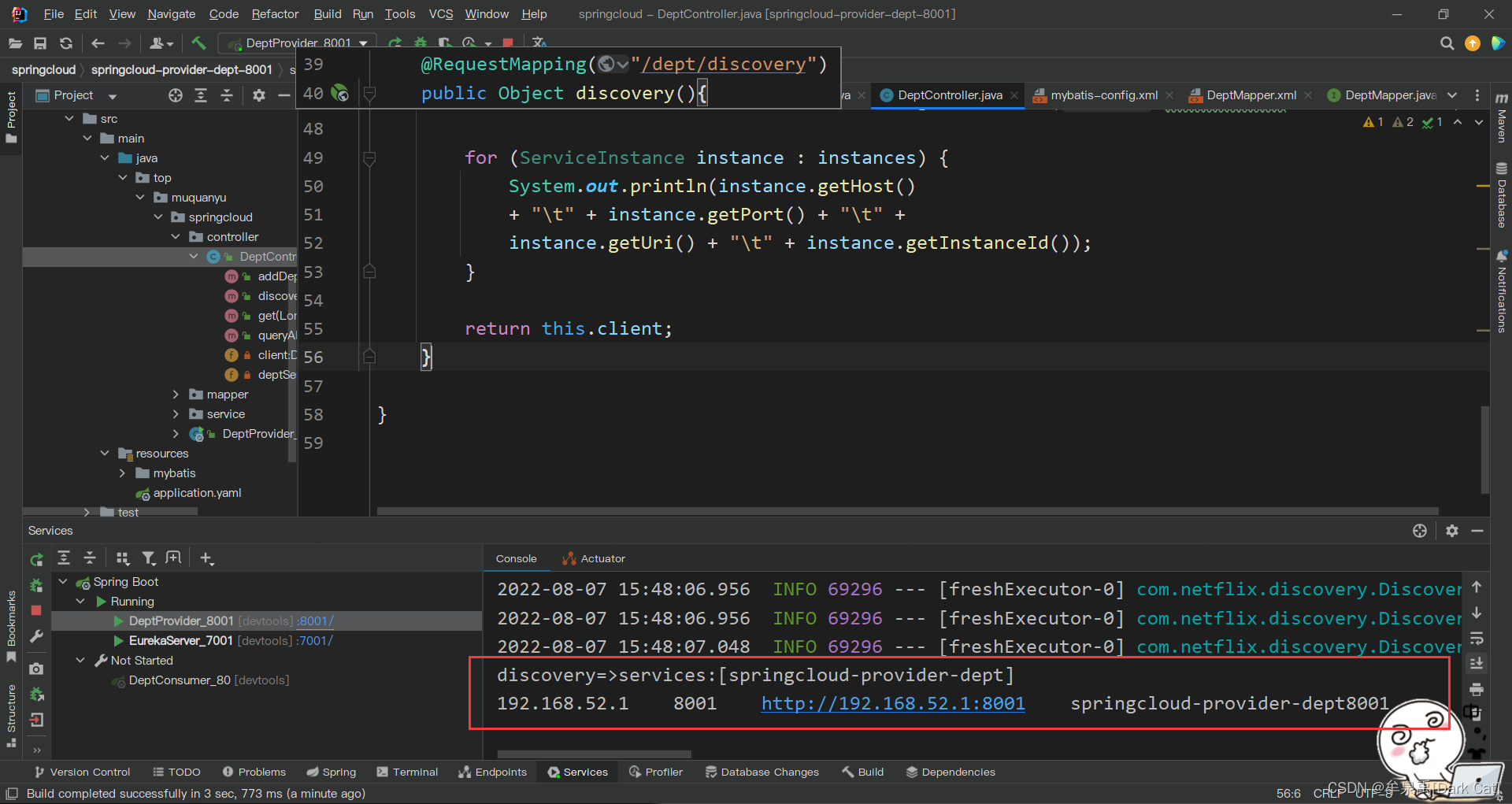
注册进来的微服务,其实 是可以 通过
discoveryClient来获取到 信息的。@RequestMapping("/dept/discovery") public Object discovery(){ // 获取微服务列表的清单 List<String> services = client.getServices(); System.out.println("discovery=>services:" + services); // 得到一个具体的微服务信息,通过具体的微服务 id 或 applicationName List<ServiceInstance> instances = client.getInstances("SPRINGCLOUD-PROVIDER-DEPT"); for (ServiceInstance instance : instances) { System.out.println(instance.getHost() + "\t" + instance.getPort() + "\t" + instance.getUri() + "\t" + instance.getInstanceId()); } return this.client; }- 1
- 2
- 3
- 4
- 5
- 6
- 7
- 8
- 9
- 10
- 11
- 12
- 13
- 14
- 15
- 16
- 17
- 18
使用
@EnableDiscoveryClient
-
相关阅读:
Redis实战——缓存
SMU可以供电的同时测量电流和电压
Java实现FTP下载文件到客户端(浏览器)
趣解设计模式之《庞大的组织架构带来的烦恼》
分类(二):损失函数
java设计模式
数据结构 — 双向链表
uniapp上下滑屏切换支持视频和图片轮播实现,类似抖音效果
信创加速,美创科技加入UOS主动安全防护计划(UAPP)
Python中的import和from import
- 原文地址:https://blog.csdn.net/qq_52606908/article/details/126205507