-
Spring Security OAuth实现Gitee快捷登录
活动地址:CSDN21天学习挑战赛
前言
前面已经介绍了【Spring Security OAuth实现GitHub登录】,但由于GitHub会因网络原因,无法范围,因此该文将介绍如何使用国内的Gitee进行集成登录。
实现Gitee快捷登录
源代码地址:https://github.com/jujunchen/21Study
新建工程
新创建一个Spring Boot 工程,pom依赖如下
<dependencies> <dependency> <groupId>org.springframework.bootgroupId> <artifactId>spring-boot-starter-oauth2-clientartifactId> dependency> <dependency> <groupId>org.springframework.bootgroupId> <artifactId>spring-boot-starter-webartifactId> dependency> <dependency> <groupId>org.projectlombokgroupId> <artifactId>lombokartifactId> <optional>trueoptional> dependency> <dependency> <groupId>org.springframework.bootgroupId> <artifactId>spring-boot-starter-testartifactId> <scope>testscope> dependency> <dependency> <groupId>org.springframework.securitygroupId> <artifactId>spring-security-testartifactId> <scope>testscope> dependency> dependencies>- 1
- 2
- 3
- 4
- 5
- 6
- 7
- 8
- 9
- 10
- 11
- 12
- 13
- 14
- 15
- 16
- 17
- 18
- 19
- 20
- 21
- 22
- 23
- 24
- 25
- 26
- 27
- 28
- 29
注意: 必须引入
spring-boot-starter-oauth2-client依赖注册OAuth应用
进入Gitee->设置->数据管理->第三方应用

注册界面如下:
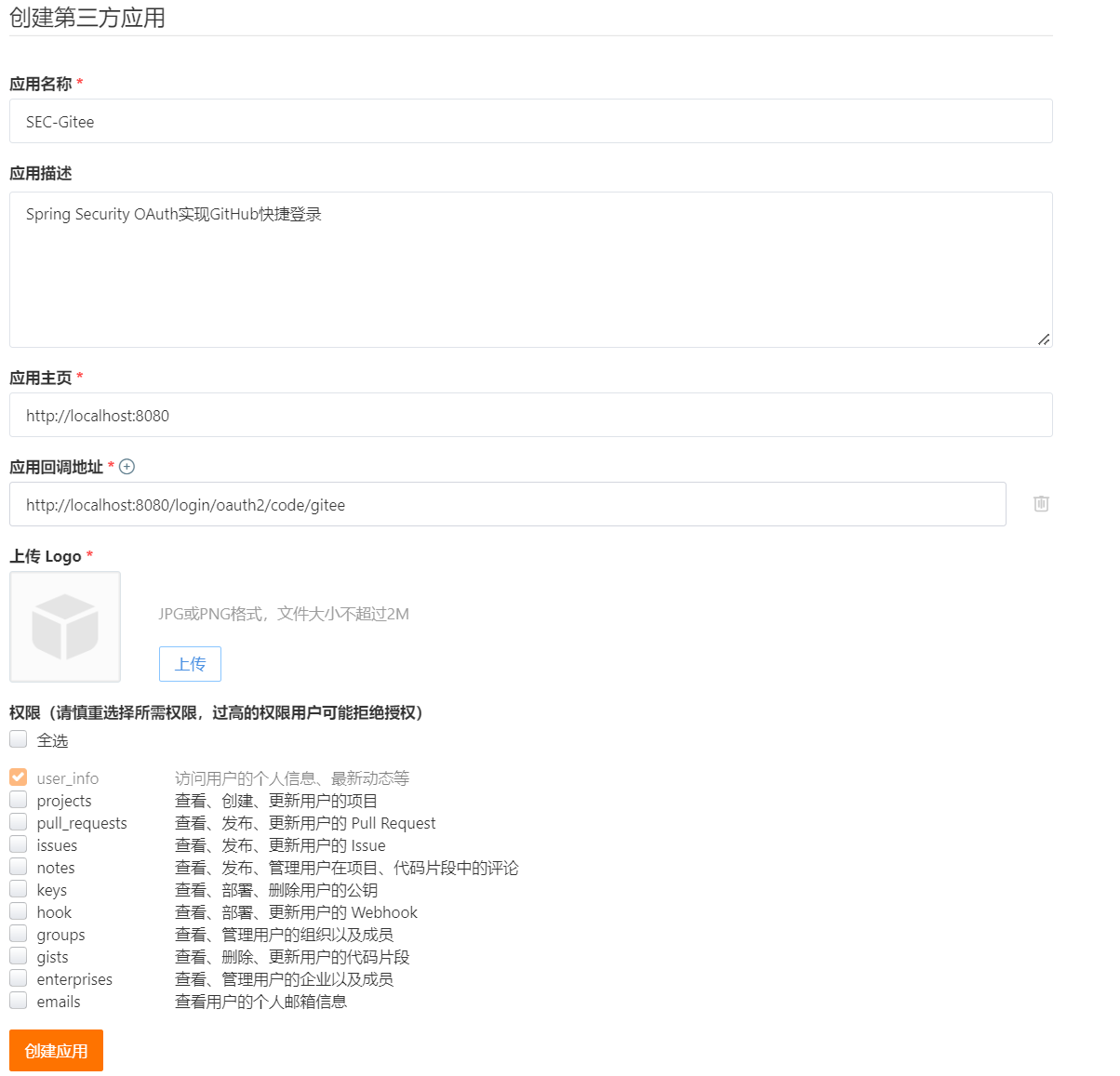
填写内容同GitHub
- 应用名称:必填,
- 应用主页:必填,主页的URL地址,本地开发,我们将其设置为http://localhost:8080
- 应用描述:非必填,应用描述
- 应用回调地址:必填,OAuth认证的重定向地址,本地开发环境设置为http://localhost:8080/login/oauth2/code/github
- 权限:这里使用默认权限
创建应用后,生成Client ID和Client Secret
配置application.yml
接下来在配置文件中增加对于的配置
spring: security: oauth2: client: registration: gitee: client-id: gitee-client-id client-secret: gitee-client-secret authorization-grant-type: authorization_code redirect-uri: '{baseUrl}/login/oauth2/code/{registrationId}' client-name: Gitee github: client-id: b4713d47174917b34c28 client-secret: 898389369c2e9f3d1d0ff4543ba1d9b45adfd093 provider: gitee: authorization-uri: https://gitee.com/oauth/authorize token-uri: https://gitee.com/oauth/token user-info-uri: https://gitee.com/api/v5/user user-name-attribute: name- 1
- 2
- 3
- 4
- 5
- 6
- 7
- 8
- 9
- 10
- 11
- 12
- 13
- 14
- 15
- 16
- 17
- 18
- 19
- 20
其中:
(1)client_id、client-secret替换为Gitee获取的数据(2)authorization-grant-type:授权模式使用授权码模式
(3)redirect-uri:回调地址,填写的与Gitee上申请的一致
(4)client-name:客户端名称,可以在登录选择页面上显示
Gitee的OAuth登录需要自定义provider,Spring Security OAuth提供了配置的方式来实现。
(5)authorization-uri:授权服务器地址
(6)token-uri:授权服务器获取token地址
(7)user-info-uri:授权服务器获取用户信息的地址
(8)user-name-attribute:用户信息中的用户名属性
新建Controller
@RestController public class HelloController { @GetMapping("/hello") public String hello(Principal principal) { return "Hello," + principal.getName(); } }- 1
- 2
- 3
- 4
- 5
- 6
- 7
- 8
principal对象由Spring框架自动注入,表示当前登录的用户。
演示
- 启动Spring Boot应用
- 访问http://localhost:8080/hello的时候,会跳转到默认的登录页,现在有两个登录选项GitHub和Gitee

- 点击Gitee,将跳转到Gitee的授权登录页,页面列出了可以访问的数据权限

- 同意授权后,将跳转到http://localhost:8080/login/oauth2/code/gitee地址,客户端创建认证对象后,再被重定向到http://localhost:8080/hello,页面会显示"Hello,xxx"
通过Configuration覆盖自动配置
Spring Security OAuth 使用OAuth2ClientAutoConfiguration 来完成自动配置,也可以通过如下步骤覆盖自动配置:
- 注册一个 ClientRegistrationRepository Bean
- 注册一个SecurityFilterChain Bean
@Configuration public class OAuth2LoginConfig { @Bean public SecurityFilterChain filterChain(HttpSecurity http) throws Exception { http .authorizeHttpRequests(authorize -> authorize .anyRequest().authenticated() ) .oauth2Login(withDefaults()); return http.build(); } @Bean public ClientRegistrationRepository clientRegistrationRepository() { return new InMemoryClientRegistrationRepository(this.giteeClientRegistration()); } private ClientRegistration giteeClientRegistration() { return ClientRegistration.withRegistrationId("gitee") .clientId("gitee-client-id") .clientSecret("gitee-client-secret") .authorizationGrantType(AuthorizationGrantType.AUTHORIZATION_CODE) .redirectUri("{baseUrl}/login/oauth2/code/{registrationId}") .authorizationUri("https://gitee.com/oauth/authorize") .tokenUri("https://gitee.com/oauth/token") .userInfoUri("https://gitee.com/api/v5/user") .userNameAttributeName("name") .clientName("Gitee") .build(); } }- 1
- 2
- 3
- 4
- 5
- 6
- 7
- 8
- 9
- 10
- 11
- 12
- 13
- 14
- 15
- 16
- 17
- 18
- 19
- 20
- 21
- 22
- 23
- 24
- 25
- 26
- 27
- 28
- 29
- 30
- 31
- 32
效果:

-
相关阅读:
手帐怎么做?推荐这10款手帐达人都在用的好用软件!
七夕情人节送女朋友什么礼物?七夕情人节礼物推荐
DP读书:开源软件的影响力(小白向)解读Embedded_SIG介绍以及代码架构解析
【计算机网络】UDP/TCP 协议
一码胜千言,博园Polo衫,上架预售啦
three.js webgl_tiled_forward 例子分析
2022牛客暑期多校训练营5(BCDFGHK)
influxdb
riscv-gcc工具编译firmware进行仿真问题总结
sqllab第十关通关笔记
- 原文地址:https://blog.csdn.net/weixin_40972073/article/details/126210758
