-
Linux之ansible(playbook)超详解
目录
1.编写Playbook:具备两个play, 每个Play具备两个任务
2.在play中定义变量: play_var = students10 -> 使用debug模块输出
3.在文件中定义变量: file_var = file_var -> 使用debug模块输出
在清单文件中定义主机变量和主机组变量:4.inventory_host_var -> 使用debug模块输出
5.inventory_group_var -> 使用debug模块输出
6.在host_vars和group_vars中定义文件:在文件中定义变量使用debug模块输出要求定义单个变量,数组变量,和字典变量
7.vault加密:创建加密文件(注意提供密码的方式:键盘输入,文件读取)
事实:facts11.使用debug模块输出:收集事实的hostname, default_address, fqdn, kernel
15.自定义事实:使用两种方式:INI和json方式(注意格式)
16.提供数据:需要自己组织成INI格式或json格式的数据
1.编写Playbook:具备两个play, 每个Play具备两个任务
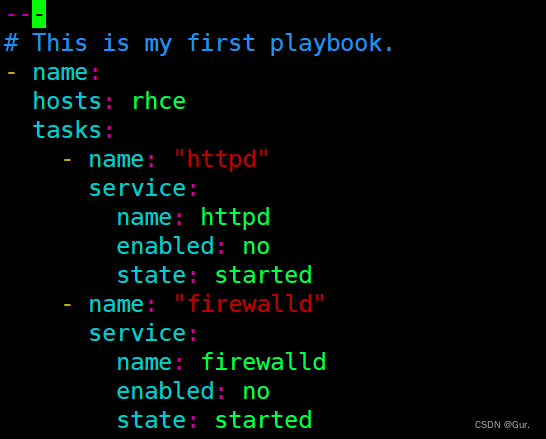
- [root@rhcsa ~]# ansible-playbook playbook.yml
- PLAY [rhce] ****************************************************************************
- TASK [Gathering Facts] *****************************************************************
- ok: [rhce]
- TASK [httpd] ***************************************************************************
- changed: [rhce]
- TASK [firewalld] ***********************************************************************
- changed: [rhce]
- PLAY RECAP *****************************************************************************
- rhce : ok=3 changed=2 unreachable=0 failed=0 skipped=0 rescued=0 ignored=0
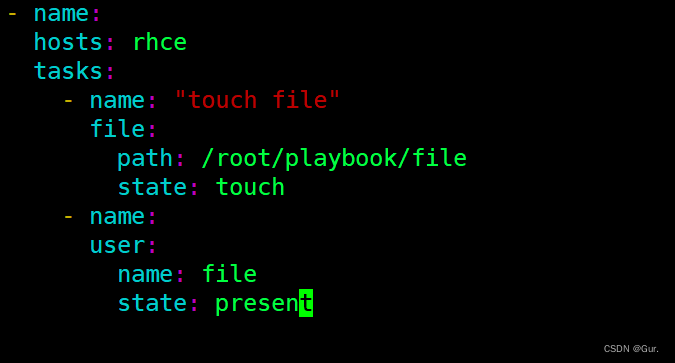
- [root@rhcsa ~]# ansible-playbook playbook.yml
- PLAY [rhce] ****************************************************************************
- TASK [Gathering Facts] *****************************************************************
- ok: [rhce]
- TASK [touch file] **********************************************************************
- changed: [rhce]
- TASK [user] ****************************************************************************
- changed: [rhce]
- PLAY RECAP *****************************************************************************
- rhce : ok=3 changed=2 unreachable=0 failed=0 skipped=0 rescued=0 ignored=0
2.在play中定义变量: play_var = students10 -> 使用debug模块输出
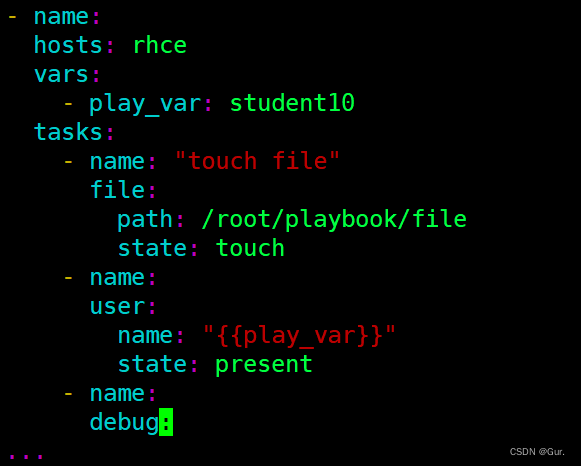
- [root@rhcsa ~]# ansible-playbook playbook.yml
- PLAY [rhce] ****************************************************************************
- TASK [Gathering Facts] *****************************************************************
- ok: [rhce]
- TASK [touch file] **********************************************************************
- changed: [rhce]
- TASK [user] ****************************************************************************
- changed: [rhce]
- TASK [debug] ***************************************************************************
- ok: [rhce] => {
- "msg": "Hello world!"
- }
- PLAY RECAP *****************************************************************************
- rhce : ok=4 changed=2 unreachable=0 failed=0 skipped=0 rescued=0 ignored=0
3.在文件中定义变量: file_var = file_var -> 使用debug模块输出
- [root@rhcsa ~]# echo "file_var: students12" > vars_files
- [root@rhcsa ~]# more vars_files
- students12
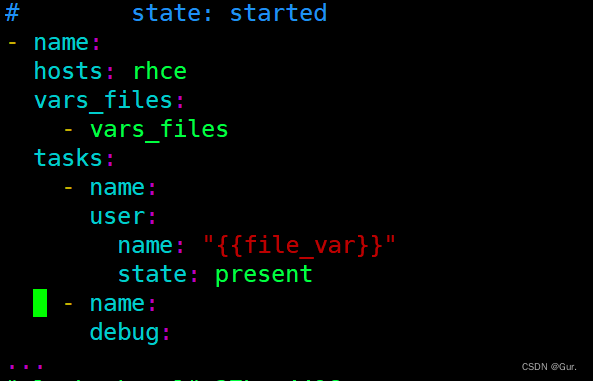
- [root@rhcsa ~]# ansible-playbook playbook.yml
- PLAY [rhce] ****************************************************************************
- TASK [Gathering Facts] *****************************************************************
- ok: [rhce]
- TASK [user] ****************************************************************************
- changed: [rhce]
- TASK [debug] ***************************************************************************
- ok: [rhce] => {
- "msg": "Hello world!"
- }
- PLAY RECAP *****************************************************************************
- rhce : ok=3 changed=1 unreachable=0 failed=0 skipped=0 rescued=0 ignored=0
在清单文件中定义主机变量和主机组变量:
4.inventory_host_var -> 使用debug模块输出
- [root@rhcsa ~]# ansible-playbook playbook.yml -C
- PLAY [inventory_host_var] **************************************************************
- TASK [Gathering Facts] *****************************************************************
- ok: [rhce]
- TASK [debug] ***************************************************************************
- ok: [rhce] => {
- "msg": "Hello world!"
- }
- PLAY RECAP *****************************************************************************
- rhce : ok=2 changed=0 unreachable=0 failed=0 skipped=0 rescued=0 ignored=0
5.inventory_group_var -> 使用debug模块输出


- [root@rhcsa ~]# ansible-playbook playbook.yml -C
- PLAY [inventory_group_var1 inventory_group_var2] ***************************************
- TASK [Gathering Facts] *****************************************************************
- ok: [rhce]
- ok: [rhel]
- TASK [debug] ***************************************************************************
- ok: [rhce] => {
- "msg": "Hello world!"
- }
- ok: [rhel] => {
- "msg": "Hello world!"
- }
- PLAY RECAP *****************************************************************************
- rhce : ok=2 changed=0 unreachable=0 failed=0 skipped=0 rescued=0 ignored=0
- rhel : ok=2 changed=0 unreachable=0 failed=0 skipped=0 rescued=0 ignored=0
6.在host_vars和group_vars中定义文件:在文件中定义变量使用debug模块输出
要求定义单个变量,数组变量,和字典变量
7.vault加密:创建加密文件(注意提供密码的方式:键盘输入,文件读取)- #键盘输入
- [root@rhcsa ~]# ansible-vault create file1.yml
- New Vault password:
- Confirm New Vault password:
- 文件读取
- [root@rhcsa ~]# echo "123456" > file2
- [root@rhcsa ~]# ansible-vault create --vault-id file2 file2.yml
8.加密已有文件
- #从键盘输入密码
- [root@rhcsa ~]# ansible-vault encrypt test.txt
- New Vault password:
- Confirm New Vault password:
- Encryption successful
- #从已有文件中提取密码
- [root@rhcsa ~]# ansible-vault encrypt --vault-id file2 test2.txt
- Encryption successful
9.解密文件
- #从键盘输入密码
- [root@rhcsa ~]# ansible-vault decrypt test.txt
- Vault password:
- Decryption successful
- #从已有文件中提取密码
- [root@rhcsa ~]# ansible-vault decrypt --vault-id file2 test2.txt
- Decryption successful
10.使用--vault-id选项来对已有文件进行加密
- #从键盘输入密码
- [root@rhcsa ~]# ansible-vault --vault-id encrypt test.txt
- New Vault password:
- Confirm New Vault password:
- Encryption successful
- #从已有文件中提取密码
- [root@rhcsa ~]# ansible-vault encrypt --vault-id file2 test2.txt
- Encryption successful
事实:facts
11.使用debug模块输出:收集事实的hostname, default_address, fqdn, kernelhostname

- [root@rhcsa ~]# ansible-playbook playbook.yml -C
- PLAY [Facts] ***************************************************************************
- TASK [Gathering Facts] *****************************************************************
- ok: [rhce]
- TASK [debug] ***************************************************************************
- ok: [rhce] => {
- "msg": "The hostname is rhce"
- }
- PLAY RECAP *****************************************************************************
- rhce : ok=2 changed=0 unreachable=0 failed=0 skipped=0 rescued=0 ignored=0
default_address

- [root@rhcsa ~]# ansible-playbook playbook.yml -C
- PLAY [Facts] ***************************************************************************
- TASK [Gathering Facts] *****************************************************************
- ok: [rhce]
- TASK [debug] ***************************************************************************
- ok: [rhce] => {
- "msg": "The default_address is 192.168.40.131"
- }
- PLAY RECAP *****************************************************************************
- rhce : ok=2 changed=0 unreachable=0 failed=0 skipped=0 rescued=0 ignored=0
fqdn

- [root@rhcsa ~]# ansible-playbook playbook.yml -C
- PLAY [Facts] ***************************************************************************
- TASK [Gathering Facts] *****************************************************************
- ok: [rhce]
- TASK [debug] ***************************************************************************
- ok: [rhce] => {
- "msg": "The fqdn is rhce"
- }
- PLAY RECAP *****************************************************************************
- rhce : ok=2 changed=0 unreachable=0 failed=0 skipped=0 rescued=0 ignored=0
kernel

- [root@rhcsa ~]# ansible-playbook playbook.yml -C
- PLAY [Facts] ***************************************************************************
- TASK [Gathering Facts] *****************************************************************
- ok: [rhce]
- TASK [debug] ***************************************************************************
- ok: [rhce] => {
- "msg": "The kernel is 4.18.0-348.el8.x86_64"
- }
- PLAY RECAP *****************************************************************************
- rhce : ok=2 changed=0 unreachable=0 failed=0 skipped=0 rescued=0 ignored=0
12.关闭事实:两种方式
一

- [root@rhcsa ~]# ansible-playbook playbook.yml -C
- PLAY [This play gathers no facts automatically] ****************************************
- PLAY RECAP *****************************************************************************
二
可以在 ansible.cfg 中添加如下配置:
[defaults]
gathering = explicit (明确的)
ansible 的配置文件中可以修改'gathering'的值为 smart、 implicit 或者 explicit
(1)smart 表示默认收集 facts,但 facts 已有的情况下不会收集,即使用缓存 facts
(2)implicit 表示默认收集 facts
(3)explicit 则表示默认不收集13.针对单个play的关闭
- # vim test.yml
- 创建以下内容:
- ---
- - name: test
- hosts: all
- gather_facts: false
- tasks:
- ......
14.针对所有play的关闭
- [root@rhcsa ~]# ansible-playbook playbook.yml -C
- PLAY [This play gathers no facts automatically] ****************************************
- PLAY RECAP *****************************************************************************
15.自定义事实:使用两种方式:INI和json方式(注意格式)
- ##INI格式
- [packages]
- web_pkg = httpd
- db_pkg = mariadb-server
- [users]
- user1 = rhce
- user2 = rhel
- ##JSON格式
- {
- "packages":{
- "web_packages":"httpd",
- "db_packages":"mariadb"
- },
- "users":{
- "user1":"rhce",
- "user2":"rhel"
- }
- }
16.提供数据:需要自己组织成INI格式或json格式的数据
student1:
name: zhangsan
age: 8
agender: male
address: openlab.com
student2:
name: lisi
age: 8
agender: female
address: openlab.com默认情况下 setup 模块从受管主机的/etc/ansible/facts.d 目录下的文件和脚本中加
载自定义事实。各个文件名必须以.fact 结尾才能使用。动态自定义事实脚本必须
输出 JSON 格式的事实,而且必须是可执行文件。
INI 和 JSON 格式编写的静态自定义事实文件。 INI 格式的自定义事实文件包含由一
部分定义的顶层值,后跟用于待定义事实的键值对。- ##INI
- [packages]
- name: zhangsan
- age: 8
- agender: male
- [users]
- user1 = rhce
- user2 = rhel
- ##json
- {
- "packages":{
- "name: lisi",
- "age: 8",
- "agender: female",
- "address: openlab.com"
- },
- "users":{
- "users1":"rhce",
- "users2":"rhel"
- }
- }
-
相关阅读:
jar包导入到本地仓库无法引用
FastGpt流程
零基础HTML入门教程(15)——合并单元格
PCB叠层设计
【ES】笔记-Map介绍与API
hive分桶分区表和内部外部表
Gradle 笔记 2
部署zookeeper+kafka
真香!阿里最新公开的200页Spring全家桶进阶指南及视频汇总
网络——IPv6(一)
- 原文地址:https://blog.csdn.net/weixin_64051859/article/details/126197939
