-
SpringCloudAlibaba组件 — — OpenFeign的其他作用【超时时间、日志打印】
SpringCloudAlibaba组件 — — OpenFeign的其他作用
本项目只涉及到controller层及service层,其他层可忽略
1 实现负载均衡【只需要导入nacos、cloudalibaba等基础包即可】
OpenFeign自带Ribbon,因此我们只要创建相同的服务名称端口不同,Ribbon自动就会给我们实现负载均衡
1.1 服务cloudalibaba-provider-9003

application.yml:server: # 端口 port: 9003 spring: application: #服务名称 name: feign-provider cloud: discovery: #nacos地址 server-addr: 127.0.0.1:8848 #数据源配置 datasource: driver-class-name: com.mysql.cj.jdbc.Driver url: jdbc:mysql://localhost:3306/mp?serverTimezone=UTC username: root password: root type: com.alibaba.druid.pool.DruidDataSource management: endpoint: web: exposure: include: '*' #mybatis配置(别名及其他) mybatis: mapper-locations: classpath:*.xml type-aliases-package: com.zi.pojo # 打印sql语句 logging: level: com.seamax.bdsearch.dao: DEBUG- 1
- 2
- 3
- 4
- 5
- 6
- 7
- 8
- 9
- 10
- 11
- 12
- 13
- 14
- 15
- 16
- 17
- 18
- 19
- 20
- 21
- 22
- 23
- 24
- 25
- 26
- 27
- 28
- 29
- 30
- 31
- 32
- 33
- 34
- 35
1.2 服务cloudalibaba-provider-9004
该服务与9003无区别,只是端口不同
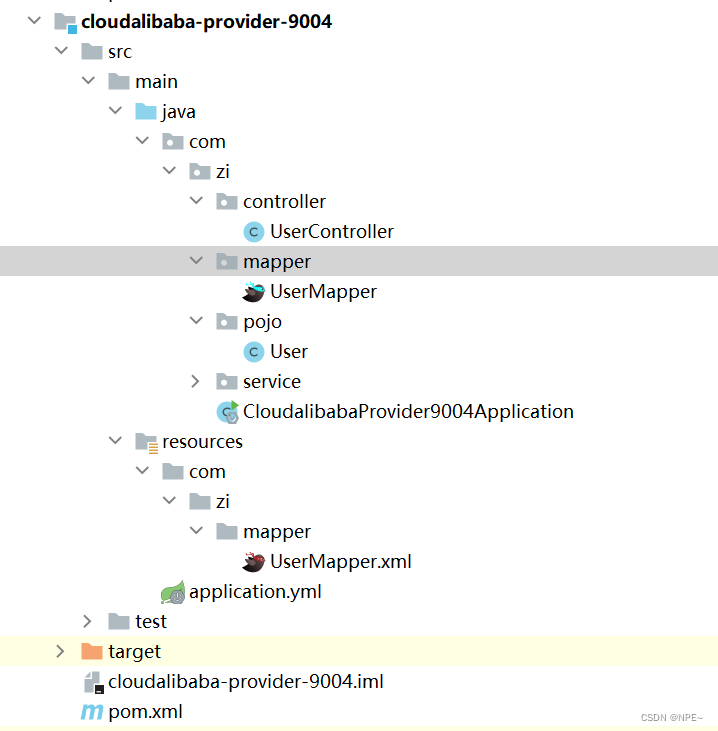
application.yml
server: # 端口 port: 9004 spring: application: #服务名称 name: feign-provider cloud: discovery: #nacos地址 server-addr: 127.0.0.1:8848 #数据源配置 datasource: driver-class-name: com.mysql.cj.jdbc.Driver url: jdbc:mysql://localhost:3306/mp?serverTimezone=UTC username: root password: root type: com.alibaba.druid.pool.DruidDataSource management: endpoint: web: exposure: include: '*' #mybatis配置(别名及其他) mybatis: mapper-locations: classpath:*.xml type-aliases-package: com.zi.pojo # 打印sql语句 logging: level: com.seamax.bdsearch.dao: DEBUG- 1
- 2
- 3
- 4
- 5
- 6
- 7
- 8
- 9
- 10
- 11
- 12
- 13
- 14
- 15
- 16
- 17
- 18
- 19
- 20
- 21
- 22
- 23
- 24
- 25
- 26
- 27
- 28
- 29
- 30
- 31
- 32
- 33
- 34
- 35
- 36
两个模块均一样:
UserController的代码:@Controller //@RequestMapping("/zi") public class UserController { @GetMapping("/test") @ResponseBody public String test01(){ return "serverPort:" + serverPort; } }- 1
- 2
- 3
- 4
- 5
- 6
- 7
- 8
- 9
1.3 消费者cloudalibaba-openFeign-consumer-8888
需要导入openFeign等依赖
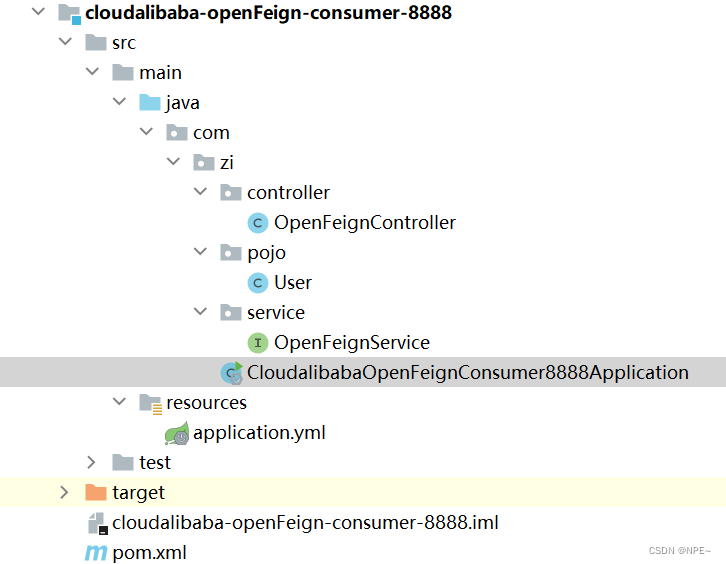
①接口OpenFeignService:/** * 此接口就是配合使用OpenFeign的接口, * 在此接口中添加@FeignClient接口同时标注 * 要调用的服务端名称,同时使用与服务提供者 * 方法签名一致的抽象方法来表示远程调用的 * 具体内容 */ @Service @FeignClient("feign-provider")//远程调用的服务名称 public interface OpenFeignService { /** * 该方法表示远程调用zi/{id}接口 * @param uid * @return */ @GetMapping("zi/{id}") public User getUserById(@PathVariable("id") Integer uid); @GetMapping("/zi/test") @ResponseBody public String test01(); @GetMapping("/timeOut") public String timeOut(); }- 1
- 2
- 3
- 4
- 5
- 6
- 7
- 8
- 9
- 10
- 11
- 12
- 13
- 14
- 15
- 16
- 17
- 18
- 19
- 20
- 21
- 22
- 23
- 24
- 25
- 26
- 27
②OpenFeignController
@RestController //@RequestMapping("/zi") public class OpenFeignController { @Autowired private OpenFeignService openFeignService; @GetMapping("getInfo/{id}") public User getInfo(@PathVariable("id") Integer uid){ return openFeignService.getUserById(uid); } @GetMapping("/test") public String test01(){ return openFeignService.test01(); } //OpenFeginController @GetMapping("/testTimeout") @ResponseBody public String TestTimeout(){ return openFeignService.timeOut(); } }- 1
- 2
- 3
- 4
- 5
- 6
- 7
- 8
- 9
- 10
- 11
- 12
- 13
- 14
- 15
- 16
- 17
- 18
- 19
- 20
- 21
- 22
- 23
- 24
- 25
③启动类
@SpringBootApplication @EnableDiscoveryClient//让nacos找到 @EnableFeignClients public class CloudalibabaOpenFeignConsumer8888Application { public static void main(String[] args) { SpringApplication.run(CloudalibabaOpenFeignConsumer8888Application.class, args); } @Bean Logger.Level feignLoggerLevel(){ //开启详细日志 return Logger.Level.FULL; } }- 1
- 2
- 3
- 4
- 5
- 6
- 7
- 8
- 9
- 10
- 11
- 12
- 13
- 14
- 15
- 16
④配置文件
server: port: 8888 spring: application: name: nacos-consumer-openFeign cloud: nacos: discovery: server-addr: localhost:8848 # 设置feign客户端超时时间(OpenFeign默认支持ribbon) ribbon: # 指的是建立连接后从服务器读取到可用资源所用的时间 ReadTimeout: 5000 # 指的是建立连接所用的时间,适用于网络状况正常的情况下,两端连接所用时间 ConnectTimeout: 5000 management: endpoints: web: exposure: include: '*' # 配置日志 logging: level: #openfeign日志以什么级别监控哪个接口 # 注意监视的接口是在level的下一层级【tab】 com.zi.service.OpenFeignService: debug- 1
- 2
- 3
- 4
- 5
- 6
- 7
- 8
- 9
- 10
- 11
- 12
- 13
- 14
- 15
- 16
- 17
- 18
- 19
- 20
- 21
- 22
- 23
- 24
- 25
- 26
- 27
- 28
1.4 结果

2 OpenFeign超时时间控制
一般来说,如果我们远程调用服务1s之内仍未返回结果时就会报错

在yml文件中控制超时时间:#设置feign客户端超时时间(OpenFeign默认支持ribbon) ribbon: #指的是建立连接后从服务器读取到可用资源所用的时间 ReadTimeout: 5000 #指的是建立连接所用的时间,适用于网络状况正常的情况下,两端连接所用的时间 ConnectTimeout: 5000- 1
- 2
- 3
- 4
- 5
- 6
全部结构:
application.yml:server: port: 8888 spring: application: name: nacos-consumer-openFeign cloud: nacos: discovery: server-addr: localhost:8848 # 设置feign客户端超时时间(OpenFeign默认支持ribbon) ribbon: # 指的是建立连接后从服务器读取到可用资源所用的时间 ReadTimeout: 5000 # 指的是建立连接所用的时间,适用于网络状况正常的情况下,两端连接所用时间 ConnectTimeout: 5000 management: endpoints: web: exposure: include: '*'- 1
- 2
- 3
- 4
- 5
- 6
- 7
- 8
- 9
- 10
- 11
- 12
- 13
- 14
- 15
- 16
- 17
- 18
- 19
- 20
- 21
- 22
3 OpenFeign的日志
3.1 在启动类中加入@Bean,日志类Logger.Level
@SpringBootApplication @EnableDiscoveryClient//让nacos找到 @EnableFeignClients public class CloudalibabaOpenFeignConsumer8888Application { public static void main(String[] args) { SpringApplication.run(CloudalibabaOpenFeignConsumer8888Application.class, args); } @Bean Logger.Level feignLoggerLevel(){ //开启详细日志 return Logger.Level.FULL; } }- 1
- 2
- 3
- 4
- 5
- 6
- 7
- 8
- 9
- 10
- 11
- 12
- 13
- 14
- 15
- 16
3.2 在配置文件中配置日志级别
# 配置日志 logging: level: #openfeign日志以什么级别监控哪个接口 # 注意监视的接口是在level的下一层级【tab】 com.zi.service.OpenFeignService: debug- 1
- 2
- 3
- 4
- 5
- 6
全部结构:
application.ymlserver: port: 8888 spring: application: name: nacos-consumer-openFeign cloud: nacos: discovery: server-addr: localhost:8848 # 设置feign客户端超时时间(OpenFeign默认支持ribbon) ribbon: # 指的是建立连接后从服务器读取到可用资源所用的时间 ReadTimeout: 5000 # 指的是建立连接所用的时间,适用于网络状况正常的情况下,两端连接所用时间 ConnectTimeout: 5000 management: endpoints: web: exposure: include: '*' # 配置日志 logging: level: #openfeign日志以什么级别监控哪个接口 # 注意监视的接口是在level的下一层级【tab】 com.zi.service.OpenFeignService: debug- 1
- 2
- 3
- 4
- 5
- 6
- 7
- 8
- 9
- 10
- 11
- 12
- 13
- 14
- 15
- 16
- 17
- 18
- 19
- 20
- 21
- 22
- 23
- 24
- 25
- 26
- 27
- 28
-
相关阅读:
Spinner
【PCB学习】几种接地符号
NBA体育决策和数据挖掘分析
AWS SAP-C02教程5--基础中间件
拯救SQL Server数据库事务日志文件损坏的终极大招
什么是网站权重?网站权重查询方法有哪些?
【java进阶03: package和import】及访问控制权限
【趣学算法】Day2 贪心算法——最优装载问题
字节、华为、美团软件测试面试真题(超详细~)
软件定制APP开发步骤分析|小程序
- 原文地址:https://blog.csdn.net/weixin_45565886/article/details/126202502
