-
SAP CRM Fiori 应用 My Opportunity 的分页读取逻辑,在 GM4 - AG3 无法正常工作
我们打开 SAP CRM Fiori 应用 My Opportunity 的 list 页面,首页默认只能显示 20 个 Opportunity:

当我们向下滚动鼠标中键时,触发一个加载更多 Opportunity 的动作,或者说延迟加载(分页加载)机制:

lo_provider = lo_processor->read( io_entity_set = lo_entity_set is_function_import_info = ls_function_import_info it_key = io_uri->key_predicates it_expand = io_uri->expand it_select = io_uri->select io_filter = io_uri->filter io_orderby = io_uri->orderby iv_skip = io_uri->skip iv_top = io_uri->top iv_skiptoken = io_uri->skiptoken iv_inlinecount = lv_inlinecount iv_for = lv_operation iv_format = lv_format ).- 1
- 2
- 3
- 4
- 5
- 6
- 7
- 8
- 9
- 10
- 11
- 12
- 13
- 14
下图是 gateway 处理 OData 请求的入口:

通过
CALL_BACKEND方法进行 RFC 调用:

进行 RFC 调用,使用的 SM59 Destination 为
ZGM4TOAG3_001:

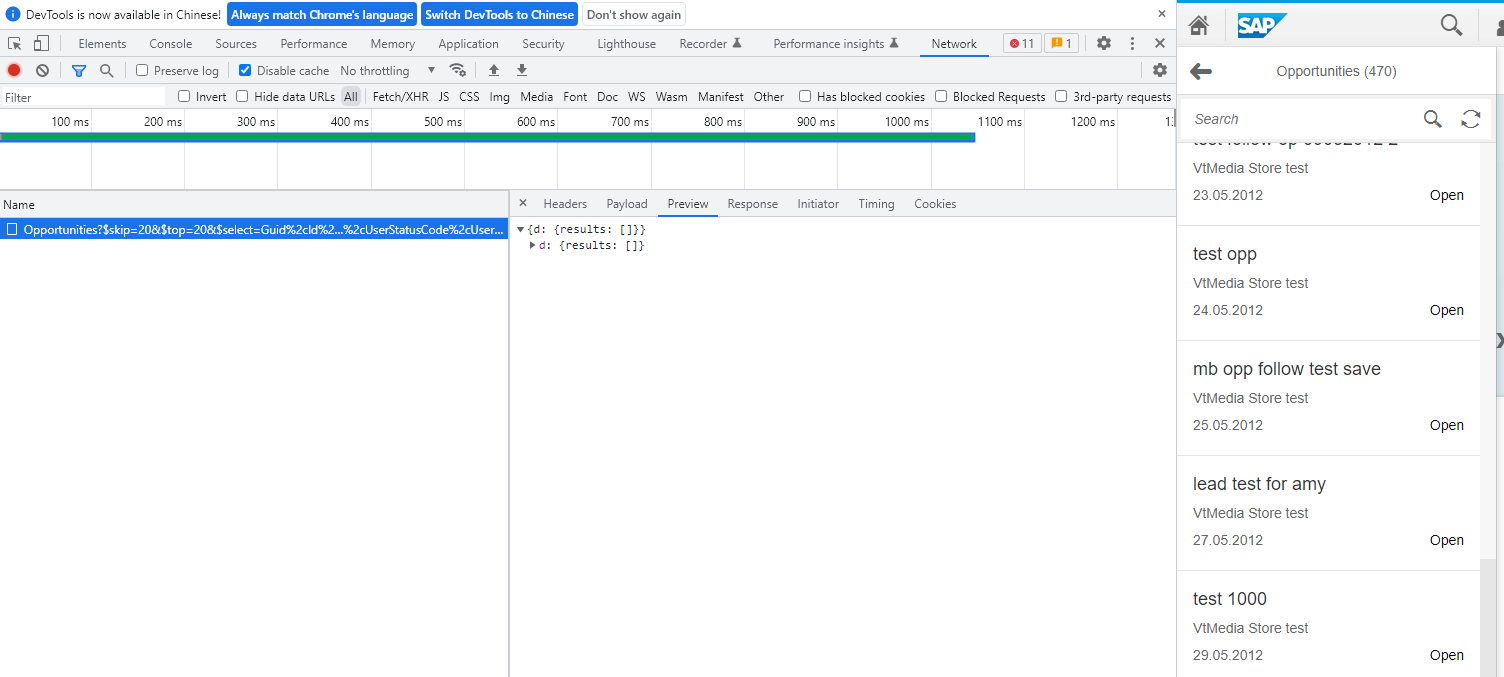
直接用 postman,没有返回记录:

CL_CRM_OPPORTUNITY_DPC_EXT~OPPORTUNITIES_GET_ENTITYSET
成功读出 470 条 Opportunity:

用 Postman 发送的请求,一 delete 就没了:
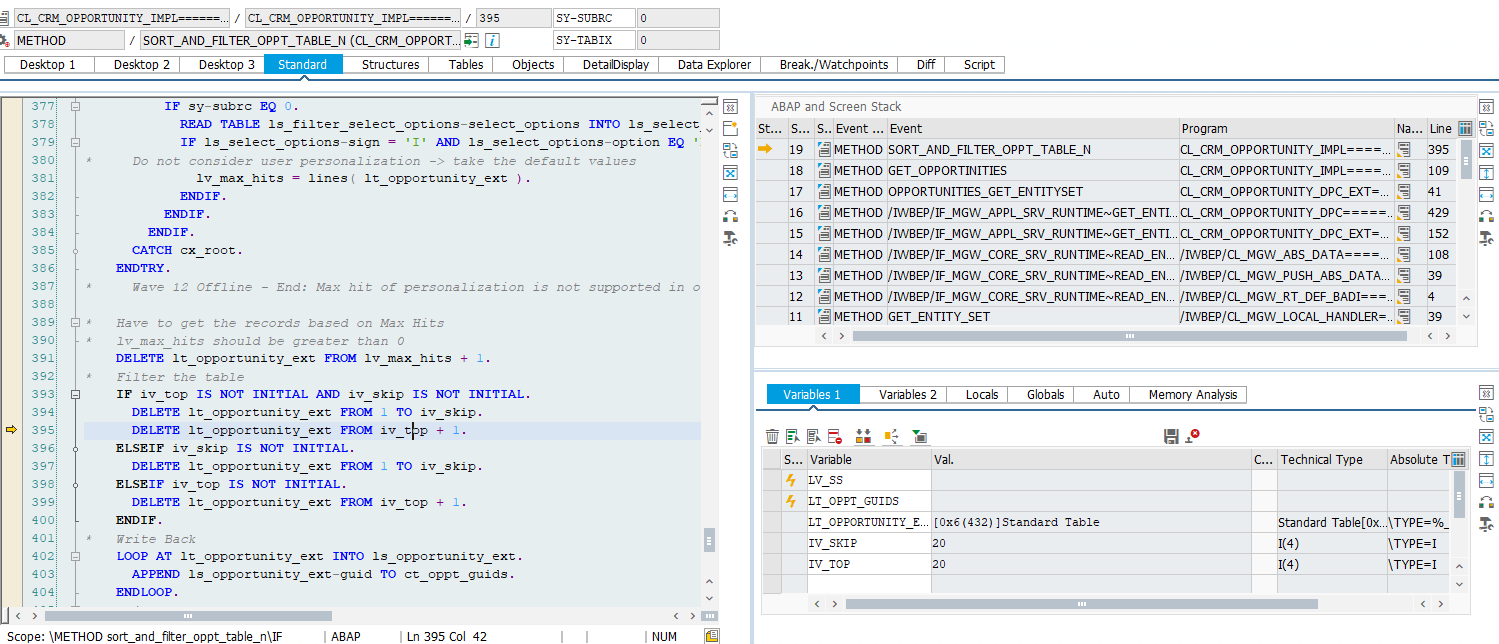
UI 上也是 0,这个 growing behavior 在 GM4/AG3 上不能正常工作。
但 task 可以。

在这之前,在 me->select_tasks 里完成 guid 的读取。

把所有 guid 都读取出来了:
[外链图片转存失败,源站可能有防盗链机制,建议将图片保存下来直接上传(img-P7IfPAjq-1659765006868)(https://upload-images.jianshu.io/upload_images/2085791-85e425bd414c0165.png?imageMogr2/auto-orient/strip%7CimageView2/2/w/1240)]

分页逻辑的实现:
IF lv_maxhits > 0. DELETE lt_sort FROM lv_maxhits + 1. ENDIF. IF iv_skip > 0. DELETE lt_sort FROM 1 TO iv_skip. ENDIF.- 1
- 2
- 3
- 4
- 5
- 6
sap.ui.model.odata.ODataMetaModel是一个OData 元模型的实现,它提供对OData V2元数据和V4注释的统一访问。它使用现有的sap.ui.model.odata.ODataMetadata作为基础,并将现有的sap.ui.model.odata.ODataAnnotations的 V4 直接合并到相应的模型元素。此模型不准备被进一步继承。
此外,来自“http://www.sap.com/Protocols/SAPData”名称空间的注释从扩展数组中提取出来,并从对象转换为名称前缀为
sap:的简单属性。注意,这是另外发生的,因此下面的示例显示了这两种表示。这样,这样的注释就可以通过简单的相对路径来处理,而不是搜索数组。例子:
{ "name" : "BusinessPartnerID", "extensions" : [{ "name" : "label", "value" : "Bus. Part. ID", "namespace" : "http://www.sap.com/Protocols/SAPData" }], "sap:label" : "Bus. Part. ID" }- 1
- 2
- 3
- 4
- 5
- 6
- 7
- 8
- 9
从OData V2注释转换而来的完整OData V4注释被包含在指定目标的注释文件中的注释所取代。转换后的注释从不使用限定符,只会被没有限定符的相同注释术语覆盖。
-
相关阅读:
Java面试复习体系总结(2021版,持续更新)
Linux之管道符
前端研习录(10)——CSS相对定位、绝对定位、固定定位以及Z-index属性、opacity属性讲解及示例说明
什么是前端构建01
前端文件下载方法总结
构建自定义ChatGPT,微软推出Copilot Studio
【前端】前端三要素之BOM
rocketMQ的使用
如何化解从数据到数据资源入表的难题
什么是勒索病毒?如何预防?
- 原文地址:https://blog.csdn.net/i042416/article/details/126193957