-
十五、商城 - 品牌管理-AngularJS(3)
一、前端框架AngularJS 入门
1.1 AngularJS 简介
AngularJS 诞生于2009年,由Misko Hevery 等人创建,后为Google所收购。是一款优秀的前端JS框架,已经被用于Google的多款产品当中。AngularJS有着诸多特性,最为核心的是:MVC、模块化、自动化双向数据绑定、依赖注入等等。


1.2 AngularJS 四大特征
1.2.1 MVC 模式
Angular遵循软件工程的MVC模式,并鼓励展现,数据,和逻辑组件之间的松耦合.通过依赖注入(dependency injection),Angular为客户端的Web应用带来了传统服务端的服务,例如独立于视图的控制。 因此,后端减少了许多负担,产生了更轻的Web应用。

- Model:数据,其实就是angular变量($scope.XX);
- View: 数据的呈现,Html+Directive(指令);
- Controller:操作数据,就是function,数据的增删改查;
1.2.2 双向绑定
AngularJS是建立在这样的信念上的:即声明式编程应该用于构建用户界面以及编写软件构建,而指令式编程非常适合来表示业务逻辑。框架采用并扩展了传统HTML,通过双向的数据绑定来适应动态内容,双向的数据绑定允许模型和视图之间的自动同步。因此,AngularJS使得对DOM的操作不再重要并提升了可测试性。

1.2.3 依赖注入
依赖注入(Dependency Injection,简称DI)是一种设计模式, 指某个对象依赖的其他对象无需手工创建,只需要“吼一嗓子”,则此对象在创建时,其依赖的对象由框架来自动创建并注入进来,其实就是最少知识法则;模块中所有的service和provider两类对象,都可以根据形参名称实现DI。
1.2.4 模块化设计
高内聚低耦合法则
- 官方提供的模块 ng、ngRoute、ngAnimate
- 用户自定义的模块 angular.module(‘模块名’,[ ])
1.3 入门小 Demo

1.3.1 表达式
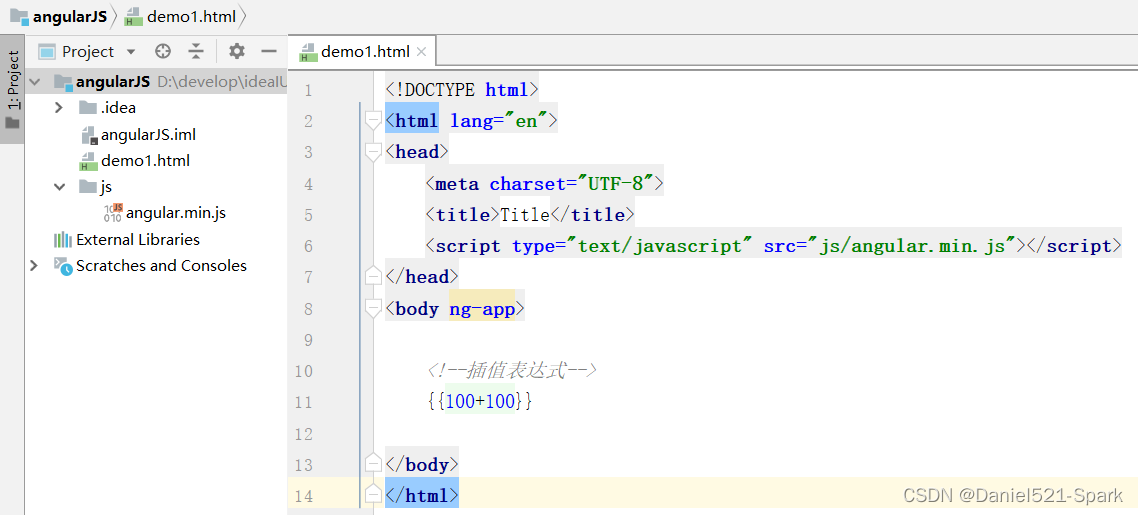
表达式的写法是
{{表达式 }}表达式可以是变量或是运算式
ng-app指令 作用是告诉子元素一下的指令是归angularJs的,angularJs会识别的
ng-app指令定义了 AngularJS 应用程序的 根元素。
ng-app指令在网页加载完毕时会自动引导(自动初始化)应用程序。(1) 创建一个
angularJS案例 👇🏾👇🏾
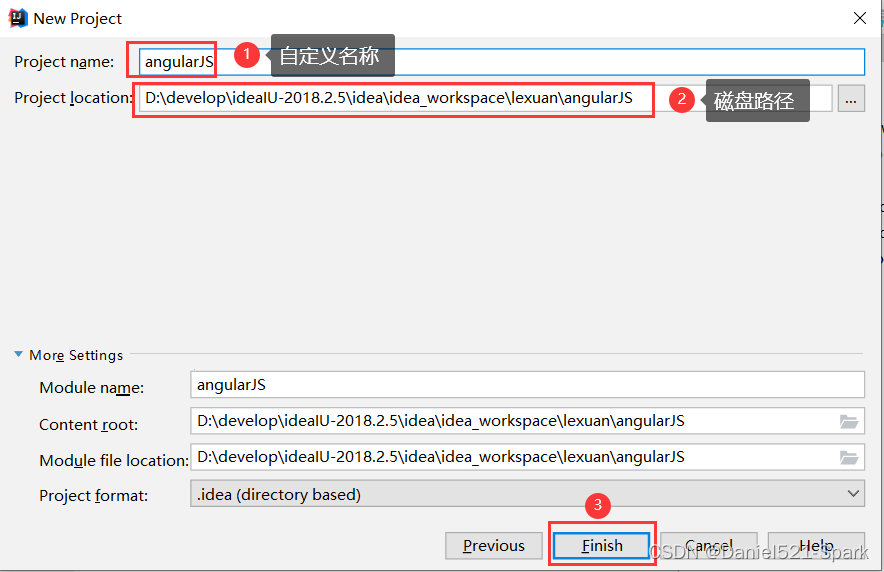
(2) angular.min.js 的引入 angular.min.js
(3)创建并且编写
demo1.htmlDOCTYPE html> <html lang="en"> <head> <meta charset="UTF-8"> <title>Titletitle> <script type="text/javascript" src="js/angular.min.js">script> head> <body ng-app> {{100+100}} body> html>- 1
- 2
- 3
- 4
- 5
- 6
- 7
- 8
- 9
- 10
- 11
- 12
- 13
- 14

1.3.2 双向绑定
注意:输入中文后回车才能显示
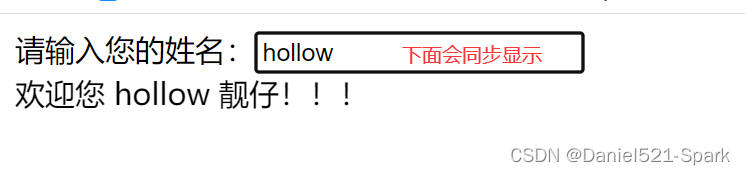
ng-model 指令用于绑定变量,这样用户在文本框输入的内容会绑定到变量上,而表达式可以实时地输出变量。创建
demo2.html并且引入 angularJS插件DOCTYPE html> <html lang="en"> <head> <meta charset="UTF-8"> <title>Titletitle> <script type="text/javascript" src="js/angular.min.js">script> head> head> <body ng-app> <input ng-model="myname"/><br/> {{myname}}恭喜您和angularJS过七夕! body> html>- 1
- 2
- 3
- 4
- 5
- 6
- 7
- 8
- 9
- 10
- 11
- 12
- 13
- 14
- 15
- 16


总结 :上面输入框 输入英文下面会同步显示,输入中文需要回车才显示。
1.3.3 初始化指令
我们如果希望有些变量具有初始值,可以使用ng-init指令来对变量初始化
创建
demo3.html并且引入 angularJS插件DOCTYPE html> <html lang="en"> <head> <meta charset="UTF-8"> <title>Titletitle> <script type="text/javascript" src="js/angular.min.js">script> head> <body ng-app ng-init="myname = 'Daniel'"> 请输入您的姓名:<input ng-model="myname"><br/> 欢迎您 {{myname}} 靓仔!!! body> html>- 1
- 2
- 3
- 4
- 5
- 6
- 7
- 8
- 9
- 10
- 11
- 12
- 13
- 14
- 15

1.3.4 控制器
ng-controller用于指定所使用的控制器。
理解
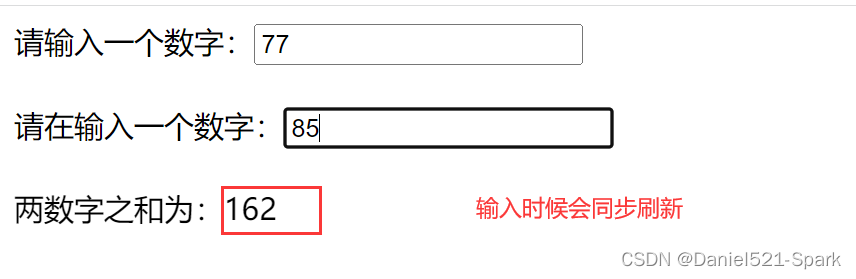
$scope:$scope的使用贯穿整个 AngularJS App 应用,它与数据模型相关联,同时也是表达式执行的上下文.- 有了
$scope就在视图和控制器之间建立了一个通道,基于作用域视图在修改数据时会立刻更新$scope,同样的$scope发生改变时也会立刻重新渲染视图。
创建
demo4.html并且引入 angularJS插件DOCTYPE html> <html lang="en"> <head> <meta charset="UTF-8"> <title>Titletitle> <script type="text/javascript" src="js/angular.min.js">script> <script> var app = angular.module('aa',[]); //定义了一个叫aa的模块 //定义控制器 app.controller('bb',function ($scope) { $scope.add = function () { return parseInt($scope.x) + parseInt($scope.y) } }); script> head> <body ng-app="aa" ng-controller="bb"> 请输入一个数字:<input ng-model="x"><br/><br/> 请在输入一个数字:<input ng-model="y"><br/><br/> 两数字之和为:{{add()}} body> html>- 1
- 2
- 3
- 4
- 5
- 6
- 7
- 8
- 9
- 10
- 11
- 12
- 13
- 14
- 15
- 16
- 17
- 18
- 19
- 20
- 21
- 22
- 23
- 24
- 25
- 26
- 27
- 28
- 29
- 30
- 31
- 32
- 33
1.3.5 事件指令
ng-click 是最常用的单击事件指令,再点击时触发控制器的某个方法
创建
demo5.html并且引入 angularJS插件DOCTYPE html> <html lang="en"> <head> <meta charset="UTF-8"> <title>Titletitle> <script type="text/javascript" src="js/angular.min.js">script> <script> var app = angular.module('aa',[]); app.controller('controller',function ($scope) { $scope.add = function () { $scope.z = parseInt($scope.x) + parseInt($scope.y) } }); script> head> <body ng-app="aa" ng-controller="controller"> 请输入第一个数字:<input ng-model="x"><br/><br/> 请输入第二个数字:<input ng-model="y"><br/><br/> <button ng-click="add()">求和button> 结果为:{{z}} body> html>- 1
- 2
- 3
- 4
- 5
- 6
- 7
- 8
- 9
- 10
- 11
- 12
- 13
- 14
- 15
- 16
- 17
- 18
- 19
- 20
- 21
- 22
- 23
- 24
- 25
- 26
- 27
- 28
- 29
- 30
- 31
- 32
- 33
- 34

1.3.6 循环数组
ng-repeat指令用于循环数组变量。
创建
demo6.html并且引入 angularJS插件DOCTYPE html> <html lang="en"> <head> <meta charset="UTF-8"> <title>Titletitle> <script type="text/javascript" src="js/angular.min.js">script> <script> var app = angular.module('myApp',[]); //定义一个叫myApp的模块 /*定义控制器*/ app.controller('myController',function ($scope) { $scope.list = [12,23,34,45,666]; //定义数组,注意元素不能重复 }) script> head> <body ng-app="myApp" ng-controller="myController"> <table> <tr ng-repeat="a in list"> <td> {{a}} td> tr> table> body> html>- 1
- 2
- 3
- 4
- 5
- 6
- 7
- 8
- 9
- 10
- 11
- 12
- 13
- 14
- 15
- 16
- 17
- 18
- 19
- 20
- 21
- 22
- 23
- 24
- 25
- 26
- 27
- 28
- 29
- 30
- 31
- 32

1.3.7 循环对象数组
创建
demo7.html并且引入 angularJS插件DOCTYPE html> <html lang="en"> <head> <meta charset="UTF-8"> <title>Titletitle> <script src="js/angular.min.js">script> <script> var app = angular.module('myApp',[]); app.controller('myController',function ($scope) { $scope.list = [ {name:'Daniel',shuxue:150,xiandai:32}, {name:'hollow',shuxue:140,xiandai:88}, {name:'Jenny',shuxue:22,xiandai:100} ]; }) script> head> <body ng-app="myApp" ng-controller="myController"> <table> <tr> <td>姓名td> <td>高数td> <td>线代td> tr> <tr ng-repeat="entity in list"> <td>{{entity.name}}td> <td>{{entity.shuxue}}td> <td>{{entity.xiandai}}td> tr> table> body> html>- 1
- 2
- 3
- 4
- 5
- 6
- 7
- 8
- 9
- 10
- 11
- 12
- 13
- 14
- 15
- 16
- 17
- 18
- 19
- 20
- 21
- 22
- 23
- 24
- 25
- 26
- 27
- 28
- 29
- 30
- 31
- 32
- 33
- 34
- 35
- 36
- 37
- 38
- 39
- 40
- 41
- 42
- 43

1.3.8 内置服务
- 我们的数据一般都是从后端获取的,那么如何获取数据呢?我们一般使用内置服务
$http来实现。 - 注意:以下代码需要在tomcat中运行。
创建
demo8.html并且引入 angularJS插件和导入 json文件DOCTYPE html> <html lang="en"> <head> <meta charset="UTF-8"> <title>Titletitle> <script src="js/angular.min.js">script> <script> /* * module 函数有两个参数 * 第一个参数:指定模块的名字(模块的名字自己指定) * 第二个参数:可以引用angular中的一些内置组件 * * */ var app = angular.module('myApp',[]); //通过app调用controller方法来创建一个控制层的一个函数 app.controller('myController',function ($scope,$http) { $scope.findAll = function () { $http.get('data.json').success(function (response) { $scope.list = response; }) } }) script> head> <body ng-app="myApp" ng-controller="myController" ng-init="findAll()"> <table> <tr> <td>序号td> <td>姓名td> <td>年龄td> tr> <tr ng-repeat="entity in list"> <td>{{entity.id}}td> <td>{{entity.name}}td> <td>{{entity.age}}td> tr> table> body> html>- 1
- 2
- 3
- 4
- 5
- 6
- 7
- 8
- 9
- 10
- 11
- 12
- 13
- 14
- 15
- 16
- 17
- 18
- 19
- 20
- 21
- 22
- 23
- 24
- 25
- 26
- 27
- 28
- 29
- 30
- 31
- 32
- 33
- 34
- 35
- 36
- 37
- 38
- 39
- 40
- 41
- 42
- 43
- 44
- 45
- 46
- 47
- 48
- 49

二、品牌列表的实现
2.1 需求分析
实现品牌列表的查询(不用分页和条件查询)效果如下:

2.2 前端代码
2.2.1 拷贝资源
将 静态原型 \ 静态原型 \ 运营商管理后”下的页面资源拷贝到 youlexuan-manager-web 下
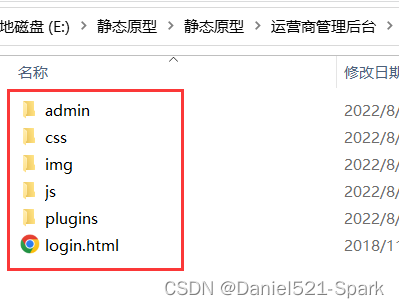

其中plugins文件夹中包括了angularJS 、bootstrap、JQuery等常用前端库,我们将在项目中用到2.2.2 引入JS
修改admin / brand.html ,引入JS
- 1
2.2.3 指定模块和控制器
ng-app="brandApp" ng-controller="brandController" ng-init="findBrandAll()"- 1
- ng-app 指令中定义的就是模块的名称
- ng-controller 指令用于为你的应用添加控制器。
- 在控制器中,你可以编写代码,制作函数和变量,并使用 scope 对象来访问。
2.2.4 编写JS代码
<script> var app = angular.module('brandApp',[]); app.controller('brandController',function ($scope,$http) { $scope.findBrandAll = function(){ $http.get('../brand/findAll.do').success(function(response){ $scope.list = response; }) } }); </script>- 1
- 2
- 3
- 4
- 5
- 6
- 7
- 8
- 9
- 10
- 11
- 12
- 13
- 14
- 15
- 16
- 17
2.2.5 循环显示表格数据
<tr ng-repeat="entity in list" > <td><input type="checkbox" >td> <td>{{entity.id}}td> <td>{{entity.name}}td> <td>{{entity.firstChar}}td> <td class="text-center"> <button type="button" class="btn bg-olive btn-xs" data-toggle="modal" data-target="#editModal" >修改button> td> tr>- 1
- 2
- 3
- 4
- 5
- 6
- 7
- 8
- 9
2.2.6 初始化调用
见 2.2.3
ng-init="findBrandAll()"2.2.7 完整代码
DOCTYPE html> <html> <head> <meta charset="utf-8"> <meta http-equiv="X-UA-Compatible" content="IE=edge"> <title>品牌管理title> <meta content="width=device-width,initial-scale=1,maximum-scale=1,user-scalable=no" name="viewport"> <link rel="stylesheet" href="../plugins/bootstrap/css/bootstrap.min.css"> <link rel="stylesheet" href="../plugins/adminLTE/css/AdminLTE.css"> <link rel="stylesheet" href="../plugins/adminLTE/css/skins/_all-skins.min.css"> <link rel="stylesheet" href="../css/style.css"> <script src="../plugins/jQuery/jquery-2.2.3.min.js">script> <script src="../plugins/bootstrap/js/bootstrap.min.js">script> <script src="../plugins/angularjs/angular.min.js">script> <script> var app = angular.module('brandApp',[]); app.controller('brandController',function ($scope,$http) { $scope.findBrandAll = function(){ $http.get('../brand/findAll.do').success(function(response){ $scope.list = response; }) } }); script> head> <body class="hold-transition skin-red sidebar-mini" ng-app="brandApp" ng-controller="brandController" ng-init="findBrandAll()"> <div class="box-header with-border"> <h3 class="box-title">品牌管理h3> div> <div class="box-body"> <div class="table-box"> <div class="pull-left"> <div class="form-group form-inline"> <div class="btn-group"> <button type="button" class="btn btn-default" title="新建" data-toggle="modal" data-target="#editModal" ><i class="fa fa-file-o">i> 新建button> <button type="button" class="btn btn-default" title="删除" ><i class="fa fa-trash-o">i> 删除button> <button type="button" class="btn btn-default" title="刷新" onclick="window.location.reload();"><i class="fa fa-refresh">i> 刷新button> div> div> div> <div class="box-tools pull-right"> <div class="has-feedback"> div> div> <table id="dataList" class="table table-bordered table-striped table-hover dataTable"> <thead> <tr> <th class="" style="padding-right:0px"> <input id="selall" type="checkbox" class="icheckbox_square-blue"> th> <th class="sorting_asc">品牌IDth> <th class="sorting">品牌名称th> <th class="sorting">品牌首字母th> <th class="text-center">操作th> tr> thead> <tbody> <tr ng-repeat="entity in list" > <td><input type="checkbox" >td> <td>{{entity.id}}td> <td>{{entity.name}}td> <td>{{entity.firstChar}}td> <td class="text-center"> <button type="button" class="btn bg-olive btn-xs" data-toggle="modal" data-target="#editModal" >修改button> td> tr> <tr> <td><input type="checkbox">td> <td>2td> <td>华为td> <td>Htd> <td class="text-center"> <button type="button" class="btn bg-olive btn-xs" data-toggle="modal" data-target="#editModal" >修改button> td> tr> <tr> <td><input type="checkbox">td> <td>3td> <td>三星td> <td>Std> <td class="text-center"> <button type="button" class="btn bg-olive btn-xs" data-toggle="modal" data-target="#editModal" >修改button> td> tr> tbody> table> div> div> <div class="modal fade" id="editModal" tabindex="-1" role="dialog" aria-labelledby="myModalLabel" aria-hidden="true"> <div class="modal-dialog" > <div class="modal-content"> <div class="modal-header"> <button type="button" class="close" data-dismiss="modal" aria-hidden="true">×button> <h3 id="myModalLabel">品牌编辑h3> div> <div class="modal-body"> <table class="table table-bordered table-striped" width="800px"> <tr> <td>品牌名称td> <td><input class="form-control" placeholder="品牌名称" > td> tr> <tr> <td>首字母td> <td><input class="form-control" placeholder="首字母"> td> tr> table> div> <div class="modal-footer"> <button class="btn btn-success" data-dismiss="modal" aria-hidden="true">保存button> <button class="btn btn-default" data-dismiss="modal" aria-hidden="true">关闭button> div> div> div> div> body> html>- 1
- 2
- 3
- 4
- 5
- 6
- 7
- 8
- 9
- 10
- 11
- 12
- 13
- 14
- 15
- 16
- 17
- 18
- 19
- 20
- 21
- 22
- 23
- 24
- 25
- 26
- 27
- 28
- 29
- 30
- 31
- 32
- 33
- 34
- 35
- 36
- 37
- 38
- 39
- 40
- 41
- 42
- 43
- 44
- 45
- 46
- 47
- 48
- 49
- 50
- 51
- 52
- 53
- 54
- 55
- 56
- 57
- 58
- 59
- 60
- 61
- 62
- 63
- 64
- 65
- 66
- 67
- 68
- 69
- 70
- 71
- 72
- 73
- 74
- 75
- 76
- 77
- 78
- 79
- 80
- 81
- 82
- 83
- 84
- 85
- 86
- 87
- 88
- 89
- 90
- 91
- 92
- 93
- 94
- 95
- 96
- 97
- 98
- 99
- 100
- 101
- 102
- 103
- 104
- 105
- 106
- 107
- 108
- 109
- 110
- 111
- 112
- 113
- 114
- 115
- 116
- 117
- 118
- 119
- 120
- 121
- 122
- 123
- 124
- 125
- 126
- 127
- 128
- 129
- 130
- 131
- 132
- 133
- 134
- 135
- 136
- 137
- 138
- 139
- 140
- 141
- 142
- 143
- 144
- 145
2.3 测试运行
- 顺序启动以下2个服务 youlexuan-sellergoods-service、youlexuan-manager-web
- 访问地址:
http://localhost:9101/admin/index.html或直接访问:http://localhost:9101/admin/brand.html - 点击:商品管理—》品牌管理
- 出现如下运行效果,可以查看到全部的品牌数据

三、品牌列表分页的实现
3.1 需求分析
在品牌管理下方放置分页栏,实现分页功能

3.2 后端代码
3.2.1 分页结果封装实体
在youlexuan-pojo工程中创建
com.zql.entity包,用于存放通用实体类,创建类PageResultpackage com.zql.entity; import java.io.Serializable; import java.util.List; /** * 分页 * @Author:Daniel * @Version 1.0 * total;//总记录数 * rows;//当前页结果 */ public class PageResult implements Serializable { private long total;//总记录数 private List rows;//当前页结果 public PageResult() { } public PageResult(long total, List rows) { this.total = total; this.rows = rows; } public long getTotal() { return total; } public void setTotal(long total) { this.total = total; } public List getRows() { return rows; } public void setRows(List rows) { this.rows = rows; } }- 1
- 2
- 3
- 4
- 5
- 6
- 7
- 8
- 9
- 10
- 11
- 12
- 13
- 14
- 15
- 16
- 17
- 18
- 19
- 20
- 21
- 22
- 23
- 24
- 25
- 26
- 27
- 28
- 29
- 30
- 31
- 32
- 33
- 34
- 35
- 36
- 37
- 38
- 39
- 40
- 41
3.2.2 服务接口层
在youlexuan-sellergoods-interface的BrandService.java 增加方法定义
//分页 public PageResult findPage(int pageNum, int pageSize);- 1
- 2
3.2.3 服务实现层
在youlexuan-sellergoods-service的BrandServiceImpl.java中实现该方法
/*分页*/ @Override public PageResult findPage(int pageNum, int pageSize) { PageHelper.startPage(pageNum, pageSize); Page<TbBrand> page = (Page<TbBrand>) brandMapper.selectByExample(null); return new PageResult(page.getTotal(),page.getResult()); }- 1
- 2
- 3
- 4
- 5
- 6
- 7
- 8
- 9
- 10
PageHelper为MyBatis分页插件,找到项目模块youlexuan-dao设置mybatis配置文件SqlMapConfig.xml增加插件配置(应该已经增加了)
<plugins> <plugin interceptor="com.github.pagehelper.PageHelper"> <property name="dialect" value="mysql"/> plugin> plugins>- 1
- 2
- 3
- 4
- 5
- 6
- 7
模块youlexuan-sellergoods-service需要导入PageHelper依赖包
<dependency> <groupId>com.github.pagehelper</groupId> <artifactId>pagehelper</artifactId> </dependency>- 1
- 2
- 3
- 4
3.2.4 控制层
在youlexuan-manager-web工程的BrandController.java新增方法
//分页 返回指定页码、行数 品牌列表 @RequestMapping("/findPage") public PageResult findPage(int page, int rows){ return brandService.findPage(page,rows); }- 1
- 2
- 3
- 4
- 5
- 6
注意:因为duobbo远程调用Service,所以需要修改youlexuan-manager-web中pom.xml导入如下类库包
<dependency> <groupId>com.github.pagehelpergroupId> <artifactId>pagehelperartifactId> dependency> <dependency> <groupId>org.mybatisgroupId> <artifactId>mybatisartifactId> dependency>- 1
- 2
- 3
- 4
- 5
- 6
- 7
- 8
- 9
3.3 前端代码
3.3.1 HTML
在brand.html引入分页组件
<!-- 分页组件开始 --> <script src="../plugins/angularjs/pagination.js"></script> <link rel="stylesheet" href="../plugins/angularjs/pagination.css"> <!-- 分页组件结束 -->- 1
- 2
- 3
- 4
构建app模块时引入pagination模块

//构建app模块时引入pagination模块 var app = angular.module('brandApp',['pagination']);//定义优乐选模块,增加分页模块 pagination:能引入分页组件- 1
- 2
页面的表格下放置分页组件

<tm-pagination conf="paginationConf">tm-pagination>- 1
- 2
3.3.2 JS代码
在
brandController内层添加如下代码//重新加载列表 数据 $scope.reloadList=function(){ //切换页码 $scope.findPage( $scope.paginationConf.currentPage, $scope.paginationConf.itemsPerPage); } //分页控件配置 $scope.paginationConf = { //变量各属性的意义: currentPage: 1, //当前页码 totalItems: 5, //总条数 itemsPerPage: 5, perPageOptions: [5, 10, 15, 20, 30], //页码选项 onChange: function(){ //更改页面时触发的事件 $scope.reloadList();//重新加载 } }; /*分页*/ $scope.findPage = function(page,rows){ $http.get('../brand/findPage.do?page='+page+'&rows='+rows).success(function(response){ $scope.list = response.rows; $scope.paginationConf.totalItems = response.total;//更新总记录数 }) }- 1
- 2
- 3
- 4
- 5
- 6
- 7
- 8
- 9
- 10
- 11
- 12
- 13
- 14
- 15
- 16
- 17
- 18
- 19
- 20
- 21
- 22
- 23
- 24
- 25
- 26
在页面的body元素上换掉ng-init指令的调用为
reloadList ()👇🏾👇🏾
3.4 测试运行
(1)先安装下

顺序启动以下2个服务 youlexuan-sellergoods-service、youlexuan-manager-web
访问地址:http://localhost:9101/admin/index.html- 点击:商品管理—》品牌管理
- 出现如下运行效果,可以查看到品牌数据,点击下面的页码,可以正常分页显示

-
相关阅读:
JVM系列之GC
浅析“代码可视化”
【定制项目】【M14 监测预警平台】百度地图区域绘制(时间轴)/柱状图/仪表图 - 关键技术 python flask + echarts
Gitlab自动化测试的配置
“池化技术” - 深度剖释底层内存管理细节,明晰“池化技术”内存管理技术
【C++】:在构造函数中使用new时的注意事项
linux服务器升级tomcat步骤
NPM详解
MySQL——几种常见的嵌套查询
mongodb 基本概念
- 原文地址:https://blog.csdn.net/weixin_42171159/article/details/126164904
