-
数据库及ADO.NET学习(五)
电话本小程序
1、将姓名、手机号、分组显示在控件DataGridView上
string sql = "select pName,ptName,pCellPhone from PhoneNum,PhoneType where PhoneType.ptId = PhoneNum.pTypeId"; DataTable dt=SqlHelper.ExecuteDateTable(sql); dataGridView1.DataSource = dt;- 1
- 2
- 3
首列中文显示:
1)数据库中操作select pName as '姓名',ptName as '关系',pCellPhone as '电话号码' from PhoneNum,PhoneType where PhoneType.ptId = PhoneNum.pTypeId- 1
2)控件操作
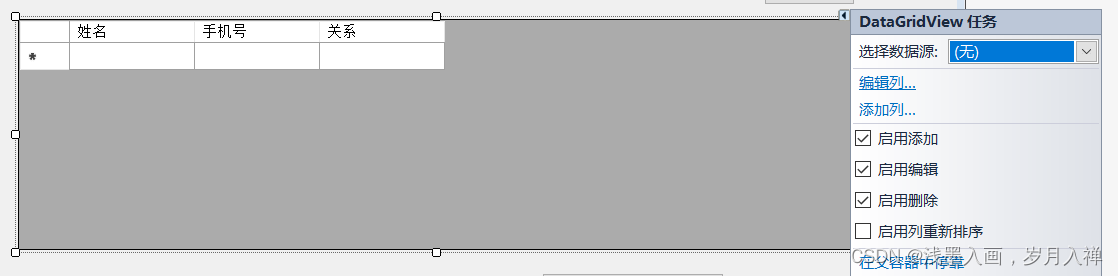
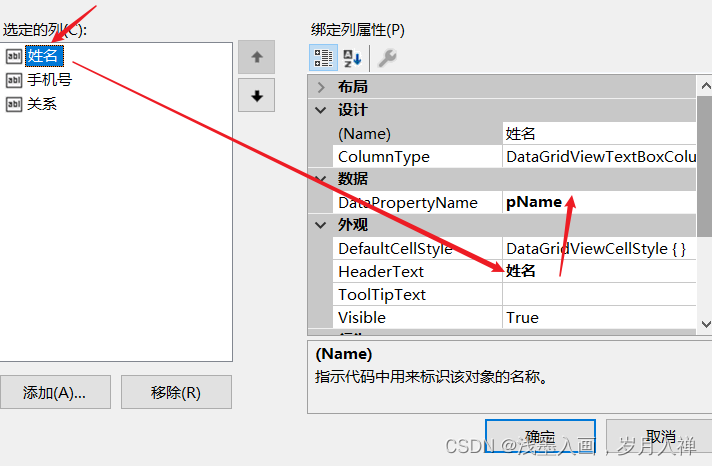
也可以使用代码,这种操作之后design.cs文件会有相应代码。
结果:
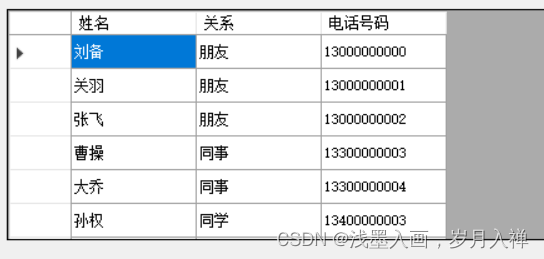
其它:selectmode属性可以选择选中控件中数据的时候选择的是一个还是一行还是一列

2、多条件搜索实现

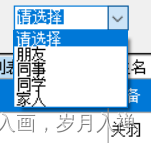
//查找,多条件搜索 #region sql语句拼接 /*StringBuilder sql = new StringBuilder("select pid,pName as '姓名',ptName as '关系',pCellPhone as '电话号码' from PhoneNum,PhoneType" + " where 1=1 and PhoneType.ptId = PhoneNum.pTypeId"); if (comboBox1.SelectedIndex != 0) { sql.Append(" and PhoneNum.pTypeId = " + comboBox1.SelectedIndex); } if (textBox1.Text.Trim().Length > 0) { sql.Append(" and pName like '%" + textBox1.Text.Trim() + "%' "); } if (textBox2.Text.Trim().Length > 0) { sql.Append(" and pCellPhone like '" + textBox2.Text.Trim() + "%'"); }*/ #endregion #region 使用list集合拼接条件 /*StringBuilder sql = new StringBuilder("select pid,pName as '姓名',ptName as '关系',pCellPhone as '电话号码' from PhoneNum,PhoneType" + " where PhoneType.ptId = PhoneNum.pTypeId and "); Listl=new List #endregion #region 使用带参数的sql语句 StringBuilder sql = new StringBuilder("select pid,pName as '姓名',ptName as '关系',pCellPhone as '电话号码' from PhoneNum,PhoneType" + " where PhoneType.ptId = PhoneNum.pTypeId and "); List<string> l = new List<string>(); List<SqlParameter> listPms=new List<SqlParameter>(); if (comboBox1.SelectedIndex != 0) { l.Add(" PhoneNum.pTypeId = @pTypeId"); listPms.Add(new SqlParameter("@pTypeId", comboBox1.SelectedIndex)); } if (textBox1.Text.Trim().Length > 0) { l.Add(" pName like '@pName' "); listPms.Add(new SqlParameter("@pName", "%"+textBox1.Text.Trim()+ "%")); } if (textBox2.Text.Trim().Length > 0) { l.Add(" pCellPhone like '@pCellPhone'"); listPms.Add(new SqlParameter("@pCellPhone","%"+textBox2.Text.Trim()+ "%")); } if (l.Count > 0) { string str = string.Join("and", l.ToArray()); sql.Append(str); } #endregion SqlHelper.ExecuteDateTable(sql.ToString(), listPms.ToArray()); MessageBox.Show(sql.ToString());(); if (comboBox1.SelectedIndex != 0) { l.Add(" PhoneNum.pTypeId = " + comboBox1.SelectedIndex); } if (textBox1.Text.Trim().Length > 0) { l.Add(" pName like '%" + textBox1.Text.Trim() + "%' "); } if (textBox2.Text.Trim().Length > 0) { l.Add(" pCellPhone like '" + textBox2.Text.Trim() + "%'"); } if (l.Count > 0) { string str=string.Join("and", l.ToArray()); sql.Append(str); }*/ - 1
- 2
- 3
- 4
- 5
- 6
- 7
- 8
- 9
- 10
- 11
- 12
- 13
- 14
- 15
- 16
- 17
- 18
- 19
- 20
- 21
- 22
- 23
- 24
- 25
- 26
- 27
- 28
- 29
- 30
- 31
- 32
- 33
- 34
- 35
- 36
- 37
- 38
- 39
- 40
- 41
- 42
- 43
- 44
- 45
- 46
- 47
- 48
- 49
- 50
- 51
- 52
- 53
- 54
- 55
- 56
- 57
- 58
- 59
- 60
- 61
- 62
- 63
- 64
- 65
- 66
- 67
case函数
格式: case when then end end 举例: case expression when value1 then return value1 when value2 then return value2 when value3 then return value3 else default return value end case后为变量: case level when 1 then '骨灰' when 2 then '大虾' when 3 then '菜鸟' end- 1
- 2
- 3
- 4
- 5
- 6
- 7
- 8
- 9
- 10
- 11
- 12
- 13
- 14
- 15
- 16
- 17
- 18
then后值的数据类型必须一样
索引
全表扫描:一条条地找
索引:提高查询效率,但是索引会占用存储空间,可能降低增删改的效率。
1、聚集索引(聚簇索引):数据实际的存储顺序与索引的顺序一致
2、非聚集索引(非聚簇索引):索引的顺序和数据实际存储的顺序不一致
索引就意味着排序,排序后则可更高效地查询。
填充因子:为了提高增删改的效率,每页只填充一部分空间,保留一部分空余空间,增加或移动的时候不是操作所有数据,本页就有剩余空间
建立一个自动增长的主键时,会自动出现一个聚集索引,一个表最多只有一个聚集索引=======非聚集索引============= CREATE NONCLUSTERED INDEX 索引名 ON 数据库名.表名(列名, 列名); ====创建唯一非聚集索引============= CREATE UNIQUE INDEX 索引名 ON 数据库名.表名(列名); =======创建聚集索引================= CREATE UNIQUE CLUSTERED INDEX Idx1 ON t1(c);- 1
- 2
- 3
- 4
- 5
- 6
子查询
把一个查询的结果在另一个查询中使用,就是将一个查询语句作为一个结果集供SQL语句使用。
子查询分为独立子查询(子查询可以独立运行)和相关子查询(子查询中引用了父查询中的结果)。in exists not in not exists if(exists(select * from PhoneType)) begin print'有结果' end else begin print'没结果' end- 1
- 2
- 3
- 4
- 5
exists:如果exists中包含的查询查到了结果则exists语句返回true,否则返回false,主要是判断查询有没有结果
select * from PhoneNum where exists ( select * from PhoneType where PhoneNum.pTypeId=PhoneType.ptId and ptId=2 )- 1
- 2
- 3
- 4
- 5
- 6
- 7
相关子查询:好乱好乱哦
查找PhoneNum,如果where中的返回true,就会显示出来;如果返回false,就不会被显示出来
会不会显示取决于子查询中是否能查出来分页
1、排序,把前些页数据跳过
--假设每页显示两条 --1、显示第一页数据,首先排序 select * from PhoneNum order by pId --2、第一页 select top 2 * from PhoneNum order by pId --3、第二页 select top 2 * from PhoneNum where pId not in ( select top 2 pId from PhoneNum order by pId )order by pId --4、第三页 select top 2 * from PhoneNum where pId not in ( select top (2*2) pId from PhoneNum order by pId )order by pId- 1
- 2
- 3
- 4
- 5
- 6
- 7
- 8
- 9
- 10
- 11
- 12
- 13
- 14
- 15
- 16
- 17
2、利用row_number函数简化实现
row_number函数使用效果:select *,row_number() over (order by pName) from PhoneNum- 1
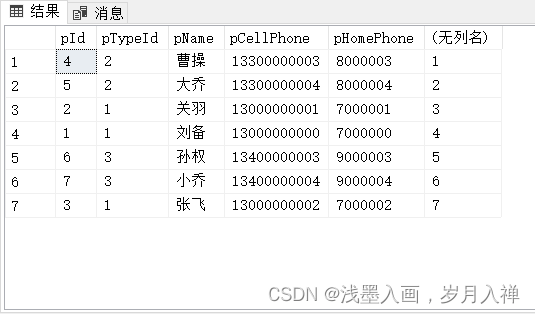
使用在排序上:select * from ( select *,row_number() over (order by pId) as rnumber from PhoneNum ) as tbl where tbl.rnumber between 2*2+1 and 3*2- 1
- 2
- 3
- 4
- 5
第三页的数据,假设每页两条,第三页就是在22+1~32之间
over是开窗函数,本身聚合函数只会计算一次,开窗以后就可以为每条记录都计算一次聚合,可以为每一行计算表达式而不是只为一行,并且over可以单独定义窗口中的排序方式,而不影响最终结果集联接查询
inner join、left join、right join、自连接
cross join 、交叉连接、笛卡尔积、
连接分为内连接和外连接。
当多个列在不同的表中时,要跨表查询,所以一般可以使用inner join;inner join只返回两个表中联结字段相等的行,就是相匹配的那些记录
外连接分为左外连接(左连接)和右外连接(右连接)。
left (outer) join返回包括左表中的所有记录和右表中联结字段相等的记录,如果在右表中能找到匹配记录则显示对应匹配数据,对于那些在右表中找不到怕匹配的记录显示为NULL
right (outer) join就是返回包括右表中的所有记录和左表中联结字段相等的记录
注意:左连接和右连接都是先将匹配的数据找到,再将没有匹配的数据添加进来(不是一起查询出来的,有先后顺序) -
相关阅读:
JAVASE(复习)——API(String)
js制作九宫格抽奖功能
记录每天学习的新知识: Room
qt tcp 连接 秒断连
基于yolov5的手掌特效app(安卓)
【ASTGCN】代码解读(torch)之train_ASTGCN_r(二)
如何在opensea批量发布NFT(Rinkeby测试网)
Python小波分析库pywt介绍
Greenplum数据库数据分片策略Hash分布——GUC gp_use_legacy_hashops
Hadoop核心源码NameNode启动源码-尚硅谷大数据培训
- 原文地址:https://blog.csdn.net/a10750/article/details/126170632
