-
Qt菜单栏-工具栏-状态栏
1、创建动作
QAction是Qt中用于添加动作的类,可以将它添加在菜单,作为一个菜单项,也可以添加到工具栏,作为一个工具栏按钮。
- 其中参数一是设置该操作按钮的图标,":/images/icon"是资源文件的路径
- 参数二中"&“号代表设置快捷键为"Alt+o”
QAction *open = new QAction(QIcon(“:/images/icon”),“Open(&O)”,this);
【关联动作的槽函数】
//绑定槽函数 connect(open, &QAction::triggered, this, &MainWindow::openAct); //槽函数定义 void MyNotePad::openAct() { ... }- 1
2、设置快捷键
设置快捷键为"Ctrl+o",这里使用QKeySequence类是为了可以跨平台,例如pc和mac下的键盘不一样,Qt可以根据平台不同设置相应的快捷键。该类中为我们定义了很多内置的快捷键,可以直接使用,例如下面注释的一行。也可以自己创建一个QKeySequence类,传入我们想要设置的快捷键。
//open->setShortcut(QKeySequence(QKeySequence::Open)); open->setShortcut(QKeySequence("Ctrl+O"));- 1
3、设置工具提示
open->setToolTip(“open file”);//不写默认为行为名称
4、动作提示
open->setStatusTip(“open existing file”);
5、 添加菜单
在菜单栏中添加一个菜单。因为Qt界面工程,默认自带了菜单栏、工具栏和状态栏,所以我们可以直接使用ui->menuBar来调用。
QMenu *file = ui->menuBar->addMenu("File(&F)"); menuBar()->addMenu("文件");- 1
6、给菜单添加动作
//将动作添加为一个菜单项 file->addAction(open);- 1
- 2
7、添加道工具
ui->mainToolBar->addAction(open);- 1
8、状态栏提醒
状态栏可以显示临时信息、永久信息和其他组件。
// 还可以设定显示时间,毫秒为单位,例如: statusBar()->showMessage("欢迎!",2000);- 1
- 2
状态栏中显示一些组件:
QLabel *statusLabel; statusLabel = new QLabel(this); statusLabel->setFrameShape(QFrame::WinPanel); statusLabel->setFrameShadow(QFrame::Sunken); ui->statusBar->addWidget(statusLabel); statusLabel->setText("欢迎!!!");- 1
- 2
- 3
- 4
- 5
- 6
这样就可以在需要显示信息的时候,调用statusLabel->setText()来设置了。
状态栏显示永久信息:
需要使用addPermanentWdget函数来添加一个可以显示信息的组建,它会显示在状态栏的右侧,不会被临时信息所遮盖。
//显示一个超链接: QLabel *permanent = new QLabel; permanent->setFrameStyle(QFrame::Box | QFrame::Sunken); permanent->setText( tr("baidu.com")); permanent->setTextFormat(Qt::RichText); //设置为超文本 permanent->setOpenExternalLinks(true); //开启自动打开超链接 ui->statusBar->addPermanentWidget(permanent); 显示一个滑块: slider = new QSlider(Qt::Horizontal, this); slider->setMaximum(100); slider->setMaximumWidth(200); ui->statusBar->addPermanentWidget(slider); connect(slider, &QSlider::valueChanged, this, &MainWindow::set_label_value);- 1
- 2
- 3
- 4
- 5
- 6
- 7
- 8
- 9
- 10
- 11
- 12
- 13
- 14
- 15
Qt实现一个记事本test
功能:
新建文件、保存文件
打开指定的文本文件 (文件对话框,菜单栏)
显示文件内容 (textEdit)
修改文件内容并保持(工具栏 ,快捷键)
工具栏设置字体,背景颜色(字体对话框,颜色对话框,工具栏)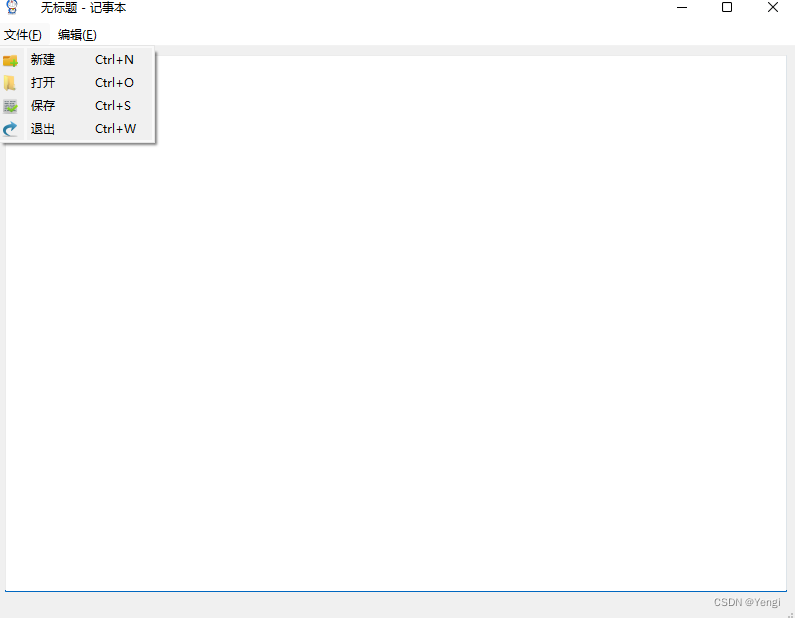
-
相关阅读:
IP-guard客户端WINDOWS的打包方式
自动化安装脚本(Ansible+shell)
布隆过滤器在项目中的使用
Github限时开源24小时,Alibaba架构师内部最新发布SpringCloud开发手册
MyBatis Generator自动生成MyBatis的mapper接口、XML映射文件以及实体类的代码生成工具
Dubbo环境搭建
SSM+教学网站 毕业设计-附源码211611
win10系统下使用onnxruntime部署yolov5模型
学习笔记-FRIDA脚本系列(二)
解读大数据技术在金融行业中的应用
- 原文地址:https://blog.csdn.net/qq_45698138/article/details/126167853