-
5. redux
1. redux简介
redux是一个专门用于做状态管理的JS库(不是react插件库),可以用在react、angular、vue等项目中,能够集中式管理react应用中多个组件共享的状态。
redux开发者工具:
在Google应用商店搜索Redux DevTools
使用场景:
- 某个组件的状态需要让其他组件随时拿到(共享)
- 一个组件需要改变另一个组件的状态(通信)
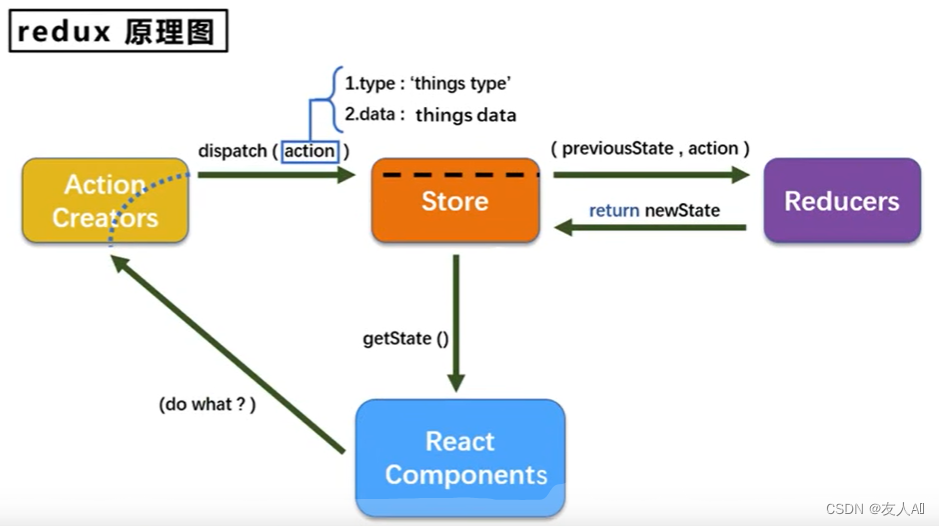
1.1 action
动作的对象。
包含两个属性:
- type:标识属性,值为字符串,唯一,必要属性
- data:数据属性,值为任意类型,可选属性
{ type: 'ADD_PERSON', data: { name: '张三', age: 12 } }- 1
- 2
- 3
- 4
- 5
- 6
- 7
1.2 reducer
用于初始化状态、加工状态。
加工时会根据旧的state和action来产生新的state的纯函数。
redux的reducer函数必须是一个纯函数。
1.3 store
将state、action和reducer联系在一起的对象。
得到此对象:import {createStore} from 'index'import reducer from './reducersconst store = createStore(reducer)
此对象的功能:
getState():得到statedispatch(action):分发action,触发reducer,产生新的statesubscribe(listener):注册监听,当产生了新的state时,自动调用
2. redux核心API
2.1 legacy_createStore()
用于创建包含指定reducer的store对象
createStore已弃用
2.2 store对象
store对象是redux库最核心的管理对象。
store对象内部维护:
- state
- reducer
核心方法:
- getStore()
- dispatch(action)
- subscribe(listener)
具体编码:
- store.getState()
- store.dispatch({type: ‘方法’, number})
- store.subscribe(render)
2.3 applyMiddleware()
应用上基于redux的中间件(插件库)
2.4 combineReducers()
合并多个reducer函数
3. 使用redux
想做一个求和案例:
-
安装redux:
npm install redux -
在src目录下新建redux目录,并创建store.js和count_reducer.js(转为求和服务的reducer文件)文件

- store.js 文件
/** * 该文件专门用于暴露一个store对象,整个应用只有一个store对象 */ // 引入legacy_createStore,用于创建redux中最为核心的store对象 import { legacy_createStore } from 'redux' // 引入为Count组件服务的reducer import countReducer from './count_reducer' // 暴露store export default legacy_createStore(countReducer)- 1
- 2
- 3
- 4
- 5
- 6
- 7
- 8
- 9
- 10
- 11
- count_reducer.js 文件
初始化时,preState的值为undefined,action中的type为@@init形式的值,没有data
/** * 该文件用于创建一个为Count组件服务的reducer,reducer的本质就是一个函数 * reducrt函数接收两个参数,分别为:之前的状态和动作对象 */ // 初始化状态 const initState = 0 export default function countReducer(preState = initState, action) { // 从action对象中获取 type、data const { type, data } = action // 根据 type 决定如何加工数据 switch (type) { case 'increment': // 加 return preState + data case 'decrement': // 减 return preState - data default: return preState } }- 1
- 2
- 3
- 4
- 5
- 6
- 7
- 8
- 9
- 10
- 11
- 12
- 13
- 14
- 15
- 16
- 17
- 18
- 19
- 20
- 21
- 22
- 仅使用react实现的求和组件
import React, { Component } from 'react'; import './index.css' export default class Count extends Component { state = { count: 0 } increment = () => { const { value } = this.selectNumber const { count } = this.state this.setState({ count: count + value * 1 }) } decrement = () => { const { value } = this.selectNumber const { count } = this.state this.setState({ count: count - value * 1 }) } incrementIfOdd = () => { const { value } = this.selectNumber const { count } = this.state if (count % 2 !== 0) { this.setState({ count: count + value * 1 }) } } incrementAsync = () => { const { value } = this.selectNumber const { count } = this.state setTimeout(() => { this.setState({ count: count + value * 1 }) }, 500); } render() { return ( <div> <h1>当前求和为:{this.state.count}</h1> <select ref={c => this.selectNumber = c}> <option value="1">1</option> <option value="2">2</option> <option value="3">3</option> </select> <button onClick={this.increment}>+</button> <button onClick={this.decrement}>-</button> <button onClick={this.incrementIfOdd}>当前求和为奇数时+</button> <button onClick={this.incrementAsync}>异步+</button> </div> ); } }- 1
- 2
- 3
- 4
- 5
- 6
- 7
- 8
- 9
- 10
- 11
- 12
- 13
- 14
- 15
- 16
- 17
- 18
- 19
- 20
- 21
- 22
- 23
- 24
- 25
- 26
- 27
- 28
- 29
- 30
- 31
- 32
- 33
- 34
- 35
- 36
- 37
- 38
- 39
- 40
- 41
- 42
- 43
- 44
- 45
- 46
- 47
- 48
- 49
- 50
- 51
- 52
- 53
- 54
- 55
- 56
- 57
- 58
- 59
- 60
- 61
- 62
- 改造Count组件
import React, { Component } from 'react'; import './index.css' import store from '../../redux/store'; export default class Count extends Component { // 去除Count组件自身的状态 // state = { // count: 0 // } // 可以直接在入口文件中写,当多个组件使用redux时,只需写一次就能实现状态更新时组件自动更新 // componentDidMount() { // /** // * redux只负责状态管理,状态更改并不会引起组件更新 // * 需要监测redux中状态的变化,只要变化,就调用render // */ // store.subscribe(() => { // this.setState({}) // }) // } increment = () => { const { value } = this.selectNumber // 通知 redux 加 value store.dispatch({ type: 'increment', data: value * 1 }) } decrement = () => { const { value } = this.selectNumber store.dispatch({ type: 'decrement', data: value * 1 }) } incrementIfOdd = () => { const { value } = this.selectNumber const count = store.getState() if (count % 2 !== 0) { store.dispatch({ type: 'increment', data: value * 1 }) } } incrementAsync = () => { const { value } = this.selectNumber setTimeout(() => { store.dispatch({ type: 'increment', data: value * 1 }) }, 500); } render() { return ( <div> <h1>当前求和为:{store.getState()}</h1> <select ref={c => this.selectNumber = c}> <option value="1">1</option> <option value="2">2</option> <option value="3">3</option> </select> <button onClick={this.increment}>+</button> <button onClick={this.decrement}>-</button> <button onClick={this.incrementIfOdd}>当前求和为奇数时+</button> <button onClick={this.incrementAsync}>异步+</button> </div> ); } }- 1
- 2
- 3
- 4
- 5
- 6
- 7
- 8
- 9
- 10
- 11
- 12
- 13
- 14
- 15
- 16
- 17
- 18
- 19
- 20
- 21
- 22
- 23
- 24
- 25
- 26
- 27
- 28
- 29
- 30
- 31
- 32
- 33
- 34
- 35
- 36
- 37
- 38
- 39
- 40
- 41
- 42
- 43
- 44
- 45
- 46
- 47
- 48
- 49
- 50
- 51
- 52
- 53
- 54
- 55
- 56
- 57
- 58
- 59
- 60
- 61
- 62
- 63
- 64
- 65
- 在入口文件中实现更新组件状态

- 新建count_action.js
export const createIncrementAction = data => ({ type: 'increment', data }) export const createDecrementAction = data => ({ type: 'decrement', data })- 1
- 2
- 对Count组件进行改造

4. 异步action
action的值可以是一般对象Object(同步) 或 函数function(异步)。
redux默认是不能进行异步处理的,但某些时候应用中需要在redux中执行异步任务(ajax, 定时器)。
例子:将组件中的异步任务交到action中去实现:
-
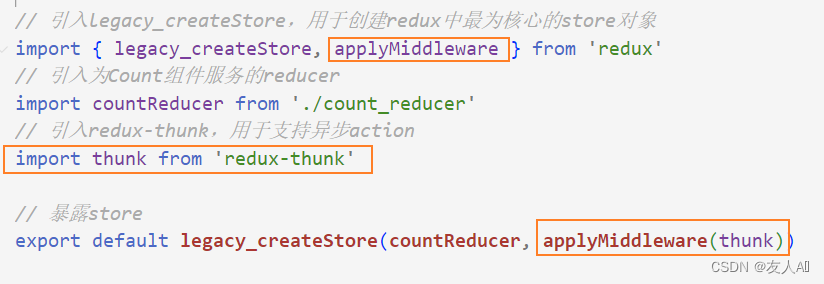
store默认action必须是一个Object类型的一般对象,所以需要通过一个中间件来使用异步action
可以使用异步中间件:
npm install --save redux-thunk -
在store.js中引入异步中间件
- 开启异步任务


不过此时这个函数已经是store帮忙调用的,可以不用引入store
异步action中一般都会调用同步action

5. react-redux
react-redux是一个react插件库,专门用来简化react应用中使用redux。
5.1 react-redux中的组件分类
- UI组件
- 只负责 UI 的呈现,不带有任何业务逻辑
- 通过props接收数据(一般数据和函数)
- 不使用任何 Redux 的 API
- 一般保存在components文件夹下
- 容器组件
- 负责管理数据和业务逻辑,不负责UI的呈现
- 使用 Redux 的 API
- 一般保存在containers文件夹下
UI组件都会被容器组件包裹,由容器组件与redux打交道,且容器组件可以随意使用redux的API,而UI组件中则不能使用任何redux的API。
容器组件给UI组件传:(都通过props传递)
- redux中所保存的状态
- 用于操作状态的方法

5.2 相关API
-
Provider:让所有组件都可以得到state数据
-
connect:用于包装 UI 组件生成容器组件
-
mapStateToprops:将外部的数据(即state对象)转换为UI组件的标签属性
-
mapDispatchToProps:将分发action的函数转换为UI组件的标签属性
使用:
- 改造Count组件,将store相关内容清除,使其称为一个合法的UI组件
import React, { Component } from 'react' import './index.css' export default class Count extends Component { increment = () => { const { value } = this.selectNumber } decrement = () => { const { value } = this.selectNumber } incrementIfOdd = () => { const { value } = this.selectNumber } incrementAsync = () => { const { value } = this.selectNumber } render() { return ( <div> <h1>当前求和为:?</h1> <select ref={c => this.selectNumber = c}> <option value="1">1</option> <option value="2">2</option> <option value="3">3</option> </select> <button onClick={this.increment}>+</button> <button onClick={this.decrement}>-</button> <button onClick={this.incrementIfOdd}>当前求和为奇数时+</button> <button onClick={this.incrementAsync}>异步+</button> </div> ); } }- 1
- 2
- 3
- 4
- 5
- 6
- 7
- 8
- 9
- 10
- 11
- 12
- 13
- 14
- 15
- 16
- 17
- 18
- 19
- 20
- 21
- 22
- 23
- 24
- 25
- 26
- 27
- 28
- 29
- 30
- 31
- 32
- 33
- 34
- 35
- 36
- 37
- 38
- 为Count准备容器组件:
src -> containers -> Count -> index.jsx - 实现容器组件,需要借助 react-redux:
npm i react-redux
/** * 容器组件作为UI组件和redux的桥梁,需要将两者引入 */ // 引入Count的UI组件 import CountUI from '../../components/Count' import { createIncrementAction, createDecrementAction, createIncrementAsyncAction } from '../../redux/count_action' // 引入connect用于连接UI组件和redux import { connect } from 'react-redux' /** * mapStateToProps函数返回一个对象 * 返回的对象中的key就作为传递给了UI组件props的key * 返回的对象中的value就作为传递给了UI组件props的value * 用于传递状态 */ // function mapStateToProps(state) { // return { count: state } // } const mapStateToProps = (state) => ({ count: state }) /** * mapDispatchToProps函数返回一个对象 * 返回的对象中的key就作为传递给了UI组件props的key * 返回的对象中的value就作为传递给了UI组件props的value * 用于传递操作状态的方法 */ // function mapDispatchToProps(dispatch) { // return { // add: (data) => { // // 通知redux执行加法 // dispatch(createIncrementAction(data)) // }, // des: (data) => { // // 通知redux执行减法 // dispatch(createDecrementAction(data)) // }, // addAsync: (data, time) => { // // 异步加 // dispatch(createIncrementAsyncAction(data, time)) // } // } const mapDispatchToProps = (dispatch) => ({ add: (data) => { // 通知redux执行加法 dispatch(createIncrementAction(data)) }, des: (data) => { // 通知redux执行减法 dispatch(createDecrementAction(data)) }, addAsync: (data, time) => { // 异步加 dispatch(createIncrementAsyncAction(data, time)) } }) } // 使用connent创建并暴露Count的容器组件 export default connect(mapStateToProps, mapDispatchToProps)(CountUI)- 1
- 2
- 3
- 4
- 5
- 6
- 7
- 8
- 9
- 10
- 11
- 12
- 13
- 14
- 15
- 16
- 17
- 18
- 19
- 20
- 21
- 22
- 23
- 24
- 25
- 26
- 27
- 28
- 29
- 30
- 31
- 32
- 33
- 34
- 35
- 36
- 37
- 38
- 39
- 40
- 41
- 42
- 43
- 44
- 45
- 46
- 47
- 48
- 49
- 50
- 51
- 52
- 53
- 54
- 55
- 56
- 57
- 58
- 59
- 60
- 61
- 62
- 63
- 64
- 此时在App.js中不能引入Count的UI组件,而要引入Count的容器组件,并引入store

- 在UI容器中使用this.props接收
import React, { Component } from 'react' import './index.css' export default class Count extends Component { increment = () => { const { value } = this.selectNumber this.props.add(value * 1) } decrement = () => { const { value } = this.selectNumber this.props.des(value * 1) } incrementIfOdd = () => { const { value } = this.selectNumber if (this.props.count % 2 !== 0) { this.props.add(value * 1) } } incrementAsync = () => { const { value } = this.selectNumber this.props.addAsync(value * 1, 500) } render() { // console.log(this.props); return ( <div> <h1>当前求和为:{this.props.count}</h1> <select ref={c => this.selectNumber = c}> <option value="1">1</option> <option value="2">2</option> <option value="3">3</option> </select> <button onClick={this.increment}>+</button> <button onClick={this.decrement}>-</button> <button onClick={this.incrementIfOdd}>当前求和为奇数时+</button> <button onClick={this.incrementAsync}>异步+</button> </div> ); } }- 1
- 2
- 3
- 4
- 5
- 6
- 7
- 8
- 9
- 10
- 11
- 12
- 13
- 14
- 15
- 16
- 17
- 18
- 19
- 20
- 21
- 22
- 23
- 24
- 25
- 26
- 27
- 28
- 29
- 30
- 31
- 32
- 33
- 34
- 35
- 36
- 37
- 38
- 39
- 40
- 41
- 42
- 43
- 44
- 45
-
mapDispatchToProps可以简写,因为react-redux做了自动分发

-
index.js文件中不再需要监测redux状态发生改变,容器组件中已经默认拥有监测redux状态发生改变的能力
// 检测redux中状态改变,若redux状态发生改变,则重新渲染App组件 // store.subscribe(() => { // ReactDOM.render(, document.getElementById('root')) // }) - 1
- 2
- 3
- 4
- 不在App.jsx文件中为容器组件一个个传递store,可以在index.js中将所有容器组件都需要store交给Provider,Provider会自动分析应用里面所有的容器组件,把store传给每一个需要store的容器组件


- 可以将容器组件和UI组件整合
import React, { Component } from 'react' import '../../components/Count/index' import { createIncrementAction, createDecrementAction, createIncrementAsyncAction } from '../../redux/count_action' // 引入connect用于连接UI组件和redux import { connect } from 'react-redux' // 定义UI组件 class Count extends Component { increment = () => { const { value } = this.selectNumber this.props.add(value * 1) } decrement = () => { const { value } = this.selectNumber this.props.des(value * 1) } incrementIfOdd = () => { const { value } = this.selectNumber if (this.props.count % 2 !== 0) { this.props.add(value * 1) } } incrementAsync = () => { const { value } = this.selectNumber this.props.addAsync(value * 1, 500) } render() { // console.log(this.props); return ( <div> <h1>当前求和为:{this.props.count}</h1> <select ref={c => this.selectNumber = c}> <option value="1">1</option> <option value="2">2</option> <option value="3">3</option> </select> <button onClick={this.increment}>+</button> <button onClick={this.decrement}>-</button> <button onClick={this.incrementIfOdd}>当前求和为奇数时+</button> <button onClick={this.incrementAsync}>异步+</button> </div> ); } } // 使用connent创建并暴露Count的容器组件 export default connect((state) => ({ count: state }), { add: createIncrementAction, des: createDecrementAction, addAsync: createIncrementAsyncAction })(Count)- 1
- 2
- 3
- 4
- 5
- 6
- 7
- 8
- 9
- 10
- 11
- 12
- 13
- 14
- 15
- 16
- 17
- 18
- 19
- 20
- 21
- 22
- 23
- 24
- 25
- 26
- 27
- 28
- 29
- 30
- 31
- 32
- 33
- 34
- 35
- 36
- 37
- 38
- 39
- 40
- 41
- 42
- 43
- 44
- 45
- 46
- 47
- 48
- 49
- 50
- 51
- 52
- 53
- 54
- 55
- 56
- 57
- 58
- 59
- 60
- 61
-
相关阅读:
PCL 使用克拉默法则进行三点定圆(二维)
【Ubuntu18.04】Livox Tele-15使用教程
golang的docker 简单部署
使用数据增强从头开始训练卷积神经网络(CNN)
Tabby All configured authentication methods failed
基于python用telnet连接设备+查询指定文件内容的脚本
深入MNN:开源深度学习框架的介绍、安装与编译指南
聊聊Kafka的生产者消费者确认机制
【SQL Server】外键约束
搜素专题(DFS )
- 原文地址:https://blog.csdn.net/qq_46025031/article/details/126071573
