• 使用ansible统一管理修改Linux和Windows管理员密码


    一、ansible安装:

    1、选择一台centos 7
    2、通过yum安装ansible

    #安装epel源
    yum install epel-release -y
    #安装ansible
    yum install -y ansible
    #安装ansible.windows 模块
    ansible-galaxy collection install ansible.windows
    #安装pip
    wget https://bootstrap.pypa.io/pip/2.7/get-pip.py
    python get-pip.py
    #使用pip安装所需插件
    pip install pywinrm
    
    • 1
    • 2
    • 3
    • 4
    • 5
    • 6
    • 7
    • 8
    • 9
    • 10
    • 11

    二、Server端配置

    #配置远程主机:
    vim /etc/ansible/hosts
    [linux]
    192.168.83.128
    192.168.83.133
    [win]
    192.168.83.132 ansible_ssh_user=administrator ansible_ssh_pass=2008.Com ansibe_port=5985 ansible_connection="winrm" ansible_winrm_server_cert_validation=ignore ansible_winrm_transport=ntlm
    192.168.83.134 ansible_ssh_user=administrator ansible_ssh_pass=2008.Com ansibe_port=5985 ansible_connection="winrm" ansible_winrm_server_cert_validation=ignore ansible_winrm_transport=ntlm
    
    #配置Linux免密登录
    ssh-keygen -t rsa
    ssh-copy-id -i ~/.ssh/id_rsa.pub root@192.168.83.128
    ssh-copy-id -i ~/.ssh/id_rsa.pub root@192.168.83.133
    
    • 1
    • 2
    • 3
    • 4
    • 5
    • 6
    • 7
    • 8
    • 9
    • 10
    • 11
    • 12
    • 13

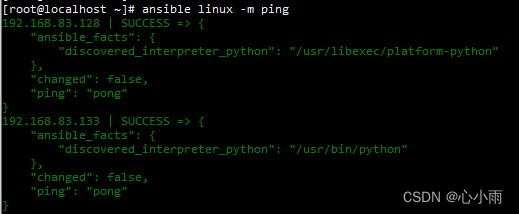
    测试:
    在这里插入图片描述

    三、编写用于修改Linux的yml文件

    #通过命令直接修改root密码
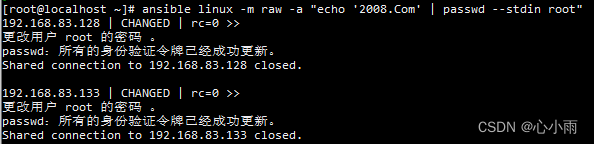
    ansible all -m raw -a "echo 'my_root_new_password' | passwd --stdin root"    #密码不允许有特殊字符
    
    #编写yml文件
    [root@localhost ~]# cat pwd-linux.yaml
    ---
    - hosts: linux
      gather_facts: false
      tasks:
      - name: change password for root
        user: name=root password={{ chpass | password_hash('sha512') }} update_password=always
    
    #使用方法:
    ansible-playbook pwd-linux.yaml -e 'chpass=admin#123'
    
    • 1
    • 2
    • 3
    • 4
    • 5
    • 6
    • 7
    • 8
    • 9
    • 10
    • 11
    • 12
    • 13
    • 14

    在这里插入图片描述
    在这里插入图片描述

    四、Windows主机配置

    要求:不满足该配置请进行升级
    PowerShell 3.0+
    .NET 4.0+

    Microsoft .NET Framework 4.5下载地址:https://download.microsoft.com/download/B/A/4/BA4A7E71-2906-4B2D-A0E1-80CF16844F5F/dotNetFx45_Full_setup.exe

    更新PowerShell 2.0到3.0的脚本:https://github.com/ansible/ansible/blob/devel/examples/scripts/upgrade_to_ps3.ps1

    
    # Powershell script to upgrade a PowerShell 2.0 system to PowerShell 3.0
    # based on http://occasionalutility.blogspot.com/2013/11/everyday-powershell-part-7-powershell.html
    #
    # some Ansible modules that may use Powershell 3 features, so systems may need
    # to be upgraded.  This may be used by a sample playbook.  Refer to the windows
    # documentation on docs.ansible.com for details.
    #
    # - hosts: windows
    #   tasks:
    #     - script: upgrade_to_ps3.ps1
    
    # Get version of OS
    
    # 6.0 is 2008
    # 6.1 is 2008 R2
    # 6.2 is 2012
    # 6.3 is 2012 R2
    
    
    if ($PSVersionTable.psversion.Major -ge 3) {
        Write-Output "Powershell 3 Installed already; You don't need this"
        Exit
    }
    
    $powershellpath = "C:\powershell"
    
    function download-file {
        param ([string]$path, [string]$local)
        $client = new-object system.net.WebClient
        $client.Headers.Add("user-agent", "PowerShell")
        $client.downloadfile($path, $local)
    }
    
    if (!(test-path $powershellpath)) {
        New-Item -ItemType directory -Path $powershellpath
    }
    
    
    # .NET Framework 4.0 is necessary.
    
    #if (($PSVersionTable.CLRVersion.Major) -lt 2)
    #{
    #    $DownloadUrl = "http://download.microsoft.com/download/B/A/4/BA4A7E71-2906-4B2D-A0E1-80CF16844F5F/dotNetFx45_Full_x86_x64.exe"
    #    $FileName = $DownLoadUrl.Split('/')[-1]
    #    download-file $downloadurl "$powershellpath\$filename"
    #    ."$powershellpath\$filename" /quiet /norestart
    #}
    
    #You may need to reboot after the .NET install if so just run the script again.
    
    # If the Operating System is above 6.2, then you already have PowerShell Version > 3
    if ([Environment]::OSVersion.Version.Major -gt 6) {
        Write-Output "OS is new; upgrade not needed."
        Exit
    }
    
    
    $osminor = [environment]::OSVersion.Version.Minor
    
    $architecture = $ENV:PROCESSOR_ARCHITECTURE
    
    if ($architecture -eq "AMD64") {
        $architecture = "x64"
    }
    else {
        $architecture = "x86"
    }
    
    if ($osminor -eq 1) {
        $DownloadUrl = "http://download.microsoft.com/download/E/7/6/E76850B8-DA6E-4FF5-8CCE-A24FC513FD16/Windows6.1-KB2506143-" + $architecture + ".msu"
    }
    elseif ($osminor -eq 0) {
        $DownloadUrl = "http://download.microsoft.com/download/E/7/6/E76850B8-DA6E-4FF5-8CCE-A24FC513FD16/Windows6.0-KB2506146-" + $architecture + ".msu"
    }
    else {
        # Nothing to do; In theory this point will never be reached.
        Exit
    }
    
    $FileName = $DownLoadUrl.Split('/')[-1]
    download-file $downloadurl "$powershellpath\$filename"
    
    Start-Process -FilePath "$powershellpath\$filename" -ArgumentList /quiet
    
    • 1
    • 2
    • 3
    • 4
    • 5
    • 6
    • 7
    • 8
    • 9
    • 10
    • 11
    • 12
    • 13
    • 14
    • 15
    • 16
    • 17
    • 18
    • 19
    • 20
    • 21
    • 22
    • 23
    • 24
    • 25
    • 26
    • 27
    • 28
    • 29
    • 30
    • 31
    • 32
    • 33
    • 34
    • 35
    • 36
    • 37
    • 38
    • 39
    • 40
    • 41
    • 42
    • 43
    • 44
    • 45
    • 46
    • 47
    • 48
    • 49
    • 50
    • 51
    • 52
    • 53
    • 54
    • 55
    • 56
    • 57
    • 58
    • 59
    • 60
    • 61
    • 62
    • 63
    • 64
    • 65
    • 66
    • 67
    • 68
    • 69
    • 70
    • 71
    • 72
    • 73
    • 74
    • 75
    • 76
    • 77
    • 78
    • 79
    • 80
    • 81
    • 82
    • 83
    • 84

    配置ansible远程的脚本:https://github.com/ansible/ansible/blob/devel/examples/scripts/ConfigureRemotingForAnsible.ps1

    #Requires -Version 3.0
    
    # Configure a Windows host for remote management with Ansible
    # -----------------------------------------------------------
    #
    # This script checks the current WinRM (PS Remoting) configuration and makes
    # the necessary changes to allow Ansible to connect, authenticate and
    # execute PowerShell commands.
    #
    # IMPORTANT: This script uses self-signed certificates and authentication mechanisms
    # that are intended for development environments and evaluation purposes only.
    # Production environments and deployments that are exposed on the network should
    # use CA-signed certificates and secure authentication mechanisms such as Kerberos.
    #
    # To run this script in Powershell:
    #
    # [Net.ServicePointManager]::SecurityProtocol = [Net.SecurityProtocolType]::Tls12
    # $url = "https://raw.githubusercontent.com/ansible/ansible/devel/examples/scripts/ConfigureRemotingForAnsible.ps1"
    # $file = "$env:temp\ConfigureRemotingForAnsible.ps1"
    #
    # (New-Object -TypeName System.Net.WebClient).DownloadFile($url, $file)
    #
    # powershell.exe -ExecutionPolicy ByPass -File $file
    #
    # All events are logged to the Windows EventLog, useful for unattended runs.
    #
    # Use option -Verbose in order to see the verbose output messages.
    #
    # Use option -CertValidityDays to specify how long this certificate is valid
    # starting from today. So you would specify -CertValidityDays 3650 to get
    # a 10-year valid certificate.
    #
    # Use option -ForceNewSSLCert if the system has been SysPreped and a new
    # SSL Certificate must be forced on the WinRM Listener when re-running this
    # script. This is necessary when a new SID and CN name is created.
    #
    # Use option -EnableCredSSP to enable CredSSP as an authentication option.
    #
    # Use option -DisableBasicAuth to disable basic authentication.
    #
    # Use option -SkipNetworkProfileCheck to skip the network profile check.
    # Without specifying this the script will only run if the device's interfaces
    # are in DOMAIN or PRIVATE zones.  Provide this switch if you want to enable
    # WinRM on a device with an interface in PUBLIC zone.
    #
    # Use option -SubjectName to specify the CN name of the certificate. This
    # defaults to the system's hostname and generally should not be specified.
    
    # Written by Trond Hindenes 
    # Updated by Chris Church 
    # Updated by Michael Crilly 
    # Updated by Anton Ouzounov 
    # Updated by Nicolas Simond 
    # Updated by Dag Wieërs 
    # Updated by Jordan Borean 
    # Updated by Erwan Quélin 
    # Updated by David Norman 
    #
    # Version 1.0 - 2014-07-06
    # Version 1.1 - 2014-11-11
    # Version 1.2 - 2015-05-15
    # Version 1.3 - 2016-04-04
    # Version 1.4 - 2017-01-05
    # Version 1.5 - 2017-02-09
    # Version 1.6 - 2017-04-18
    # Version 1.7 - 2017-11-23
    # Version 1.8 - 2018-02-23
    # Version 1.9 - 2018-09-21
    
    # Support -Verbose option
    [CmdletBinding()]
    
    Param (
        [string]$SubjectName = $env:COMPUTERNAME,
        [int]$CertValidityDays = 1095,
        [switch]$SkipNetworkProfileCheck,
        $CreateSelfSignedCert = $true,
        [switch]$ForceNewSSLCert,
        [switch]$GlobalHttpFirewallAccess,
        [switch]$DisableBasicAuth = $false,
        [switch]$EnableCredSSP
    )
    
    Function Write-ProgressLog {
        $Message = $args[0]
        Write-EventLog -LogName Application -Source $EventSource -EntryType Information -EventId 1 -Message $Message
    }
    
    Function Write-VerboseLog {
        $Message = $args[0]
        Write-Verbose $Message
        Write-ProgressLog $Message
    }
    
    Function Write-HostLog {
        $Message = $args[0]
        Write-Output $Message
        Write-ProgressLog $Message
    }
    
    Function New-LegacySelfSignedCert {
        Param (
            [string]$SubjectName,
            [int]$ValidDays = 1095
        )
    
        $hostnonFQDN = $env:computerName
        $hostFQDN = [System.Net.Dns]::GetHostByName(($env:computerName)).Hostname
        $SignatureAlgorithm = "SHA256"
    
        $name = New-Object -COM "X509Enrollment.CX500DistinguishedName.1"
        $name.Encode("CN=$SubjectName", 0)
    
        $key = New-Object -COM "X509Enrollment.CX509PrivateKey.1"
        $key.ProviderName = "Microsoft Enhanced RSA and AES Cryptographic Provider"
        $key.KeySpec = 1
        $key.Length = 4096
        $key.SecurityDescriptor = "D:PAI(A;;0xd01f01ff;;;SY)(A;;0xd01f01ff;;;BA)(A;;0x80120089;;;NS)"
        $key.MachineContext = 1
        $key.Create()
    
        $serverauthoid = New-Object -COM "X509Enrollment.CObjectId.1"
        $serverauthoid.InitializeFromValue("1.3.6.1.5.5.7.3.1")
        $ekuoids = New-Object -COM "X509Enrollment.CObjectIds.1"
        $ekuoids.Add($serverauthoid)
        $ekuext = New-Object -COM "X509Enrollment.CX509ExtensionEnhancedKeyUsage.1"
        $ekuext.InitializeEncode($ekuoids)
    
        $cert = New-Object -COM "X509Enrollment.CX509CertificateRequestCertificate.1"
        $cert.InitializeFromPrivateKey(2, $key, "")
        $cert.Subject = $name
        $cert.Issuer = $cert.Subject
        $cert.NotBefore = (Get-Date).AddDays(-1)
        $cert.NotAfter = $cert.NotBefore.AddDays($ValidDays)
    
        $SigOID = New-Object -ComObject X509Enrollment.CObjectId
        $SigOID.InitializeFromValue(([Security.Cryptography.Oid]$SignatureAlgorithm).Value)
    
        [string[]] $AlternativeName += $hostnonFQDN
        $AlternativeName += $hostFQDN
        $IAlternativeNames = New-Object -ComObject X509Enrollment.CAlternativeNames
    
        foreach ($AN in $AlternativeName) {
            $AltName = New-Object -ComObject X509Enrollment.CAlternativeName
            $AltName.InitializeFromString(0x3, $AN)
            $IAlternativeNames.Add($AltName)
        }
    
        $SubjectAlternativeName = New-Object -ComObject X509Enrollment.CX509ExtensionAlternativeNames
        $SubjectAlternativeName.InitializeEncode($IAlternativeNames)
    
        [String[]]$KeyUsage = ("DigitalSignature", "KeyEncipherment")
        $KeyUsageObj = New-Object -ComObject X509Enrollment.CX509ExtensionKeyUsage
        $KeyUsageObj.InitializeEncode([int][Security.Cryptography.X509Certificates.X509KeyUsageFlags]($KeyUsage))
        $KeyUsageObj.Critical = $true
    
        $cert.X509Extensions.Add($KeyUsageObj)
        $cert.X509Extensions.Add($ekuext)
        $cert.SignatureInformation.HashAlgorithm = $SigOID
        $CERT.X509Extensions.Add($SubjectAlternativeName)
        $cert.Encode()
    
        $enrollment = New-Object -COM "X509Enrollment.CX509Enrollment.1"
        $enrollment.InitializeFromRequest($cert)
        $certdata = $enrollment.CreateRequest(0)
        $enrollment.InstallResponse(2, $certdata, 0, "")
    
        # extract/return the thumbprint from the generated cert
        $parsed_cert = New-Object System.Security.Cryptography.X509Certificates.X509Certificate2
        $parsed_cert.Import([System.Text.Encoding]::UTF8.GetBytes($certdata))
    
        return $parsed_cert.Thumbprint
    }
    
    Function Enable-GlobalHttpFirewallAccess {
        Write-Verbose "Forcing global HTTP firewall access"
        # this is a fairly naive implementation; could be more sophisticated about rule matching/collapsing
        $fw = New-Object -ComObject HNetCfg.FWPolicy2
    
        # try to find/enable the default rule first
        $add_rule = $false
        $matching_rules = $fw.Rules | Where-Object { $_.Name -eq "Windows Remote Management (HTTP-In)" }
        $rule = $null
        If ($matching_rules) {
            If ($matching_rules -isnot [Array]) {
                Write-Verbose "Editing existing single HTTP firewall rule"
                $rule = $matching_rules
            }
            Else {
                # try to find one with the All or Public profile first
                Write-Verbose "Found multiple existing HTTP firewall rules..."
                $rule = $matching_rules | ForEach-Object { $_.Profiles -band 4 }[0]
    
                If (-not $rule -or $rule -is [Array]) {
                    Write-Verbose "Editing an arbitrary single HTTP firewall rule (multiple existed)"
                    # oh well, just pick the first one
                    $rule = $matching_rules[0]
                }
            }
        }
    
        If (-not $rule) {
            Write-Verbose "Creating a new HTTP firewall rule"
            $rule = New-Object -ComObject HNetCfg.FWRule
            $rule.Name = "Windows Remote Management (HTTP-In)"
            $rule.Description = "Inbound rule for Windows Remote Management via WS-Management. [TCP 5985]"
            $add_rule = $true
        }
    
        $rule.Profiles = 0x7FFFFFFF
        $rule.Protocol = 6
        $rule.LocalPorts = 5985
        $rule.RemotePorts = "*"
        $rule.LocalAddresses = "*"
        $rule.RemoteAddresses = "*"
        $rule.Enabled = $true
        $rule.Direction = 1
        $rule.Action = 1
        $rule.Grouping = "Windows Remote Management"
    
        If ($add_rule) {
            $fw.Rules.Add($rule)
        }
    
        Write-Verbose "HTTP firewall rule $($rule.Name) updated"
    }
    
    # Setup error handling.
    Trap {
        $_
        Exit 1
    }
    $ErrorActionPreference = "Stop"
    
    # Get the ID and security principal of the current user account
    $myWindowsID = [System.Security.Principal.WindowsIdentity]::GetCurrent()
    $myWindowsPrincipal = new-object System.Security.Principal.WindowsPrincipal($myWindowsID)
    
    # Get the security principal for the Administrator role
    $adminRole = [System.Security.Principal.WindowsBuiltInRole]::Administrator
    
    # Check to see if we are currently running "as Administrator"
    if (-Not $myWindowsPrincipal.IsInRole($adminRole)) {
        Write-Output "ERROR: You need elevated Administrator privileges in order to run this script."
        Write-Output "       Start Windows PowerShell by using the Run as Administrator option."
        Exit 2
    }
    
    $EventSource = $MyInvocation.MyCommand.Name
    If (-Not $EventSource) {
        $EventSource = "Powershell CLI"
    }
    
    If ([System.Diagnostics.EventLog]::Exists('Application') -eq $False -or [System.Diagnostics.EventLog]::SourceExists($EventSource) -eq $False) {
        New-EventLog -LogName Application -Source $EventSource
    }
    
    # Detect PowerShell version.
    If ($PSVersionTable.PSVersion.Major -lt 3) {
        Write-ProgressLog "PowerShell version 3 or higher is required."
        Throw "PowerShell version 3 or higher is required."
    }
    
    # Find and start the WinRM service.
    Write-Verbose "Verifying WinRM service."
    If (!(Get-Service "WinRM")) {
        Write-ProgressLog "Unable to find the WinRM service."
        Throw "Unable to find the WinRM service."
    }
    ElseIf ((Get-Service "WinRM").Status -ne "Running") {
        Write-Verbose "Setting WinRM service to start automatically on boot."
        Set-Service -Name "WinRM" -StartupType Automatic
        Write-ProgressLog "Set WinRM service to start automatically on boot."
        Write-Verbose "Starting WinRM service."
        Start-Service -Name "WinRM" -ErrorAction Stop
        Write-ProgressLog "Started WinRM service."
    
    }
    
    # WinRM should be running; check that we have a PS session config.
    If (!(Get-PSSessionConfiguration -Verbose:$false) -or (!(Get-ChildItem WSMan:\localhost\Listener))) {
        If ($SkipNetworkProfileCheck) {
            Write-Verbose "Enabling PS Remoting without checking Network profile."
            Enable-PSRemoting -SkipNetworkProfileCheck -Force -ErrorAction Stop
            Write-ProgressLog "Enabled PS Remoting without checking Network profile."
        }
        Else {
            Write-Verbose "Enabling PS Remoting."
            Enable-PSRemoting -Force -ErrorAction Stop
            Write-ProgressLog "Enabled PS Remoting."
        }
    }
    Else {
        Write-Verbose "PS Remoting is already enabled."
    }
    
    # Ensure LocalAccountTokenFilterPolicy is set to 1
    # https://github.com/ansible/ansible/issues/42978
    $token_path = "HKLM:\SOFTWARE\Microsoft\Windows\CurrentVersion\Policies\System"
    $token_prop_name = "LocalAccountTokenFilterPolicy"
    $token_key = Get-Item -Path $token_path
    $token_value = $token_key.GetValue($token_prop_name, $null)
    if ($token_value -ne 1) {
        Write-Verbose "Setting LocalAccountTOkenFilterPolicy to 1"
        if ($null -ne $token_value) {
            Remove-ItemProperty -Path $token_path -Name $token_prop_name
        }
        New-ItemProperty -Path $token_path -Name $token_prop_name -Value 1 -PropertyType DWORD > $null
    }
    
    # Make sure there is a SSL listener.
    $listeners = Get-ChildItem WSMan:\localhost\Listener
    If (!($listeners | Where-Object { $_.Keys -like "TRANSPORT=HTTPS" })) {
        # We cannot use New-SelfSignedCertificate on 2012R2 and earlier
        $thumbprint = New-LegacySelfSignedCert -SubjectName $SubjectName -ValidDays $CertValidityDays
        Write-HostLog "Self-signed SSL certificate generated; thumbprint: $thumbprint"
    
        # Create the hashtables of settings to be used.
        $valueset = @{
            Hostname = $SubjectName
            CertificateThumbprint = $thumbprint
        }
    
        $selectorset = @{
            Transport = "HTTPS"
            Address = "*"
        }
    
        Write-Verbose "Enabling SSL listener."
        New-WSManInstance -ResourceURI 'winrm/config/Listener' -SelectorSet $selectorset -ValueSet $valueset
        Write-ProgressLog "Enabled SSL listener."
    }
    Else {
        Write-Verbose "SSL listener is already active."
    
        # Force a new SSL cert on Listener if the $ForceNewSSLCert
        If ($ForceNewSSLCert) {
    
            # We cannot use New-SelfSignedCertificate on 2012R2 and earlier
            $thumbprint = New-LegacySelfSignedCert -SubjectName $SubjectName -ValidDays $CertValidityDays
            Write-HostLog "Self-signed SSL certificate generated; thumbprint: $thumbprint"
    
            $valueset = @{
                CertificateThumbprint = $thumbprint
                Hostname = $SubjectName
            }
    
            # Delete the listener for SSL
            $selectorset = @{
                Address = "*"
                Transport = "HTTPS"
            }
            Remove-WSManInstance -ResourceURI 'winrm/config/Listener' -SelectorSet $selectorset
    
            # Add new Listener with new SSL cert
            New-WSManInstance -ResourceURI 'winrm/config/Listener' -SelectorSet $selectorset -ValueSet $valueset
        }
    }
    
    # Check for basic authentication.
    $basicAuthSetting = Get-ChildItem WSMan:\localhost\Service\Auth | Where-Object { $_.Name -eq "Basic" }
    
    If ($DisableBasicAuth) {
        If (($basicAuthSetting.Value) -eq $true) {
            Write-Verbose "Disabling basic auth support."
            Set-Item -Path "WSMan:\localhost\Service\Auth\Basic" -Value $false
            Write-ProgressLog "Disabled basic auth support."
        }
        Else {
            Write-Verbose "Basic auth is already disabled."
        }
    }
    Else {
        If (($basicAuthSetting.Value) -eq $false) {
            Write-Verbose "Enabling basic auth support."
            Set-Item -Path "WSMan:\localhost\Service\Auth\Basic" -Value $true
            Write-ProgressLog "Enabled basic auth support."
        }
        Else {
            Write-Verbose "Basic auth is already enabled."
        }
    }
    
    # If EnableCredSSP if set to true
    If ($EnableCredSSP) {
        # Check for CredSSP authentication
        $credsspAuthSetting = Get-ChildItem WSMan:\localhost\Service\Auth | Where-Object { $_.Name -eq "CredSSP" }
        If (($credsspAuthSetting.Value) -eq $false) {
            Write-Verbose "Enabling CredSSP auth support."
            Enable-WSManCredSSP -role server -Force
            Write-ProgressLog "Enabled CredSSP auth support."
        }
    }
    
    If ($GlobalHttpFirewallAccess) {
        Enable-GlobalHttpFirewallAccess
    }
    
    # Configure firewall to allow WinRM HTTPS connections.
    $fwtest1 = netsh advfirewall firewall show rule name="Allow WinRM HTTPS"
    $fwtest2 = netsh advfirewall firewall show rule name="Allow WinRM HTTPS" profile=any
    If ($fwtest1.count -lt 5) {
        Write-Verbose "Adding firewall rule to allow WinRM HTTPS."
        netsh advfirewall firewall add rule profile=any name="Allow WinRM HTTPS" dir=in localport=5986 protocol=TCP action=allow
        Write-ProgressLog "Added firewall rule to allow WinRM HTTPS."
    }
    ElseIf (($fwtest1.count -ge 5) -and ($fwtest2.count -lt 5)) {
        Write-Verbose "Updating firewall rule to allow WinRM HTTPS for any profile."
        netsh advfirewall firewall set rule name="Allow WinRM HTTPS" new profile=any
        Write-ProgressLog "Updated firewall rule to allow WinRM HTTPS for any profile."
    }
    Else {
        Write-Verbose "Firewall rule already exists to allow WinRM HTTPS."
    }
    
    # Test a remoting connection to localhost, which should work.
    $httpResult = Invoke-Command -ComputerName "localhost" -ScriptBlock { $using:env:COMPUTERNAME } -ErrorVariable httpError -ErrorAction SilentlyContinue
    $httpsOptions = New-PSSessionOption -SkipCACheck -SkipCNCheck -SkipRevocationCheck
    
    $httpsResult = New-PSSession -UseSSL -ComputerName "localhost" -SessionOption $httpsOptions -ErrorVariable httpsError -ErrorAction SilentlyContinue
    
    If ($httpResult -and $httpsResult) {
        Write-Verbose "HTTP: Enabled | HTTPS: Enabled"
    }
    ElseIf ($httpsResult -and !$httpResult) {
        Write-Verbose "HTTP: Disabled | HTTPS: Enabled"
    }
    ElseIf ($httpResult -and !$httpsResult) {
        Write-Verbose "HTTP: Enabled | HTTPS: Disabled"
    }
    Else {
        Write-ProgressLog "Unable to establish an HTTP or HTTPS remoting session."
        Throw "Unable to establish an HTTP or HTTPS remoting session."
    }
    Write-VerboseLog "PS Remoting has been successfully configured for Ansible."
    
    • 1
    • 2
    • 3
    • 4
    • 5
    • 6
    • 7
    • 8
    • 9
    • 10
    • 11
    • 12
    • 13
    • 14
    • 15
    • 16
    • 17
    • 18
    • 19
    • 20
    • 21
    • 22
    • 23
    • 24
    • 25
    • 26
    • 27
    • 28
    • 29
    • 30
    • 31
    • 32
    • 33
    • 34
    • 35
    • 36
    • 37
    • 38
    • 39
    • 40
    • 41
    • 42
    • 43
    • 44
    • 45
    • 46
    • 47
    • 48
    • 49
    • 50
    • 51
    • 52
    • 53
    • 54
    • 55
    • 56
    • 57
    • 58
    • 59
    • 60
    • 61
    • 62
    • 63
    • 64
    • 65
    • 66
    • 67
    • 68
    • 69
    • 70
    • 71
    • 72
    • 73
    • 74
    • 75
    • 76
    • 77
    • 78
    • 79
    • 80
    • 81
    • 82
    • 83
    • 84
    • 85
    • 86
    • 87
    • 88
    • 89
    • 90
    • 91
    • 92
    • 93
    • 94
    • 95
    • 96
    • 97
    • 98
    • 99
    • 100
    • 101
    • 102
    • 103
    • 104
    • 105
    • 106
    • 107
    • 108
    • 109
    • 110
    • 111
    • 112
    • 113
    • 114
    • 115
    • 116
    • 117
    • 118
    • 119
    • 120
    • 121
    • 122
    • 123
    • 124
    • 125
    • 126
    • 127
    • 128
    • 129
    • 130
    • 131
    • 132
    • 133
    • 134
    • 135
    • 136
    • 137
    • 138
    • 139
    • 140
    • 141
    • 142
    • 143
    • 144
    • 145
    • 146
    • 147
    • 148
    • 149
    • 150
    • 151
    • 152
    • 153
    • 154
    • 155
    • 156
    • 157
    • 158
    • 159
    • 160
    • 161
    • 162
    • 163
    • 164
    • 165
    • 166
    • 167
    • 168
    • 169
    • 170
    • 171
    • 172
    • 173
    • 174
    • 175
    • 176
    • 177
    • 178
    • 179
    • 180
    • 181
    • 182
    • 183
    • 184
    • 185
    • 186
    • 187
    • 188
    • 189
    • 190
    • 191
    • 192
    • 193
    • 194
    • 195
    • 196
    • 197
    • 198
    • 199
    • 200
    • 201
    • 202
    • 203
    • 204
    • 205
    • 206
    • 207
    • 208
    • 209
    • 210
    • 211
    • 212
    • 213
    • 214
    • 215
    • 216
    • 217
    • 218
    • 219
    • 220
    • 221
    • 222
    • 223
    • 224
    • 225
    • 226
    • 227
    • 228
    • 229
    • 230
    • 231
    • 232
    • 233
    • 234
    • 235
    • 236
    • 237
    • 238
    • 239
    • 240
    • 241
    • 242
    • 243
    • 244
    • 245
    • 246
    • 247
    • 248
    • 249
    • 250
    • 251
    • 252
    • 253
    • 254
    • 255
    • 256
    • 257
    • 258
    • 259
    • 260
    • 261
    • 262
    • 263
    • 264
    • 265
    • 266
    • 267
    • 268
    • 269
    • 270
    • 271
    • 272
    • 273
    • 274
    • 275
    • 276
    • 277
    • 278
    • 279
    • 280
    • 281
    • 282
    • 283
    • 284
    • 285
    • 286
    • 287
    • 288
    • 289
    • 290
    • 291
    • 292
    • 293
    • 294
    • 295
    • 296
    • 297
    • 298
    • 299
    • 300
    • 301
    • 302
    • 303
    • 304
    • 305
    • 306
    • 307
    • 308
    • 309
    • 310
    • 311
    • 312
    • 313
    • 314
    • 315
    • 316
    • 317
    • 318
    • 319
    • 320
    • 321
    • 322
    • 323
    • 324
    • 325
    • 326
    • 327
    • 328
    • 329
    • 330
    • 331
    • 332
    • 333
    • 334
    • 335
    • 336
    • 337
    • 338
    • 339
    • 340
    • 341
    • 342
    • 343
    • 344
    • 345
    • 346
    • 347
    • 348
    • 349
    • 350
    • 351
    • 352
    • 353
    • 354
    • 355
    • 356
    • 357
    • 358
    • 359
    • 360
    • 361
    • 362
    • 363
    • 364
    • 365
    • 366
    • 367
    • 368
    • 369
    • 370
    • 371
    • 372
    • 373
    • 374
    • 375
    • 376
    • 377
    • 378
    • 379
    • 380
    • 381
    • 382
    • 383
    • 384
    • 385
    • 386
    • 387
    • 388
    • 389
    • 390
    • 391
    • 392
    • 393
    • 394
    • 395
    • 396
    • 397
    • 398
    • 399
    • 400
    • 401
    • 402
    • 403
    • 404
    • 405
    • 406
    • 407
    • 408
    • 409
    • 410
    • 411
    • 412
    • 413
    • 414
    • 415
    • 416
    • 417
    • 418
    • 419
    • 420
    • 421
    • 422
    • 423
    • 424
    • 425
    • 426
    • 427
    • 428
    • 429
    • 430
    • 431
    • 432
    • 433
    • 434
    • 435

    配置Windows客户端

    #查看powershell执行策略:
    get-executionpolicy
    #设置powershell执行策略为 remotesigned
    set-executionpolicy remotesigned
    
    #查看powershell版本号,如果低于3.0请执行upgrade_to_ps3.ps1
    get-host
    
    #配置远程控制(与winrm二选一即可)
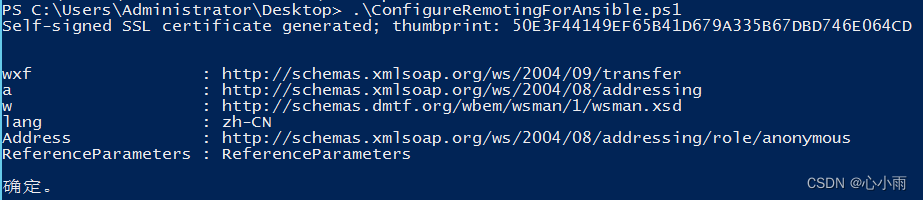
    .\ConfigureRemotingForAnsible.ps1
    
    #启动winrm(与ConfigureRemotingForAnsible.ps1脚本二选一即可)
    winrm quickconfig
    #修改winrm配置,启用远程连接认证
    winrm set winrm/config/service '@{AllowUnencrypted="true"}'
    winrm set winrm/config/service/auth '@{Basic="true"}'
    #查看winrm service启动监听状态
    winrm enumerate winrm/config/listener
    #查看winrm配置信息
    winrm get winrm/config
    
    • 1
    • 2
    • 3
    • 4
    • 5
    • 6
    • 7
    • 8
    • 9
    • 10
    • 11
    • 12
    • 13
    • 14
    • 15
    • 16
    • 17
    • 18
    • 19
    • 20

    防火墙配置5985、5986端口开放或者关闭防火墙

    在这里插入图片描述
    在这里插入图片描述
    在这里插入图片描述

    五、编写用于修改Windows的yml与脚本文件

    #用于将bat脚本传输与执行
    [root@localhost ~]# cat pwd-win.yml
    ---
    - hosts: win
      tasks:
      - name: copy file
        win_copy: src=/root/pwd.bat dest=C:\\pwd.bat
      - name: change password
        win_shell: C:\pwd.bat
    
    #用于删除bat脚本
    [root@localhost ~]# cat file-win.yml
    ---
    - hosts: win
      tasks:
      - name: delete file
        win_shell: "del C:\\pwd.bat"
    
    #bat脚本内容:
    net users administrator "password"
    
    由于修改Windows密码后无法直接执行删除脚本,需要修改/etc/ansible/hosts内windows密码后才可以执行,所以编写可执行脚本:
    [root@localhost ~]# cat change-win-pwd.sh
    #!/bin/bash
    read -p "please input old password: " password1
    read -p "please input new password: " password2
    read -p "Retype new password: " password3
    
    if [ $password2 = $password3 ]; then
        echo "net users administrator \"$password3\"" > pwd.bat
        ansible-playbook pwd-win.yml
        sed -i "s/$password1/$password3/g" /etc/ansible/hosts
        ansible-playbook file-win.yml
    else
        echo "try again"
    fi
    
    • 1
    • 2
    • 3
    • 4
    • 5
    • 6
    • 7
    • 8
    • 9
    • 10
    • 11
    • 12
    • 13
    • 14
    • 15
    • 16
    • 17
    • 18
    • 19
    • 20
    • 21
    • 22
    • 23
    • 24
    • 25
    • 26
    • 27
    • 28
    • 29
    • 30
    • 31
    • 32
    • 33
    • 34
    • 35
    • 36

    执行效果:
    在这里插入图片描述

  • 相关阅读:
    git 如何向保护分支合并代码?
    漏洞修复---SSL/TLS协议信息泄露漏洞(CVE-2016-2183)【原理扫描】
    你能猜出这是什么代码吗
    计算机视觉和机器视觉有什么区别?
    有了Spring为什么还需要SpringBoot呢
    新能源汽车OTA升级中的UDS通信分析
    Java 面试需要掌握哪些内容?
    MATLAB命令
    Java Math.abs()如何获取绝对值呢?
    七、商城(中级)项目报错汇总
  • 原文地址:https://blog.csdn.net/xinxiaoyu_/article/details/126159158