-
基于HTML+CSS+JavaScript角色后台管理系统设计毕业论文源码
🎉精彩专栏推荐 💭文末获取联系
✍️ 作者简介: 一个热爱把逻辑思维转变为代码的技术博主
💂 作者主页: 【主页——🚀获取更多优质源码】
🎓 web前端期末大作业: 【📚毕设项目精品实战案例 (1000套) 】
🧡 程序员有趣的告白方式:【💌HTML七夕情人节表白网页制作 (110套) 】
🌎超炫酷的Echarts大屏可视化源码:【🔰 Echarts大屏展示大数据平台可视化(150套) 】
🔖 HTML+CSS+JS实例代码: 【🗂️HTML+CSS+JS实例代码 (炫酷特效网页代码) 继续更新中…】
🎁 免费且实用的WEB前端学习指南: 【📂web前端零基础到高级学习视频教程 120G干货分享】
🥇 关于作者: 💬历任研发工程师,技术组长,教学总监;曾于2016年、2020年两度荣获CSDN年度十大博客之星。 十载寒冰,难凉热血;多年过去,历经变迁,物是人非。 然而,对于技术的探索和追求从未停歇。 💪坚持原创,热衷分享,初心未改,继往开来!
一、👨🎓网站题目
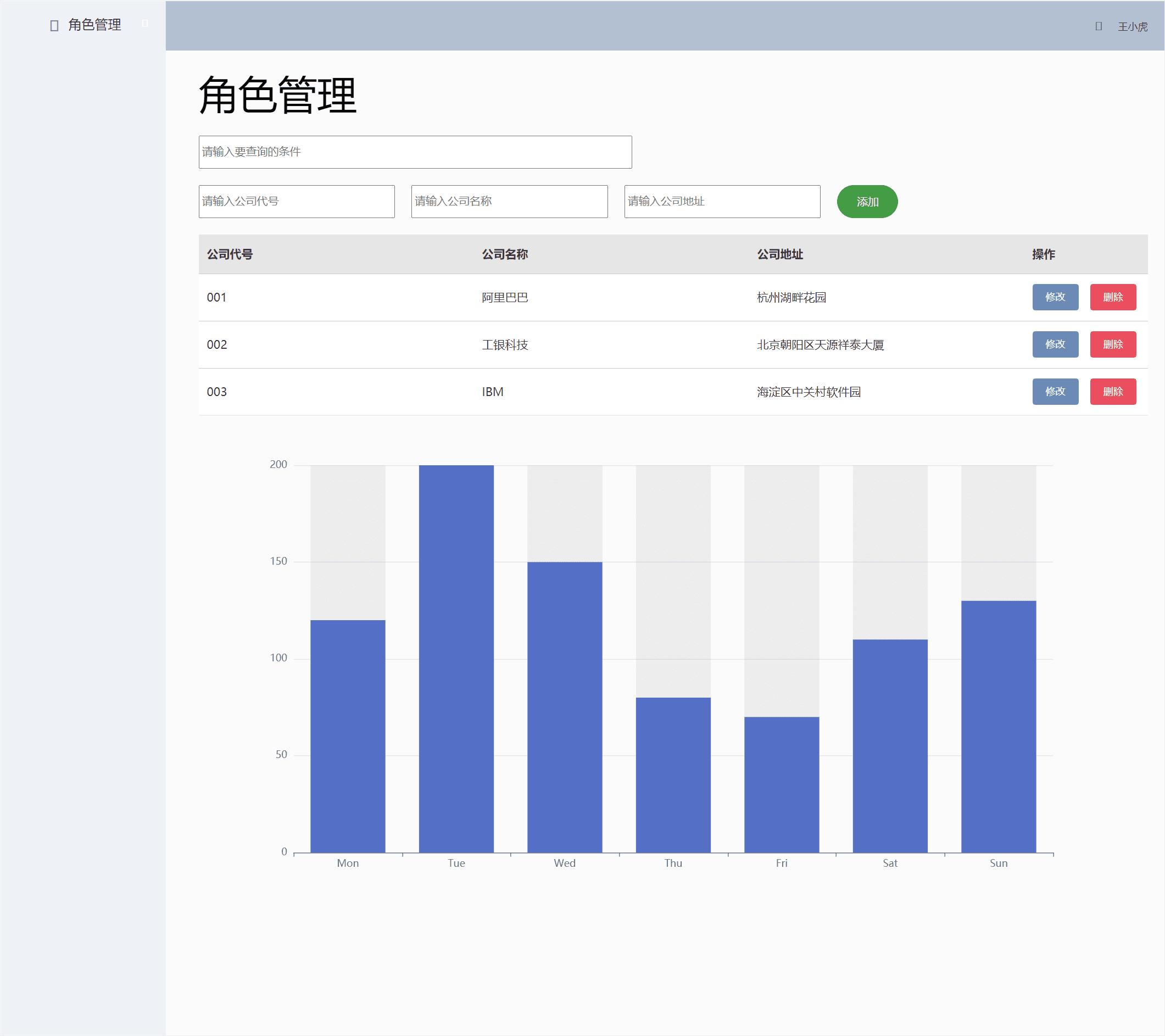
🧑🎓 学生管理系统网页设计 、OA管理系统、后台管理模板、智能停车系统、等网站的设计与制作。
二、✍️网站描述
🏷️HTML网页设计,采用DIV+CSS布局,共有多个页面,排版整洁,内容丰富,主题鲜明,首页使用CSS排版比较丰富,色彩鲜明有活力,导航与正文字体分别设置不同字号大小。导航区域设置了背景图。子页面有纯文字页面和图文并茂页面。
🏅 一套优质的💯网页设计应该包含 (具体可根据个人要求而定)
- 页面分为页头、菜单导航栏(最好可下拉)、中间内容板块、页脚四大部分。
- 所有页面相互超链接,可到二三级页面,有多页面组成。
- 页面样式风格统一布局显示正常,不错乱,使用Div+Css技术。
- 菜单美观、醒目,二级菜单可正常弹出与跳转。
- 可选有JS特效,如定时切换和手动切换图片轮播。
- 页面中有多媒体元素,如gif、视频、音乐,表单技术的使用。
- 页面清爽、美观、大方,不雷同。 。
- 不仅要能够把用户要求的内容呈现出来,还要满足布局良好、界面美观、配色优雅、表现形式多样等要求。
三、📚网站介绍
📔网站布局方面:计划采用目前主流的、能兼容各大主流浏览器、显示效果稳定的浮动网页布局结构。
📓网站程序方面:计划采用最新的网页编程语言HTML5+CSS3+JS程序语言完成网站的功能设计。并确保网站代码兼容目前市面上所有的主流浏览器,已达到打开后就能即时看到网站的效果。
📘网站素材方面:计划收集各大平台好看的图片素材,并精挑细选适合网页风格的图片,然后使用PS做出适合网页尺寸的图片。
📒网站文件方面:网站系统文件种类包含:html网页结构文件、css网页样式文件、js网页特效文件、images网页图片文件;
📙网页编辑方面:网页作品代码简单,可使用任意HTML编辑软件(如:
Dreamweaver、HBuilder、Vscode 、Sublime 、Webstorm、Text 、Notepad++等任意html编辑软件进行运行及修改编辑等操作)。
其中:
(1)📜html文件包含:其中index.html是首页、其他html为二级页面;
(2)📑 css文件包含:css全部页面样式,文字滚动, 图片放大等;
(3)📄 js文件包含:js实现动态轮播特效, 表单提交, 点击事件等等(个别网页中运用到js代码)。
四、💠网站演示
五、⚙️ 网站代码
🧱HTML结构代码
DOCTYPE html> <html lang="en" xmlns:v-on="http://www.w3.org/1999/xhtml"> <head> <meta charset="UTF-8"> <title>管理系统title> <link rel="stylesheet" href="js/reset.css" type="text/css" /> <link rel="stylesheet" href="css/elementUi.css" type="text/css" /> <link rel="stylesheet" href="css/styles.css"> <link rel="stylesheet" href="css/base.css" type="text/css" /> <link rel="stylesheet" href="css/main.css" type="text/css" /> <link rel="stylesheet" href="css/bootstrap.min.css"> <script src="js/vue.js">script> <script src="js/elementUi.js">script> <script src="js/jquery.min.js">script> <script type="text/javascript" src="js/echarts.js">script> <style> #tianjia { margin-bottom: 20px; } #tianjia>input { margin-right: 20px; } .title { padding: 10px; border-bottom: 1px solid #00ffff; } .mask { width: 300px; height: 250px; background: rgba(255, 255, 255, 1); position: absolute; left: 0; top: 0; right: 0; bottom: 0; margin: auto; z-index: 47; border-radius: 5px; } #mask { background: rgba(0, 0, 0, .5); width: 100%; height: 100%; position: fixed; z-index: 4; top: 0; left: 0; } .el-header { background-color: #B3C0D1; color: #333; line-height: 60px; } .el-aside { color: #333; } #demo { /* 必须设置宽高*/ width: 1000; height: 600px; } style> head> <body> <div id="one" align="center" style="display: flex;"> <el-container style="height: 100vh; border: 1px solid #eee"> <el-aside width="200px" style="background-color: rgb(238, 241, 246)"> <el-menu :default-openeds="['1', '3']"> <el-submenu index="1"> <template slot="title"><i class="el-icon-message">i>角色管理template> <el-menu-item-group> <template slot="title">角色管理template> <el-menu-item index="1-1">角色管理el-menu-item> <el-menu-item index="1-2">角色管理el-menu-item> el-menu-item-group> el-submenu> el-menu> el-aside> <el-container> <el-header style="text-align: right; font-size: 12px"> <el-dropdown> <i class="el-icon-setting" style="margin-right: 15px">i> <el-dropdown-menu slot="dropdown"> <el-dropdown-item>查看el-dropdown-item> <el-dropdown-item>新增el-dropdown-item> <el-dropdown-item>删除el-dropdown-item> el-dropdown-menu> el-dropdown> <span>王小虎span> el-header> <el-main> <el-form align="center" style="margin-left:20px"> <el-row style="display:flex"> <font size="50px" color="black">角色管理font> el-row> <input type="text" placeholder="请输入要查询的条件" style="width:45%;display:flex;margin-top: 20px;height: 34px;" v-model="search" v-on:input="searchFn"> <div id="tianjia" style="display:flex;margin-top: 20px;"> <input type="text" name="id" v-model="addDetail.id" value="" placeholder="请输入公司代号" style="width:20%"> <input type="text" name="name" v-model="addDetail.name" value="" placeholder="请输入公司名称" style="width:20%"> <input type="text" name="adress" v-model="addDetail.adress" value="" placeholder="请输入公司地址" style="width:20%"> <el-button type="success" size="big" round="true" @click.native.prevent="adddetail()"> <font color="#f0f8ff" size="2px">添加font> el-button> div> <el-form> <el-table :data="newsList" style="width:100%"> <el-table-column prop="id" label="公司代号">el-table-column> <el-table-column prop="name" label="公司名称">el-table-column> <el-table-column prop="adress" label="公司地址">el-table-column> <el-table-column label="操作" width="150"> <template slot-scope="scope"> <el-button @click.native.prevent="editdetail(scope.$index,newsList)" type="info" size="small">修改el-button> <el-button @click.native.prevent="deletedetail(scope.$index,newsList)" type="danger" size="small">删除el-button> template> el-table-column> el-table> el-form> <div id="demo">div> <div> <el-dialog title="编辑" :visible.sync="dialogFormVisible" width="30%" :before-close="handleClose" append-to-body="true"> <el-form :model="form"> <el-form-item label="公司ID"> <el-input v-model="form.id" autocomplete="off">el-input> el-form-item> <el-form-item label="公司名称"> <el-input v-model="form.name" autocomplete="off">el-input> el-form-item> <el-form-item label="公司地址"> <el-input v-model="form.adress" autocomplete="off">el-input> el-form-item> el-form> <div> <el-button type="primary" @click.native.prevent="editSubForm" :loading="addLoading"> 确定 el-button> <el-button @click.native.prevent="dialogFormVisible=false">取消el-button> div> el-dialog> div> el-form> el-main> el-container> el-container> div> body> <script> var _index; new Vue({ el: "#one", /*定义的数据*/ data: { clonenewsList: [], checked: true, tableform: [], formLabeWidth: '120px', dialogFormVisible: false, editForm: [], selectList: {}, search: "", currentPage: 1, addDetail: {}, editList: false, editDetail: {}, radio: 1, form: { id: "", name: "", adress: "" }, /*表格中写死的数据*/ newsList: [ { id: "001", name: "阿里巴巴", adress: "杭州湖畔花园", }, { id: "002", name: "工银科技", adress: "北京朝阳区天源祥泰大厦" }, { id: "003", name: "IBM", adress: "海淀区中关村软件园" }, ] /*写死的数据结束*/ }, methods: { /*添加方法*/ adddetail: function () { this.$confirm('确认进行添加', '是否继续?', '提示', { confirmButtonText: '确定', confirmButtonText: '取消', }).then(() => { this.newsList.push({ id: this.addDetail.id, name: this.addDetail.name, adress: this.addDetail.adress, }), /*成功添加之后的提示信息*/ this.$message({ type: 'success', message: '添加成功', }) }).catch((err) => { this.$message({ type: 'error', message: err }) }) }, /*删除方法*/ deletedetail: function (index, rows) { this.$confirm('此操作将删除数据,', '是否继续?', '提示', { confirmButtonText: '确定', confirmButtonText: '取消', type: 'warning' }).then(() => { this.newsList.splice(index, 1) this.$message({ type: 'success', message: '删除成功', }) }).catch((err) => { this.$message({ type: 'error', message: err }) }) }, /*修改方法*/ editdetail: function (index, rows) { this.dialogFormVisible = true this.selected = index; this.form = JSON.parse(JSON.stringify(this.newsList))[index]; }, /*提交修改*/ editSubForm: function () { Vue.set(this.newsList, this.selected, this.form); this.getShowData(this.newsList); this.dialogFormVisible = false; }, /*查询方法*/ searchFn: function (e) { var key = e.target.value; /*查询公司ID*/ if (key) { var serchArray = []; this.newsList.forEach(function (item) { if (item.id.indexOf(key) > -1) { serchArray.push(item); } /*name查询*/ if (item.name.indexOf(key) > -1) { serchArray.push(item); } /*地址查询*/ if (item.adress.indexOf(key) > -1) { serchArray.push(item); } }); this.getShowData1(serchArray); } else { this.getShowData1(this.newsList); } }, /*获取需要渲染到页面中的数据*/ getShowData: function (arr) { this.clonenewsList = JSON.parse(JSON.stringify(arr)); }, /*专门为查询写的渲染数据*/ getShowData1: function (arr) { this.newsList = JSON.parse(JSON.stringify(arr)); }, /*分页功能代码*/ handleSizeChange(val) { console.log(`每页${val}条`); }, handleCurrentChange(val) { console.log(`当前页:$(val)`); }, handleOpen(key, keyPath) { console.log(key, keyPath); }, handleClose(key, keyPath) { console.log(key, keyPath); } } }) let myChart = echarts.init(document.getElementById("demo")) // var chartDom = document.getElementById('main'); var option; option = { xAxis: { type: 'category', data: ['Mon', 'Tue', 'Wed', 'Thu', 'Fri', 'Sat', 'Sun'] }, yAxis: { type: 'value' }, series: [ { data: [120, 200, 150, 80, 70, 110, 130], type: 'bar', showBackground: true, backgroundStyle: { color: 'rgba(180, 180, 180, 0.2)' } } ] }; option && myChart.setOption(option); script> html>- 1
- 2
- 3
- 4
- 5
- 6
- 7
- 8
- 9
- 10
- 11
- 12
- 13
- 14
- 15
- 16
- 17
- 18
- 19
- 20
- 21
- 22
- 23
- 24
- 25
- 26
- 27
- 28
- 29
- 30
- 31
- 32
- 33
- 34
- 35
- 36
- 37
- 38
- 39
- 40
- 41
- 42
- 43
- 44
- 45
- 46
- 47
- 48
- 49
- 50
- 51
- 52
- 53
- 54
- 55
- 56
- 57
- 58
- 59
- 60
- 61
- 62
- 63
- 64
- 65
- 66
- 67
- 68
- 69
- 70
- 71
- 72
- 73
- 74
- 75
- 76
- 77
- 78
- 79
- 80
- 81
- 82
- 83
- 84
- 85
- 86
- 87
- 88
- 89
- 90
- 91
- 92
- 93
- 94
- 95
- 96
- 97
- 98
- 99
- 100
- 101
- 102
- 103
- 104
- 105
- 106
- 107
- 108
- 109
- 110
- 111
- 112
- 113
- 114
- 115
- 116
- 117
- 118
- 119
- 120
- 121
- 122
- 123
- 124
- 125
- 126
- 127
- 128
- 129
- 130
- 131
- 132
- 133
- 134
- 135
- 136
- 137
- 138
- 139
- 140
- 141
- 142
- 143
- 144
- 145
- 146
- 147
- 148
- 149
- 150
- 151
- 152
- 153
- 154
- 155
- 156
- 157
- 158
- 159
- 160
- 161
- 162
- 163
- 164
- 165
- 166
- 167
- 168
- 169
- 170
- 171
- 172
- 173
- 174
- 175
- 176
- 177
- 178
- 179
- 180
- 181
- 182
- 183
- 184
- 185
- 186
- 187
- 188
- 189
- 190
- 191
- 192
- 193
- 194
- 195
- 196
- 197
- 198
- 199
- 200
- 201
- 202
- 203
- 204
- 205
- 206
- 207
- 208
- 209
- 210
- 211
- 212
- 213
- 214
- 215
- 216
- 217
- 218
- 219
- 220
- 221
- 222
- 223
- 224
- 225
- 226
- 227
- 228
- 229
- 230
- 231
- 232
- 233
- 234
- 235
- 236
- 237
- 238
- 239
- 240
- 241
- 242
- 243
- 244
- 245
- 246
- 247
- 248
- 249
- 250
- 251
- 252
- 253
- 254
- 255
- 256
- 257
- 258
- 259
- 260
- 261
- 262
- 263
- 264
- 265
- 266
- 267
- 268
- 269
- 270
- 271
- 272
- 273
- 274
- 275
- 276
- 277
- 278
- 279
- 280
- 281
- 282
- 283
- 284
- 285
- 286
- 287
- 288
- 289
- 290
- 291
- 292
- 293
- 294
- 295
- 296
- 297
- 298
- 299
- 300
- 301
- 302
- 303
- 304
- 305
- 306
- 307
- 308
- 309
- 310
- 311
- 312
- 313
- 314
- 315
- 316
- 317
- 318
- 319
- 320
- 321
- 322
- 323
- 324
- 325
- 326
- 327
- 328
- 329
- 330
- 331
- 332
- 333
- 334
- 335
- 336
- 337
- 338
- 339
- 340
- 341
- 342
- 343
- 344
- 345
- 346
- 347
- 348
- 349
- 350
- 351
- 352
- 353
- 354
- 355
- 356
- 357
- 358
- 359
- 360
- 361
- 362
- 363
- 364
- 365
- 366
- 367
- 368
- 369
- 370
- 371
- 372
- 373
- 374
- 375
- 376
- 377
- 378
- 379
- 380
- 381
- 382
- 383
- 384
- 385
- 386
- 387
- 388
- 389
- 390
- 391
- 392
- 393
- 394
- 395
- 396
- 397
- 398
- 399
- 400
- 401
- 402
- 403
- 404
- 405
- 406
- 407
- 408
- 409
- 410
- 411
- 412
- 413
- 414
- 415
- 416
- 417
- 418
- 419
- 420
- 421
- 422
- 423
- 424
- 425
- 426
- 427
- 428
- 429
- 430
- 431
- 432
- 433
- 434
- 435
- 436
- 437
- 438
- 439
- 440
- 441
- 442
- 443
- 444
- 445
- 446
六、🥇 如何让学习不再盲目
21年程序员总结给编程菜鸟的16条忠告
- 入门期间不要盲目看太多书,找一本网上或身边有经验程序员推荐的教材,先系统的学习。
- 多看帮助文档,帮助文档就像一个游戏的玩法说明通关秘籍,该看就看别太自信。
- 菜鸟容易被对象、属性、方法等词汇迷惑?那是你连最基础知识都还没掌握。
- 不要忽视没一个看起来不起眼的问题,经常总结做到举一反三。
- 没积累足够知识和经验前,你是开发不出一个完整项目的。
- 把最新技术挂在嘴边,还不如把过时技术牢记心中。
- 活到老学到老,只有一招半式是闯不了江湖的。
- 看得懂的书,仔细看;看不懂的书,硬着头皮也要看完。
- 书读百遍其义自见,别指望读一遍就能掌握。
- 请把教程里的例子亲手实践下,即使案例中有完整源码。
- 把在教程中看到的有意义的例子扩充;并将其切实的运用到自己的工作中。
- 不要漏掉教程中任何一个习题——请全部做完并做好笔记。
- 水平是在不断的实践中完善和发展的,你与大牛差的只是经验的积累。
- 每学到一个难点的时候,尝试对朋友或网上分享你的心得,让别人都能看得懂说明你真的掌握。
- 做好保存源文件的习惯,这些都是你的知识积累。
- 遇到问题不要张口就问,要学会自己找答案,比如google、百度和w3cschool上都有很多编程相关资料,你只要输入关键字就能找到你的答案。
七、🎁更多干货
1.如果我的博客对你有帮助、如果你喜欢我的博客内容,
请 “👍点赞” “✍️评论” “💙收藏”一键三连哦!2.
💗【👇🏻👇🏻👇🏻关注我| 💬获取更多源码 | 优质文章】带您学习各种前端插件、3D炫酷效果、图片展示、文字效果、以及整站模板 、大学生毕业HTML模板 、期末大作业模板 、等! 「在这里有好多 前端 开发者,一起探讨 前端 Node 知识,互相学习」!3.
以上内容技术相关问题💌欢迎一起交流学习👇🏻👇🏻👇🏻💬

-
相关阅读:
Oracle LiveLabs实验:Manage Database Instance and Memory for Oracle Database 21c
【蓝桥杯国赛真题24】Scratch货物运输 第十三届蓝桥杯 图形化编程scratch国赛真题和答案讲解
基于bootstrap,个人简历网页模板,响应式布局
LLMs在股票投资组合崩溃中的时间关系推理
Nginx 负载均衡实现上游服务健康检查
ArmV8常用汇编指令2
软件测试人员提问常用的ChatGPT通用提示词模板
一起Talk Android吧(第五百五十七回:如何获取文件读写权限)
NC338 删除升序数组的重复元素
生命在于学习——Linux学习笔记(八)启动引导
- 原文地址:https://blog.csdn.net/bigwhiteshark/article/details/126146482
