-
IO:字节流&字符流
输入流和输出流
- 按照流的流向来分 , 可以分为输入流和输出流
- 输入流 : 只能从中读取数据,而不能向其写入数据
- 输出流 : 只能向其写入数据,而不能从中读取数据
字节流和字符流
- 字节流和字符流的用法几乎完全一样,区别在于字节流和字符流所操作的数据单元不同字节流操作的数据单元是 8 位的字节,而字符流操作的数据单元是16位的字符。字节流主要由 InputStream 和 OutputStream作为基类 , 而字符流则主要由 Reader 和 Writer作为基类 。
字节流
- 一切文件数据(文本、图片、视频等)在存储时,都是以二进制数字的形式保存,都一个一个的字节,那么传输时一样如此。所以,字节流可以传输任意文件数据。在操作流的时候,我们要时刻明确,无论使用什么样的流对象,底层传输的始终为二进制数据。
OutputStream类
java.io.OutputStream抽象类是表示字节输出流的所有类的超类,将指定的字节信息写出到目的地。它定义了字节输出流的基本共性功能方法。public void close():关闭此输出流并释放与此流相关联的任何系统资源。public void flush():刷新此输出流并强制任何缓冲的输出字节被写出。public void write(byte[] b):将 b.length字节从指定的字节数组写入此输出流。public void write(byte[] b, int off, int len):从指定的字节数组写入 len字节,从偏移量 off开始输出到此输出流。public abstract void write(int b):将指定的字节输出流。
FileOutputStream类用法
- 输出流:将内存的数据写到文件
- 字节流:它是以字节为位置写数据
- 节点流:直接面向就是文件操作
构造器
- 当你创建一个流对象时,必须传入一个文件路径。该路径下,如果没有这个文件,会创建该文件。如果有这个文件,会清空这个文件的数据。

- FileOutputStream的核心方法

-
write(int b)
- 写入字节
package FileOutputStream用法; import java.io.File; import java.io.FileNotFoundException; import java.io.FileOutputStream; import java.io.IOException; public class MainTest { public static void main(String[] args) { //通过File对象描述文件 File file=new File("D:\\filetest\\file2.txt"); //创建FileOutputStream对象 FileOutputStream fileOutputStream=null; try { fileOutputStream=new FileOutputStream(file); fileOutputStream.write(97); fileOutputStream.write(98); fileOutputStream.write(99); fileOutputStream.write(100); }catch(FileNotFoundException e) { //输出异常的堆栈信息 e.printStackTrace(); } catch (IOException e) { // TODO Auto-generated catch block e.printStackTrace(); }finally { try { //关闭输出流,释放资源 fileOutputStream.close(); } catch (IOException e) { // TODO Auto-generated catch block e.printStackTrace(); } } } }- 1
- 2
- 3
- 4
- 5
- 6
- 7
- 8
- 9
- 10
- 11
- 12
- 13
- 14
- 15
- 16
- 17
- 18
- 19
- 20
- 21
- 22
- 23
- 24
- 25
- 26
- 27
- 28
- 29
- 30
- 31
- 32
- 33
- 34
- 35
- 36
- 37
- 38
- 39
- 40
- 41
- 42
- 43
- 44
- 45
- 46
- 47
-
write(byte [] buf)
-
写入字节数组
-
举例
package FileOutputStream用法; import java.io.File; import java.io.FileNotFoundException; import java.io.FileOutputStream; import java.io.IOException; public class MainTest2 { public static void main(String[] args) { // 通过File对象描述文件 File file = new File("D:\\filetest\\file3.txt"); // 创建FileOutputStream对象 FileOutputStream fileOutputStream = null; try { fileOutputStream = new FileOutputStream(file); String content="weclome to gec,I love java"; //将字符串转换成字节数组 byte []buf=content.getBytes(); fileOutputStream.write(buf); //刷新 fileOutputStream.flush(); } catch (FileNotFoundException e) { // 输出异常的堆栈信息 e.printStackTrace(); } catch (IOException e) { // TODO Auto-generated catch block e.printStackTrace(); } finally { try { // 关闭输出流,释放资源 fileOutputStream.close(); } catch (IOException e) { // TODO Auto-generated catch block e.printStackTrace(); } } } }- 1
- 2
- 3
- 4
- 5
- 6
- 7
- 8
- 9
- 10
- 11
- 12
- 13
- 14
- 15
- 16
- 17
- 18
- 19
- 20
- 21
- 22
- 23
- 24
- 25
- 26
- 27
- 28
- 29
- 30
- 31
- 32
- 33
- 34
- 35
- 36
- 37
- 38
- 39
- 40
- 41
- 42
- 43
- 44
- 45
-
FileInputStream类
- 输入流:将数据读取到内存
- 字节流:以字节单元读数据
- 节点流:直接对接文件
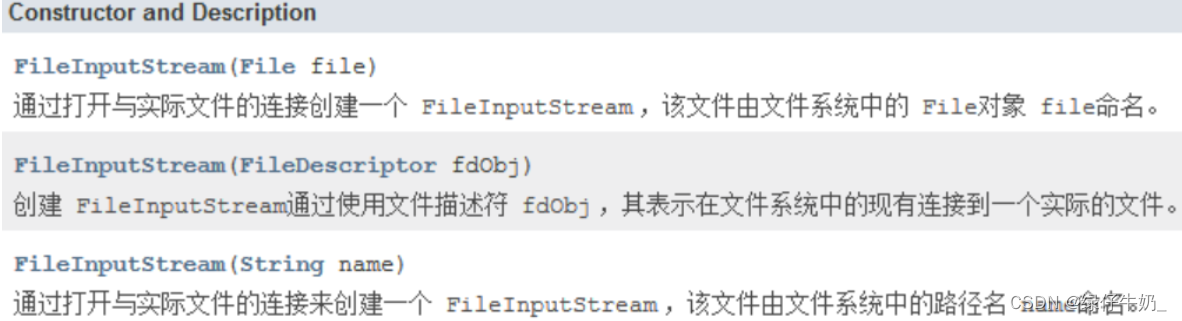
构造器
- 当你创建一个流对象时,必须传入一个文件路径。该路径下,如果没有该文件,会抛出
FileNotFoundException。
- 方法

用法
-
从文件读取内容到内存
-
read()
-
读取一个字节,返回值就是读到的数据值,如果读取的数据值等于-1,则读取到文件末尾
package FileInputStream用法; import java.io.File; import java.io.FileInputStream; import java.io.FileNotFoundException; import java.io.IOException; public class MainTest { public static void main(String[] args) { //创建File对象 //File对象描述一个文件 File file=new File("D:\\filetest\\file1.txt"); try { //新建一个FileInputStream对象 FileInputStream fileInputStream=new FileInputStream(file); int c1=fileInputStream.read(); System.out.println((char)c1); int c2=fileInputStream.read(); System.out.println((char)c2); int c3=fileInputStream.read(); System.out.println((char)c3); int c4=fileInputStream.read(); System.out.println((char)c4); }catch(FileNotFoundException e) { //输出堆栈信息 e.printStackTrace(); }catch(IOException e) { e.printStackTrace(); } } }- 1
- 2
- 3
- 4
- 5
- 6
- 7
- 8
- 9
- 10
- 11
- 12
- 13
- 14
- 15
- 16
- 17
- 18
- 19
- 20
- 21
- 22
- 23
- 24
- 25
- 26
- 27
- 28
- 29
- 30
- 31
- 32
- 33
- 34
- 35
- 36
- 37
- 38
- 39
- 40
- 41
-
-
read(buf)
- 实现从文件读取内容到内存
package FileInputStream用法; import java.io.File; import java.io.FileInputStream; import java.io.FileNotFoundException; import java.io.IOException; public class MainTest2 { public static void main(String[] args) { // 创建File对象 // File对象描述一个文件 File file = new File("file1.txt"); try { file.createNewFile(); } catch (IOException e1) { // TODO Auto-generated catch block e1.printStackTrace(); } FileInputStream fileInputStream=null; try { //新建一个FileInputStream对象 fileInputStream=new FileInputStream(file); //新建一个字节数组 byte []buf=new byte[32]; //read(buf):此方法的返回值就是当前读取的字节个数,将数据读取到buf数组 //将readLen变量也就是read方法的返回值,当此变量等于-1,则读到文件末尾 int readLen=-1; while((readLen=fileInputStream.read(buf))!=-1) { buf=new byte[32]; //将字节数组转换成字符串 String content=new String(buf,0,readLen); System.out.print(content); } }catch(FileNotFoundException e) { //输出堆栈信息 e.printStackTrace(); }catch(IOException e) { e.printStackTrace(); }finally { try { //文件输入流关闭(释放资源) fileInputStream.close(); } catch (IOException e) { // TODO Auto-generated catchblock e.printStackTrace(); } } } }- 1
- 2
- 3
- 4
- 5
- 6
- 7
- 8
- 9
- 10
- 11
- 12
- 13
- 14
- 15
- 16
- 17
- 18
- 19
- 20
- 21
- 22
- 23
- 24
- 25
- 26
- 27
- 28
- 29
- 30
- 31
- 32
- 33
- 34
- 35
- 36
- 37
- 38
- 39
- 40
- 41
- 42
- 43
- 44
- 45
- 46
- 47
- 48
- 49
- 50
- 51
- 52
- 53
- 54
- 55
- 56
- 57
- 58
- 59
- 60
- 61
-
范例
-
实现文件复制(将src.txt文件的内容复制到dest.txt)
package com.gec.复制文件操作; import java.io.FileInputStream; import java.io.FileOutputStream; import java.io.IOException; /* * 实现文件复制(将src.txt文件的内容复制到dest.txt) * */ public class CopyFileMainTest { public static void main(String[] args) throws IOException { //创建文件输入流对象,读取src.txt FileInputStream fileInputStream=new FileInputStream("src.txt"); //创建输出文件的输出流对象,将数据写到dest.txt FileOutputStream fileOutputStream=new FileOutputStream("dest.txt"); //定义一个字节数组 byte []buf=new byte[32]; //每次读取字节数据的个数 int len=-1; //读取len等于-1,则证明文件已经读完,跳出此循环 while ((len=fileInputStream.read(buf))!=-1){ //将每次读取的数组数据写到目标文件 fileOutputStream.write(buf,0,len); } fileOutputStream.flush(); fileOutputStream.close(); fileInputStream.close(); } }- 1
- 2
- 3
- 4
- 5
- 6
- 7
- 8
- 9
- 10
- 11
- 12
- 13
- 14
- 15
- 16
- 17
- 18
- 19
- 20
- 21
- 22
- 23
- 24
- 25
- 26
- 27
- 28
- 29
- 30
- 31
- 32
- 33
- 34
- 35
- 36
- 37
- 38
4. 字符流
FileReader用法
-
输入流:从文件读取数据到内存
-
字符流:以字符为传输数据单元
-
节点流:直接面向文件操作
4.1.2 主要方法

4.2.3 举例
package FileWriter用法; import java.io.File; import java.io.FileWriter; import java.io.IOException; public class MainTest { public static void main(String[] args) throws IOException { //创建文件 File file=new File("file2.txt"); FileWriter fw=new FileWriter(file); String message="我来自郑州"; fw.write(message); /*String message="java,hello world"; fw.write(message);*/ /*fw.write(0+48); fw.write(1+48); char cbuf[]= {'a','b'}; fw.write(cbuf);*/ fw.flush(); fw.close(); } }- 1
- 2
- 3
- 4
- 5
- 6
- 7
- 8
- 9
- 10
- 11
- 12
- 13
- 14
- 15
- 16
- 17
- 18
- 19
- 20
- 21
- 22
- 23
- 24
- 25
- 26
- 27
- 28
- 29
- 30
关闭和刷新
因为内置缓冲区的原因,如果不关闭输出流,无法写出字符到文件中。但是关闭的流对象,是无法继续写出数据的。如果我们既想写出数据,又想继续使用流,就需要
flush方法了。-
flush:刷新缓冲区,流对象可以继续使用。 -
close:先刷新缓冲区,然后通知系统释放资源。流对象不可以再被使用了。public class FWWrite { public static void main(String[] args) throws IOException { // 使用文件名称创建流对象 FileWriter fw = new FileWriter("fw.txt"); // 写出数据,通过flush fw.write('刷'); // 写出第1个字符 fw.flush(); fw.write('新'); // 继续写出第2个字符,写出成功 fw.flush(); // 写出数据,通过close fw.write('关'); // 写出第1个字符 fw.close(); fw.write('闭'); // 继续写出第2个字符,【报错】java.io.IOException: Stream closed fw.close(); } }- 1
- 2
- 3
- 4
- 5
- 6
- 7
- 8
- 9
- 10
- 11
- 12
- 13
- 14
- 15
- 16
- 17
拷贝
/* 低级字节流实现数据拷贝 a---->b (一) */ public static void main(String[] args) throws IOException { //创建字节输入输出流 FileInputStream fis = new FileInputStream("a.txt"); FileOutputStream fos = new FileOutputStream("b.txt"); int len = 0; while((len = fis.read()) != -1){ //此处的每个len表示的是每个数据的Ascii码 fos.write(len); } fos.flush(); fos.close(); } /* 低级字符流实现数据拷贝 a---->b (二) */ public static void main(String[] args) throws IOException { FileWriter fw = new FileWriter("b.txt"); FileReader fr = new FileReader("a.txt"); char[] chars = new char[100]; int len = -1; while ((len = fr.read(chars)) != -1){ //此处的len为读取的数据个数 System.out.println(len); fw.write(chars,0,len); } fw.flush(); fw.close(); } /** * 小结: * 为什么要添加len? * :每个中文字符占3字节,而利用字节流每次只能读取或者写入一个字节 * 当读取到中文字符时,可能会将其强制拆开出现乱码 * 所以添加len作为每次读取的字节数 * 当不使用数组来存储数据时,len 表示的是每个数据的ASCII码 * int len = -1; * while((len = fis.read()) != -1){ * System.out.print((char)len); * } * 反之,利用数组存储数据时,len表示的是每次读取数据的长度 * int len = -1; * while((len = fis.read(arrs)) != -1){ * String content = new String(arrs,0,len); * System.out.print(content); * } */- 1
- 2
- 3
- 4
- 5
- 6
- 7
- 8
- 9
- 10
- 11
- 12
- 13
- 14
- 15
- 16
- 17
- 18
- 19
- 20
- 21
- 22
- 23
- 24
- 25
- 26
- 27
- 28
- 29
- 30
- 31
- 32
- 33
- 34
- 35
- 36
- 37
- 38
- 39
- 40
- 41
- 42
- 43
- 44
- 45
- 46
- 47
- 48
- 49
- 50
- 51
- 按照流的流向来分 , 可以分为输入流和输出流
-
相关阅读:
GIT 基础命令使用
分布式系统中常用的缓存方案
探索人工智能 | 模型训练 使用算法和数据对机器学习模型进行参数调整和优化
SpringBoot异步任务、邮件发送、定时任务
【数据结构】循环链表的增删查改
Java 遍历指定路径下的所有文件和子文件夹
Taro React组件开发(1) —— Overlay 遮罩层【渐入渐出动画遮罩层】
mysql图片存取初探
设置一个不能被继承的类
浅谈敏捷开发
- 原文地址:https://blog.csdn.net/yuqu1028/article/details/126151038
