-
文件内容的操作
目录
2.1 字节流-InputStream / FileInputStream
3.1 字节流-OutputStream / FileOutputStream
1. 什么是流
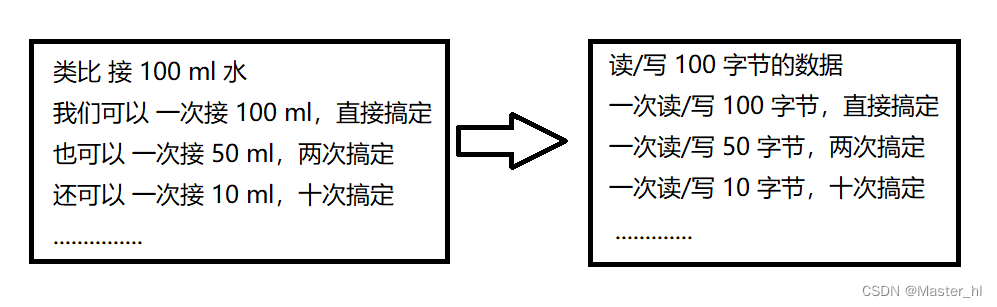
2. 读文件
2.1 字节流-InputStream / FileInputStream
【方法】
修饰符及返回值类型方法 说明 intread() 读取一个字节的数据,返回 -1 代表已经完全读完了 intread(byte[] b) 最多读取 b.length 字节的数据到 b 中,返回实际读到的数量;返回 -1 代表以及读完了intread(byte[] b, int off, int len)读数据到 b 数组中,从 b[ off ] 开始放,返回实际读到的数量; -1 代表以及读完了voidclose() 关闭字节流
InputStream 是一个抽象类,不能直接实例化,它的实现类有很多,我们现在只关心读,所以可以通过 FileInputStream 来实现。
🍃打开文件
InputStream inputStream = new FileInputStream("test2.txt");对于这一行代码,打开文件成功后,就得到了 InputStream 对象,后续针对文件的操作,就都是通过这个对象展开的。
再者,我们操作硬盘不方便直接操作,在内存里构造一个和它关联的对象,操作这个对象就相当于操作硬盘数据。
上述操作对象相当于操作硬盘数据,就类似于遥控器,我们开空调的时候,不可能每次借助梯子爬上去,用手摁下空调开关,而是通过空调遥控器去操作空调。
🍃关闭文件
- inputStream.close();
- // 此处会抛出一个 IOException,对于打开文件抛出的文件找不到异常,IOException是其父类
为什么要关闭文件??
关闭文件主要是为了释放文件描述符表资源。
文件描述符表,这个表就相当于是个数组,这个数组的下标就称为 "文件描述符",每次打开一个文件,都会在文件描述符表中占据一个位置;每次关闭文件,都会释放一个位置。并且文件描述符表,是存在上线的,如果一个进程,一直在打开文件,没有释放,此时就会导致我们的进程在进行后续打开文件操作的时候,就会打开文件失败!!
🍃读取文件
🍔read() 代码示例
- public static void main(String[] args) throws IOException {
- // 1.打开文件
- InputStream inputStream = new FileInputStream("test2.txt");
- // 2.读取文件
- while(true) {
- int b = inputStream.read();
- if(b == -1) {
- // 文件读完了
- break;
- }
- // 因为 ASCII 码值以字节为单位存储,所以这里输出的是每个单词对应的 ASCII 码值
- System.out.println(b); // hello 对应的 ASCII 码值
- }
- // 3.关闭文件
- inputStream.close();
- }

🍔read(byte[] b)代码示例
- public static void main(String[] args) throws IOException {
- // 1.打开文件
- InputStream inputStream = new FileInputStream("test2.txt");
- // 2.读取文件
- byte[] buf = new byte[1024];
- // 返回的长度(字节)
- int len = inputStream.read(buf);
- System.out.println(len);
- for(int i = 0; i < len; i++) {
- System.out.println(buf[i]);
- }
- // 3.关闭文件
- inputStream.close();
- }
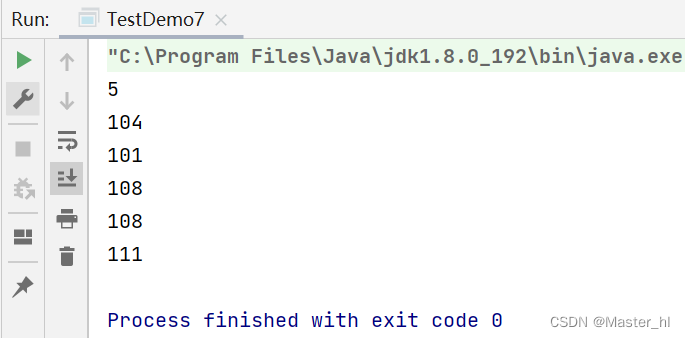
注意: 如果是读取中文,UTF8 的编码格式,一个汉字占3个字节。
如果要想读取中文在控制台,字节流只能通过指定编码格式,就比较麻烦。例如以下代码:
- public static void main(String[] args) throws IOException {
- // 1.打开文件
- InputStream inputStream = new FileInputStream("test2.txt");
- // 2.读取文件
- byte[] buf = new byte[1024];
- int len = inputStream.read(buf);
- String s = new String(buf, 0, len, "UTF8");
- System.out.println(s);
- // 3.关闭文件
- inputStream.close();
- }
为了解决上述问题,我们就可以通过字符流来进行读取。
2.2 字符流-Reader / FileReader
这里的方法和上面的 InputStream 相似就不过多介绍了。
🍔读取中文代码示例
- public static void main(String[] args) throws IOException {
- // 字符流
- Reader reader = new FileReader("test2.txt");
- char[] buffer = new char[1024];
- int len = reader.read(buffer);
- for(int i = 0; i < len; i++) {
- System.out.println(buffer[i]);
- }
- reader.close();
- }
虽然字符流读取中文比纯字节流好使一些,但还是不够方便。对于文本文件,还有更简单的写法。
2.3 通过 Scanner 进行字符读取
🍁Scanner 构造方法
构造方法说明 Scanner(InputStream is, String charset) 使用 charset 字符集进行 is 的扫描读取
(也可以不指定编码格式,使用默认编码格式)
代码示例
- public static void main(String[] args) throws IOException {
- InputStream inputStream = new FileInputStream("test2.txt");
- Scanner scanner = new Scanner(inputStream);
- // 想读什么类型就用 scanner 去调用什么
- String s = scanner.next();
- System.out.println(s);
- inputStream.close();
- }
2.4 关闭资源的优化
我们在前面字节流读取中文的代码中,发现如果在 read() 读文件的过程中出现异常,就可能导致 close() 执行不到,按照我们以前的思路,使用 try...catch...finally,将关闭资源放在 finally 中。
- public static void main(String[] args) {
- InputStream inputStream = null;
- try {
- // 打开文件(字节流)
- inputStream = new FileInputStream("test2.txt");
- byte[] buf = new byte[1024];
- int len = inputStream.read(buf);
- // 读取中文
- String s = new String(buf, 0, len, "UTF8");
- System.out.println(s);
- } catch (IOException e) {
- e.printStackTrace();
- } finally {
- // 关闭资源
- try {
- inputStream.close();
- } catch (IOException e) {
- e.printStackTrace();
- }
- }
- }
如果这样做的话,我们的代码显得又臭又长,更推荐的做法是以下做法:
- public static void main(String[] args) {
- try (InputStream inputStream = new FileInputStream("test2.txt")) {
- byte[] buf = new byte[1024];
- int len = inputStream.read(buf);
- // .........
- } catch (IOException e) {
- e.printStackTrace();
- }
- }
这种语法机制叫做 try with resources,这个操作就会在 try 执行结束后,自动调用 inputStream 的 close 方法(实现 Closeable 接口的类才能这样做)。
3.写文件
3.1 字节流-OutputStream / FileOutputStream
【方法】
修饰 符及 返回 值类 型方法 说明 voidwrite(int b) 写入要给字节的数据 voidwrite(byte[] b)将 b 这个字符数组中的数据全部写入 os 中 int write(byte[] b, int off,int len)将 b 这个字符数组中从 off 开始的数据写入 os 中,一共写 len 个 void close() 关闭字节流 voidflush() I/O 的速度是很慢的,所以,大多的 OutputStream 为了减少设备操作的次数,在写数据的时候都会将数据先暂时写入缓冲区。但造成一个结果,就是我们写的数据,很可能会遗留一部分在缓冲区中。需要在最后或者合适的位置,调用 flush(刷新)操作,将数据刷到设备中。🍃代码示例
- public static void main(String[] args) {
- try(OutputStream outputStream = new FileOutputStream("test2.txt")) {
- // 方法一
- /* outputStream.write('h');
- outputStream.write('e');
- outputStream.write('l');
- outputStream.write('l');
- outputStream.write('o'); */
- // 方法二
- String s = " hello java";
- outputStream.write(s.getBytes());
- // 把旧的文件内容清空,重新去写
- } catch (IOException e) {
- e.printStackTrace();
- }
- }
注意:每次重新写的时候,都会把旧的文件内容清空掉,重新去写。
但是这种原生字节流的写文件方法,用起来还是不方便。
3.2 字符流-Writer / FileWriter
🍃代码示例
- public static void main(String[] args) {
- try (Writer writer = new FileWriter("test2.txt")) {
- // 能写字符串,就很方便
- writer.write("hello world");
- } catch (IOException e) {
- e.printStackTrace();
- }
- }
我们的这个字符流中的 Writer 还能写字符串,就很方便。还有一种方式 -- PrintWriter ,它提供了更丰富的写。
PrintWriter 代码示例
- public static void main(String[] args) {
- try (OutputStream outputStream = new FileOutputStream("test2.txt")) {
- PrintWriter printWriter = new PrintWriter(outputStream);
- printWriter.println("hello");
- printWriter.println("你好");
- printWriter.printf("%d: %s\n", 1, "Java");
- // println 需要搭配 flush 使用
- printWriter.flush();
- } catch (IOException e) {
- e.printStackTrace();
- }
- }
🍃这里要注意 PrintWrite 是自带缓冲区的,缓冲区是时候会被刷新到硬盘中呢?
🍃1.缓冲区满了;2.显示调用 flush 方法
所以我们在调用 println 写文件的时候,务必记得 flush 刷新。
4.小程序示例
🍁代码示例1
扫描指定目录,并找到名称中包含指定字符的所有普通文件(不包含目录),并且后续询问用户是否要删除该文件。- public class applet1 {
- public static void main(String[] args) {
- Scanner scanner = new Scanner(System.in);
- System.out.println("请输入要扫描的路径: ");
- String path = scanner.next();
- File rootPath = new File(path);
- // 判断文件是否存在
- if (!rootPath.exists()) {
- System.out.println("您输入的路径不存在,无法进行扫描!");
- return;
- }
- System.out.println("请输入要删除文件的文件名: ");
- String toDelete = scanner.next();
- // 遍历目录,查找待删除文件
- dfsDir(rootPath, toDelete);
- }
- // 重点:目录递归的过程
- public static void dfsDir(File rootDir, String toDelete) {
- // 每次递归的日志
- try {
- System.out.println(rootDir.getCanonicalPath());
- } catch (IOException e) {
- e.printStackTrace();
- }
- // rootDir 对象代表的目录下的所有文件名
- File[] files = rootDir.listFiles();
- if (files == null) {
- // 空目录,直接返回
- return;
- }
- // 遍历每个文件
- for (File file : files) {
- if (file.isDirectory()) {
- // 是目录,继续递归
- dfsDir(file, toDelete);
- } else {
- tryDelete(file, toDelete);
- }
- }
- }
- public static void tryDelete(File file, String toDelete) {
- if (file.getName().contains(toDelete)) {
- try {
- System.out.println("是待删除文件吗?(Y/N)" + file.getCanonicalPath());
- Scanner scanner = new Scanner(System.in);
- String choice = scanner.next();
- if (choice.equals("Y")) {
- file.delete();
- }
- } catch (IOException e) {
- e.printStackTrace();
- }
- }
- }
- }

🍁代码示例2
进行普通文件的复制(regular file)
- public class applet2 {
- public static void main(String[] args) {
- Scanner scanner = new Scanner(System.in);
- System.out.println("请输入待复制的文件路径: ");
- String srcPath = scanner.next();
- File srcFile = new File(srcPath);
- if(!srcFile.exists()) {
- System.out.println("待复制的文件不存在!");
- return;
- }
- if(!srcFile.isFile()) {
- System.out.println("待复制的不是普通文件!");
- return;
- }
- System.out.println("请输入要复制到的目标路径: ");
- String destPath = scanner.next();
- File destFile = new File(destPath);
- if(destFile.exists()) {
- System.out.println("待复制的文件在目标路径下已存在!");
- return;
- }
- // 以上都是准备工作
- // 进行拷贝工作
- try (InputStream inputStream = new FileInputStream(srcFile)) {
- try(OutputStream outputStream = new FileOutputStream(destFile)) {
- while(true) {
- byte[] buf = new byte[1024];
- int len = inputStream.read(buf);
- if(len == -1) {
- break;
- }
- // 写具体长度,不要写数组
- outputStream.write(buf,0,len);
- }
- }
- } catch (IOException e) {
- e.printStackTrace();
- }
- System.out.println("复制完成!");
- }
- }
问题1
while 循环里头,为什么读文件的时候,每次都知道接着上次读的地方继续往下读?
在读文件的时候,文件对象内部,有一个 "光标" ,通过这个 "光标" 表示当前文件读到哪个位置了。每次读操作,都会让 "光标" 往后移动,一直到文件末尾,再继续读的话,就会读到一个特殊的字符 -- EOF(end of file),就表示文件读完了。
问题2
while 循环里头,写文件的时候,为什么不直接将 buf 数组写进去,而是写具体的长度?
举个极端的例子,我们待复制的文件大小为 2049 个字节,我们前两次读到数组里面的都是 1024,都可以把数组读满,所以将整个数组写进去是没有影响的,但是最后的一个字节,读到数组里,这时候返回的 len 是 1 ,我们此时再读数组就不合适了。
问题3
前面不是演示过例子,第二次写会将第一次的写清空,再写吗?
之前是运行一次程序,写一次,再写第二次的时候,我们已经将流关闭了。而这里是读和写同时进行的,再读完文件之前,流一直都是打开的,所以不会清空。
🍁代码示例3
扫描指定目录,并找到名称或者内容中包含指定字符的所有普通文件(不包含目录)。
- public class TestDemo1 {
- public static void main(String[] args) throws IOException {
- Scanner scanner = new Scanner(System.in);
- System.out.println("请输入要搜索的目录: ");
- String path = scanner.next();
- File rootPath = new File(path);
- if(!rootPath.exists()) {
- System.out.println("要扫描的目录不存在!");
- return;
- }
- if(!rootPath.isDirectory()) {
- System.out.println("要扫描的路径不是目录!");
- return;
- }
- System.out.println("请输入你要搜索的关键词: ");
- String toFind = scanner.next();
- // 递归遍历目录
- dfsDir(rootPath, toFind);
- }
- public static void dfsDir(File rootDir, String toFind) throws IOException {
- File[] files = rootDir.listFiles();
- if(rootDir == null) {
- return;
- }
- for(File file : files) {
- if(file.isDirectory()) {
- dfsDir(file, toFind);
- } else {
- toFindInFile(file, toFind);
- }
- }
- }
- public static void toFindInFile(File file, String toFind) throws IOException {
- // 1.判断查找的关键词是否为文件的一部分
- if(file.getName().contains(toFind)) {
- System.out.println("找到文件匹配的文件,该文件路径为: " + file.getCanonicalPath());
- return;
- }
- // 2.判断查找的关键词是否为文件内容的一部分
- try (InputStream inputStream = new FileInputStream(file)) {
- // 这些流对象,在打开文件的时候,参数不光可以放字符串构造的路径,还可以放构造好的文件对象
- StringBuilder stringBuilder = new StringBuilder();
- Scanner scanner = new Scanner(inputStream);
- while(scanner.hasNextLine()) {
- stringBuilder.append(scanner.nextLine());
- }
- // 读取完毕,进行判断
- if(stringBuilder.indexOf(toFind) != -1) {
- System.out.println("找到文件内容匹配的文件了,其路径为: " + file.getCanonicalPath());
- return;
- }
- }
- }
- }
🍃1.此处没有 contains 方法,indexOf:也可以用来查找字符串,查找到了,就返回该字符串起始位置的下标,没有查找到,就返回 -1。
🍃2.上述代码只适合文件比较小,比较少的场景,因为 indexOf 本身的时间复杂度就是 O(M(字符串长度) * N(文件内容的长度)),如果在算上文件个数 K,那么它的时间复杂度就相当的高了:O(M*N*K)。
本篇博客就到这里了,谢谢观看!!
-
相关阅读:
2022谷粒商城学习笔记(二十五)支付宝沙箱模拟支付
Android 查看手机的当时电量
java117-list迭代器和包含方法
【MySQL8入门到精通】基础篇- Linux系统静默安装MySQL,跨版本升级
PT2035(TWS 蓝牙耳机双触控双输出 IC)
招聘网站实现
uniapp使用plus.sqlite实现图片、视频缓存到手机本地
深度强化学习与APS的一些感想
十大开源机器人 智能体
【题解】蒙德里安的梦想
- 原文地址:https://blog.csdn.net/xaiobit_hl/article/details/126134250
