-
【无标题】
在之前的的章节已经简单介绍了如何断言接口的响应值,在实际工作过程中,json 的响应内容往往十分复杂,面对复杂的 json 响应体,主要通过 JSONPath 解决。JSONPath 提供了强大的 JSON 解析功能,使用它自带的类似 XPath 的语法,可以更便捷灵活的用来获取对应的 JSON 内容。
环境准备
Python 版本安装
pip install jsonpath- 1
- 2
Java 版本安装
com.jayway.jsonpath json-path 2.6.0 - 1
- 2
- 3
- 4
- 5
- 6
XPath 和 JSONPath 语法
下表是 XPath 和 JSONPath 语法进行对比,这两者的定位方式,有着非常多的相似之处:
[外链图片转存失败,源站可能有防盗链机制,建议将图片保存下来直接上传(img-WszXBeZ2-1659492631446)(upload://5oVlgIyEqfmWANfdzWFXkIIQ3tU.png)]
比如同样一个字段,XPath 中的语法是:
/store/book[0]/title- 1
- 2
JSONPath 的语法是:
$.store.book[0].title $['store']['book'][0]['title']- 1
- 2
- 3
下面是一组 json 结构,分别通过 JSONPath 和 XPath 的方式提取出来
{ "store": { "book": [ { "category": "reference", "author": "Nigel Rees", "title": "Sayings of the Century", "price": 8.95 }, { "category": "fiction", "author": "Evelyn Waugh", "title": "Sword of Honour", "price": 12.99 }, { "category": "fiction", "author": "Herman Melville", "title": "Moby Dick", "isbn": "0-553-21311-3", "price": 8.99 }, { "category": "fiction", "author": "J. R. R. Tolkien", "title": "The Lord of the Rings", "isbn": "0-395-19395-8", "price": 22.99 } ], "bicycle": { "color": "red", "price": 19.95 } } }- 1
- 2
- 3
- 4
- 5
- 6
- 7
- 8
- 9
- 10
- 11
- 12
- 13
- 14
- 15
- 16
- 17
- 18
- 19
- 20
- 21
- 22
- 23
- 24
- 25
- 26
- 27
- 28
- 29
- 30
- 31
- 32
- 33
- 34
- 35
- 36
- 37
下表列出了 XPath 与 JSONPath 的对比:
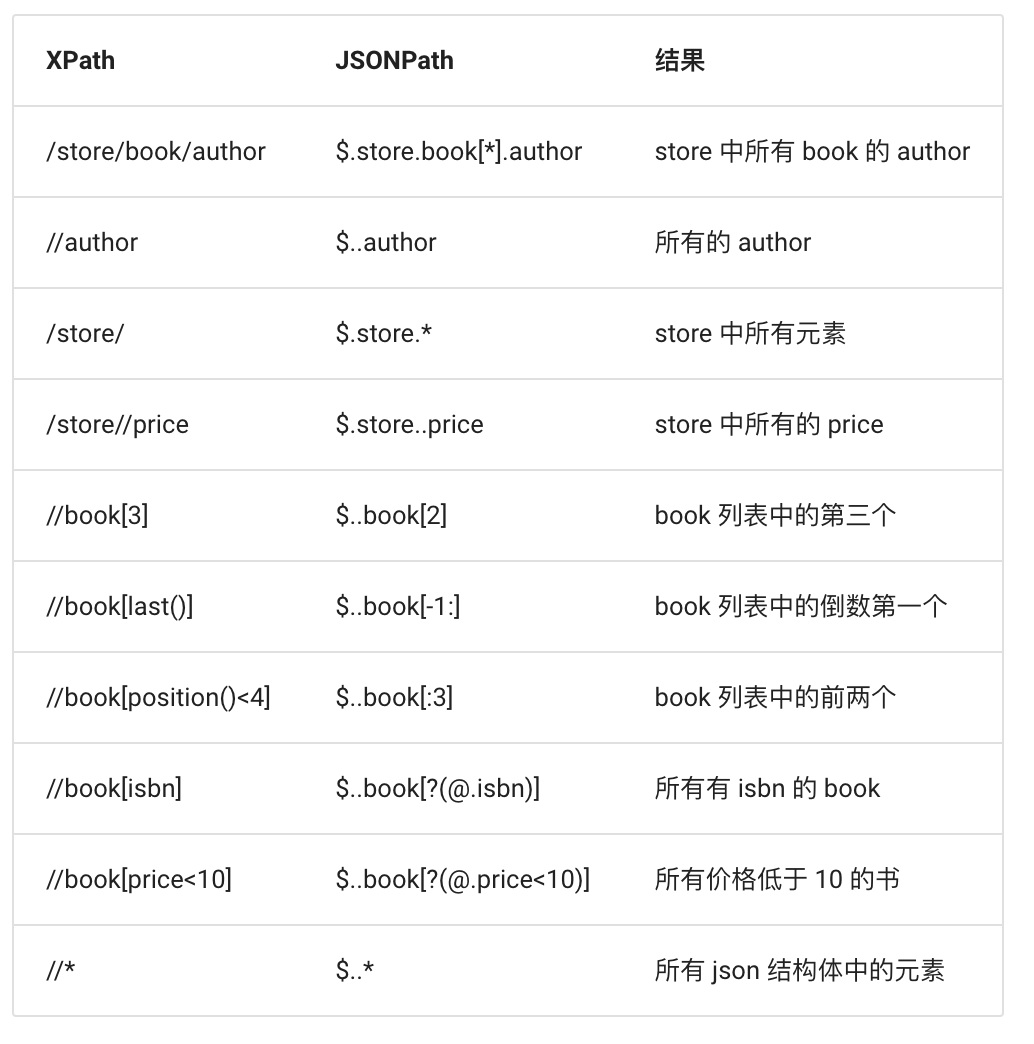
更多内容请访问:https://goessner.net/articles/JsonPath
实战练习
以下是 https://ceshiren.com/t/topic/6950.json 这个接口的正常响应值(因响应篇幅过长,删除了部分内容):
{ 'post_stream': { 'posts': [ { 'id': 17126, 'name': '思寒', 'username': 'seveniruby', 'avatar_template': '/user_avatar/ceshiren.com/seveniruby/{size}/2_2.png', 'created_at': '2020-10-02T04:23:30.586Z', 'cooked': '一直以来的平均涨薪率在30%以上,这次刷新的记录估计要保持好几年了
', 'post_number': 6, 'post_type': 1, 'updated_at': '2020-10-02T04:23:48.775Z', 'reply_to_post_number': None, 'reads': 651, 'readers_count': 650, 'score': 166.6, 'yours': False, 'topic_id': 6950, 'topic_slug': 'topic', 'display_username': '思寒', 'primary_group_name': 'python_12', ...省略... }, ], }, 'timeline_lookup': , 'suggested_topics':, 'tags': [ '精华帖', '测试开发', '测试求职', '外包测试' ], 'id': 6950, 'title': '测试人生 | 从外包菜鸟到测试开发,薪资一年翻三倍,连自己都不敢信!(附面试真题与答案)', 'fancy_title': '测试人生 | 从外包菜鸟到测试开发,薪资一年翻三倍,连自己都不敢信!(附面试真题与答案)', }- 1
- 2
- 3
- 4
- 5
- 6
- 7
- 8
- 9
- 10
- 11
- 12
- 13
- 14
- 15
- 16
- 17
- 18
- 19
- 20
- 21
- 22
- 23
- 24
- 25
- 26
- 27
- 28
- 29
- 30
- 31
- 32
- 33
- 34
- 35
- 36
- 37
- 38
- 39
- 40
接下来则需要实现一个请求,断言以上的响应内容中 name 字段为’思寒’所对应的 cooked 包含"涨薪"
Python 演示代码
JSONPath 断言
import requests from jsonpath import jsonpath r = requests.get("https://ceshiren.com/t/topic/6950.json").json() result = jsonpath(r, "$..posts[?(@.name == '思寒')].cooked")[1] assert "涨薪" in result- 1
- 2
- 3
- 4
- 5
- 6
Java 演示代码
JSONPath 断言
import com.jayway.jsonpath.JsonPath; import org.junit.jupiter.api.Test; import java.util.List; import static io.restassured.RestAssured.given; public class jsonTest { @Test void jsonTest() { //获取响应信息,并转成字符串类型 String res = given().when(). get("https://ceshiren.com/t/topic/6950.json") .then().extract().response().asString(); //通过jsonpath表达式提取需要的字段 Listresult = JsonPath.read(res, "$..posts[?(@.name == '思寒')].cooked"); // 断言验证 assert result.get(1).contains("涨薪"); } } - 1
- 2
- 3
- 4
- 5
- 6
- 7
- 8
- 9
- 10
- 11
- 12
- 13
- 14
- 15
- 16
- 17
- 18
- 19
-
相关阅读:
EXMC(FSMC)转BRAM,实现单片机与FPGA的交互,FPGA端
1.在官网选择版本并下载
Linux——Linux用户管理、组管理和文件管理常用命令总结
韩国网络安全体系特征与发展前景
天融信上网行为管理系统设置wifi短信验证流程
Windows mysql 5.7 msi版、mysql 8.0 msi版下载、安装教程,附详细图文
Java基础知识点
简易版的进程池
NetSuite知识会汇编-管理员篇&顾问篇2023
项目管理实战总结(二)-沟通路径
- 原文地址:https://blog.csdn.net/Hogwartstester/article/details/126135045
