-
CADEditorX ActiveX 14.1.X
CADEditorX is an ActiveX component for adding CAD features to the Web page or to the application under development in any development environment supporting ActiveX and COM technology, for example C#, Visual C++, Delphi, VB, JavaScript etc. It enables viewing, editing, converting, printing and measuring DWG, DXF, SVG, HPGL, PDF, STEP, IGES, STL and other CAD files. An easy-to-use API and numerous examples allow fast integration of CADEditorX to the final application.Ω578867473
CADEditorX scope of use:
- database systems;
- monitoring and remote control programs;
- CNC machines;
- CAD applications development;
- data export to CAD formats;
- document management systems and highly specialized products.

Main Features
- Viewing files (full list of supported formats):
- vector formats: DWG, DXF, PDF, HPGL, SVG, CGM etc.
- 3D models: STEP, IGES, STL, OBJ, SLDPRT, X_T, X_B etc.
- raster formats: BMP, PNG, JPG, ICO, TIFF etc. - Editing 2D files: work with entity properties, layers, blocks, dimension and text styles, support of SHX fonts, support of XRefs etc.
- Measuring in 2D and 3D modes as well as saving measurement results to TXT.
- Saving to DWG, DXF, PDF, SVG, CGM, PLT, STL, STEP, IGES, OBJ etc. (the full list of export formats).
- Batch conversion to DWG, DXF, PDF, SVG, PLT, CGM, BPM and other formats.
- Adding markups and commentaries to the file in the Redline mode.
- The Compare files tool for finding differences between two file revisions.
- Multipage printing of large format files.
- Sending a group of files to different output devices with Batch print.
- Easy-to-use API containing a single function and a single event.
Demo Examples
The SDK includes demo examples presented as executable files and the source code in popular programming languages: C#, Delphi, VB.NET, HTML, VC++, VBA etc.
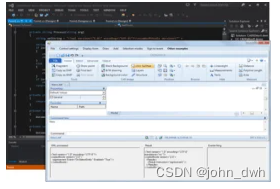
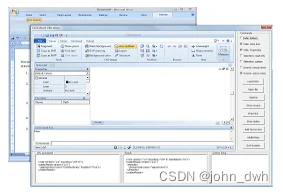

C# Demo
VBA Demo
Delphi Demo
To learn instructions, commands and system variables it is especially convenient to use the XML IDE application. In this application you will find a lot of XML instruction examples and what is more you can immediately see the result of their execution.

-
相关阅读:
Vue.js 组件通信——父组件向子组件通过props传值
数据结构和算法(8):搜索树(二叉搜索树和AVL树)
Android 查看路由表
CCC数字钥匙设计 --数字钥匙数据结构
axios封装使用
PLC攻击(一):应用层攻击
怎么将客户引到私域?
肝爆3w字整理出这50道计算机网络必问面试题
vue开发-语法和基础流程规范
Android 学习之多状态布局的一种实现方案
- 原文地址:https://blog.csdn.net/john_dwh/article/details/126133786