-
EasyExcel读写数字类型数据丢失精度解决方案
问题背景
我们项目深入使用EasyExcel,有个场景是上传数字,上传的文档中有保留两位小数的格式,上传之后的数据会经过处理后在写入另一个文档
首先我们准备以下代码
public class Test5 { public static void main(String[] args) { String fileName = "g://" + "demo" + File.separator + "demo.xlsx"; List<DemoData> list = EasyExcel.read(fileName, DemoData.class, null).sheet().doReadSync(); List<DemoData1> result = new ArrayList<>(); for(DemoData demoData:list){ if(demoData.getCol2() != null){ demoData.setCol2(demoData.getCol2().add(new BigDecimal("500000000000.123456"))); DemoData1 demoData1= new DemoData1(); demoData1.setCol1(demoData.getCol1()); demoData1.setCol2(demoData.getCol2().toString()); result.add(demoData1); } } //case1 EasyExcel.write("g://" + "demo" + File.separator + "demoTemp1.xlsx",DemoData.class).sheet().doWrite(list); //case2 EasyExcel.write("g://" + "demo" + File.separator + "demoTemp2.xlsx",DemoData1.class).sheet().doWrite(result); } } public class DemoData { @ExcelProperty("序号") private String col1; @ExcelProperty("数字1") private BigDecimal col2; public String getCol1() { return col1; } public void setCol1(String col1) { this.col1 = col1; } public BigDecimal getCol2() { return col2; } public void setCol2(BigDecimal col2) { this.col2 = col2; } } public class DemoData1 { @ExcelProperty("序号") private String col1; @ExcelProperty("数字1") private String col2; public String getCol1() { return col1; } public void setCol1(String col1) { this.col1 = col1; } public String getCol2() { return col2; } public void setCol2(String col2) { this.col2 = col2; } }- 1
- 2
- 3
- 4
- 5
- 6
- 7
- 8
- 9
- 10
- 11
- 12
- 13
- 14
- 15
- 16
- 17
- 18
- 19
- 20
- 21
- 22
- 23
- 24
- 25
- 26
- 27
- 28
- 29
- 30
- 31
- 32
- 33
- 34
- 35
- 36
- 37
- 38
- 39
- 40
- 41
- 42
- 43
- 44
- 45
- 46
- 47
- 48
- 49
- 50
- 51
- 52
- 53
- 54
- 55
- 56
- 57
- 58
- 59
- 60
- 61
- 62
- 63
- 64
- 65
然后准备以下导入文档

操作说明
在Test5的demo里面,主要就是做了个读-处理-写的操作。
预想的是读到"500000000.123456"再经过数据处理,与"500000000000.123456"相加,输出结果"500500000000.246912"
两个case写入文件不同之处在于headClass不一样。在case1里面,是用DemoData读取并写入,在case2里面,则是先用DemoData读,再用DemoData1去写。而在两个class里面,主要区别在于col2的类型。
下面我们来看一下执行结果,读入内存数据如下图:

case1写入结果如下图

case2写入结果如下图

通过以上截图可以发现以下几点
1、读入内存数据正确
2、case1以同样的dto读写数据后,精度丢失
3、case2以BigDecimal去读数据,然后以String类型写数据,结果正确,但对比case1,涉及到大量的dto copy,影响读写效率。
如果我们以String去读写,则会读到如下数据,可以发现是按单元格格式读的,不是我们想要的结果
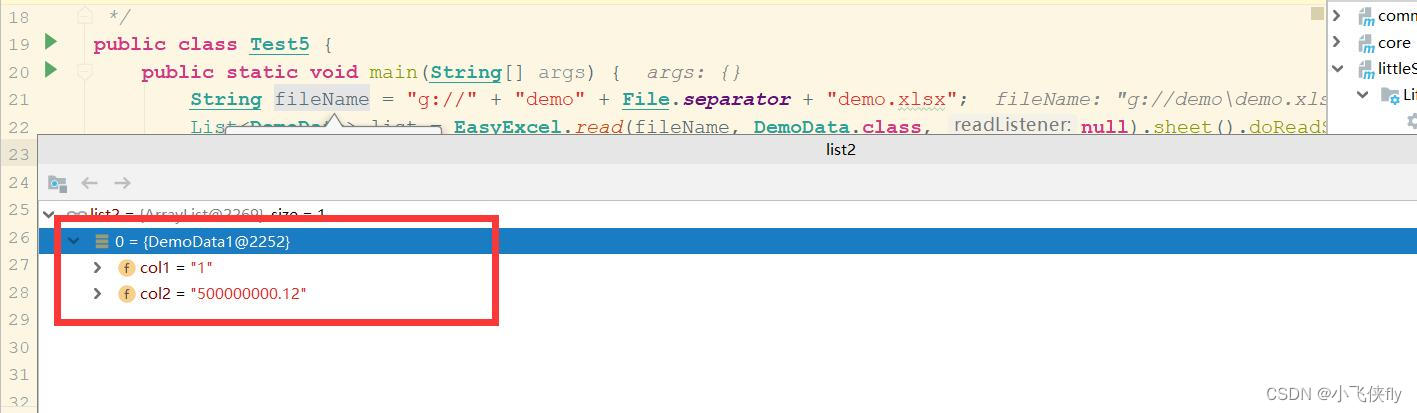
对此,我也像官方提了issue,看是否能有不错的解决方案
https://github.com/alibaba/easyexcel/issues/2595解决方案
对此,经过几天的源码解读,我发现可以用String类型去读写数字,只需要在对应字段上添加注解@NumberFormat,添加注解之后读取数据截图如下,可以发现能正常读取小数位数据。
这样就能实现用String类型的dto去同时读写excel文档,而不影响数字精度。

源码展现
能这样绕过源码,主要是在如下源码处com.alibaba.excel.converters.string.StringNumberConverter#convertToJavaData
如果发现有@NumberFormat注解,则会优先处理此注解,否则就会使用表格格式来格式化数据。@Override public String convertToJavaData(ReadCellData<?> cellData, ExcelContentProperty contentProperty, GlobalConfiguration globalConfiguration) { // If there are "DateTimeFormat", read as date if (contentProperty != null && contentProperty.getDateTimeFormatProperty() != null) { return DateUtils.format( DateUtil.getJavaDate(cellData.getNumberValue().doubleValue(), contentProperty.getDateTimeFormatProperty().getUse1904windowing(), null), contentProperty.getDateTimeFormatProperty().getFormat()); } // If there are "NumberFormat", read as number if (contentProperty != null && contentProperty.getNumberFormatProperty() != null) { return NumberUtils.format(cellData.getNumberValue(), contentProperty); } // Excel defines formatting boolean hasDataFormatData = cellData.getDataFormatData() != null && cellData.getDataFormatData().getIndex() != null && !StringUtils.isEmpty( cellData.getDataFormatData().getFormat()); if (hasDataFormatData) { return NumberDataFormatterUtils.format(cellData.getNumberValue(), cellData.getDataFormatData().getIndex(), cellData.getDataFormatData().getFormat(), globalConfiguration); } // Default conversion number return NumberUtils.format(cellData.getNumberValue(), contentProperty); }- 1
- 2
- 3
- 4
- 5
- 6
- 7
- 8
- 9
- 10
- 11
- 12
- 13
- 14
- 15
- 16
- 17
- 18
- 19
- 20
- 21
- 22
- 23
- 24
- 25
深入看处理@NumberFormat注解的代码中,如果判定有此注解,但是注解上的格式化数据为空的话,则会走第一个if逻辑,直接返回toPlainString()的数据,因此能以最简单的方式解决此问题。
public static String format(Number num, ExcelContentProperty contentProperty) { if (contentProperty == null || contentProperty.getNumberFormatProperty() == null || StringUtils.isEmpty(contentProperty.getNumberFormatProperty().getFormat())) { if (num instanceof BigDecimal) { return ((BigDecimal)num).toPlainString(); } else { return num.toString(); } } String format = contentProperty.getNumberFormatProperty().getFormat(); RoundingMode roundingMode = contentProperty.getNumberFormatProperty().getRoundingMode(); DecimalFormat decimalFormat = new DecimalFormat(format); decimalFormat.setRoundingMode(roundingMode); return decimalFormat.format(num); }- 1
- 2
- 3
- 4
- 5
- 6
- 7
- 8
- 9
- 10
- 11
- 12
- 13
- 14
- 15
-
相关阅读:
tiup cluster restart
[pytorch笔记]04 --进阶训练技巧
python切分TXT的句子到Excel(复制可用)——以及python切分句子遇到的问题汇总
【vue3】keep-alive缓存组件
2022年中科磐云——服务器内部信息获取 解析flag
Maven 知识点总结
【linux命令讲解大全】107.mkdir命令:创建目录的指令
JVM运行时数据区——虚拟机栈
linux下nginx安装与配置说明
DDOS攻击分析
- 原文地址:https://blog.csdn.net/qq_34306010/article/details/126131887