-
JavaWeb AJAX请求
1. 什么是 AJAX 请求
AJAX 即“ A synchronous J avascript A nd X ML ” (异步 JavaScript 和 XML ),是指一种创建交互式 网页 应用的网页开发技术。ajax 是一种浏览器通过 js 异步发起请求,局部更新页面的技术。Ajax 请求的局部更新,浏览器地址栏不会发生变化局部更新不会舍弃原来页面的内容2. javaScript 原生 Ajax 请求
原生的 Ajax 请求,1、我们首先要创建 XMLHttpRequest 对象2、调用 open 方法设置请求参数3、调用 send 方法发送请求4、在 send 方法前绑定 onreadystatechange 事件,处理请求完成后的操作。2.1 方法说明
2.1.1 创建 XMLHttpRequest 对象
XMLHttpRequest 对象
所有现代浏览器均支持 XMLHttpRequest 对象(IE5 和 IE6 使用 ActiveXObject)。
XMLHttpRequest 用于在后台与服务器交换数据。这意味着可以在不重新加载整个网页的情况下,对网页的某部分进行更新。
创建 XMLHttpRequest 对象
所有现代浏览器(IE7+、Firefox、Chrome、Safari 以及 Opera)均内建 XMLHttpRequest 对象。
创建 XMLHttpRequest 对象的语法:
variable=new XMLHttpRequest();
老版本的 Internet Explorer (IE5 和 IE6)使用 ActiveX 对象:
variable=new ActiveXObject("Microsoft.XMLHTTP");
为了应对所有的现代浏览器,包括 IE5 和 IE6,请检查浏览器是否支持 XMLHttpRequest 对象。如果支持,则创建 XMLHttpRequest 对象。如果不支持,则创建 ActiveXObject2.1.2 向服务器发送请求
如需将请求发送到服务器,我们使用 XMLHttpRequest 对象的 open() 和 send() 方法方法 描述 open(method,url,async) 规定请求的类型、URL 以及是否异步处理请求。
- method:请求的类型;GET 或 POST
- url:文件在服务器上的位置
- async:true(异步)或 false(同步)
send(string) 将请求发送到服务器。
- string:仅用于 POST 请求,传入请求参数
2.1.3 onreadystatechange 事件
当请求被发送到服务器时,我们需要执行一些基于响应的任务。
每当 readyState 改变时,就会触发 onreadystatechange 事件。
readyState 属性存有 XMLHttpRequest 的状态信息。
下面是 XMLHttpRequest 对象的三个重要的属性:
属性 描述 onreadystatechange 存储函数(或函数名),每当 readyState 属性改变时,就会调用该函数。 readyState 存有 XMLHttpRequest 的状态。从 0 到 4 发生变化。
- 0: 请求未初始化
- 1: 服务器连接已建立
- 2: 请求已接收
- 3: 请求处理中
- 4: 请求已完成,且响应已就绪
status 200: "OK"
404: 未找到页面在 onreadystatechange 事件中,我们规定当服务器响应已做好被处理的准备时所执行的任务。
当 readyState 等于 4 且状态为 200 时,表示响应已就绪.
2.1.4 服务器响应
如需获得来自服务器的响应,请使用 XMLHttpRequest 对象的 responseText 或 responseXML 属性。
属性 描述 responseText 获得字符串形式的响应数据。 responseXML 获得 XML 形式的响应数据。 注意:获取相应之前要先判断readyState 等于 4 且状态为 200
2.1 代码示例
1. 导包:gson.jar

2. 编写Person类
- public class Person {
- private Integer id;
- private String name;
- public Person() {
- }
- public Person(Integer id, String name) {
- this.id = id;
- this.name = name;
- }
- public Integer getId() {
- return id;
- }
- public void setId(Integer id) {
- this.id = id;
- }
- public String getName() {
- return name;
- }
- public void setName(String name) {
- this.name = name;
- }
- @Override
- public String toString() {
- return "Person{" +
- "id=" + id +
- ", name='" + name + '\'' +
- '}';
- }
- }
3.ajax.html代码
- html PUBLIC "-//W3C//DTD HTML 4.01 Transitional//EN" "http://www.w3.org/TR/html4/loose.dtd">
- <html>
- <head>
- <meta http-equiv="pragma" content="no-cache"/>
- <meta http-equiv="cache-control" content="no-cache"/>
- <meta http-equiv="Expires" content="0"/>
- <meta http-equiv="Content-Type" content="text/html; charset=UTF-8">
- <title>Insert title heretitle>
- <script type="text/javascript">
- // 在这里使用 javaScript 语言发起 Ajax 请求,访问服务器 AjaxServlet 中 javaScriptAjax
- function ajaxRequest() {
- // 1、我们首先要创建XMLHttpRequest
- var xmlhttprequest = new XMLHttpRequest();
- // 2、调用open方法设置请求参数
- xmlhttprequest.open("GET","http://localhost:8080/18_AJAX/ajaxServlet?action=javaScriptAjax",true);
- // 4、在send方法前绑定onreadystatechange事件,处理请求完成后的操作。
- xmlhttprequest.onreadystatechange = function () {
- if (xmlhttprequest.readyState == 4 && xmlhttprequest.status == 200) {
- var personJson = JSON.parse(xmlhttprequest.responseText);
- document.getElementById("div01").innerText = "编号:" + personJson.id + " ,姓名:" + personJson.name;
- }
- };
- // 3、调用send方法发送请求
- xmlhttprequest.send();
- }
- script>
- head>
- <body>
- <button onclick="ajaxRequest()">ajax requestbutton>
- <div id="div01">
- div>
- body>
- html>
4.Servlet代码
BaseServlet:
- @WebServlet(name = "BaseServlet", value = "/BaseServlet")
- public abstract class BaseServlet extends HttpServlet {
- @Override
- protected void doGet(HttpServletRequest req, HttpServletResponse resp) throws ServletException, IOException {
- doPost(req, resp);
- }
- @Override
- protected void doPost(HttpServletRequest request, HttpServletResponse response) throws ServletException, IOException {
- // 解决post请求中文乱码问题
- // 一定要在获取请求参数之前调用才有效
- request.setCharacterEncoding("UTF-8");
- // 解决响应中文乱码问题
- response.setContentType("text/html;charset=UTF-8");
- String action = request.getParameter("action");
- // 获取 action 业务鉴别字符串,获取相应的业务 方法反射对象
- try {
- Method method = this.getClass().getDeclaredMethod(action, HttpServletRequest.class, HttpServletResponse.class);
- // 调用目标业务 方法
- method.invoke(this, request, response);
- } catch (Exception e) {
- // e.printStackTrace();
- throw new RuntimeException(e);
- }
- }
- }
AjaxServlet:- @WebServlet(name = "AjaxServlet", value = "/ajaxServlet")
- public class AjaxServlet extends BaseServlet {
- protected void javaScriptAjax(HttpServletRequest request, HttpServletResponse response) throws ServletException, IOException {
- System.out.println("AJAX请求进来了");
- Person person = new Person(1, "张三");
- Gson gson = new Gson();
- String personJsonString = gson.toJson(person);
- // 将 personJsonString 数据响应到客户端
- response.getWriter().write(personJsonString);
- }
- }
5. 结果
 四个 Ajax 请求方法$.ajax 方法$.get 方法$.post 方法$.getJSON 方法一个表单序列化方法:serialize() 表单序列化方法
3.1 $.ajax 方法
$.ajax 请求参数url : 请求的地址type : 请求的方式 get 或 postdata : 请求的参数 string 或 jsonsuccess: 成功的回调函数dataType: 返回的数据类型 常用 json 或 text代码示例:方式1:- html PUBLIC "-//W3C//DTD HTML 4.01 Transitional//EN" "http://www.w3.org/TR/html4/loose.dtd">
- <html>
- <head>
- <meta http-equiv="pragma" content="no-cache"/>
- <meta http-equiv="cache-control" content="no-cache"/>
- <meta http-equiv="Expires" content="0"/>
- <meta http-equiv="Content-Type" content="text/html; charset=UTF-8">
- <title>Insert title heretitle>
- <script type="text/javascript" src="script/jquery-1.7.2.js">script>
- <script type="text/javascript">
- $(function () {
- // ajax请求
- $("#ajaxBtn").click(function () {
- $.ajax({
- url: "http://localhost:8080/18_AJAX/ajaxServlet",
- type: "GET",
- data: "action=jQueryAjax",
- success: function (date) { // 这里的date是服务器响应的数据,所有该回调函数一定要含有参数
- var jsonObj = JSON.parse(date); // 若dateType的值为 text,则需将服务器响应的json字符串转为json数据
- $("#divId").html("jQueryAjax 编号:" + jsonObj.id + " , 姓名:" + jsonObj.name);
- },
- dateType: "text" // 返回文本形式
- });
- });
- // ajax--get请求
- $("#getBtn").click(function () {
- alert(" get btn ");
- });
- // ajax--post请求
- $("#postBtn").click(function () {
- // post请求
- alert("post btn");
- });
- // ajax--getJson请求
- $("#getJSONBtn").click(function () {
- // 调用
- alert("getJSON btn");
- });
- // ajax请求
- $("#submit").click(function () {
- // 把参数序列化
- alert("serialize()");
- });
- });
- script>
- head>
- <body>
- <div>
- <button id="ajaxBtn">$.ajax请求button>
- <button id="getBtn">$.get请求button>
- <button id="postBtn">$.post请求button>
- <button id="getJSONBtn">$.getJSON请求button>
- div>
- <div id="divId">div>
- <br/>
- <form id="form01">
- 用户名:<input name="username" type="text"/><br/>
- 密码:<input name="password" type="password"/><br/>
- 下拉单选:<select name="single">
- <option value="Single">Singleoption>
- <option value="Single2">Single2option>
- select><br/>
- 下拉多选:
- <select name="multiple" multiple="multiple">
- <option selected="selected" value="Multiple">Multipleoption>
- <option value="Multiple2">Multiple2option>
- <option selected="selected" value="Multiple3">Multiple3option>
- select><br/>
- 复选:
- <input type="checkbox" name="check" value="check1"/> check1
- <input type="checkbox" name="check" value="check2" checked="checked"/> check2<br/>
- 单选:
- <input type="radio" name="radio" value="radio1" checked="checked"/> radio1
- <input type="radio" name="radio" value="radio2"/> radio2<br/>
- form>
- <button id="submit">提交--serialize()button>
- body>
- html>
方式2:
- // ajax请求
- $("#ajaxBtn").click(function () {
- $.ajax({
- url: "http://localhost:8080/18_AJAX/ajaxServlet",
- type: "GET",
- data: "action=jQueryAjax",
- success: function (date) { // 这里的date是服务器响应的数据,所有该回调函数一定要含有参数
- // var jsonObj = JSON.parse(date); // 若dateType的值为 text,则需将服务器响应的json字符串转为json数据
- // $("#divId").html("jQueryAjax 编号:" + jsonObj.id + " , 姓名:" + jsonObj.name);
- $("#divId").html("jQueryAjax 编号:" + date.id + " , 姓名:" + date.name);
- },
- // dateType: "text" // 返回文本形式
- dataType: "json"
- });
- });
Servlet代码:
- protected void jQueryAjax(HttpServletRequest request, HttpServletResponse response) throws ServletException, IOException {
- System.out.println("jQueryAjax 请求进来了");
- Person person = new Person(2, "李四");
- Gson gson = new Gson();
- String personJsonString = gson.toJson(person);
- // 将 personJsonString 数据响应到客户端
- response.getWriter().write(personJsonString);
- }
结果:

3.2 $.get 方法和$.post 方法
$.get 方法和$.post 方法url 请求的 url 地址data 发送的数据callback 成功的回调函数type 返回的数据类型注意:$.get 方法和$.post 方法使用方式一样,当时参数的顺序不能改变代码示例:JQuery代码:- // ajax--get请求
- $("#getBtn").click(function () {
- $.get("http://localhost:8080/18_AJAX/ajaxServlet", {action:"jQueryGet"},function (data) {
- $("#divId").html("jQueryGet 编号:" + data.id + " , 姓名:" + data.name);
- },"json");
- });
- // ajax--post请求
- $("#postBtn").click(function () {
- $.get("http://localhost:8080/18_AJAX/ajaxServlet", {action:"jQueryPost"},function (data) {
- $("#divId").html("jQueryPost 编号:" + data.id + " , 姓名:" + data.name);
- },"json");
- });
Servlet代码:
- protected void jQueryGet(HttpServletRequest request, HttpServletResponse response) throws ServletException, IOException {
- System.out.println("jQueryGet 请求进来了");
- Person person = new Person(3, "王五");
- Gson gson = new Gson();
- String personJsonString = gson.toJson(person);
- // 将 personJsonString 数据响应到客户端
- response.getWriter().write(personJsonString);
- }
- protected void jQueryPost(HttpServletRequest request, HttpServletResponse response) throws ServletException, IOException {
- System.out.println("jQueryPost 请求进来了");
- Person person = new Person(4, "赵六");
- Gson gson = new Gson();
- String personJsonString = gson.toJson(person);
- // 将 personJsonString 数据响应到客户端
- response.getWriter().write(personJsonString);
- }
结果:


3.3 $.getJSON 方法
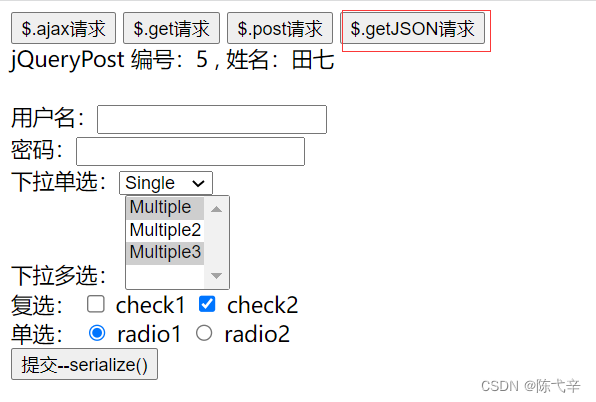
$.getJSON 方法url 请求的 url 地址data 发送给服务器的数据callback 成功的回调函数代码示例:
JQuery代码:- // ajax--getJson请求
- $("#getJSONBtn").click(function () {
- // 调用
- $.getJSON("http://localhost:8080/18_AJAX/ajaxServlet","action=jQueryGetJson",function (data) {
- $("#divId").html("jQueryPost 编号:" + data.id + " , 姓名:" + data.name);
- });
- });
Servlet代码:
- protected void jQueryGetJson(HttpServletRequest request, HttpServletResponse response) throws ServletException, IOException {
- System.out.println("jQueryGetJson 请求进来了");
- Person person = new Person(5, "田七");
- Gson gson = new Gson();
- String personJsonString = gson.toJson(person);
- // 将 personJsonString 数据响应到客户端
- response.getWriter().write(personJsonString);
- }
结果:
3.4 表单序列化 serialize()方法
serialize()可以把表单中所有表单项的内容都获取到,并以 name=value&name=value 的形式进行拼接。代码示例:JQuery代码:- // ajax请求
- $("#submit").click(function () {
- // 把参数序列化
- $.getJSON("http://localhost:8080/18_AJAX/ajaxServlet","action=jQuerySerialize&"+$("#form01").serialize(),function (data) {
- $("#divId").html("jQueryPost 编号:" + data.id + " , 姓名:" + data.name);
- });
- });
Servlet代码:
- protected void jQuerySerialize(HttpServletRequest request, HttpServletResponse response) throws ServletException, IOException {
- System.out.println("jQuerySerialize 请求进来了");
- Person person = new Person(6, "老八");
- Gson gson = new Gson();
- String personJsonString = gson.toJson(person);
- // 将 personJsonString 数据响应到客户端
- response.getWriter().write(personJsonString);
- // 获取表单参数
- String username = request.getParameter("username");
- String password = request.getParameter("password");
- String multiple = request.getParameter("multiple");
- String check = request.getParameter("check");
- String radio = request.getParameter("radio");
- // 输出表单参数
- System.out.println("username="+username);
- System.out.println("password="+password);
- System.out.println("multiple="+multiple);
- System.out.println("check="+check);
- System.out.println("radio="+radio);
- }
结果:


-
相关阅读:
基于JAVA作品测评网站计算机毕业设计源码+系统+数据库+lw文档+部署
正则表达式
字节网上面经整理(100道面试题)二篇
vscode开发相关
开通经营收款码要手续费吗
欧科云链研究院:30年期美债收益率破5%,高利率环境会维持多久?
linux下解决 git clone每次都要输入用户名密码问题(推荐)
习题1.24
Springcloud的学习笔记(二)
day46((VueJS)vuex(全局状态管理对象))
- 原文地址:https://blog.csdn.net/weixin_65637841/article/details/126115882