-
Hadoop(一)
目录
Hadoop运行环境搭建
模板虚拟机环境准备
1.关闭防火墙,关闭防火墙开机自启
- [doudou@localhost ~]$ su root
- Password:
- [root@localhost doudou]# systemctl stop firewalld
- [root@localhost doudou]# systemctl disable firewalld.service
- Removed symlink /etc/systemd/system/multi-user.target.wants/firewalld.service.
- Removed symlink /etc/systemd/system/dbus-org.fedoraproject.FirewallD1.service.
小贴士:
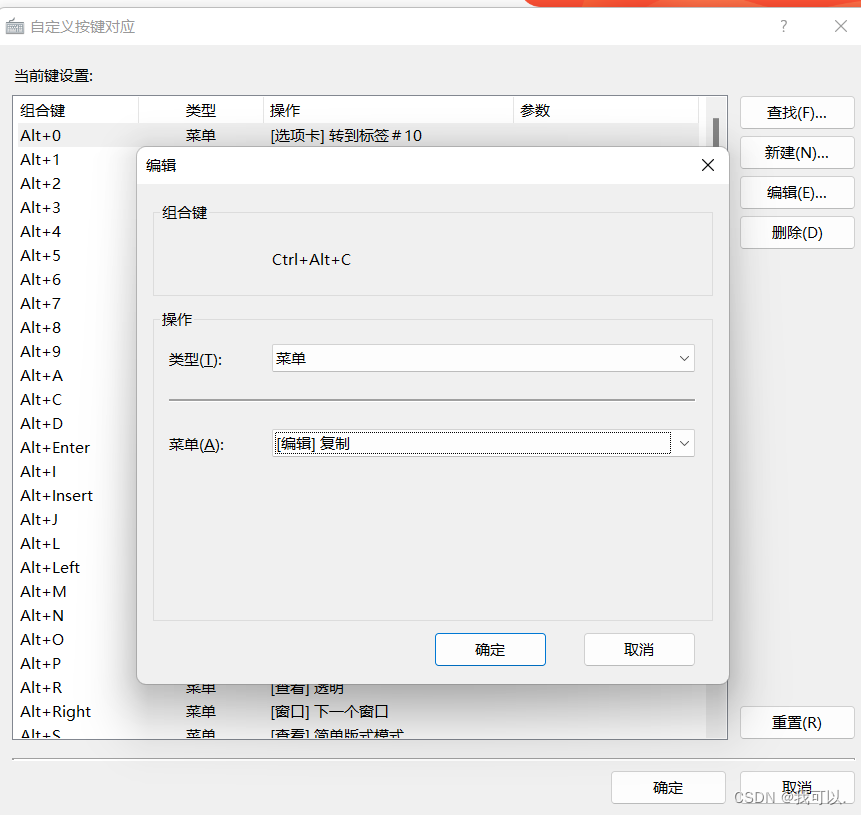
在xshell中怎样添加复制粘贴功能
1.点击工具,选择里面的按键对应

2.点击新建,输入组合键,类型选择菜单,菜单选择复制或粘贴
2.创建一个用户,并修改用户密码
- [root@localhost hadoop100]# useradd doudou
- [root@localhost hadoop100]# passwd doudou
- 更改用户 doudou 的密码 。
- 新的 密码:
- 无效的密码: 密码少于 8 个字符
- 重新输入新的 密码:
- passwd:所有的身份验证令牌已经成功更新。
3.配置用户具有root权限,方便后期加sudo执行root命令
[root@localhost doudou]# vim /etc/sudoers- ## Allow root to run any commands anywhere
- root ALL=(ALL) ALL
- doudou ALL=(ALL) NOPASSWD:ALL
4.在/opt目录下创建文件夹,并修改所属组和用户组
- [root@localhost doudou]# mkdir /opt/module
- [root@localhost doudou]# mkdir /opt/software
- [root@localhost doudou]# chown doudou:doudou /opt/module
- [root@localhost doudou]# chown doudou:doudou /opt/software
- [root@localhost doudou]# cd /opt/
- [root@localhost opt]# ll
- total 0
- drwxr-xr-x. 2 doudou doudou 6 Aug 1 08:07 module
- drwxr-xr-x. 2 root root 6 Oct 30 2018 rh
- drwxr-xr-x. 2 doudou doudou 6 Aug 1 08:08 software
5.卸载虚拟机自带的JDK
- [root@localhost opt]# cd ~
- [root@localhost ~]# rpm -qa | grep -i java | xargs -nl rpm -e --nodeps
- xargs: invalid number for -n option
- Usage: xargs [OPTION]... COMMAND INITIAL-ARGS...
- Run COMMAND with arguments INITIAL-ARGS and more arguments read from input.
- Mandatory arguments to long options are mandatory for short options too.
- Non-mandatory arguments are indicated by [square brackets]
- -0, --null Items are separated by a null, not whitespace.
- Disables quote and backslash processing
- -a, --arg-file=FILE Read arguments from FILE, not standard input
- -d, --delimiter=CHARACTER Input items are separated by CHARACTER, not by
- blank space. Disables quote and backslash
- processing
- -E END If END occurs as a line of input, the rest of
- the input is ignored.
- -e [END], --eof[=END] Equivalent to -E END if END is specified.
- Otherwise, there is no end-of-file string
- --help Print a summary of the options to xargs.
- -I R same as --replace=R (R must be specified)
- -i,--replace=[R] Replace R in initial arguments with names
- read from standard input. If R is
- unspecified, assume {}
- -L,-l, --max-lines=MAX-LINES Use at most MAX-LINES nonblank input lines per
- command line
- -l Use at most one nonblank input line per
- command line
- -n, --max-args=MAX-ARGS Use at most MAX-ARGS arguments per command
- line
- -P, --max-procs=MAX-PROCS Run up to max-procs processes at a time
- -p, --interactive Prompt before running commands
- --process-slot-var=VAR Set environment variable VAR in child
- processes
- -r, --no-run-if-empty If there are no arguments, run no command.
- If this option is not given, COMMAND will be
- run at least once.
- -s, --max-chars=MAX-CHARS Limit commands to MAX-CHARS at most
- --show-limits Show limits on command-line length.
- -t, --verbose Print commands before executing them
- --version Print the version number
- -x, --exit Exit if the size (see -s) is exceeded
- Report bugs to
6.重启虚拟机
[root@localhost ~]# reboot克隆虚拟机
1.克隆模板虚拟机,注意要选择完整克隆
2.修改克隆机的IP和名称
- [doudou@localhost ~]$ su root
- 密码:
- [root@localhost doudou]# ifconfig
- ens33: flags=4163
- inet 192.168.149.131 netmask 255.255.255.0 broadcast 192.168.149.255
- inet6 fe80::fe9e:c2f3:2656:bcbd prefixlen 64 scopeid 0x20
- inet6 fe80::b406:2768:a50c:e991 prefixlen 64 scopeid 0x20
- inet6 fe80::afc4:b77f:4ea9:33af prefixlen 64 scopeid 0x20
- ether 00:0c:29:01:27:af txqueuelen 1000 (Ethernet)
- RX packets 287 bytes 61246 (59.8 KiB)
- RX errors 0 dropped 0 overruns 0 frame 0
- TX packets 192 bytes 31239 (30.5 KiB)
- TX errors 0 dropped 0 overruns 0 carrier 0 collisions 0
- lo: flags=73
- inet 127.0.0.1 netmask 255.0.0.0
- inet6 ::1 prefixlen 128 scopeid 0x10
- loop txqueuelen 1000 (Local Loopback)
- RX packets 64 bytes 5568 (5.4 KiB)
- RX errors 0 dropped 0 overruns 0 frame 0
- TX packets 64 bytes 5568 (5.4 KiB)
- TX errors 0 dropped 0 overruns 0 carrier 0 collisions 0
- virbr0: flags=4099
- inet 192.168.122.1 netmask 255.255.255.0 broadcast 192.168.122.255
- ether 52:54:00:ae:e3:4b txqueuelen 1000 (Ethernet)
- RX packets 0 bytes 0 (0.0 B)
- RX errors 0 dropped 0 overruns 0 frame 0
- TX packets 0 bytes 0 (0.0 B)
- TX errors 0 dropped 0 overruns 0 carrier 0 collisions 0
- [root@localhost doudou]# vim /etc/hostname
- [root@localhost doudou]# reboot
编写集群分发脚本
- [doudou@hadoop101 ~]$ cd
- [doudou@hadoop101 ~]$ cd bin
- [doudou@hadoop101 bin]$ vim xsync
- #脚本内
- #!/bin/bash
- if [ $# -lt 1 ]
- then
- echo Not Enough Arguement!
- exit
- fi
- for host in hadoop101 hadoop102 hadoop103
- do
- echo =================== $host ==================
- for file in $@
- do
- if [ -e $file ]
- then
- pdir=$(cd -P $(dirname $file); pwd)
- fname=$(basename $file)
- ssh $host "mkdir -p $pdir"
- rsync -av $pdir/$fname $host:$pdir
- else
- echo $file does not exists!
- fi
- done
- done
- [doudou@hadoop101 bin]$ chmod 777 xsync
- [doudou@hadoop101 bin]$ ll
- total 4
- -rwxrwxrwx. 1 doudou root 431 Aug 2 02:46 xsync
SSH无密登录配置
[doudou@hadoop101 ~]$ cd .ssh/[doudou@hadoop101 .ssh]$ ssh-keygen -t rsa- [doudou@hadoop101 .ssh]$ ssh-copy-id hadoop101
- [doudou@hadoop101 .ssh]$ ssh-copy-id hadoop102
- [doudou@hadoop101 .ssh]$ ssh-copy-id hadoop103
-
相关阅读:
【C/C++】C编程技巧
Rust Yew应用开发的事件初探
Qt 停靠布局QDockWidget使用
走进Elasticsearch
C++:string的模拟实现
如何获得淘宝/天猫app商品详情原数据API数据
在typora中利用正则表达式,批量处理图片
Go 语言变量
day25-Listener监听器
使用Flink完成流数据统计
- 原文地址:https://blog.csdn.net/qq_61741696/article/details/126111655
