-
windows环境压力测试工具Apache ab安装及使用(apache benchmark)
1.首先下载并解压安装包,下载地址Apache Haus Downloads
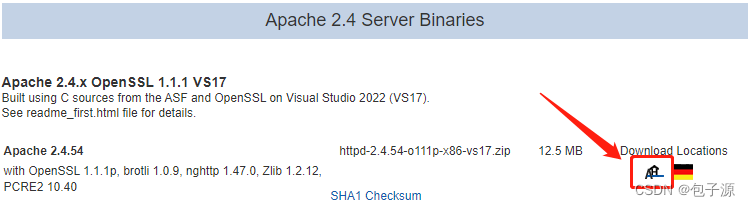
2.解压到C盘,并进入bin目录,复制路径,并配置环境变量,保存后就OK了


3.可以开始使用了,测试一下吧
ab -n 2000 -c 10 -k http://localhost:6868/dataScreenLibrary/findPublicShareByPk?id=4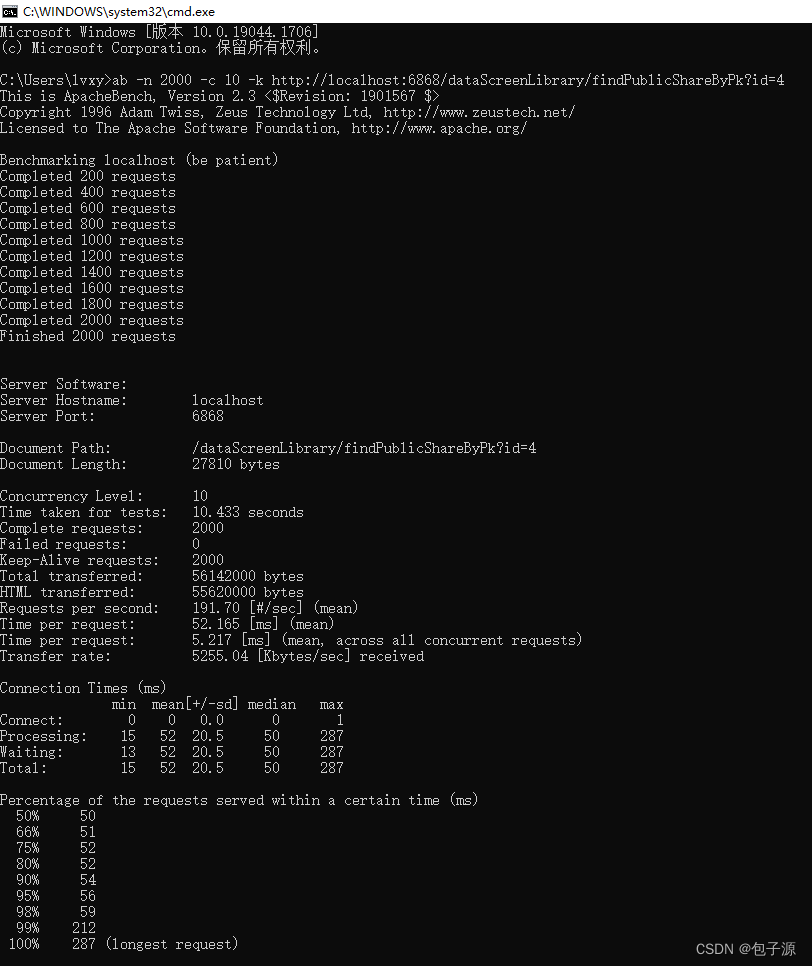
常用参数详解:
- ab [可选的参数选项] 需要进行压力测试的url
- 此外,我们再根据上面的用法介绍界面来详细了解每个参数选项的作用。
- -n
- 即requests,用于指定压力测试总共的执行次数。
- -c
- 即concurrency,用于指定压力测试的并发数。
- -t
- 即timelimit,等待响应的最大时间(单位:秒)。
- -b
- 即windowsize,TCP发送/接收的缓冲大小(单位:字节)。
- -p
- 即postfile,发送POST请求时需要上传的文件,此外还必须设置-T参数。
- -u
- 即putfile,发送PUT请求时需要上传的文件,此外还必须设置-T参数。
- -T
- 即content-type,用于设置Content-Type请求头信息,例如:application/x-www-form-urlencoded,默认值为text/plain。
- -v
- 即verbosity,指定打印帮助信息的冗余级别。
- -w
- 以HTML表格形式打印结果。
- -i
- 使用HEAD请求代替GET请求。
- -x
- 插入字符串作为table标签的属性。
- -y
- 插入字符串作为tr标签的属性。
- -z
- 插入字符串作为td标签的属性。
- -C
- 添加cookie信息,例如:"Apache=1234"(可以重复该参数选项以添加多个)。
- -H
- 添加任意的请求头,例如:"Accept-Encoding: gzip",请求头将会添加在现有的多个请求头之后(可以重复该参数选项以添加多个)。
- -A
- 添加一个基本的网络认证信息,用户名和密码之间用英文冒号隔开。
- -P
- 添加一个基本的代理认证信息,用户名和密码之间用英文冒号隔开。
- -X
- 指定使用的代理服务器和端口号,例如:"126.10.10.3:88"。
- -V
- 打印版本号并退出。
- -k
- 使用HTTP的KeepAlive特性。
- -k
- 使用HTTP的KeepAlive特性。
- -d
- 不显示百分比。
- -S
- 不显示预估和警告信息。
- -g
- 输出结果信息到gnuplot格式的文件中。
- -e
- 输出结果信息到CSV格式的文件中。
- -r
- 指定接收到错误信息时不退出程序。
- -h
- 显示用法信息,其实就是ab -help。
压力测试结果
C:\Users\lvxy>ab -n 2000 -c 10 -k http://localhost:6868/dataScreenLibrary/findPublicShareByPk?id=4
This is ApacheBench, Version 2.3 <$Revision: 1901567 $>
Copyright 1996 Adam Twiss, Zeus Technology Ltd, http://www.zeustech.net/
Licensed to The Apache Software Foundation, http://www.apache.org/Benchmarking localhost (be patient)
Completed 200 requests
Completed 400 requests
Completed 600 requests
Completed 800 requests
Completed 1000 requests
Completed 1200 requests
Completed 1400 requests
Completed 1600 requests
Completed 1800 requests
Completed 2000 requests
Finished 2000 requests
Server Software:
Server Hostname: localhost
Server Port: 6868Document Path: /dataScreenLibrary/findPublicShareByPk?id=4
Document Length: 27810 bytesConcurrency Level: 10
Time taken for tests: 10.433 seconds
Complete requests: 2000
Failed requests: 0
Keep-Alive requests: 2000
Total transferred: 56142000 bytes
HTML transferred: 55620000 bytes
Requests per second: 191.70 [#/sec] (mean)
Time per request: 52.165 [ms] (mean)
Time per request: 5.217 [ms] (mean, across all concurrent requests)
Transfer rate: 5255.04 [Kbytes/sec] receivedConnection Times (ms)
min mean[+/-sd] median max
Connect: 0 0 0.0 0 1
Processing: 15 52 20.5 50 287
Waiting: 13 52 20.5 50 287
Total: 15 52 20.5 50 287Percentage of the requests served within a certain time (ms)
50% 50
66% 51
75% 52
80% 52
90% 54
95% 56
98% 59
99% 212
100% 287 (longest request) -
相关阅读:
为什么页面跟设计稿差距这么大 优漫动游
十五管还原炉舟皿自动卸料单元
【NVMe2.0b 14-8】Set Features(下篇)
iptables DNAT和de-DNAT
面试小计_TX
记录一些 PostgreSQL问题分析思路
3d可视化产品爆炸图案例
Visual Studio Code安装和设置中文
kube-proxy 流量流转方式
Flink(二)
- 原文地址:https://blog.csdn.net/ziwoods/article/details/126126695
