-
MySQL数据表操作实战
创建数据库Market,在Market中创建数据表customers,customers 表结构如下图所示,按要求进行操作
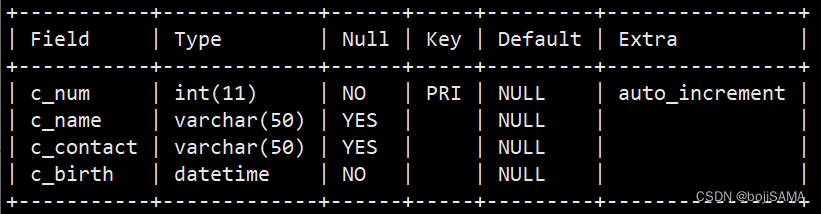
操作1:
mysql> create database Market; #该行为执行操作 Query OK, 1 row affected (0.00 sec) mysql> create table customers( c_num int(11)primary key not null UNIQUE AUTO_INCREMENT,c_name varchar(50),c_contact varchar(50),c_birth datetime not null); Query OK, 0 rows affected (0.01 sec)- 1
- 2
- 3
- 4
- 5
- 创建数据库Market。
在操作1已经完成 - 创建数据表customers,在c_num字段上添加主键约束和自增约
束,在c_birth字段上添加非空约束。
在操作1已经完成 - 将c_contact字段插入到c_birth字段后面。
mysql> alter table customers modify c_contact varchar(50) after c_birth; Query OK, 0 rows affected (0.02 sec) Records: 0 Duplicates: 0 Warnings: 0 mysql> desc customers; +-----------+-------------+------+-----+---------+----------------+ | Field | Type | Null | Key | Default | Extra | +-----------+-------------+------+-----+---------+----------------+ | c_num | int(11) | NO | PRI | NULL | auto_increment | | c_name | varchar(50) | YES | | NULL | | | c_birth | datetime | NO | | NULL | | | c_contact | varchar(50) | YES | | NULL | | +-----------+-------------+------+-----+---------+----------------+ 4 rows in set (0.00 sec)- 1
- 2
- 3
- 4
- 5
- 6
- 7
- 8
- 9
- 10
- 11
- 12
- 13
- 14
- 将c_name字段数据类型改为VARCHAR(70)。
mysql> alter table customers MODIFY c_name varchar(70); Query OK, 0 rows affected (0.00 sec) Records: 0 Duplicates: 0 Warnings: 0 mysql> desc customers; +-----------+-------------+------+-----+---------+----------------+ | Field | Type | Null | Key | Default | Extra | +-----------+-------------+------+-----+---------+----------------+ | c_num | int(11) | NO | PRI | NULL | auto_increment | | c_name | varchar(70) | YES | | NULL | | | c_birth | datetime | NO | | NULL | | | c_contact | varchar(50) | YES | | NULL | | +-----------+-------------+------+-----+---------+----------------+ 4 rows in set (0.01 sec)- 1
- 2
- 3
- 4
- 5
- 6
- 7
- 8
- 9
- 10
- 11
- 12
- 13
- 14
- 将c_contact字段名改为c_phone,数据类型保持不变
mysql> alter table customers CHANGE c_contact c_phone varchar(50); Query OK, 0 rows affected (0.01 sec) Records: 0 Duplicates: 0 Warnings: 0 mysql> desc customers; +---------+-------------+------+-----+---------+----------------+ | Field | Type | Null | Key | Default | Extra | +---------+-------------+------+-----+---------+----------------+ | c_num | int(11) | NO | PRI | NULL | auto_increment | | c_name | varchar(70) | YES | | NULL | | | c_birth | datetime | NO | | NULL | | | c_phone | varchar(50) | YES | | NULL | | +---------+-------------+------+-----+---------+----------------+ 4 rows in set (0.00 sec)- 1
- 2
- 3
- 4
- 5
- 6
- 7
- 8
- 9
- 10
- 11
- 12
- 13
- 14
- 增加c_gender字段,数据类型为CHAR(1)。
mysql> alter table customers add c_gender char(1); Query OK, 0 rows affected (0.02 sec) Records: 0 Duplicates: 0 Warnings: 0 mysql> desc customers; +----------+-------------+------+-----+---------+----------------+ | Field | Type | Null | Key | Default | Extra | +----------+-------------+------+-----+---------+----------------+ | c_num | int(11) | NO | PRI | NULL | auto_increment | | c_name | varchar(70) | YES | | NULL | | | c_birth | datetime | NO | | NULL | | | c_phone | varchar(50) | YES | | NULL | | | c_gender | char(1) | YES | | NULL | | +----------+-------------+------+-----+---------+----------------+ 5 rows in set (0.01 sec)- 1
- 2
- 3
- 4
- 5
- 6
- 7
- 8
- 9
- 10
- 11
- 12
- 13
- 14
- 15
- 16
- 将表名修改为customers_info。
mysql> alter table customers RENAME customers_info; Query OK, 0 rows affected (0.00 sec) mysql> show tables; +------------------+ | Tables_in_Market | +------------------+ | customers_info | +------------------+ 1 row in set (0.00 sec)- 1
- 2
- 3
- 4
- 5
- 6
- 7
- 8
- 9
- 10
- 11
- 创建数据类型为varchar(50)的c_city字段 后 删除该字段。
mysql> alter table customers_info add c_city varchar(50); #添加字段操作 Query OK, 0 rows affected (0.02 sec) Records: 0 Duplicates: 0 Warnings: 0 mysql> desc customers_info; +----------+-------------+------+-----+---------+----------------+ | Field | Type | Null | Key | Default | Extra | +----------+-------------+------+-----+---------+----------------+ | c_num | int(11) | NO | PRI | NULL | auto_increment | | c_name | varchar(70) | YES | | NULL | | | c_birth | datetime | NO | | NULL | | | c_phone | varchar(50) | YES | | NULL | | | c_gender | char(1) | YES | | NULL | | | c_city | varchar(50) | YES | | NULL | | +----------+-------------+------+-----+---------+----------------+ 6 rows in set (0.00 sec) mysql> alter table customers_info drop c_city; #删除字段操作 Query OK, 0 rows affected (0.02 sec) Records: 0 Duplicates: 0 Warnings: 0 mysql> desc customers_info -> ; +----------+-------------+------+-----+---------+----------------+ | Field | Type | Null | Key | Default | Extra | +----------+-------------+------+-----+---------+----------------+ | c_num | int(11) | NO | PRI | NULL | auto_increment | | c_name | varchar(70) | YES | | NULL | | | c_birth | datetime | NO | | NULL | | | c_phone | varchar(50) | YES | | NULL | | | c_gender | char(1) | YES | | NULL | | +----------+-------------+------+-----+---------+----------------+ 5 rows in set (0.00 sec)- 1
- 2
- 3
- 4
- 5
- 6
- 7
- 8
- 9
- 10
- 11
- 12
- 13
- 14
- 15
- 16
- 17
- 18
- 19
- 20
- 21
- 22
- 23
- 24
- 25
- 26
- 27
- 28
- 29
- 30
- 31
- 32
- 修改数据表的存储引擎为MyISAM。
mysql> alter table customers_info engine MyISAM; Query OK, 0 rows affected (0.01 sec) Records: 0 Duplicates: 0 Warnings: 0 mysql> show create table customers_info\G;# \G为规范化显示 *************************** 1. row *************************** Table: customers_info Create Table: CREATE TABLE `customers_info` ( `c_num` int(11) NOT NULL AUTO_INCREMENT, `c_name` varchar(70) DEFAULT NULL, `c_birth` datetime NOT NULL, `c_phone` varchar(50) DEFAULT NULL, `c_gender` char(1) DEFAULT NULL, PRIMARY KEY (`c_num`), UNIQUE KEY `c_num` (`c_num`) ) ENGINE=MyISAM DEFAULT CHARSET=latin1 #可以看到engine已经变成了MyISAM,查看数据库支持的所有引擎可通过show engines\G;来查 1 row in set (0.00 sec)- 1
- 2
- 3
- 4
- 5
- 6
- 7
- 8
- 9
- 10
- 11
- 12
- 13
- 14
- 15
- 16
- 17
在Market中创建数据表orders,orders表结构如下表所示,按要求进行操作。
⑴创建数据表orders,在c_num字段上添加主键约束和自增约束, 在c_id字段上添加外键约束,关联customers表中的主键c_num。
#必须先把表引擎都设为Innodb mysql> alter table customers_info engine=innodb -> ; Query OK, 0 rows affected (0.01 sec) Records: 0 Duplicates: 0 Warnings: 0 mysql> show create table customers_info\G #规范化结束输出显示 *************************** 1. row *************************** Table: customers_info Create Table: CREATE TABLE `customers_info` ( `c_num` int(11) NOT NULL AUTO_INCREMENT, `c_name` varchar(70) DEFAULT NULL, `c_birth` datetime NOT NULL, `c_phone` varchar(50) DEFAULT NULL, `c_gender` char(1) DEFAULT NULL, PRIMARY KEY (`c_num`), UNIQUE KEY `c_num` (`c_num`) ) ENGINE=InnoDB DEFAULT CHARSET=latin1 1 row in set (0.00 sec) mysql> create table orders(c_num int(11) primary key not null unique AUTO_INCREMENT,o_date date,c_id int(11),CONSTRAINT xxxxxx FOREIGN KEY(c_id)REFERENCES customers_info(c_num))ENGINE=InnoDB DEFAULT CHARSET=laatin1; Query OK, 0 rows affected (0.01 sec) mysql> show create table orders\G *************************** 1. row *************************** Table: orders Create Table: CREATE TABLE `orders` ( `c_num` int(11) NOT NULL AUTO_INCREMENT, `o_date` date DEFAULT NULL, `c_id` int(11) DEFAULT NULL, PRIMARY KEY (`c_num`), UNIQUE KEY `c_num` (`c_num`), KEY `xxxxxx` (`c_id`), CONSTRAINT `xxxxxx` FOREIGN KEY (`c_id`) REFERENCES `customers_info` (`c_num`) ) ENGINE=InnoDB DEFAULT CHARSET=latin1 1 row in set (0.00 sec) # 如果两个表都是MyISAM 引擎的,即使设定外键也不会产生外键)- 1
- 2
- 3
- 4
- 5
- 6
- 7
- 8
- 9
- 10
- 11
- 12
- 13
- 14
- 15
- 16
- 17
- 18
- 19
- 20
- 21
- 22
- 23
- 24
- 25
- 26
- 27
- 28
- 29
- 30
- 31
- 32
- 33
- 34
- 35
- 36
- 37
⑵删除orders表的外键约束,然后删除表customers_info。
mysql> drop table customers_info -> ; ERROR 1217 (23000): Cannot delete or update a parent row: a foreign key constraint fails #当有外键关联本(父)表的时候,本(父)表无法被删除 mysql> alter table orders drop foreign key xxxxxx; Query OK, 0 rows affected (0.00 sec) Records: 0 Duplicates: 0 Warnings: 0 mysql> show create table orders\G *************************** 1. row *************************** Table: orders Create Table: CREATE TABLE `orders` ( `c_num` int(11) NOT NULL AUTO_INCREMENT, `o_date` date DEFAULT NULL, `c_id` int(11) DEFAULT NULL, PRIMARY KEY (`c_num`), UNIQUE KEY `c_num` (`c_num`), KEY `xxxxxx` (`c_id`) #可以看到外键约束被删除 ) ENGINE=InnoDB DEFAULT CHARSET=latin1 1 row in set (0.00 sec) mysql> drop table customers_info; Query OK, 0 rows affected (0.00 sec) #外键约束被删除后即可成功删除父表。- 1
- 2
- 3
- 4
- 5
- 6
- 7
- 8
- 9
- 10
- 11
- 12
- 13
- 14
- 15
- 16
- 17
- 18
- 19
- 20
- 21
- 22
- 23
-
相关阅读:
C语言——递归题
技术对接40
代码随想录算法训练营第45天 [ 198.打家劫舍 213.打家劫舍II 337.打家劫舍III ]
activiti-image-generator
Vue源码学习(六):(支线)渲染函数中with(),call()的使用以及一些思考
ES6学习笔记
c++中的list容器讲解
2022爱分析・采购数字化厂商全景报告 | 爱分析报告
Bugku MISC 这是一张单纯的图片 & 想要种子吗
kubernetes 安装与部署
- 原文地址:https://blog.csdn.net/weixin_45052781/article/details/126115865