-
Spring Boot 2.x系列【23】应用监控篇之Info端点
有道无术,术尚可求,有术无道,止于术。
本系列Spring Boot版本2.7.0
前言
info端点主要是获取应用程序的各种信息,一般需要用户自定义,INFO 信息提供的顶级接口为InfoContributor,Spring Boot包含许多自动配置的该接口的 Bean :ID 类名 描述 先决条件 build BuildInfoContributor 公开构建信息 META-INF/build-info.properties env EnvironmentInfoContributor 公开Environment其名称以 info.开头的任何属性。 没有 git GitInfoContributor 公开 git 信息。 git.properties java JavaInfoContributor 公开 Java 运行时信息。 没有 os OsInfoContributor 公开操作系统信息。 没有 OS操作系统信息
首先配置开启OS信息,默认是关闭的:
management: info: os: enabled: true- 1
- 2
- 3
- 4
显示如下:

Java 运行时信息
也需要开启,默认是关闭的:
management: info: java: enabled: true- 1
- 2
- 3
- 4
显示如下:

自定义应用程序信息
env会公开Environment环境中所有info.开头的属性,比如我们添加两个应用程序属性信息:info: app: name: 用户中心 version: 1.0.0- 1
- 2
- 3
- 4
也需要开启,默认是关闭的:
management: info: env: enabled: true- 1
- 2
- 3
- 4
显示如下:

但是版本号不能硬编码,因为它肯定是会有变化的,所以需要从Maven 中获取,想要实现需要添加相应的 Maven 插件:<build> <resources> <resource> <directory>src/main/resourcesdirectory> <filtering>truefiltering> resource> resources> <plugins> <plugin> <groupId>org.springframework.bootgroupId> <artifactId>spring-boot-maven-pluginartifactId> <executions> <execution> <goals> <goal>repackagegoal> goals> execution> executions> plugin> <plugin> <groupId>org.apache.maven.pluginsgroupId> <artifactId>maven-resources-pluginartifactId> <version>2.7version> <configuration> <delimiters> <delimiter>@delimiter> delimiters> <useDefaultDelimiters>falseuseDefaultDelimiters> configuration> plugin> plugins> build>- 1
- 2
- 3
- 4
- 5
- 6
- 7
- 8
- 9
- 10
- 11
- 12
- 13
- 14
- 15
- 16
- 17
- 18
- 19
- 20
- 21
- 22
- 23
- 24
- 25
- 26
- 27
- 28
- 29
- 30
- 31
- 32
然后使用指定的占位符就可以了:
info: app: name: 用户中心 version: @version@- 1
- 2
- 3
- 4
测试显示即结果如下:

除了配置文件外,还可以实现
InfoContributor接口:@Component public class MyInfoContributor implements InfoContributor { @Override public void contribute(Info.Builder builder) { builder.withDetail("example", Collections.singletonMap("key", "value")); } }- 1
- 2
- 3
- 4
- 5
- 6
- 7
- 8
- 9
访问
info端点:{ "example": { "key" : "value" } }- 1
- 2
- 3
- 4
- 5
Git 信息
可以配置Git 源代码存储库状态的信息,首先需要使用
git-commit-id-plugin生成git.properties文件:<plugin> <groupId>pl.project13.mavengroupId> <artifactId>git-commit-id-pluginartifactId> <version>2.2.5version> <executions> <execution> <id>get-the-git-infosid> <phase>initializephase> <goals> <goal>revisiongoal> goals> execution> executions> <configuration> <dotGitDirectory>${project.basedir}/.gitdotGitDirectory> <verbose>falseverbose> <dateFormat>yyyy-MM-dd HH:mm:ssdateFormat> <prefix>gitprefix> <generateGitPropertiesFile>truegenerateGitPropertiesFile> <generateGitPropertiesFilename>${project.build.outputDirectory}/git.propertiesgenerateGitPropertiesFilename> <format>propertiesformat> <gitDescribe> <skip>falseskip> <always>falsealways> <dirty>-dirtydirty> gitDescribe> configuration> plugin>- 1
- 2
- 3
- 4
- 5
- 6
- 7
- 8
- 9
- 10
- 11
- 12
- 13
- 14
- 15
- 16
- 17
- 18
- 19
- 20
- 21
- 22
- 23
- 24
- 25
- 26
- 27
- 28
- 29
- 30
- 31
- 32
- 33
- 34
- 35
- 36
- 37
- 38
执行
package打包,可以看到生成的文件包含了远程仓库和一些GIT 提交信息:

然后配置显示完整的git信息:management: info: git: mode: full enabled: true- 1
- 2
- 3
- 4
- 5
测试显示结果如下:

Build构建信息
查看项目打包构建信息,需要在类路径中存在
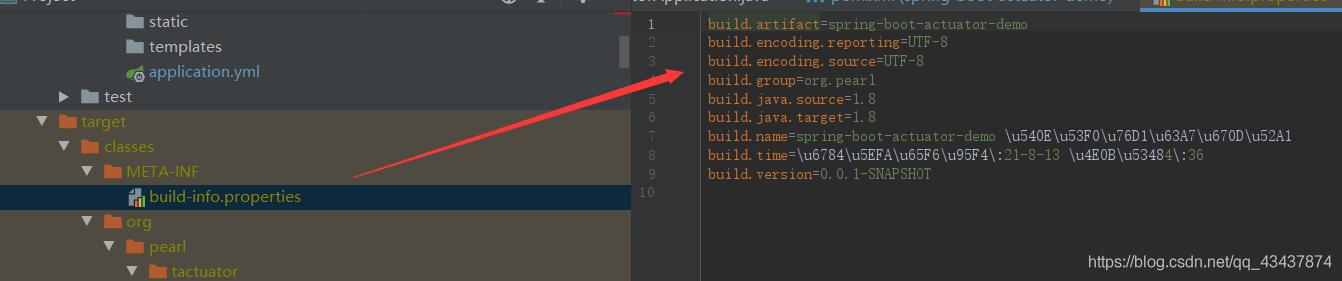
META-INF/build-info.properties文件,首先添加POM 插件,生成build-info.properties文件。<build> <plugins> <plugin> <groupId>org.codehaus.mojogroupId> <artifactId>build-helper-maven-pluginartifactId> <version>3.2.0version> <executions> <execution> <id>local-timestamp-propertyid> <phase>validatephase> <goals> <goal>timestamp-propertygoal> goals> <configuration> <name>local.build.timestampname> <pattern>${maven.build.timestamp.format}pattern> <timeZone>Asia/ShanghaitimeZone> <timeSource>buildtimeSource> configuration> execution> executions> plugin> <plugin> <groupId>org.springframework.bootgroupId> <artifactId>spring-boot-maven-pluginartifactId> <executions> <execution> <goals> <goal>build-infogoal> goals> <configuration> <additionalProperties> <name>spring-boot-actuator-demo 后台监控服务name> <encoding.source>UTF-8encoding.source> <encoding.reporting>UTF-8encoding.reporting> <java.source>${maven.compiler.source}java.source> <java.target>${maven.compiler.target}java.target> <time>构建时间:${local.build.timestamp}time> additionalProperties> configuration> execution> executions> plugin> plugins> build>- 1
- 2
- 3
- 4
- 5
- 6
- 7
- 8
- 9
- 10
- 11
- 12
- 13
- 14
- 15
- 16
- 17
- 18
- 19
- 20
- 21
- 22
- 23
- 24
- 25
- 26
- 27
- 28
- 29
- 30
- 31
- 32
- 33
- 34
- 35
- 36
- 37
- 38
- 39
- 40
- 41
- 42
- 43
- 44
- 45
- 46
- 47
- 48
- 49
执行打包命令,查看生成的文件:
访问info端点:

-
相关阅读:
WPF命令
优化 C++ 字符串拼接:高效方法与代码示例
lotus 检索数据 filecoin.tools
OpenHarmony、HarmonyOS、HarmonyNext互相兼容吗?
走进音视频的世界——RGB与YUV格式
Linux 命令(181)—— jobs 命令(builtin)
Vue 3 渲染机制解密:从模板到页面的魔法
Docker 问题记录
Asp-Net-Core开发笔记:使用alpine镜像并加入健康检查
OpenCV 图像拼接
- 原文地址:https://blog.csdn.net/qq_43437874/article/details/126112083
