-
[Linux系统编程]_进程(二)
嵌入式之路,贵在日常点滴
---阿杰在线送代码
目录
3、父进程等待子进程退出并收集子进程的退出状态的相关函数如下:
一、进程相关概念
问1. 什么是程序,什么是进程,有什么区别?
程序是静态的概念,进程是动态的概念。
gcc a.c -o a,a就是一个程序,存在于硬盘中,当a跑起来之后,系统中就多了一个进程,进程就是跑起来的程序。
问2. 如何查看系统中有哪些进程?
a、使用ps指令查看
实际工作中,配合grep来查找程序中是否存在某一个进程
例如查看init进程
ps -aux | grep init结果:
 即把ps -aux指令所有输出的结果通过管道导向grep进行搜索,查找init关键字的文本
 -aux显示所有包含其他使用者的进程|管道符号grep用于查找文件里符合条件的字符串b.使用top指令查看,类似windows任务管理器
 问3. 什么是进程标识符?
每一个进程都有一个非负整数标识唯一的ID,即为pid。系统所占用的进程标识符如下:
pid 进程名称 作用 说明 pid = 0 交换进程 用于进程调度 所有“同时”在运行的程序所占用的资源受到进程调度的影响 pid = 1 init进程 用于系统初始化 程序运行,内核加载完毕,文件系统起来的第一个进程就是init进程,读取配置文件然后再启动其他进程。(如ktv点歌机开机后看到的是点歌界面,而不是字符界面) 获取进程标识符
编程调用getpid函数获取自身的进程标识符
getppid获取父进程的进程标识符
- //获取当前进程id
- pid_t getpid(void);
- //获取父进程id
- pid_t getppid(void);
- #include
- #include
- #include "stdio.h"
- int main()
- {
- pid_t pid;
- pid = getpid();
- printf("my pid is %d\n",pid);
- while(1);
- return 0;
- }
运行结果

问4. 什么叫父进程,什么叫子进程?
进程A创建了进程B
那么A叫做父进程,B叫做子进程,父子进程是相对的概念,理解为人类中的父子关系
问5. C程序的存储空间是如何分配?


内容 存放位置 正文(类似循环,分支等) 代码段 初始化后的数据 数据段 未初始化的数据 bss段 a.out运行后 划分出来的如上图的地址空间 malloc申请空间 堆 函数调用返回的地址,局部变量等信息 栈 二、进程创建实战
使用fork函数创建一个进程
- pid_t fork(void);
- fork函数调用成功,返回两次
- 返回值为0,代表当前进程是子进程
- 返回值非负数,代表当前进程为父进程
- 调用失败,返回-1
- #include
- #include
- #include "stdio.h"
- int main()
- {
- pid_t pid;
- pid = getpid();
- fork();
- printf("my pid is %d,current pro id:%d\n",pid,getpid());
- return 0;
- }
运行结果:

- #include
- #include
- #include "stdio.h"
- int main()
- {
- pid_t pid;
- pid_t pid2;
- pid = getpid();
- printf("before fork pid = %d\n",pid);
- fork();
- pid2 = getpid();
- printf("after fork pid = %d\n",pid2);
- if(pid == pid2){
- printf("this is father print:%d \n",pid);
- }
- else{
- printf("this is child print,child pid = %d \n",getpid());
- }
- return 0;
- }
运行结果:

这里我们可以分析得出,创建进程就是把fork后面的代码(包括fork行)重新运行一次,不过得父进程运行完成之后再来运行子进程
通过fork返回的值来判断父子进程
- #include
- #include
- #include "stdio.h"
- int main()
- {
- pid_t pid;
- printf("father: id = %d\n",getpid());
- pid = fork();
- if(pid>0){
- printf("this is father print,pid = %d\n",getpid());
- }
- else if(pid == 0){
- printf("this is child print,child pid = %d\n",getpid());
- }
- return 0;
- }
运行结果:

那父子进程创建过程中发生了什么呢?
早期Linux
进程创建后子进程会拷贝程序存储空间的正文 初始化的数据 堆 栈等全部做了一份拷贝。
后期经过更新后的Linux 采用了写时拷贝 (即后面子进程没有对变量数据做改变的话,则采用共享内存空间方式;只有在对变量数据做改变时,子进程的地址空间才会拷贝一份变量数据过来)
(口述不一定精确,望指正)
- #include
- #include
- #include "stdio.h"
- int main()
- {
- pid_t pid;
- int data = 10;
- printf("father: id = %d\n",getpid());
- pid = fork();
- if(pid>0){
- printf("this is father print,pid = %d\n",getpid());
- }
- else if(pid == 0){
- printf("this is child print,child pid = %d\n",getpid());
- data = data + 100;
- }
- printf("data = %d\n",data);
- return 0;
- }
运行结果:

创建新进程的实际应用场景
fork创建一个子进程的一般目的:
1.一个父进程希望复制自己,使父子进程同时执行不同的代码段,在这个网络服务进程中是常见的。父进程等待客户端的服务请求。当这种请求到达时,父进程调用fork,使子进程处理此请求。父进程则继续等待下一个服务请求到达。
- #include
- #include
- #include "stdio.h"
- int main()
- {
- pid_t pid;
- int data;
- while(1)//父进程一直存在检测用户输入
- {
- printf("please input a num\n");
- scanf("%d",&data);
- if(data == 1){//客户端有输入
- pid = fork();//来一个客户则创建一个子进程来执行请求
- if(pid > 0){
- }
- else if(pid == 0){//子进程运行,服务客户端
- while(1)
- {
- printf("do net request,pid is %d\n",getpid());
- sleep(3);//以免print的太快 霸屏
- }
- }
- }
- else{
- printf("wait,do nothing\n");
- }
- }
- return 0;
- }
运行结果:
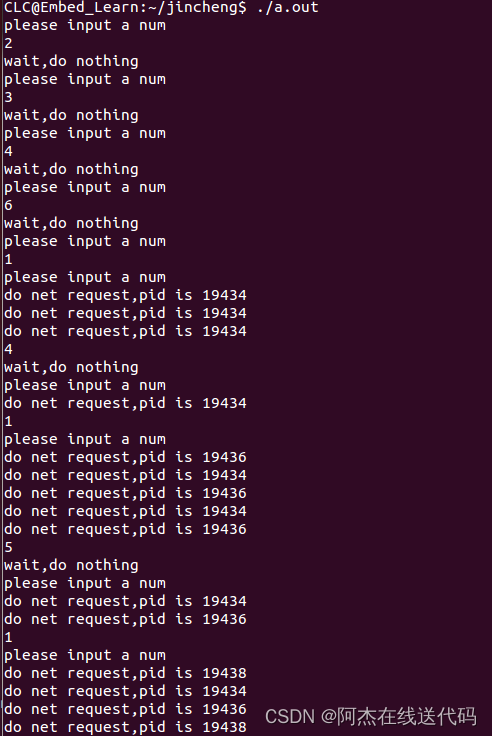
父子进程两者都是同时运行,父进程一直监测用户输入,当有客户端来时,创建子进程服务于客户端。父进程只检测什么也不干。这里我们可以看出当未创建服务端时,父进程一直在等待输入,当服务端来临时,立刻创建一个子进程,同时父进程也在运行等待新的输入,最后我们输入三个1意味着创建了三个子进程,这三个子进程同时运行。
!!!核心:创建子进程时,子进程copy了父进程的代码部分存到存储器,这时共有两份数据同时运行。
不妨,我们来验证一下父子进程同时在运行的结果:
- #include
- #include
- #include
- int main()
- {
- pid_t pid;
- pid = fork();
- if(pid>0)
- {
- while(1)
- {
- printf("this is father fork,pid is %d\n",getpid());
- sleep(1);
- }
- }
- else if(pid == 0)
- {
- while(1)
- {
- printf("this is fchild fork,pid is %d\n",getpid());
- sleep(1);
- }
- }
- return 0;
- }
运行结果:

这里我们可以看到父子进程同时运行,在争夺CPU的资源 谁先执行取决于进程的调度
2.一个进程要执行一个不同的程序,这对shell常见的情况。在这种情况下,子进程从fork返回后立即调用exec(后续提及再补充)
fork总结

vfork函数
那vfork和fork有什么区别呢?
区别一:vfork直接使用父进程存储空间,不拷贝
区别二:vfork保证子进程先运行,当子进程调用exit()退出后,父进程再运行下面我们来验证一下:
- #include
- #include
- #include
- int main()
- {
- pid_t pid;
- pid = vfork();
- int cnt = 0;
- if(pid>0)
- {
- while(1)
- {
- printf("this is father fork,pid is %d\n",getpid());
- sleep(1);
- printf("cnt = %d\n",cnt);
- }
- }
- else if(pid == 0)
- {
- while(1)
- {
- printf("this is child fork,pid is %d\n",getpid());
- sleep(1);
- cnt++;
- if(cnt == 3)
- {
- break;//非正常退出
- }
- }
- }
- return 0;
- }
运行结果:

- #include
- #include
- #include
- #include
- int main()
- {
- pid_t pid;
- int cnt = 0;
- pid = vfork();
- if(pid>0)
- {
- while(1)
- {
- printf("this is father fork,pid is %d\n",getpid());
- sleep(1);
- printf("cnt = %d\n",cnt);
- }
- }
- else if(pid == 0)
- {
- while(1)
- {
- printf("this is child fork,pid is %d\n",getpid());
- sleep(1);
- cnt++;
- if(cnt == 3)
- {
- exit(0);//正常退出
- }
- }
- }
- return 0;
- }

这里先让子进程运行三次,然后退出执行父进程。这里我们可以看出当程序异常退出时会改变cnt的值,我们必须使用exit使程序正常退出。
二、进程退出
正常退出(5个)
1.Main函数调用return2.进程调用exit(),标准c库3.进程调用_exit()或者_Exit(),属于系统调用补充:
1.进程最后一个线程返回2.最后一个线程调用pthread_exit
 1.exit和return:
在main()函数中,调用exit 0 和调用 return 0 的作用和结果是一样的。exit后,程序会调用atexit标记的退出处理函数,和调用fclose关闭文件描述符。这样才会退出程序。
使用方法:
对于return : return 0;
对于exit : exit(0);
2._exit和_Exit
_exit和_Exit是一样的。在系统看来,属于正常退出。但是比起exit,这两个退出函数不会调用atexit标记的退出处理函数,也不会调用fclose关闭文件描述符。
使用方法:
对于_exit: _exit(0);
对于_Exit: _Exit(0);
异常退出(3个)
1.调用abort2.当进程收到某些信号时,如ctrl+C3.最后一个线程对取消(cancellation)请求做出响应三、父进程等待子进程退出
不管进程如何终止,最后都会执行内核中的同一段代码。这段代码为相应进程关闭所有打开描述符,释放它所使用的存储器等。
对上述任意一种终止情形,我们都希望终止进程能够通知其父进程它是如何终止的。对于三个终止函数(exit、_exit和_Exit),实现这一点的方法是,将其退出状态(exit status)作为参数传送给函数。在异常终止情况下,内核(不是进程本身)产生一个指示其异常终止原因的终止状态(termination status)。在任意一种情况下,该终止进程的父进程都能用wait或 waitpid函数(在下一节说明)取得其终止状态。1、父进程等待子进程的目的
进程创建子进程的目的就是能够让子进程去响应某个事件,并且做出相应的处理。如果父进程关心子进程对于事件的处理情况,那么父进程则可收集子进程的退出状态来判断。
2、父进程等待子进程的方式
- 当调用vfork函数来创建子进程时,父进程将会等待子进程执行完毕退出后,才会执行。然而调用fork函数来创建子进程后,父进程和子进程谁先执行是不确定的,并且会不断地抢占CPU资源,交替地执行。
- 不过,在调用fork创建子进程地条件下,内核提供了让子进程先运行的方法——wait(int *status)。在父进程中调用wait(int status)后,内核会让父进程进入休眠状态,让子进程先运行,并且收集子进程退出的状态exit(int status)。
- 子进程调用exit(int status)正常退出——> 传递status到父进程wait(int status) ,状态码status由WEXITSTATUS(int status)来解析。
 如果子进程退出状态不被收集,该子进程就会变成僵尸进程 (zombie进程)僵尸进程 。
 - #include
- #include
- #include
- #include "stdlib.h"
- int main()
- {
- pid_t pid;
- int cnt = 0;
- pid = vfork();
- if(pid>0)
- {
- while(1)
- {
- printf("cnt = %d\n",cnt);
- printf("this is father fork,pid is %d\n",getpid());
- sleep(1);
- }
- }
- else if(pid == 0)
- {
- while(1)
- {
- printf("this is child fork,pid is %d\n",getpid());
- sleep(1);
- cnt++;
- if(cnt == 3)
- {
- exit(0);
- }
- }
- }
- return 0;
- }

3、父进程等待子进程退出并收集子进程的退出状态的相关函数如下:
相关函数1:wait
函数原型: pid_t wait(int *status);
status参数:
是一个整形数指针,非空:子进程退出状态放在它所指向的地址中。空:不关心退出状态。
使用说明:
1.如果其所有子进程都还在运行,则阻塞。
2.如果一个子进程已终止,正等待父进程获取其终止状态,则取得该子进程的终止状态立即返回。
3.如果它没有任何子进程,则立即出错返回。
- 情况一:status为空,不关心退出状态
- #include
- #include
- #include
- #include "stdlib.h"
- int main()
- {
- pid_t pid;
- int cnt = 0;
- pid = fork();
- if(pid>0)
- {
- wait(NULL);
- while(1)
- {
- printf("cnt = %d\n",cnt);
- printf("this is father fork,pid is %d\n",getpid());
- sleep(1);
- }
- }
- else if(pid == 0)
- {
- while(1)
- {
- printf("this is child fork,pid is %d\n",getpid());
- sleep(1);
- cnt++;
- if(cnt == 5)
- {
- exit(0);
- }
- }
- }
- return 0;
- }


这里我们可以看到程序的运行结果,父进程先等待子进程运行,子进程运行完成后,父进程运行,并释放子进程,此时系统中无僵尸进程。
- 情况二:status为非空,子进程退出状态放在它所指向的地址中。
- #include
- #include
- #include
- #include "stdlib.h"
- int main()
- {
- pid_t pid;
- int cnt = 0;
- int status = 10;
- pid = fork();
- if(pid>0)
- {
- wait(&status);
- printf("child quit,child status = %d\n",WEXITSTATUS(status));
- while(1)
- {
- printf("cnt = %d\n",cnt);
- printf("this is father fork,pid is %d\n",getpid());
- sleep(1);
- }
- }
- else if(pid == 0)
- {
- while(1)
- {
- printf("this is child fork,pid is %d\n",getpid());
- sleep(1);
- cnt++;
- if(cnt == 5)
- {
- exit(3);
- }
- }
- }
- return 0;
- }
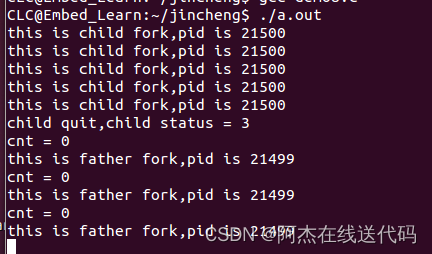
这里为什么父进程要等待子进程退出?父进程给子进程交代任务,不管干没干完什么退出情况都要给父进程一个退出码,要调用WEXITSTATUS(status)函数对退出码进行解析。
wait函数的三大功能:
(1)如果其所有子进程都还在运行,则阻塞。
(2)如果一个子进程已终止,正等待父进程收集其状态则取得该子进程终止状态并立即返回。
(3)如果它没有任何子进程则立即返回出错。wait和waitpid的区别
wait使调用者阻塞(即父进程不运行等待子进程结束运行),waitpid有一个选项可以使调用者不阻塞。
相关函数2:waitpid
函数原型:
pid_t waitpid(pid_t pid, int * status, int options);
参数说明:
status参数:
是一个整形数指针,非空:子进程退出状态放在它所指向的地址中。空:不关心退出状态。
pid参数: (进程的pid号,在父进程调用,这个pid即为子进程pid号)
pid == -1 等待任一子进程。就这一方面而言,waitpid与wait等效 pid > 0 等带其进程ID与pid相等的子进程 pid == 0 等待其组ID等于调用进程组ID的任一子进程。 pid < -1 等待其组ID等于pid绝对值的任一子进程 option参数: 多用WNOHANG(不阻塞)
WCONTINUED 若实现支持作业控制,那么由pid指定的任一子进程在暂停后已经继续,但其状态尚未报告,则返回其状态 WNOHANG 若由pid指定的子进程并不是立即可用的,则waitpid不阻塞,此时其返回值为0 WUNTRACED 若某实现支持作业控制,而由pid指定的任一子进程已处于暂停状态,并且其状态自暂停以来还未报告过,则返回其状态。WIFSTOPPED宏确定返回值是否对应于一个暂停子进程 - #include
- #include
- #include
- #include "stdlib.h"
- int main()
- {
- pid_t pid;
- int cnt = 0;
- int status = 10;
- pid = fork();
- if(pid>0)
- {
- // wait(&status);
- waitpid(pid,&status,WNOHANG);//使用WNOHANG不阻塞
- printf("child quit,child status = %d\n",WEXITSTATUS(status));
- while(1)
- {
- printf("cnt = %d\n",cnt);
- printf("this is father fork,pid is %d\n",getpid());
- sleep(1);
- }
- }
- else if(pid == 0)
- {
- while(1)
- {
- printf("this is child fork,pid is %d\n",getpid());
- sleep(1);
- cnt++;
- if(cnt == 5)
- {
- exit(3);
- }
- }
- }
- return 0;
- }


这里我们让父子进程一起运行,用到waitpid这个api,那这个子进程就变成了僵尸进程。
孤儿进程
- 父进程如果不等待子进程退出,在子进程结束之前就结束自己的生命,此时子进程叫做孤儿进程。
- Linux系统避免存在过多孤儿进程,init进程收留孤儿进程,变成孤儿进程的父进程。
- #include
- #include
- #include
- #include "stdlib.h"
- int main()
- {
- pid_t pid;
- int cnt = 0;
- int status = 10;
- pid = fork();
- if(pid>0)
- {
- printf("this is father fork,pid is %d\n",getpid());
- }
- else if(pid == 0)
- {
- while(1)
- {
- printf("this is child fork,pid is %d\nmy father pid = %d\n",getpid(),getppid());
- sleep(1);
- cnt++;
- if(cnt == 5)
- {
- exit(3);
- }
- }
- }
- return 0;
- }
运行结果:

首先父进程先运行,子进程与父进程同时运行,过一会父进程退出,此时子进程变为孤儿进程,系统默认把init进程作为子进程的父进程(init进程默认pid为1)。
四、 一些API
exec族函数
exec族函数函数的作用:
我们用fork函数创建新进程后,经常会在新进程中调用exec函数去执行另外一个程序。当进程调用exec函数时,该进程被完全替换为新程序。因为调用exec函数并不创建新进程,所以前后进程的ID并没有改变。 exec族函数定义:
可以通过这个网站查询:linux函数查询
功能:
在调用进程内部执行一个可执行文件。可执行文件既可以是二进制文件,也可以是任何Linux下可执行的脚本文件。
函数族:
exec函数族分别是:execl, execlp, execle, execv, execvp, execvpe
函数原型:- #include
- extern char **environ;
- int execl(const char *path, const char *arg, ...);
- int execlp(const char *file, const char *arg, ...);
- int execle(const char *path, const char *arg,..., char * const envp[]);
- int execv(const char *path, char *const argv[]);
- int execvp(const char *file, char *const argv[]);
- int execvpe(const char *file, char *const argv[],char *const envp[]);
返回值:
exec函数族的函数执行成功后不会返回,调用失败时,会设置errno并返回-1,然后从原程序的调用点接着往下执行。
参数说明:
path:可执行文件的路径名字
arg:可执行程序所带的参数,第一个参数为可执行文件名字,没有带路径且arg必须以NULL结束
file:如果参数file中包含/,则就将其视为路径名,否则就按 PATH环境变量,在它所指定的各目录中搜寻可执行文件。exec族函数参数极难记忆和分辨,函数名中的字符会给我们一些帮助:
l : 使用参数列表
p:使用文件名,并从PATH环境进行寻找可执行文件
v:应先构造一个指向各参数的指针数组,然后将该数组的地址作为这些函数的参数。
e:多了envp[]数组,使用新的环境变量代替调用进程的环境变量这段代码我们在自己写cp指令时用到过,作用是打印出命令行所有指令。
- #include
- int main(int argc,char *argv[])
- {
- int i = 0;
- for(i = 0; i < argc; i++)
- {
- printf("argv[%d]: %s\n",i,argv[i]);
- }
- return 0;
- }
运行结果:

当execl调用失败后,返回-1,并接着未执行的程序往下执行。执行成功的话不往下运行。
perror(“why”); //如果execl返回出错,返回了一个error,可以被这perror( )解析出来。
execl
函数原型:
int execl(const char * path,const char * arg,…);
参数说明:
path:要执行的程序路径。
arg :程序的第0个参数,即程序名自身。相当于argv【0】。
... :命令行参数列表。调用相应程序时有多少命令行参数,就需要有多少个输入参数项。注意:在使用此类函数时,在所有命令行参数的最后应该增加一个空的参数项(NULL),表明命令行参数结束。
- #include
- #include
- #include
- //函数原型:int execl(const char *path, const char *arg, ...);
- int main(void)
- {
- printf("before execl\n");
- //"echoarg":程序名 "abc":第一个参数
- if(execl("./echoarg","echoarg","abc",NULL) == -1)
- {
- printf("execl failed!\n");
- perror("why"); //如果execl返回出错,返回了一个error,可以被这perror( )解析出来
- }
- printf("after execl\n");
- return 0;
- }
运行结果:

- ls是否也可被执行呢?我们用whereis ls查看ls绝对路径。

- #include
- #include
- #include
- //函数原型:int execl(const char *path, const char *arg, ...);
- int main(void)
- {
- printf("before execl\n");
- if(execl("/bin/ls","ls",NULL,NULL) == -1)
- {
- printf("execl failed!\n");
- perror("why"); //如果execl返回出错,返回了一个error,可以被这perror( )解析出来
- }
- printf("after execl\n");
- return 0;
- }
运行结果:
 这里我们让excel运行ls程序,我们查看ls的绝对路径,用whereis ls,用族函数打开与用命令行打开运行的结果是一样的。如果要实现ls -l呢,很简单,在excel后面给ls传参即可,第三个参数变为“-l”即可。
 - #include
- #include
- #include
- //函数原型:int execl(const char *path, const char *arg, ...);
- int main(void)
- {
- printf("before execl\n");
- if(execl("/bin/ls","ls","-l",NULL) == -1)
- {
- printf("execl failed!\n");
- perror("why"); //如果execl返回出错,返回了一个error,可以被这perror( )解析出来
- }
- printf("after execl\n");
- return 0;
- }

同样的操作我们来查看系统时间:
- #include
- #include
- #include
- //函数原型:int execl(const char *path, const char *arg, ...);
- int main(void)
- {
- printf("this pro system date:\n");
- if(execl("/bin/date","date",NULL,NULL) == -1)
- {
- printf("execl failed!\n");
- perror("why"); //如果execl返回出错,返回了一个error,可以被这perror( )解析出来
- }
- printf("after execl\n");
- return 0;
- }
同样的步骤,先用whereis date查看date的绝对路径,其次date不需要其他参数,第三个参数为NULL,运行该程序,execl自动调用date函数。

execlp
那么每次都需要通过whereis来查找变量绝对路径是不是太麻烦呢,我们可以使用函数,execlp通过环境变量来查找可执行文件。
如果参数file中包含/,则就将其视为路径名,否则就按 PATH环境变量,在它所指定的各目录中搜寻可执行文件。举个例子,PATH=/bin:/usr/bin
- #include
- #include
- #include
- //函数原型:int execl(const char *path, const char *arg, ...);
- int main(void)
- {
- printf("this pro system date:\n");
- if(execlp("date","date",NULL,NULL) == -1)
- {
- printf("execl failed!\n");
- perror("why"); //如果execl返回出错,返回了一个error,可以被这perror( )解析出来
- }
- printf("after execl\n");
- return 0;
- }
运行结果:

从上面的实验结果可以看出,上面的execlp函数带p,所以能通过环境变量PATH查找到可执行文件ps
补充:PATH环境变量
可执行程序的搜索目录,可执行程序包括Linux系统命令和用户的应用程序。如果可执行程序的目录不在PATH指定的目录中,执行时需要指定目录。
1)PATH环境变量存放的是目录列表,目录之间用冒号:分隔,最后的圆点.表示当前目录。
export PATH=目录1:目录2:目录3:......目录n:.
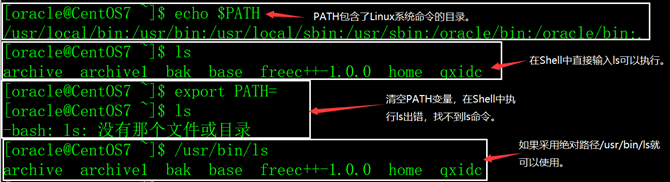
2)PATH缺省包含了Linux系统命令所在的目录(/usr/local/bin:/usr/bin:/usr/local/sbin:/usr/sbin),如果不包含这些目录,Linux的常用命令也无法执行(要输入绝对路径才能执行)。
示例:
3)在用户的.bash_profile文件中,会对PATH进行扩充,如下:
export PATH=$PATH:$HOME/bin
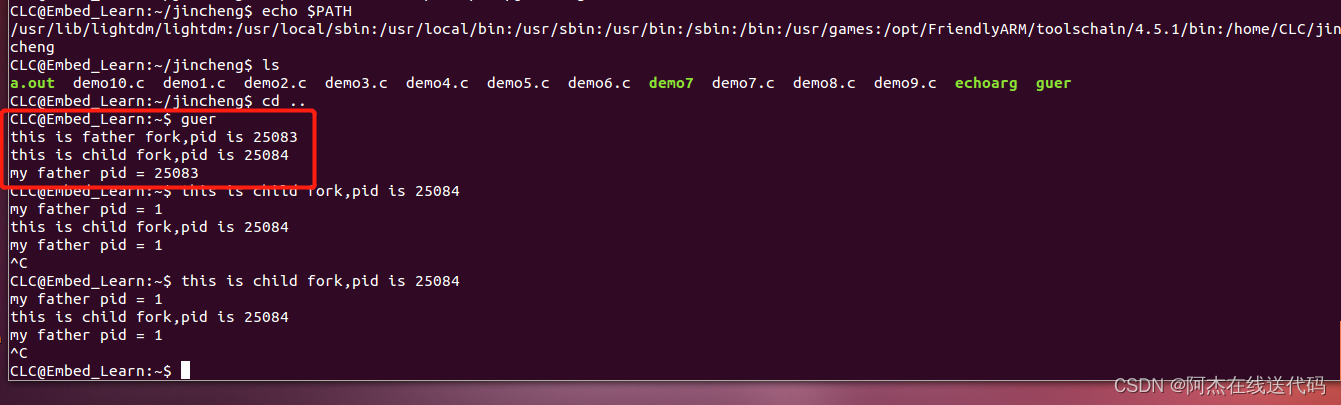
4)如果PATH变量中没有包含圆点.,执行当前目录下的程序需要加./或使用绝对路径。
示例:

查看环境变量
 修改环境变量(扩充)
 被扩充的目录包含的文件即使不在该目录下 也可以执行
  execv:
execv函数跟execl不同之处就是后面的参数用一个指针数组来保存起来
- #include
- #include
- #include
- int main(void)
- {
- printf("this is execv!:\n");
- char *arv[] = {"ls","-l",NULL};
- if(execv("/bin/ls",arv) == -1)
- {
- printf("execl failed!\n");
- perror("why"); //如果execl返回出错,返回了一个error,可以被这perror( )解析出来
- }
- printf("after execl\n");
- return 0;
- }
运行结果:

execvp:
execv跟execvp的区别也是一个需要加路径,一个不需要加路径
- #include
- #include
- #include
- int main(void)
- {
- printf("this is execv!:\n");
- char *arv[] = {"ls","-l",NULL};
- if(execvp("ls",arv) == -1)
- {
- printf("execl failed!\n");
- perror("why"); //如果execl返回出错,返回了一个error,可以被这perror( )解析出来
- }
- printf("after execl\n");
- return 0;
- }
exec配合fork使用
实现功能,当父进程检测到输入为1的时候,创建子进程把配置文件的字段值修改掉
- #include
- #include
- #include
- int main()
- {
- pid_t pid;
- int data;
- while(1)//父进程一直存在检测用户输入
- {
- printf("please input a numner\n");
- scanf("%d",&data);
- if(data == 1)//客户端有输入
- {
- pid = fork();//来一个客户则创建一个子进程来执行请求
- if(pid>0)
- {
- }
- else if(pid == 0)//子进程运行,服务客户端
- {
- execl("./changedata","changedata","config.txt",NULL);
- }//gcc changedata.c -o changedata
- }
- else
- {
- printf("wait,do nothing\n");
- }
- }
- return 0;
- }
changedata为:
- #include
- #include
- #include
- #include
- #include
- #include
- #include
- int main(int argc,char* argv[2])
- {
- char* readbuf;
- int fdScr;
- if(argc != 2)//命令行必须输入两个操作命令
- {
- printf("input error\n");
- exit(-1);
- }
- fdScr = open(argv[1],O_RDWR);
- int size = lseek(fdScr,0,SEEK_END);//lseek反应的是文件偏移量
- lseek(fdScr,0,SEEK_SET);//光标重新移到文件头
- readbuf = (char*)malloc(sizeof(char)*size);//而readbuf需要开辟(偏移量*字节数)
- read(fdScr,readbuf,size*sizeof(char));//把目标文件读到readbuf里面
- char* p = strstr(readbuf,"LENG=");//在目标文件里面查找“LENG=”字符
- if(p == NULL)
- {
- printf("Not Found\n");
- exit(-1);
- }
- p = p + strlen("LENG=");//如果找到该字符串,则strstr函数返回该字符串开始的位置,我们让该字符串偏移到我们想要的位置
- *p = '9';//修改我们需要的文件配置,以上均是把静态数据区的文件复制到动态数据区,修改以后的值是在动态数据区的readbuf,文件里面存的都是字>符
- lseek(fdScr,0,SEEK_SET);//光标移到文件头
- write(fdScr,readbuf,strlen(readbuf));//把readbuf里面的值重新写到该文件从头覆盖
- close(fdScr);//关闭该文件,并将数据同步更新到源文件
- return 0;
- }
system函数
1.system函数

system的返回值如下:
成功的话,返回进程的状态值;当sh不能执行时,返回127,失败则返回-1详细请参考精彩博文:
system函数精彩讲解system函数例子:在exec配合fork使用的例子上修改
- #include
- #include
- #include
- int main()
- {
- pid_t pid;
- int data;
- while(1)//父进程一直存在检测用户输入
- {
- printf("please input a numner\n");
- scanf("%d",&data);
- if(data == 1)//客户端有输入
- {
- pid = fork();//来一个客户则创建一个子进程来执行请求
- if(pid>0)
- {
- }
- else if(pid == 0)//子进程运行,服务客户端
- {
- // execl("./changedata","changedata","config.txt",NULL);
- system("./changedata config.txt");
- }
- }
- else
- {
- printf("wait,do nothing\n");
- }
- }
- return 0;
- }

- #include
- #include
- #include
- int main(void)
- {
- printf("this is execv!:\n");
- // char *arv[] = {"ls","-l",NULL};
- // if(execvp("ls",arv) == -1)
- if(system("ps") == -1)
- {
- printf("execl failed!\n");
- perror("why"); //如果execl返回出错,返回了一个error,可以被这perror( )解析出来
- }
- printf("after execl\n");
- return 0;
- }
 与 exec函数不一样的是 调用system函数 后面的程序也会被执行 而调用exec函数,exec函数后面的程序不被执行。
其实system函数是封装好的exec函数,相比之下其实更多人喜欢用system函数。
popen函数

popen函数比system函数在应用中的好处就是可以获取到运行的输出结果。(system函数获取不了运行的输出结果,原因是system函数封装的就是exce函数,成功运行的话 不会返回)
函数原型:
#include “stdio.h”
FILE popen( const char command, const char* mode ) (FILE返回的是流,用fread读取)
参数说明:
command: 是一个指向以 NULL 结束的 shell 命令字符串的指针。这行命令将被传到 bin/sh 并使用 -c 标志,shell 将执行这个命令。
mode: 只能是读或者写中的一种,得到的返回值(标准 I/O 流)也具有和 type 相应的只读或只写类型。如果 type 是 “r” 则文件指针连接到 command 的标准输出;如果 type 是 “w” 则文件指针连接到 command 的标准输入。
返回值:
如果调用成功,则返回一个读或者打开文件的指针,如果失败,返回NULL,具体错误要根据errno判断
精彩博文请查看:
popen函数直接上代码:
- #include
- #include
- #include
- #include
- int main()
- {
- //size_t fread(void *ptr, size_t size, size_t nmemb, FILE *stream);
- printf("this is popen!\n");
- FILE *fp;
- char *readBuf;
- int n_read;
- int n_lseek;
- fp = popen("ps","r");
- n_lseek = fseek(fp,0,SEEK_END);
- readBuf = (char *)malloc(sizeof(char)*n_lseek+5);
- fseek(fp,0,SEEK_SET);
- n_read = fread(readBuf,1,1024,fp);
- printf("n_read:%d,readBuf:%s\n",n_read,readBuf);
- return 0;
- }
运行结果:

-
相关阅读:
Redis——事务,锁机制,秒杀案例 !!!!
(附源码)python云顶之弈数据分析系统 毕业设计451545
pyModbusTCP 读取零点 CN- 8031 /CT-121F DI 数字输入
cuML机器学习GPU库
Leetcode | 560. 和为 K 的子数组
查看、校验、归档… 带你掌握 openGauss 账本数据库
揭开ChatGPT面纱(1):准备工作(搭建开发环境运行OpenAI Demo)
SpringBoot之WebSocket服务搭建
MySQL-数据操作-分组查询-连接查询-子查询-
解决SpringBoot 中Controller层加入RequestMapping导致HTML页面的静态文件路径变化问题
- 原文地址:https://blog.csdn.net/weixin_50546241/article/details/126063481
