-
使用SWIG编写python的扩展
环境:python3.8.5 ,64位,Visual Studio 2017,SWIG 4.0.2
一,安装SWIG:https://www.swig.org/download.html
下载windows 预编译好的文件,解压后把swig.exe所在目录添加到环境变量Path中,验证:
打开cmd,敲入swig -help
二,编写C++类,如:
CppDll.h:
- #pragma once
- #include
- #include
- struct cppStruct
- {
- int a = 0;
- int b = 2;
- };
- class CppDllClass
- {
- public:
- int addFunc(int a, int b);
- std::string getName();
- void setName(std::string newname)
- {
- m_name = newname;
- }
- cppStruct getS()
- {
- auto a = cppStruct();
- a.a = 100;
- return a;
- }
- std::vector<int> getV()
- {
- std::vector<int> ret;
- ret.push_back(9);
- return ret;
- }
- // 如果成员变量要暴露给python,则改为public
- private:
- std::string m_name = "default name";
- };
CppDll.cpp:
- #include "CppDll.h"
- int CppDllClass::addFunc(int a, int b)
- {
- return a+b;
- }
- std::string CppDllClass::getName()
- {
- return m_name + "tt";
- }
三,编写.i文件:
- %include "std_string.i"
- %include "std_vector.i"
- using namespace std;
- namespace std {
- %template(IntVector) vector<int>;
- }
- %module CppDll
- %{
- #include "CppDll.h"
- %}
- %include "CppDll.h"
保存到CppDll.cpp所在目录;
关于更多模板类的使用,请参考:用SWIG向Python提供C++里STL的容器 · 零壹軒·笔记
https://www.swig.org/Doc3.0/SWIGPlus.html
四,打开cmd,进入CppDll.cpp所在目录,敲入:
swig -python -c++ CppDll.i
命令执行完后会在CppDll.cpp所在目录 生成CppDll_wrap.cxx、CppDll.py文件
五,下一步编译成python能导入的模块文件(.pyd).
新建一个.py文件,名字随意(必须是英文),例如compile.py,输入以下内容:
- from distutils.core import setup, Extension
- CppDll_module = Extension('_CppDll',
- sources=['CppDll_wrap.cxx', 'CppDll.cpp'],
- )
- setup (name = 'CppDll',
- version = '0.1',
- author = "beshar",
- description = """Simple swig example from docs""",
- ext_modules = [CppDll_module],
- py_modules = ["CppDll"],
- )
这里模块名为CppDll,按照实际情况改为自己的模块名。
六,打开cmd,进入compile.py所在目录,敲入:
D:\ProgramData\anaconda3\python.exe compile.py build_ext --inplace
我的机器上,命令执行成功后,会生成_CppDll.cp38-win_amd64.pyd,手动改为_CppDll.pyd
七,验证C++模块
打开cmd,cd到_CppDll.pyd所在目录,敲入python,进入python开发环境,然后导入模块并调用C++模块的函数:
- import CppDll
- class1 = CppDll.CppDllClass()
- class1.setName('name1')
- class1.getName()
八,.pyd的也可以用vs来生成:
新建一个c++ dll工程,把CppDll.cpp,CppDll_wrap.cxx添加到工程里,修改工程属性:

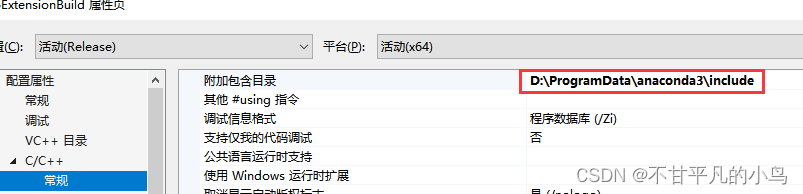
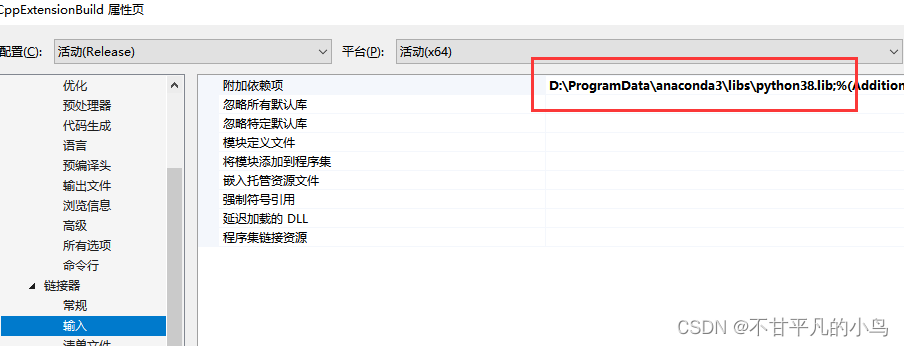
由于安装python的时候没有安装Debug的库,因此这里使用Release配置。
点击生成,即可生成.pyd文件。这一步可以替代上文的第五~第七步。
-
相关阅读:
分布式锁3: zk实现分布式锁
数据结构——二叉搜索树
电脑安全模式怎么进?掌握这4个操作技巧!
Elasticsearch-基础介绍及索引原理分析
高级 ECharts 技巧:自定义图表主题与样式
算法44-异或运算|交换int|找出出现奇数次的数|提取右边以一个1
内存完整性已关闭,你的设备可能易受攻击已解决之处理方法
Haddop 安装之 JDK
二十五、DSL查询文档(全文检索查询、精确查询、地理查询、复合查询)
【编译原理】Antlr 入门使用
- 原文地址:https://blog.csdn.net/zhushentian/article/details/126102226
