-
JavaSE:String类
文章目录
前言
要考核了,把se复习一下,顺便写个博客巩固一下知识。
一、String类的重要性
在C语言中已经涉及到字符串了,但是在C语言中要表示字符串只能使用字符数组或者字符指针,可以使用标准库提供的字符串系列函数完成大部分操作,但是这种将数据和操作数据方法分离开的方式不符合面向对象的原则,而字符串应用又非常广泛,因此Java语言专门提供了String类。
在Java中,没有所谓的 “\0” 是字符串的结尾。
二、常用方法
1、字符串构造
String类常用的构造方法有三种:
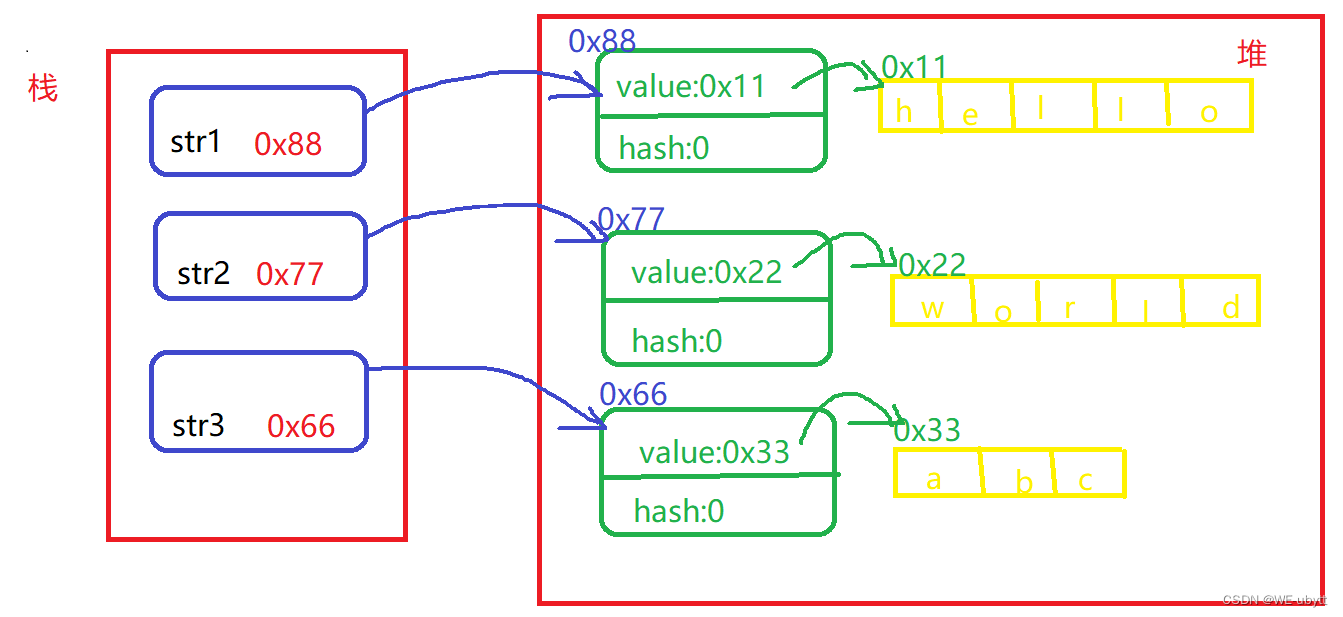
例1:public static void main(String[] args) { // 1、直接常量串构造 String str1 = "hello"; System.out.println(str1); // hello // 2、直接new String对象 String str2 = new String("world"); System.out.println(str2); // world // 3、使用字符数组进行构造 char[] chars = {'a', 'b', 'c'}; String str3 = new String(chars); System.out.println(str3); // abc }- 1
- 2
- 3
- 4
- 5
- 6
- 7
- 8
- 9
- 10
- 11
- 12
- 13
- 14
注意:
1、String是引用类型,内部并不存储字符串本身
例2:String类实例变量public final class String implements java.io.Serializable, Comparable<String>, CharSequence { /** The value is used for character storage. */ private final char value[]; /** Cache the hash code for the string */ private int hash; // Default to 0 ………… }- 1
- 2
- 3
- 4
- 5
- 6
- 7
- 8
- 9
- 10
从例2看看出,String类中,主要的两个属性为:value[]和hash,hash我们暂时不需要了解,而value是字符数组。
对于例1,其图解如下:
2、在Java中 “” 引起来的也是String类型对象。public static void main(String[] args) { System.out.println("hello".length()); // 5 }- 1
- 2
- 3
2、String对象的比较
字符串的比较是常见的操作之一,比如:字符串排序。Java中总共提供了四种方式。
(1)“==”
==比较是否引用同一个对象
注意:对于内置类型,比较的是变量中的值;对于引用类型比较的是引用中的地址。例3:"=="比较
public static void main(String[] args) { String str1 = new String("hello"); String str2 = new String("hello"); String str3 = new String("world"); String str4 = str1; System.out.println(str1 == str2); // false System.out.println(str1 == str3); // false System.out.println(str1 == str4); // true }- 1
- 2
- 3
- 4
- 5
- 6
- 7
- 8
- 9
(2)equals
public boolean equals(Object anObject) 方法:按照字典序比较
字典序:字符大小的顺序
String类重写了父类Object中equals方法,Object中equals默认按照==比较,String重写equals方法后,按照字典序进行比较。①源码
例4:String重写的equals方法源码分析
public boolean equals(Object anObject) { //判断两个对象的引用地址是否相同 if (this == anObject) { return true; } //在判断这个对象是不是String类的实现 if (anObject instanceof String) { //将这个对象转化为String String anotherString = (String)anObject; //获取这个长度 int n = value.length; //判断长度是否相等 if (n == anotherString.value.length) { //转化为字符数组 char v1[] = value; char v2[] = anotherString.value; int i = 0; //按照字典序,从前往后逐个比较 while (n-- != 0) { if (v1[i] != v2[i]) //两个字符数组中有不想同的,即为两个字符串对象不相等 return false; i++; } //两个字符数组中全部想同的,即为两个字符串对象相等 return true; } } //这个对象不是String对象的实现,既不是字符串,不相等 return false; }- 1
- 2
- 3
- 4
- 5
- 6
- 7
- 8
- 9
- 10
- 11
- 12
- 13
- 14
- 15
- 16
- 17
- 18
- 19
- 20
- 21
- 22
- 23
- 24
- 25
- 26
- 27
- 28
- 29
- 30
- 31
- 32
- 33
- 34
②样例
例5:equals比较
public static void main(String[] args) { String str1 = new String("hello"); String str2 = new String("hello"); String str3 = new String("world"); System.out.println(str1.equals(str2)); // true System.out.println(str1.equals(str3)); // false }- 1
- 2
- 3
- 4
- 5
- 6
- 7
(3)compareTo
public int compareTo(String anotherString) 方法:按照字典序进行比较
compareTo返回的是int类型,具体比较方式:(类比C语言的strcmp)
- 先按照字典次序大小比较,如果出现不等的字符,直接返回这两个字符的大小差值;
- 如果前k个字符相等(k为两个字符长度最小值),返回两个字符串长度差值。
①源码
例6:String重写的compareTo方法源码
public int compareTo(String anotherString) { int len1 = value.length; int len2 = anotherString.value.length; int lim = Math.min(len1, len2); char v1[] = value; char v2[] = anotherString.value; int k = 0; while (k < lim) { char c1 = v1[k]; char c2 = v2[k]; if (c1 != c2) { return c1 - c2; } k++; } return len1 - len2; }- 1
- 2
- 3
- 4
- 5
- 6
- 7
- 8
- 9
- 10
- 11
- 12
- 13
- 14
- 15
- 16
- 17
- 18
- 19
②样例
例7:compareTo比较
public static void main(String[] args) { String str1 = new String("abc"); String str2 = new String("ac"); String str3 = new String("abc"); String str4 = new String("abcde"); System.out.println(str1.compareTo(str2)); // -1 System.out.println(str1.compareTo(str3)); // 0 System.out.println(str1.compareTo(str4)); // -2 }- 1
- 2
- 3
- 4
- 5
- 6
- 7
- 8
- 9
(4)compareToIgnoreCase
int compareToIgnoreCase(String str) 方法:与compare方式相同,但是忽略大小写比较。
①源码
例8:String重写的compareToIgnoreCase方法源码
public int compareToIgnoreCase(String str) { return CASE_INSENSITIVE_ORDER.compare(this, str); } // CASE_INSENSITIVE_ORDER对应的代码 public static final Comparator<String> CASE_INSENSITIVE_ORDER = new CaseInsensitiveComparator(); private static class CaseInsensitiveComparator implements Comparator<String>, java.io.Serializable { // use serialVersionUID from JDK 1.2.2 for interoperability private static final long serialVersionUID = 8575799808933029326L; public int compare(String s1, String s2) { int n1 = s1.length(); int n2 = s2.length(); int min = Math.min(n1, n2); for (int i = 0; i < min; i++) { char c1 = s1.charAt(i); char c2 = s2.charAt(i); if (c1 != c2) { c1 = Character.toUpperCase(c1); c2 = Character.toUpperCase(c2); if (c1 != c2) { c1 = Character.toLowerCase(c1); c2 = Character.toLowerCase(c2); if (c1 != c2) { // No overflow because of numeric promotion return c1 - c2; } } } } return n1 - n2; }- 1
- 2
- 3
- 4
- 5
- 6
- 7
- 8
- 9
- 10
- 11
- 12
- 13
- 14
- 15
- 16
- 17
- 18
- 19
- 20
- 21
- 22
- 23
- 24
- 25
- 26
- 27
- 28
- 29
- 30
- 31
- 32
- 33
- 34
②样例
例9:compareToIgnoreCase比较
public static void main(String[] args) { String str1 = new String("hello"); String str2 = new String("hello"); String str3 = new String("Hello"); System.out.println(str1.compareToIgnoreCase(str2)); // 0 System.out.println(str1.compareToIgnoreCase(str3)); // 0 }- 1
- 2
- 3
- 4
- 5
- 6
- 7
3、字符串查找
(1)charAt()
①声明
char charAt(int index)- 1
②作用
方法返回 index 处的字符。如果 index 为负数或者越界,抛出 IndexOutOfBoundsException 异常。
③样例
例10:
public class Test2 { public static void main(String[] args) { String str = "hello"; char ch = str.charAt(4); System.out.println(ch); // o } }- 1
- 2
- 3
- 4
- 5
- 6
- 7
(2)indexOf()
①声明
int indexOf(int ch) int indexOf(int ch,int fromIndex) int indexOf(String str) int indexOf(String str,int fromIndex)- 1
- 2
- 3
- 4
②作用
- indexOf(int ch):返回 ch 第一次出现的位置,没有则返回-1;
- indexOf(int ch,int fromIndex):从 fromIndex 位置开始找 ch 第一次出现的位置,没有则返回-1;
- indexOf(String str):返回 str 第一次出现的位置,没有则返回-1;
- indexOf(String str,int fromIndex):从 fromIndex 位置开始找 str
第一次出现的位置,没有则返回-1。
③样例
例11:
public class Test2 { public static void main(String[] args) { String str = "hello world"; System.out.println(str.indexOf('h')); // 0 System.out.println(str.indexOf('h',2)); // -1 System.out.println(str.indexOf("world")); // 6 System.out.println(str.indexOf("world",7)); // -1 } }- 1
- 2
- 3
- 4
- 5
- 6
- 7
- 8
- 9
- 10
(3)lastIndexOf()
①声明
int lastIndexOf(int ch) int lastIndexOf(int ch,int fromIndex) int lastIndexOf(String str) int lastIndexOf(String str,int fromIndex)- 1
- 2
- 3
- 4
②作用
- lastIndexOf(int ch):从后往前找,返回 ch 第一次出现的位置,没有则返回-1;
- lastIndexOf(int ch,int fromIndex):从 fromIndex 位置开始,从后往前找 ch
第一次出现的位置,没有则返回-1; - lastIndexOf(String str):从后往前找,返回 str 第一次出现的位置,没有则返回-1;
- lastIndexOf(String str,int fromIndex):从 fromIndex 位置开始,从后往前找 str 第一次出现的位置,没有则返回-1。
③样例
例12:
public class Test2 { public static void main(String[] args) { String str = "hello world"; System.out.println(str.lastIndexOf('h')); // 0 System.out.println(str.lastIndexOf('h',2)); // 0 System.out.println(str.lastIndexOf("world")); // 6 System.out.println(str.lastIndexOf("world",7)); // 6 } }- 1
- 2
- 3
- 4
- 5
- 6
- 7
- 8
- 9
- 10
4、转化
(1)数值与字符串转化
a.数值转字符串(valueOf)
①作用
- String.valueOf(boolean b) : 将 boolean 变量 b 转换成字符串;
- String.valueOf(char c) : 将 char 变量 c 转换成字符串;
- String.valueOf(char[] data) : 将 char 数组 data 转换成字符串;
- String.valueOf(char[] data, int offset, int count) : 将 char 数组 data 中,由 data[offset] 开始取 count 个元素 转换成字符串;
- String.valueOf(double d) : 将 double 变量 d 转换成字符串;
- String.valueOf(float f) : 将 float 变量 f 转换成字符串;
- String.valueOf(int i) : 将 int 变量 i 转换成字符串;
- String.valueOf(long l) : 将 long 变量 l 转换成字符串;
- String.valueOf(Object obj) : 将 obj 对象转换成 字符串, 等于 obj.toString()。
②样例
例13:
public class Test2 { public static void main(String[] args) { int a = 10; double b = 10.0; long c = 1000; boolean d = true; System.out.println(String.valueOf(a)); // 10 System.out.println(String.valueOf(b)); // 10.0 System.out.println(String.valueOf(c)); // 1000 System.out.println(String.valueOf(d)); // true } }- 1
- 2
- 3
- 4
- 5
- 6
- 7
- 8
- 9
- 10
- 11
- 12
- 13
b.字符串转值字(parse)
①作用
- Byte:Byte.parseByte(String s) : 将 s 转换成 byte
- double : Double.parseDouble(String s) : 将 s 转换成 double
- float : Double.parseFloat(String s) : 将 s 转换成 float
- int : Integer.parseInt(String s) : 将 s 转换成 int
- long : Long.parseLong(String s):将 s 转换成 long
②样例
例14:
public class Test2 { public static void main(String[] args) { String a = "10"; String b = "10.0"; String c = "1000"; String d = "true"; System.out.println(Integer.valueOf(a) + 1); // 11 System.out.println(Double.valueOf(b) + 1); // 11.0 System.out.println(Long.valueOf(c) + 1); // 1001 System.out.println(Boolean.valueOf(d)); // true System.out.println(Integer.parseInt(a) + 1); // 11 System.out.println(Double.parseDouble(b) + 1); // 11.0 System.out.println(Long.parseLong(c) + 1); // 1001 System.out.println(Boolean.parseBoolean(d)); // true } }- 1
- 2
- 3
- 4
- 5
- 6
- 7
- 8
- 9
- 10
- 11
- 12
- 13
- 14
- 15
- 16
- 17
- 18
(2)大小写转化
a.小写转大写(toUpperCase)
①声明
字符串.toUpperCase()- 1
②作用
将字符串中的字母全部转换为大写,非字母不受影响
③样例
例15:
public class Test2 { public static void main(String[] args) { String s = "hello"; System.out.println(s.toUpperCase()); // HELLO } }- 1
- 2
- 3
- 4
- 5
- 6
b.大写转小写(toLowerCase)
①声明
字符串.toLowerCase()- 1
②作用
将字符串中的字母全部转换为小写,非字母不受影响
③样例
例16:
public class Test2 { public static void main(String[] args) { String s = "HELLO"; System.out.println(s.toLowerCase()); // hello } }- 1
- 2
- 3
- 4
- 5
- 6
(3)数组与字符串转化
a.字符串转数组(toCharArray)
①声明
char[] toCharArray()- 1
②作用
返回一个字符数组,该字符数组中存放了当前字符串中的所有字符。
③样例
例17:
import java.util.Arrays; public class Test2 { public static void main(String[] args) { String s = "hello"; char[] chars=s.toCharArray(); System.out.println(Arrays.toString(chars)); // [h, e, l, l, o] } }- 1
- 2
- 3
- 4
- 5
- 6
- 7
- 8
- 9
- 10
b.数组转字符串
①样例
例18:
import java.util.Arrays; public class Test2 { public static void main(String[] args) { String s = "hello"; char[] chars=s.toCharArray(); System.out.println(Arrays.toString(chars)); // [h, e, l, l, o] String s1=new String(chars); System.out.println(s1); // hello } }- 1
- 2
- 3
- 4
- 5
- 6
- 7
- 8
- 9
- 10
- 11
- 12
- 13
(4)格式化
①样例
例19:
public class Test2 { public static void main(String[] args) { String s = String.format("%d-%d-%d",2022,6,17); System.out.println(s); // 2022-6-17 } }- 1
- 2
- 3
- 4
- 5
- 6
5、字符串替换
(1)replaceAll
①声明
replaceAll(String regex, String replacement)- 1
②作用
替换所有的指定内容
③样例
例20:
public class Test2 { public static void main(String[] args) { String s = "hello world"; System.out.println(s.replaceAll("o","a")); // hella warld } }- 1
- 2
- 3
- 4
- 5
- 6
(2)replaceFirst
①声明
replaceFirst(String regex, String replacement)- 1
②作用
替换首个内容
③样例
例21:
public class Test2 { public static void main(String[] args) { String s = "hello world"; System.out.println(s.replaceFirst("o","a")); // hella world } }- 1
- 2
- 3
- 4
- 5
- 6
(3)注意
由于字符串是不可变对象,替换不改变当前字符串,而是生成一个新的字符串。
6、字符串拆分
(1)split
①声明
String[].split(String regex) String[].split(String regex, int limit)- 1
- 2
②作用
- String[].split(String regex):将字符串全部拆分;
- String[].split(String regex, int limit):将字符串以指定的格式,拆分为limit组。
③样例
例22:
import java.util.Arrays; public class Test2 { public static void main(String[] args) { String s1 = "hello world hello world hello world"; String[] s2 =s1.split(" "); System.out.println(Arrays.toString(s2)); // [hello, world, hello, world, hello, world] String s3="192.168.1.1"; String[] s4 =s3.split("."); System.out.println(Arrays.toString(s4)); // [] String[] s5 =s3.split("\\."); System.out.println(Arrays.toString(s5)); // [192, 168, 1, 1] String[] s6 =s3.split("\\.",2); System.out.println(Arrays.toString(s6)); // [192, 168.1.1] String s7 = "hello world hello world hello world"; String[] s8 =s7.split("w| "); System.out.println(Arrays.toString(s8)); // [hello, , orld, hello, , orld, hello, , orld] } }- 1
- 2
- 3
- 4
- 5
- 6
- 7
- 8
- 9
- 10
- 11
- 12
- 13
- 14
- 15
- 16
- 17
- 18
- 19
- 20
- 21
- 22
④注意事项
- 字符 “|” ,“*” ,“+” 都得加上转义字符,前加上 “\”;
- 如果是 “\” ,那么就写成 “\\”;
- 如果一个字符串中有多个分隔符,可以用 “|” 作为连字符。
7、字符串截取
(1)substring
①声明
public String substring(int beginIndex) public String substring(int beginIndex, int endIndex)- 1
- 2
②作用
- String substring(int beginIndex):从指定索引截取到结束;
- String substring(int beginIndex, int endIndex):截取部分内容。
③样例
例23:
public class Test2 { public static void main(String[] args) { String s1 = "hello world"; System.out.println(s1.substring(0)); // hello world System.out.println(s1.substring(0, 5)); // hello } }- 1
- 2
- 3
- 4
- 5
- 6
- 7
④注意
substring(0, 5):含0,不含5,区间前闭后开。
8、其他操作方法
(1)trim
①声明
public String trim()- 1
②作用
去掉字符串中的左右空格,保留中间空格
③样例
例24:
public class Test2 { public static void main(String[] args) { String s1 = " hello world "; System.out.println(s1.trim()); // hello world } }- 1
- 2
- 3
- 4
- 5
- 6
9、原理
(1)创建对象的思考
例25:
public class Test2 { public static void main(String[] args) { String s1 = "hello"; String s2 = "hello"; String s3 = new String("hello"); String s4 = new String("hello"); System.out.println(s1 == s2); // true System.out.println(s2 == s3); // false System.out.println(s3 == s4); // false } }- 1
- 2
- 3
- 4
- 5
- 6
- 7
- 8
- 9
- 10
- 11
- 12
对于例25,为什么 s1==s2 而 s3 != s4呢?
在Java程序中,类似于1,2,3,3.14,“hello”等字面类型的常量经常频繁使用,为了使程序的运行速度更快,更节省内存,java为8中基本数据类型和String类都提供了常量池。(2)字符串常量池(StringTable)
在JVM中,为了减少字符串对象的重复创建,维护了一块特殊的内存空间,这块内存空间就被称为字符串常量池。
在JDK1.6及之前,字符串常量池存放在方法区中。到JDK1.7之后,就从方法区中移除了,而存放在堆中。
(3)再谈String对象创建
①直接使用字符串进行赋值
例26:
public class Test2 { public static void main(String[] args) { String s1 = "hello"; String s2 = "hello"; System.out.println(s1 == s2); // true } }- 1
- 2
- 3
- 4
- 5
- 6
- 7
- 8
说明:
- 在字节码文件加载时,“hello”常量串已经创建好了,并保存在字符串常量池中;
- 当使用 String s1 = “hello”;创建对象时,先在字符串常量池中找,找到了,将该字符串引用赋值给 s1。

②通过new创建String类对象
例27:
public class Test2 { public static void main(String[] args) { String s3 = new String("hello"); String s4 = new String("hello"); System.out.println(s3 == s4); // false } }- 1
- 2
- 3
- 4
- 5
- 6
- 7
- 8
结论:
只要是通过 new 创建的对象,都是唯一的。通过上面的例子可以看出:使用常量池创建String类对象的效率更高,而且更节省空间,用户也可以将创建的字符串对象通过 intern 方式添加进字符串常量池中。
③intern方法
intern是一个native方法,调用的是底层C++的方法。
如果不是用双引号声明的String对象,可以使用String提供的intern方法,它会从字符串常量池中查询当前字符串是否存在,若不存在就会将当前字符串放入常量池中。
例28:
public class Test2 { public static void main(String[] args) { char[] ch = new char[]{'a', 'b', 'c'}; String s1 = new String(ch); s1.intern(); String s2 = "abc"; System.out.println(s1 == s2); // true } }- 1
- 2
- 3
- 4
- 5
- 6
- 7
- 8
- 9
10、字符串的不可变性
(1)String类在设计时就是不可改变的。
public final class String private final char value[]- 1
- 2
String类中的字符实际保存在内部维护的value字符数组当中:
- String 类被 final 修饰,表示该类不能被继承;
- value 被 final 修饰,表明 value 自身的值不能改变,即不能引用其它字符数组,但其引用空间中的内容可以修改。
(2)所有涉及到可能修改字符串内容的操作都是创建一个新对象改变的是对象。
注意:
final 修饰类表明该类不想被继承,final 修饰引用类型表明该引用变量不能引用其他对象,但是其引用对象中的内容是可以修改的。11、字符串修改
注意:尽量避免直接对 String 类型对象进行修改,因为 String 类不能修改的,所有的修改都会创建一个新的对象,效率非常低下。
例29:
public class Test2 { public static void main(String[] args) { String s = "abc"; for (int i = 0; i < 10; i++) { s += i; } System.out.println(s); // abc0123456789 } }- 1
- 2
- 3
- 4
- 5
- 6
- 7
- 8
- 9
对于例29,表面上十分的简单但是每次循环,都会创建多个个临时对象,从而导致效率低下。
三、StringBuilder和StringBuffer
刚刚我们提到了字符串是不可变的,当我们想要修改字符串的时候,直接修改效率会十分低下,这时候就需要使用 StringBuffer 和 StringBuilder 类。
和 String 类不同的是,StringBuffer 和 StringBuilder 类的对象能够被多次的修改,并且不产生新的未使用对象。
例30:
public class Test2 { public static void main(String[] args) { StringBuffer s = new StringBuffer("hello"); s.append(" world"); System.out.println(s); // hello world } }- 1
- 2
- 3
- 4
- 5
- 6
- 7
StringBuilder 和 StringBuffer 的区别:
StringBuffer 几乎所有的方法都使用 synchronized 实现了同步,线程比较安全,在多线程系统中可以保证数据同步,但是效率比较低;而 StringBuilder 没有实现同步,线程不安全,在多线程系统中不能使用 StringBuilder,但是效率比较高。总结
终于把String的博客写完了,仔细一想,String还是有很多东西值得细品的,继续加油!快结束了。
-
相关阅读:
Web3失败下互联网的未来转型之路
论文分享|NeurIPS2022‘华盛顿大学|俄罗斯套娃表示学习(OpenAI使用的文本表示学习技术)
HPA总结
Validform验证时可以为空,否则按照指定格式验证
C++学习笔记(三十二)
用CSS实现对(√)和错(×)
hadoop -hive 安装
google搜索技巧——程序员推荐
【计算机网络】应用层自定义协议
Ubuntu安装MySQL及常用操作
- 原文地址:https://blog.csdn.net/WZRbeliever/article/details/124425655
