分布式 配置中心
目前主流的分布式配置中心 :spring cloud config、apollo和nacos;spring cloud config属于java的spring体系,我们就考虑apollo和nacosapollo和nacos :apollo是携程开源、nacos是阿里开源
a、apollo大而全,功能完善;nacos小而全,可以对比成django和flask的区别 b、部署nacos更加简单 c、nacos不止支持配置中心还支持服务注册和发现 d、都支持各种语言,不过apollo是第三方支持的,nacos是官方支持各种语言 nacos官网 :https://nacos.io/zh-cn/ apollo的git地址 :https://github.com/apolloconfig/apollo apollo和nacos功能对比 功能点 apollo nacos 开源时间 2016.5 2018.6 配置实时推送 支持(http长轮询) 支持(http长轮询) 配置回滚 支持 支持 灰度发布 支持 待支持 权限管理 支持 支持 多集群 支持 支持 监听查询 支持 支持 多语言 主流语言 主流语言(官方支持) 通讯协议 http http
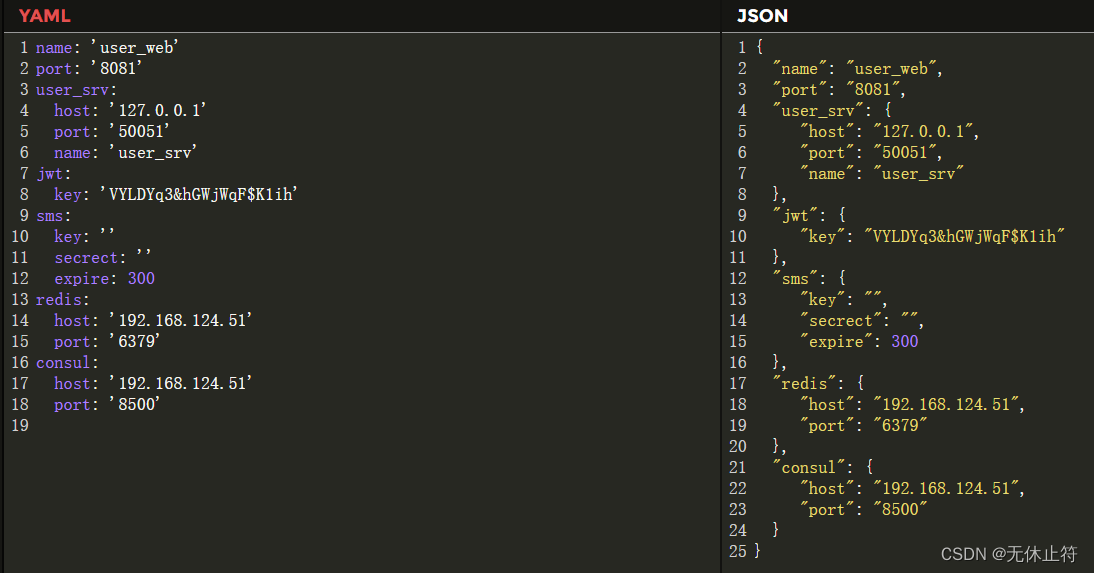
在users命名空间下为之前的user_web和user_srv添加配置集 :因为有dev和pro,所以需要新建4个配置集
package main
import (
"fmt"
"github.com/nacos-group/nacos-sdk-go/clients"
"github.com/nacos-group/nacos-sdk-go/common/constant"
"github.com/nacos-group/nacos-sdk-go/vo"
"time"
)
func main ( ) {
sc := [ ] constant. ServerConfig{
{
IpAddr: "192.168.124.51" ,
Port: 8848 ,
} ,
}
cc := constant. ClientConfig{
NamespaceId: "90dec033-6f9a-4ab2-97e5-fd60de1743c9" ,
TimeoutMs: 5000 ,
NotLoadCacheAtStart: true ,
LogDir: "tmp/nacos/log" ,
CacheDir: "tmp/nacos/cache" ,
LogLevel: "debug" ,
}
configClient, err := clients. CreateConfigClient ( map [ string ] interface { } {
"serverConfigs" : sc,
"clientConfig" : cc,
} )
if err != nil {
panic ( err)
}
content, err := configClient. GetConfig ( vo. ConfigParam{
DataId: "user_web.yaml" ,
Group: "dev" } )
if err != nil {
panic ( err)
}
fmt. Println ( content)
err = configClient. ListenConfig ( vo. ConfigParam{
DataId: "user_web.yaml" ,
Group: "dev" ,
OnChange: func ( namespace, group, dataId, data string ) {
fmt. Println ( "配置文件变化" )
fmt. Println ( "group:" + group + ", dataId:" + dataId + ", data:" + data)
} ,
} )
time. Sleep ( 3000 * time. Second)
}
1 2 3 4 5 6 7 8 9 10 11 12 13 14 15 16 17 18 19 20 21 22 23 24 25 26 27 28 29 30 31 32 33 34 35 36 37 38 39 40 41 42 43 44 45 46 47 48 49 50 51 52 53 54 55 56 57
CacheDir的作用 :
配置了CacheDir的时候,本地项目下会生成CacheDir的目录 假设nacos的ip地址我们配置错误,无法访问nacos;如果我们有配置CachaDir,那么就会读取本地配置信息
{
"name" : "user_web" ,
"port" : 8081 ,
"user_srv" : {
"host" : "127.0.0.1" ,
"port" : 50051 ,
"name" : "user_srv"
} ,
"jwt" : {
"key" : "VYLDYq3&hGWjWqF$K1ih"
} ,
"sms" : {
"key" : "" ,
"secrect" : ""
} ,
"redis" : {
"host" : "192.168.124.51" ,
"port" : 6379 ,
"expire" : 300
} ,
"consul" : {
"host" : "192.168.124.51" ,
"port" : 8500
}
}
1 2 3 4 5 6 7 8 9 10 11 12 13 14 15 16 17 18 19 20 21 22 23 24 25 user_web/config/config.go :添加NacosConfig对象package config
type UserSrvConfig struct {
Host string `mapstructure:"host" json:"host"`
Port int `mapstructure:"port" json:"port"`
Name string `mapstructure:"name" json:"name"`
}
type JWTConfig struct {
SigningKey string `mapstructure:"key" json:"key"`
}
type AliSmsConfig struct {
ApiKey string `mapstructure:"key" json:"key"`
ApiSecrect string `mapstructure:"secrect" json:"secrect"`
}
type ConsulConfig struct {
Host string `mapstructure:"host" json:"host"`
Port int `mapstructure:"port" json:"port"`
}
type RedisConfig struct {
Host string `mapstructure:"host" json:"host"`
Port int `mapstructure:"port" json:"port"`
Expire int `mapstructure:"expire" json:"expire"`
}
type ServerConfig struct {
Name string `mapstructure:"name" json:"name"`
Port int `mapstructure:"port" json:"port"`
UserSrvInfo UserSrvConfig `mapstructure:"user_srv" json:"user_srv"`
JWTInfo JWTConfig `mapstructure:"jwt" json:"jwt"`
AliSmsInfo AliSmsConfig `mapstructure:"sms" json:"sms"`
RedisInfo RedisConfig `mapstructure:"redis" json:"redis"`
ConsulInfo ConsulConfig `mapstructure:"consul" json:"consul"`
}
type NacosConfig struct {
Host string `mapstructure:"host"`
Port uint64 `mapstructure:"port"`
Namespace string `mapstructure:"namespace"`
User string `mapstructure:"user"`
Password string `mapstructure:"password"`
DataId string `mapstructure:"dataid"`
Group string `mapstructure:"group"`
}
1 2 3 4 5 6 7 8 9 10 11 12 13 14 15 16 17 18 19 20 21 22 23 24 25 26 27 28 29 30 31 32 33 34 35 36 37 38 39 40 41 42 43 44 45 46 47 48 user_web/global/global.go :添加全局NacosConfig对象package global
import (
ut "github.com/go-playground/universal-translator"
"web_api/user_web/config"
"web_api/user_web/proto"
)
var (
Trans ut. Translator
ServerConfig * config. ServerConfig = & config. ServerConfig{ }
UserSrvClient proto. UserClient
NacosConfig * config. NacosConfig = & config. NacosConfig{ }
)
1 2 3 4 5 6 7 8 9 10 11 12 13 14 15 16 17
host: '192.168 .124 .51 '
port: 8848
namespace: '90dec033- 6f9a- 4ab2- 97e5 - fd60de1743c9'
user: 'nacos'
password: 'nacos'
dataid: 'user_web. json'
group: 'dev'
host: '192.168 .124 .51 '
port: 8848
namespace: '90dec033- 6f9a- 4ab2- 97e5 - fd60de1743c9'
user: 'nacos'
password: 'nacos'
dataid: 'user_web. json'
group: 'pro'
user_web/initialize/init_config.go :
读取nacos的配置 通过nacos到配置中心读取并映射成ServerConfig package initialize
import (
"encoding/json"
"fmt"
"github.com/nacos-group/nacos-sdk-go/clients"
"github.com/nacos-group/nacos-sdk-go/common/constant"
"github.com/nacos-group/nacos-sdk-go/vo"
"github.com/spf13/viper"
"go.uber.org/zap"
"web_api/user_web/global"
)
func GetEnvInfo ( env string ) bool {
viper. AutomaticEnv ( )
return viper. GetBool ( env)
}
func InitConfig ( ) {
debug := GetEnvInfo ( "DEV_CONFIG" )
configFilePrefix := "config"
configFileName := fmt. Sprintf ( "user_web/%s_pro.yaml" , configFilePrefix)
if debug {
configFileName = fmt. Sprintf ( "user_web/%s_debug.yaml" , configFilePrefix)
}
v := viper. New ( )
v. SetConfigFile ( configFileName)
if err := v. ReadInConfig ( ) ; err != nil {
panic ( err)
}
if err := v. Unmarshal ( & global. NacosConfig) ; err != nil {
panic ( err)
}
zap. S ( ) . Infof ( "配置信息: %v" , global. NacosConfig)
sc := [ ] constant. ServerConfig{
{
IpAddr: global. NacosConfig. Host,
Port: global. NacosConfig. Port,
} ,
}
cc := constant. ClientConfig{
NamespaceId: global. NacosConfig. Namespace,
TimeoutMs: 5000 ,
NotLoadCacheAtStart: true ,
LogDir: "tmp/nacos/log" ,
CacheDir: "tmp/nacos/cache" ,
LogLevel: "debug" ,
}
configClient, err := clients. CreateConfigClient ( map [ string ] interface { } {
"serverConfigs" : sc,
"clientConfig" : cc,
} )
if err != nil {
panic ( err)
}
content, err := configClient. GetConfig ( vo. ConfigParam{
DataId: global. NacosConfig. DataId,
Group: global. NacosConfig. Group} )
if err != nil {
panic ( err)
}
err = json. Unmarshal ( [ ] byte ( content) , & global. ServerConfig)
if err != nil {
zap. S ( ) . Fatalf ( "读取nacos配置失败: %s" , err. Error ( ) )
}
fmt. Println ( & global. ServerConfig)
}
1 2 3 4 5 6 7 8 9 10 11 12 13 14 15 16 17 18 19 20 21 22 23 24 25 26 27 28 29 30 31 32 33 34 35 36 37 38 39 40 41 42 43 44 45 46 47 48 49 50 51 52 53 54 55 56 57 58 59 60 61 62 63 64 65 66 67 68 69 70 71 72 73 74 75 76 77 78 79 80 81 82
host: '192.168 .124 .51 '
port: 8848
namespace: '90dec033- 6f9a- 4ab2- 97e5 - fd60de1743c9'
user: 'nacos'
password: 'nacos'
dataid: 'user_srv. json'
group: 'dev'
host: '192.168 .124 .51 '
port: 8848
namespace: '90dec033- 6f9a- 4ab2- 97e5 - fd60de1743c9'
user: 'nacos'
password: 'nacos'
dataid: 'user_srv. json'
group: 'pro'
1 2 3 4 5 6 7 8 9 10 11 12 13 14 15 16 17 user_srv/config/config.go :新增NacosConfig对象package config
type MysqlConfig struct {
Host string `mapstructure:"host" json:"host"`
Port int `mapstructure:"port" json:"port"`
Name string `mapstructure:"db" json:"db"`
User string `mapstructure:"user" json:"user"`
Password string `mapstructure:"password" json:"password"`
}
type ConsulConfig struct {
Host string `mapstructure:"host" json:"host"`
Port int `mapstructure:"port" json:"port"`
}
type ServerConfig struct {
Name string `mapstructure:"name" json:"name"`
MysqlInfo MysqlConfig `mapstructure:"mysql" json:"mysql"`
ConsulInfo ConsulConfig `mapstructure:"consul" json:"consul"`
}
type NacosConfig struct {
Host string `mapstructure:"host"`
Port uint64 `mapstructure:"port"`
Namespace string `mapstructure:"namespace"`
User string `mapstructure:"user"`
Password string `mapstructure:"password"`
DataId string `mapstructure:"dataid"`
Group string `mapstructure:"group"`
}
1 2 3 4 5 6 7 8 9 10 11 12 13 14 15 16 17 18 19 20 21 22 23 24 25 26 27 28 29 30 31 user_srv/global/global.go :添加全局对象NacosConfigpackage global
import (
"gorm.io/gorm"
"nd/user_srv/config"
)
var (
DB * gorm. DB
ServerConfig config. ServerConfig
NacosConfig config. NacosConfig
)
user_srv/initialize/init_config.go :
读取nacos的配置 通过nacos到配置中心读取并映射成ServerConfig package initialize
import (
"encoding/json"
"fmt"
"github.com/nacos-group/nacos-sdk-go/clients"
"github.com/nacos-group/nacos-sdk-go/common/constant"
"github.com/nacos-group/nacos-sdk-go/vo"
"github.com/spf13/viper"
"go.uber.org/zap"
"nd/user_srv/global"
)
func GetEnvInfo ( env string ) bool {
viper. AutomaticEnv ( )
return viper. GetBool ( env)
}
func InitConfig ( ) {
debug := GetEnvInfo ( "DEV_CONFIG" )
configFilePrefix := "config"
configFileName := fmt. Sprintf ( "%s_pro.yaml" , configFilePrefix)
if debug {
configFileName = fmt. Sprintf ( "%s_debug.yaml" , configFilePrefix)
}
v := viper. New ( )
v. SetConfigFile ( configFileName)
if err := v. ReadInConfig ( ) ; err != nil {
panic ( err)
}
if err := v. Unmarshal ( & global. NacosConfig) ; err != nil {
panic ( err)
}
zap. S ( ) . Infof ( "配置信息: %v" , global. NacosConfig)
sc := [ ] constant. ServerConfig{
{
IpAddr: global. NacosConfig. Host,
Port: global. NacosConfig. Port,
} ,
}
cc := constant. ClientConfig{
NamespaceId: global. NacosConfig. Namespace,
TimeoutMs: 5000 ,
NotLoadCacheAtStart: true ,
LogDir: "tmp/nacos/log" ,
CacheDir: "tmp/nacos/cache" ,
LogLevel: "debug" ,
}
configClient, err := clients. CreateConfigClient ( map [ string ] interface { } {
"serverConfigs" : sc,
"clientConfig" : cc,
} )
if err != nil {
panic ( err)
}
content, err := configClient. GetConfig ( vo. ConfigParam{
DataId: global. NacosConfig. DataId,
Group: global. NacosConfig. Group} )
if err != nil {
panic ( err)
}
err = json. Unmarshal ( [ ] byte ( content) , & global. ServerConfig)
if err != nil {
zap. S ( ) . Fatalf ( "读取nacos配置失败: %s" , err. Error ( ) )
}
fmt. Println ( & global. ServerConfig)
}
1 2 3 4 5 6 7 8 9 10 11 12 13 14 15 16 17 18 19 20 21 22 23 24 25 26 27 28 29 30 31 32 33 34 35 36 37 38 39 40 41 42 43 44 45 46 47 48 49 50 51 52 53 54 55 56 57 58 59 60 61 62 63 64 65 66 67 68 69 70 71 72 73 74 75 76 77 78 79 80 81 82
mxshop_srvsV8.0.rar
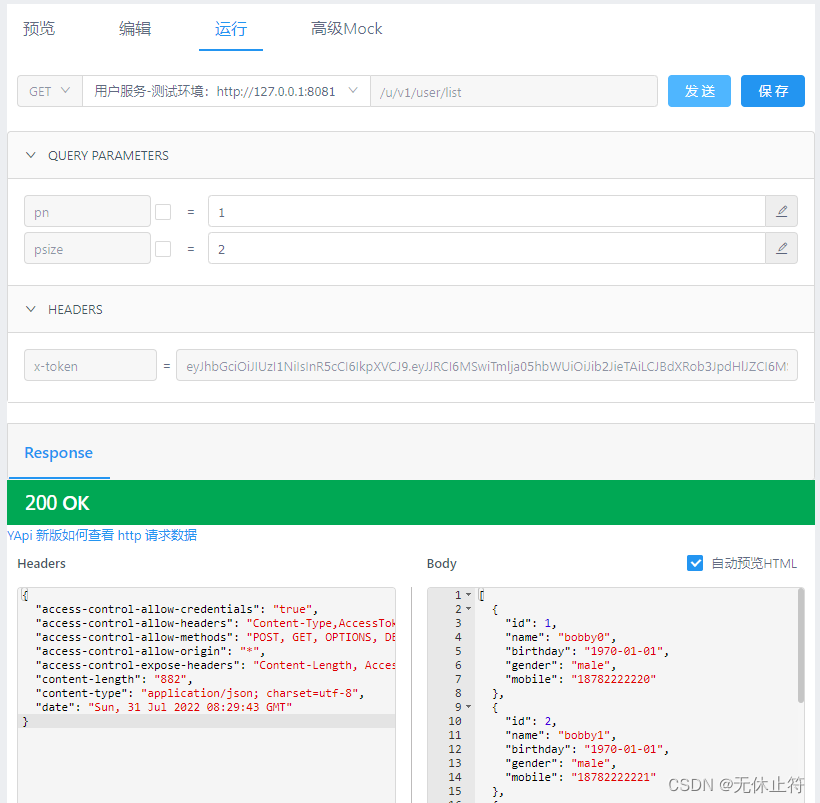
附录 :资源包含了YApi的json导入,nacos的配置集导入
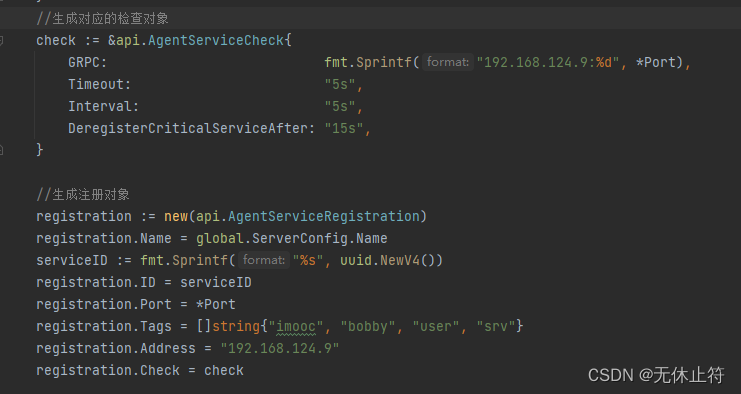
user_srv/main.go:健康监查与注册对象的ip地址需要修改为本机的ip地址