-
SpringBoot-Rest 风格请求处理
SpringBoot-Rest 风格请求处理
1.基本介绍
2.SpringBoot Rest 风格应用实例
1.需求: 演示 SpringBoot 中如何实现 Rest 风格的 增删改查
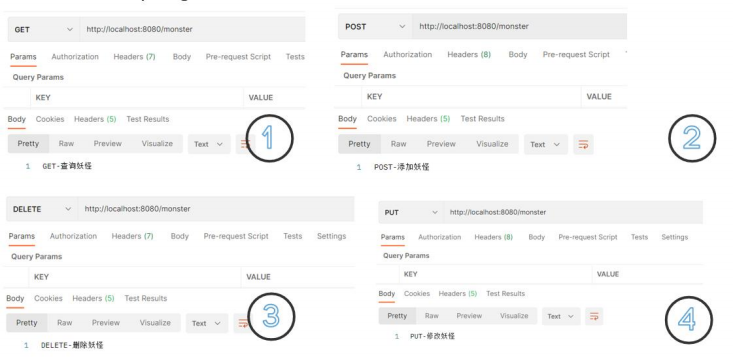
2.应用实例
1.创建src\main\java\com\llp\springboot\controller\MonsterController.java
@RestController public class MonsterController { //等价的写法 //@RequestMapping(value = "/monster",method = RequestMethod.GET) @GetMapping("/monster") public String getMonster() { return "GET-查询妖怪"; } //等价写法 //@RequestMapping(value = "/monster", method = RequestMethod.POST) @PostMapping("/monster") public String saveMonster() { return "POST-添加妖怪"; } //等价写法 //@RequestMapping(value = "/monster",method = RequestMethod.PUT) @PutMapping("/monster") public String putMonster() { return "PUT-修改妖怪~~"; } //等价写法 //@RequestMapping(value = "/monster", method = RequestMethod.DELETE) @DeleteMapping("/monster") public String delMonster() { return "DELETE-删除妖怪"; } }- 1
- 2
- 3
- 4
- 5
- 6
- 7
- 8
- 9
- 10
- 11
- 12
- 13
- 14
- 15
- 16
- 17
- 18
- 19
- 20
- 21
- 22
- 23
- 24
- 25
- 26
- 27
- 28
- 29
- 30
- 31
- 32
- 使用 Postman 完成测试, 请求 url: http://localhost:8080/monster

3.Rest 风格请求 -注意事项和细节
1、客户端是 PostMan 可以直接发送 Put、delete 等方式请求,可不设置 Filter 也可以请求rest风格请求的方法
2、如果要 SpringBoot 支持 页面表单的 Rest 功能, 则需要注意如下细节
(1)Rest 风 格 请 求 核 心 Filter ; HiddenHttpMethodFilter , 表 单 请 求 会 被 HiddenHttpMethodFilter 拦截 , 获取到表单 _method 的值, 再判断是 PUT/DELETE/PATCH (注释: PATCH 方法是新引入的,是对 PUT 方法的补充,用来对已知资源进行局部更新: https://segmentfault.com/q/1010000005685904)
(2)如果要 SpringBoot 支持 页面表单的 Rest 功能, 需要在 application.yml 启用 filter 功能, 否则无效
(3) 修改 application.yml 启用 filter 功能
spring: mvc: static-path-pattern: /llp/** #开启页面表单的 Rest 功能 hiddenmethod: filter: enabled: true web: resources: #修改/指定 静态资源的访问路径/位置 # static-locations: ["classpath:/llpimg/","classpath:/META-INF/resources/", "classpath:/resources/", "classpath:/static/", "classpath:/public/"] #String[] staticLocations- 1
- 2
- 3
- 4
- 5
- 6
- 7
- 8
- 9
- 10
- 11
- 12
- 13
(4)修改对应的页面
DOCTYPE html> <html lang="en"> <head> <meta charset="UTF-8"> <title>resttitle> head> <body> <h1>测试rest风格的url, 来完成请求.h1> <form action="/monster" method="post"> u: <input type="text" name="name"><br/> <input type="hidden" name="_method" value="delete"> <input type="submit" value="点击提交"> form> body> html>- 1
- 2
- 3
- 4
- 5
- 6
- 7
- 8
- 9
- 10
- 11
- 12
- 13
- 14
- 15
- 16
- 17
(5)完 成 测 试 , 注 意 url 是 localhost:8080/llp/rest.html, 如 果 希 望 url 是 localhost:8080/rest.html, 将 application.yml static-path-pattern: /hspres/** 注销即可


(6)如果没有配置视图解析器,则先看匹配controller的请求路径,再去查找静态资源;如果配置了视图解析器,则按照视图解析器来定位页面如何在 application.yml 配置解析器
spring: mvc: # static-path-pattern: /llp/** #开启页面表单的 Rest 功能 hiddenmethod: filter: enabled: true view: suffix: .html #这里是需要注意 prefix需要和当前的static-path-pattern一致,否则匹配不上 prefix: / web: resources: #修改/指定 静态资源的访问路径/位置 # static-locations: ["classpath:/llpimg/","classpath:/META-INF/resources/", "classpath:/resources/", "classpath:/static/", "classpath:/public/"] #String[] staticLocations- 1
- 2
- 3
- 4
- 5
- 6
- 7
- 8
- 9
- 10
- 11
- 12
- 13
- 14
- 15
- 16
- 17
修改MonsterController
@Controller public class MonsterController { @RequestMapping("/go") public String go() { // 注意 //1 看controller有没有 /hello[没有配置视图解析器] 没有再去查找静态资源 //2. 如果配置了视图解析器, 就按照视图解析器来定位页面 return "hello"; } }- 1
- 2
- 3
- 4
- 5
- 6
- 7
- 8
- 9
- 10
新增hello.html
DOCTYPE html> <html lang="en"> <head> <meta charset="UTF-8"> <title>hellotitle> head> <body> <h1>hello, 我是hello.html页面~~h1> body> html>- 1
- 2
- 3
- 4
- 5
- 6
- 7
- 8
- 9
- 10

-
相关阅读:
SQL Try Catch
Pr:创建自己的项目模板
Serverless架构演进与实践
基于深度增强学习的无人机赋能雾无线电接入网络的能效优化
【MybatisPlus】MP解决四种表与实体的映射问题,以及id自增策略
财务指标初步学习笔记
为什么高精度机器人普遍使用谐波减速器而不是普通减速器?
GeoGebra 实例 时钟
什么是langchain
MYSQL使用binlog日志恢复数据
- 原文地址:https://blog.csdn.net/qq_44981526/article/details/126087721
