-
Vue(4)
监视属性
DOCTYPE html> <html lang="en"> <head> <meta charset="UTF-8"> <meta http-equiv="X-UA-Compatible" content="IE=edge"> <meta name="viewport" content="width=device-width, initial-scale=1.0"> <title>天气案例title> <script type="text/javascript" src="/02_Vue模板语法/vue.js">script> head> <body> <div id="root"> <h2>今天天气很{{info}}h2> <button @click="changeweather ">切换天气button> div> <script type="text/javascript"> const vm= new Vue({ el:'#root', data:{ isHot:true, x:1, window }, computed:{ info() { return this.isHot ? '炎热' : '凉爽' } }, methods: { changeweather(){ this.isHot=!this.isHot } }, watch:{ isHot:{ immediate:true,//初始化时让handler调用一下 //handler什么时候调用 当isHot发生改变时 handler(newValue,oldValue){ console.log("isHot被修改了",newValue,oldValue) } } } }) script> body> html>- 1
- 2
- 3
- 4
- 5
- 6
- 7
- 8
- 9
- 10
- 11
- 12
- 13
- 14
- 15
- 16
- 17
- 18
- 19
- 20
- 21
- 22
- 23
- 24
- 25
- 26
- 27
- 28
- 29
- 30
- 31
- 32
- 33
- 34
- 35
- 36
- 37
- 38
- 39
- 40
- 41
- 42
- 43
- 44
- 45
- 46

深度监视
知识点:
深度监视:
(1).Vue中的watch默认不监测对象内部值的改变(一层)
(2).配置deep:true可以监测对象内部值改变(多层).备注: (1).Vue自身可以监测对象内部值的改变,但Vue提供的watch默认不可以! (2).使用watch时根据数据的具体结构,决定是否采用深度监视。- 1
- 2
- 3
DOCTYPE html> <html lang="en"> <head> <meta charset="UTF-8"> <meta http-equiv="X-UA-Compatible" content="IE=edge"> <meta name="viewport" content="width=device-width, initial-scale=1.0"> <title>天气案例title> <script type="text/javascript" src="/02_Vue模板语法/vue.js">script> head> <body> <div id="root"> <h2>今天天气很{{info}}h2> <button @click="changeweather ">切换天气button> <hr/> <h3>a的值是:{{numbers.a}}h3> <button @click="numbers.a++">点我让a+1button> <button @click="numbers.b++">点我b+1button> <h3>b的值是:{{numbers.b}}h3> <button @click="numbers={a:666,b:888}">彻底替换掉numbersbutton> {{numbers.c.d.e}} div> <script type="text/javascript"> const vm= new Vue({ el:'#root', data:{ isHot:true, numbers:{ a:1, b:1, c:{ d:{ e:100 } } } }, computed:{ info() { return this.isHot ? '炎热' : '凉爽' } }, methods: { changeweather(){ this.isHot=!this.isHot } }, watch:{ isHot:{ immediate:true,//初始化时让handler调用一下 //handler什么时候调用 当isHot发生改变时 handler(newValue,oldValue){ console.log("isHot被修改了",newValue,oldValue) } } //监视多级结构中某个属性的变化 // ,'numbers.a':{ // handler(){ // console.log('a被改变了') // } // }, , numbers:{ deep:true, handler(){ console.log('numbers改变了') } } }, }) // vm.$watch('isHot',{ // immediate:true, // handler(newValue,oldValue){ // console.log('isHot被修改了',newValue,oldValue) // } // }) script> body> html>- 1
- 2
- 3
- 4
- 5
- 6
- 7
- 8
- 9
- 10
- 11
- 12
- 13
- 14
- 15
- 16
- 17
- 18
- 19
- 20
- 21
- 22
- 23
- 24
- 25
- 26
- 27
- 28
- 29
- 30
- 31
- 32
- 33
- 34
- 35
- 36
- 37
- 38
- 39
- 40
- 41
- 42
- 43
- 44
- 45
- 46
- 47
- 48
- 49
- 50
- 51
- 52
- 53
- 54
- 55
- 56
- 57
- 58
- 59
- 60
- 61
- 62
- 63
- 64
- 65
- 66
- 67
- 68
- 69
- 70
- 71
- 72
- 73
- 74
- 75
- 76
- 77
- 78
- 79
- 80
- 81
- 82
- 83
- 84
- 85
- 86
- 87

watch VS computed
computed和watch之间的区别:
1.computed能完成的功能,watch都可以完成
2.watch能完成的功能,computed不一定能完成。例如:watch可以进行异步操作。两个重要的小原则: 1.所被Vue管理的函数,最好写成普通函数,这样this的指向才是vm或组件实例对象。 2.所有不被Vue所管理的函数(定时器的回调函数,ajax的回调函数等),最好写成箭头函数,这样this的指向才是vm或组件实例对象。例如计时器等。- 1
- 2
- 3
绑定样式
绑定class样式
DOCTYPE html> <html lang="en"> <head> <meta charset="UTF-8"> <meta http-equiv="X-UA-Compatible" content="IE=edge"> <meta name="viewport" content="width=device-width, initial-scale=1.0"> <title>Documenttitle> <style> .basic{ width: 400px; height: 100px; border: 1px solid black; } .happy{ border: 4px solid red;; background-color: rgba(255, 255, 0, 0.644); background: linear-gradient(30deg,yellow,pink,orange,yellow); } .sad{ border: 4px dashed rgb(2, 197, 2); background-color: gray; } .normal{ background-color: skyblue; } .atguigu1{ background-color: yellowgreen; } .atguigu2{ font-size: 30px; text-shadow:2px 2px 10px red; } .atguigu3{ border-radius: 20px; } style> <script type="text/javascript" src="/02_Vue模板语法/vue.js">script> head> <body> <div id="root"> <div class="basic " :class="arr" @click="changeMood">{{name}}div> <div class="basic " :class="classObj">{{name}}div> div> body> <script type="text/javascript"> new Vue({ el:'#root', data:{ name:'尚硅谷', a:"normal", arr:['atguigu1','atguigu2','atguigu3'], classObj:{ atguigu1:false, atguigu2:false } }, methods:{ changeMood(){ // document.getElementById('demo').className='basic happy' // this.a='happy' const arr=['happy','sad','normal'] const index= Math.floor(Math.random()*3) this.a=arr[index] } } }) script> html>- 1
- 2
- 3
- 4
- 5
- 6
- 7
- 8
- 9
- 10
- 11
- 12
- 13
- 14
- 15
- 16
- 17
- 18
- 19
- 20
- 21
- 22
- 23
- 24
- 25
- 26
- 27
- 28
- 29
- 30
- 31
- 32
- 33
- 34
- 35
- 36
- 37
- 38
- 39
- 40
- 41
- 42
- 43
- 44
- 45
- 46
- 47
- 48
- 49
- 50
- 51
- 52
- 53
- 54
- 55
- 56
- 57
- 58
- 59
- 60
- 61
- 62
- 63
- 64
- 65
- 66
- 67
- 68
- 69
- 70
- 71
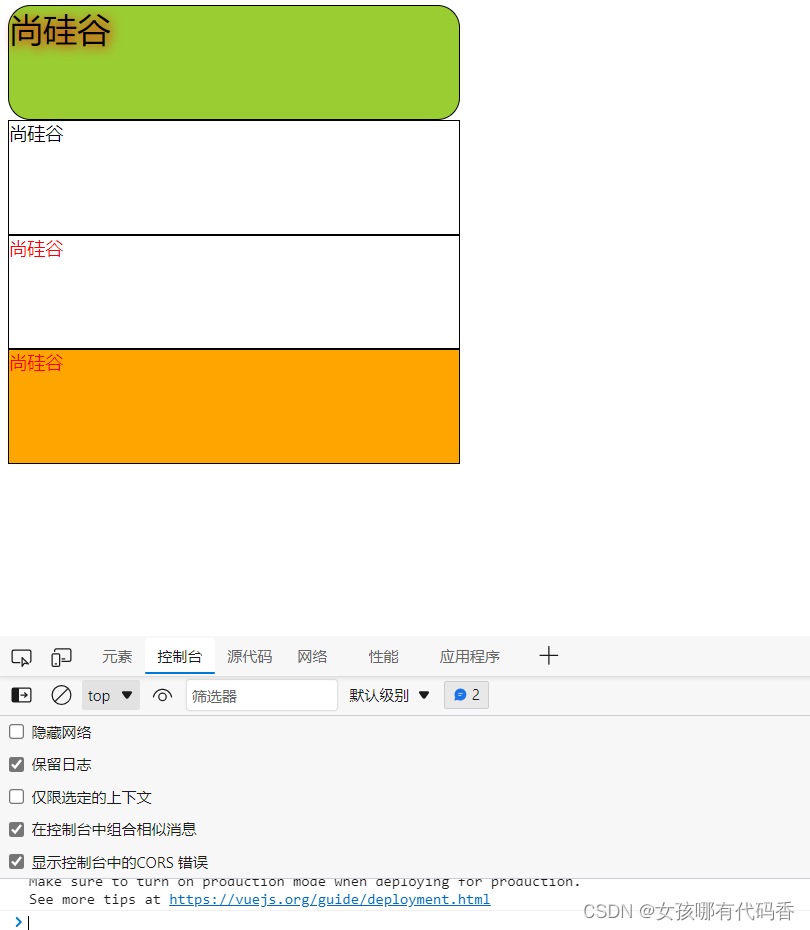
条件渲染
DOCTYPE html> <html lang="en"> <head> <meta charset="UTF-8"> <meta http-equiv="X-UA-Compatible" content="IE=edge"> <meta name="viewport" content="width=device-width, initial-scale=1.0"> <title>Documenttitle> <style>style> <script type="text/javascript" src="/02_Vue模板语法/vue.js">script> head> <body> <div id="root"> <h2>当前的n值是{{n}}h2> <button @click="n++">点我加nbutton> <h1 v-show="true">人外有人{{name}}h1> <h1 v-show="1==1">人外有人{{name}}h1> <div v-show="n===1">Angulardiv> <div v-show="n===2">Reactdiv> <div v-show="n===3">Vuediv> div> body> <script type="text/javascript"> new Vue({ el:'#root', data:{ name:'山外有山', a:false, n:1 } }) script> html>- 1
- 2
- 3
- 4
- 5
- 6
- 7
- 8
- 9
- 10
- 11
- 12
- 13
- 14
- 15
- 16
- 17
- 18
- 19
- 20
- 21
- 22
- 23
- 24
- 25
- 26
- 27
- 28
- 29
- 30
- 31
- 32
- 33
- 34
- 35

代码学自尚硅谷。 -
相关阅读:
车载电子专用DC-DC方案PL5501
Git笔记——2
Kafka-go各部分详细分析、案例
Dynamics 365 QueryExpression生成工具
同步时序逻辑电路
【C++】类和对象 从入门到超神
Android——gradle构建知识片-散装版
C++ 语言学习 day10 复习(1)
LeetCode 2342. 数位和相等数对的最大和 哈希
Ajax入门-Express框架介绍和基本使用
- 原文地址:https://blog.csdn.net/m0_52774518/article/details/125804941
