-
【React路由】编程式路由导航和withRouter的使用——push replace
文章目录
上篇文章学习了 React路由组件传参的三种方式
本篇文章学习学习 编程式路由导航及相关知识点,感兴趣的小伙伴可以来个三连哦~
??路由的push与replace
push模式是栈的常规模式,可以回到上一级,会留下痕迹
replace模式是替换模式,会替换掉栈顶的路由,回不到上一级,不会留下痕迹(无痕模式),适用于登录后,不需要重新回到登录页。
开启方法:
{ pathname: '/home/message/detail', state: { id: msgObj.id, title: msgObj.title } }}> {msgObj.title}- 1
- 2
- 3
??编程式路由导航
编程式路由导航:通过JS路由对象的方式来实现页面跳转(push、replace、go)
声明式路由导航: < < > >和 < < > >实现路由的跳转
随着
react-router,可以使用Link元素创建的原生处理反应路由器链接。但是,我不想点击链接进行导航,我想通过点击按钮自动实现页面跳转。实现方法如下:
-
push跳转+携带params参数
this.props.history.push(
/home/message/detail/${id}/${title}) -
push跳转+携带search参数
this.props.history.push(
/home/message/detail?id=${id}&title=${title}) -
push跳转+携带state参数
this.props.history.push(
/home/message/detail, { id: id, title: title })
-
replace跳转+携带params参数
this.props.history.replace(
/home/message/detail/${id}/${title}) -
replace跳转+携带search参数
this.props.history.replace(
/home/message/detail?id=${id}&title=${title}) -
replace跳转+携带state参数
this.props.history.replace(
/home/message/detail, { id: id, title: title }) -
前进
this.props.history.goForward()
-
回退
this.props.history.goBack()
-
前进或回退 ( go )
this.props.history.go(-2) //回退到前2条的路由
??案例需求
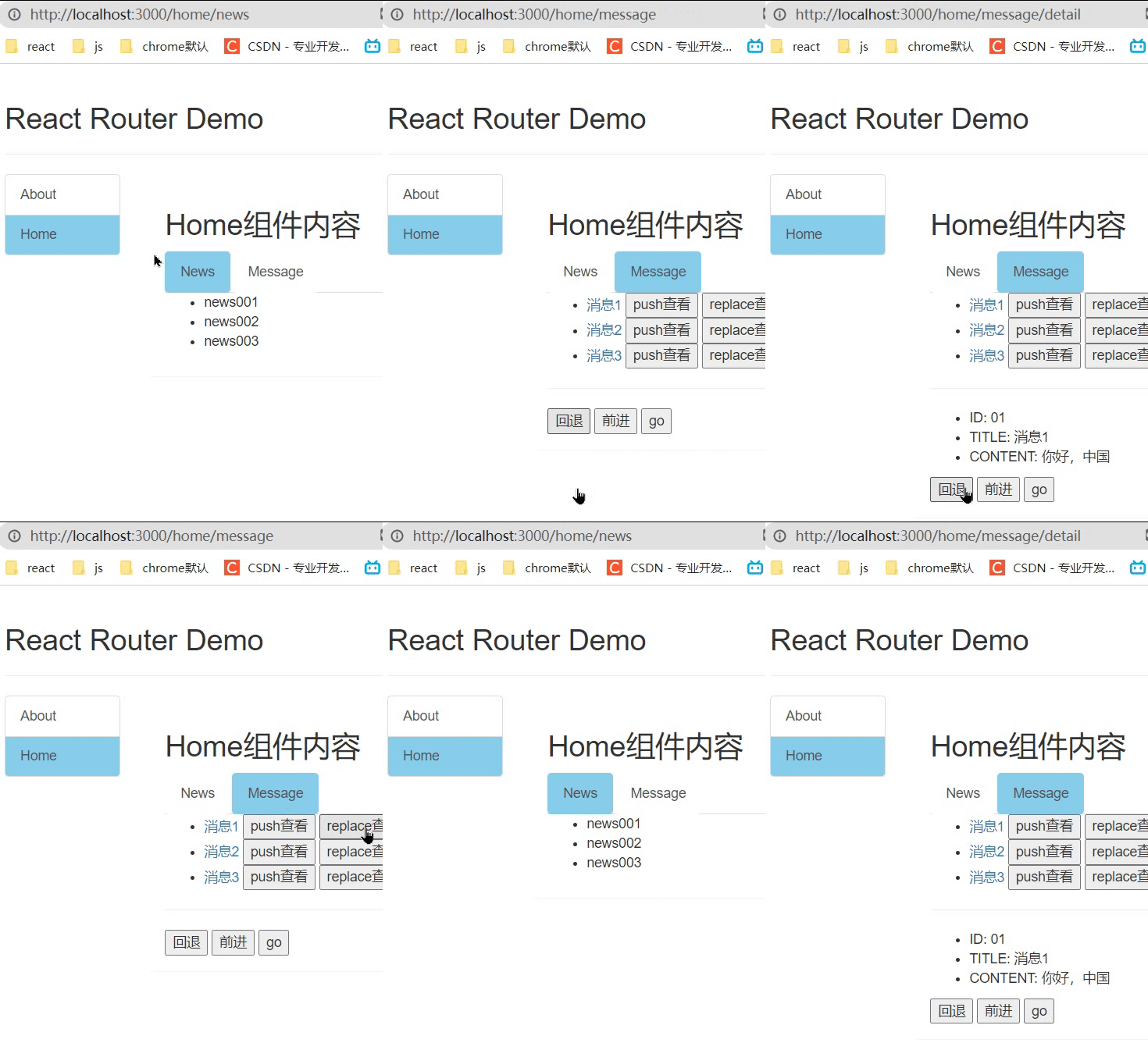
点击push按钮实现页面跳转,会留下历史记录,可以回到上一级;点击replace按钮也可以实现页面跳转,但是不会留下历史记录,不可以回到上一级;点击回退按钮,返回上一个记录的路由;点击前进按钮,前进一个记录的路由。
效果:
Message->index.jsx:import React, { Component } from 'react' import { Link, Route } from 'react-router-dom' import Detail from './Detail'; export default class Message extends Component { state = { messageArr: [ { id: '01', title: '消息1' }, { id: '02', title: '消息2' }, { id: '03', title: '消息3' } ] } replaceShow = (id, title) => { // 编写一段代码,让其实现跳转到Detail组件,且为replace跳转 +携带params参数 // this.props.history.replace(`/home/message/detail/${id}/${title}`) // replace跳转 +携带search参数 // this.props.history.replace(`/home/message/detail?id=${id}&title=${title}`) // replace跳转 +携带state参数 this.props.history.replace(`/home/message/detail`, { id: id, title: title }) } pushShow = (id, title) => { // 编写一段代码,让其实现跳转到Detail组件,且为push跳转 +携带params参数 // this.props.history.push(`/home/message/detail/${id}/${title}`) // push跳转 +携带search参数 // this.props.history.push(`/home/message/detail?id=${id}&title=${title}`) // push跳转 +携带state参数 this.props.history.push(`/home/message/detail`, { id: id, title: title }) } back = () => { this.props.history.goBack() } forward = () => { this.props.history.goForward() } go = () => { this.props.history.go(-2) } render() { const { messageArr } = this.state return () } }-
{
messageArr.map((msgObj) => {
return (
- {/* 向路由组件传递params参数 */} {/* {msgObj.title} */} {/* 向路由组件传递search参数 */} {/* {msgObj.title} */} {/* 向路由组件传递state参数 */} { pathname: '/home/message/detail', state: { id: msgObj.id, title: msgObj.title } }}> {msgObj.title} ) }) }
{/* 注册路由 */} {/* 声明接收params参数 */} {/**/} {/* search参数无需声明接收,正常注册路由即可 */} {/* */} {/* state参数无需声明接收,正常注册路由即可 */} - 1
- 2
- 3
- 4
- 5
- 6
- 7
- 8
- 9
- 10
- 11
- 12
- 13
- 14
- 15
- 16
- 17
- 18
- 19
- 20
- 21
- 22
- 23
- 24
- 25
- 26
- 27
- 28
- 29
- 30
- 31
- 32
- 33
- 34
- 35
- 36
- 37
- 38
- 39
- 40
- 41
- 42
- 43
- 44
- 45
- 46
- 47
- 48
- 49
- 50
- 51
- 52
- 53
- 54
- 55
- 56
- 57
- 58
- 59
- 60
- 61
- 62
- 63
- 64
- 65
- 66
- 67
- 68
- 69
- 70
- 71
- 72
- 73
- 74
- 75
- 76
- 77
- 78
- 79
- 80
- 81
- 82
- 83
- 84
- 85
- 86
- 87
- 88
- 89
- 90
- 91
- 92
- 93
- 94
- 95
- 96
- 97
- 98
- 99
- 100
- 101
- 102
Detail->index.jsx:import React, { Component } from 'react' // 引入query-string库 // import qs from 'query-string' const DetailData = [ { id: '01', content: '你好,中国' }, { id: '02', content: '你好,程序员' }, { id: '03', content: '你好,csdn' } ] export default class Detail extends Component { render() { console.log(this.props) // 接收params参数 // const { id, title } = this.props.match.params // 接收search参数 // const { search } = this.props.location // const { id, title } = qs.parse(search.slice(1)) // 接收state参数 const { id, title } = this.props.location.state || {} const findResult = DetailData.find((detailObj) => { // 如果某一项对象的id和我传过来的Id相等,findResult就等于这一项对象 return detailObj.id === id }) || {} return (- ID: {id}
- TITLE: {title}
- CONTENT: {findResult.content}
- 1
- 2
- 3
- 4
- 5
- 6
- 7
- 8
- 9
- 10
- 11
- 12
- 13
- 14
- 15
- 16
- 17
- 18
- 19
- 20
- 21
- 22
- 23
- 24
- 25
- 26
- 27
- 28
- 29
- 30
- 31
- 32
- 33
- 34
- 35
??总结
借助this.props.history对象上的API对操作路由跳转、前进、后退
this.props.history.push()
this.props.history.replace()
this.props.history.goBack()
this.props.history.goForward()
this.props.history.go()
??withRouter的使用
由于路由组件的props中是有history属性的,而一般组件(非路由组件)是没有history属性。所以在一般组件中,是不能使用history属性身上的API的(push/replace/goBack等)。但是,
WithRouter函数可以解决上述问题。引入WithRouter:import {withRouter} from 'react-router-dom'- 1
WithRouter :是一个
函数,接收一个一般组件作为参数,返回一个新组件,在新组件里的props里会被注入路由对象 ,让一般组件具备路由组件所特有的API。使用WithRouter:class Header extends Component { // withRouter(Header)后,就可以在一般组件内部使用 this.props.history } export default withRouter(Header) import React, { Component } from 'react' import { withRouter } from 'react-router-dom' class Header extends Component { back = () => { this.props.history.goBack() } forward = () => { this.props.history.goForward() } go = () => { this.props.history.go(-2) } render() { console.log(this.props) return () } } export default withRouter(Header)React Router Demo
- 1
- 2
- 3
- 4
- 5
- 6
- 7
- 8
- 9
- 10
- 11
- 12
- 13
- 14
- 15
- 16
- 17
- 18
- 19
- 20
- 21
- 22
- 23
- 24
- 25
- 26
- 27
- 28
- 29
- 30
- 31
- 32
- 33
- 34
- 35
- 36
这样一般组件里也能使用路由组件所特有的API。

??BrowserRouter与HashRouter的区别
底层原理不一样:
(1).BrowserRouter使用的是H5的
history API,不兼容IE9及以下版本。(2).HashRouter使用的是
URL的哈希值。path表现形式不一样:
(1).BrowserRouter的
路径中没有#,例如:localhost:3000/demo/test(2).HashRouter的
路径包含#,例如:localhost:3000/#/demo/test刷新后对路由state参数的影响:
(1).BrowserRouter没有任何影响,因为
state保存在history对象中。(2).HashRouter刷新后会
导致路由state参数的丢失。备注:HashRouter可以用于解决一些路径错误相关的问题(多级路径刷新页面样式丢失的问题)。
今天的分享就到这里啦
如果对你有帮助的话,还请???关注??点赞??收藏评论??哦
不定时回访哟??先自我介绍一下,小编13年上师交大毕业,曾经在小公司待过,去过华为OPPO等大厂,18年进入阿里,直到现在。深知大多数初中级java工程师,想要升技能,往往是需要自己摸索成长或是报班学习,但对于培训机构动则近万元的学费,着实压力不小。自己不成体系的自学效率很低又漫长,而且容易碰到天花板技术停止不前。因此我收集了一份《java开发全套学习资料》送给大家,初衷也很简单,就是希望帮助到想自学又不知道该从何学起的朋友,同时减轻大家的负担。添加下方名片,即可获取全套学习资料哦
-
相关阅读:
【Docker】Docker Network(网络)
神经网络(NN)网络构建及模型算法介绍
Spring框架系列 - 深入浅出SpringMVC请求流程和案例
免费小程序商城搭建之b2b2c o2o 多商家入驻商城 直播带货商城 电子商务b2b2c o2o 多商家入驻商城 直播带货商城 电子商务
SSM之Spring注解式缓存Redis
无代码维格云OAuth 2.0入门教程
lc42接雨水详解
Java流程控制
生成的二维码如何解析出原来的地址?
Builder 请进:波卡最新开发入门指南
- 原文地址:https://blog.csdn.net/m0_67403188/article/details/126080656
