-
【SaToken使用】springboot+redis+satoken权限认证
前言
之前看到satoken(文档),感觉很方便。之前我用shiro+redis+jwt(或者session)遇到的一些问题,用这个感觉都不是问题,很轻易就能解决,比如:多端登录可以不用写realm、移动端保持长期登录、token自动刷新、超过系统空闲时间重新登录等。
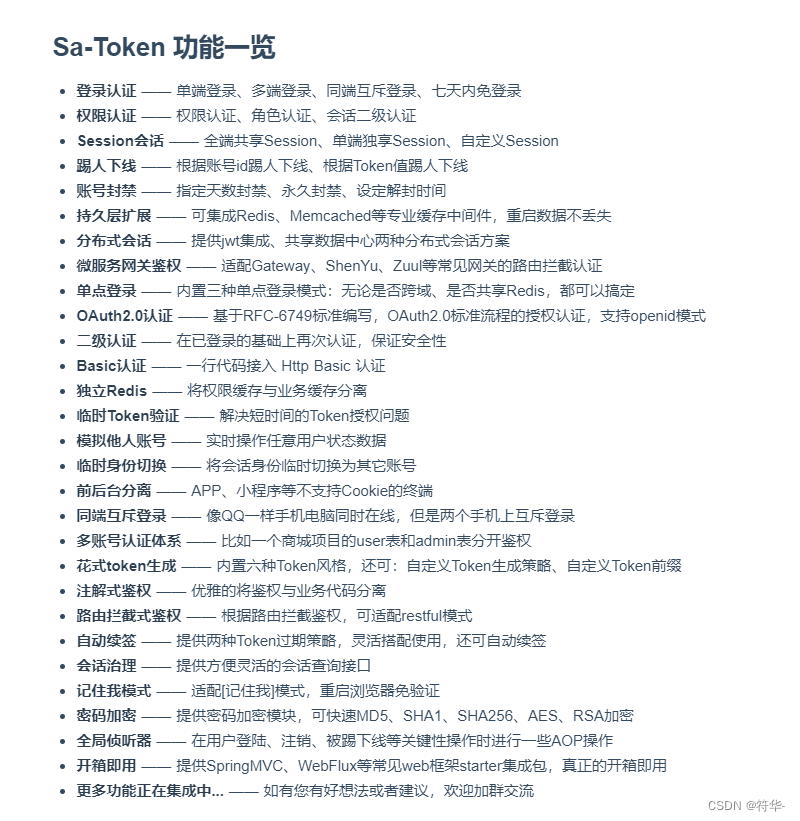
功能还是比较全面的,下面主要是会写一些比较常用的。一、大概需求
web登录,有个闲置时间设置:1 30分钟未发送请求,重新登录,0 无限制。
角色菜单权限控制。一、框架搭建
1、引入依赖、yml文件
1.8 UTF-8 UTF-8 2.5.6 1.29.0 org.springframework.boot spring-boot-starter org.apache.logging.log4j log4j-api org.apache.logging.log4j log4j-to-slf4j org.springframework.boot spring-boot-starter-aop org.springframework.boot spring-boot-starter-test test org.springframework.boot spring-boot-starter-web org.springframework.boot spring-boot-starter-freemarker org.projectlombok lombok true mysql mysql-connector-java 8.0.11 runtime com.baomidou mybatis-plus-boot-starter 3.4.3 cn.hutool hutool-all 5.7.22 org.apache.commons commons-pool2 com.github.pagehelper pagehelper-spring-boot-starter 1.2.9 org.mybatis mybatis org.mybatis mybatis-spring cn.dev33 sa-token-spring-boot-starter ${sa-token-version} cn.dev33 sa-token-dao-redis-jackson ${sa-token-version} cn.dev33 sa-token-alone-redis ${sa-token-version} - 1
- 2
- 3
- 4
- 5
- 6
- 7
- 8
- 9
- 10
- 11
- 12
- 13
- 14
- 15
- 16
- 17
- 18
- 19
- 20
- 21
- 22
- 23
- 24
- 25
- 26
- 27
- 28
- 29
- 30
- 31
- 32
- 33
- 34
- 35
- 36
- 37
- 38
- 39
- 40
- 41
- 42
- 43
- 44
- 45
- 46
- 47
- 48
- 49
- 50
- 51
- 52
- 53
- 54
- 55
- 56
- 57
- 58
- 59
- 60
- 61
- 62
- 63
- 64
- 65
- 66
- 67
- 68
- 69
- 70
- 71
- 72
- 73
- 74
- 75
- 76
- 77
- 78
- 79
- 80
- 81
- 82
- 83
- 84
- 85
- 86
- 87
- 88
- 89
- 90
- 91
- 92
- 93
- 94
- 95
- 96
- 97
- 98
- 99
- 100
- 101
- 102
- 103
- 104
- 105
- 106
- 107
- 108
- 109
- 110
- 111
- 112
- 113
- 114
- 115
- 116
- 117
- 118
- 119
- 120
- 121
- 122
- 123
- 124
- 125
- 126
- 127
- 128
- 129
- 130
- 131
- 132
- 133
- 134
- 135
- 136
- 137
- 138
- 139
- 140
- 141
- 142
- 143
- 144
- 145
- 146
- 147
- 148
- 149
- 150
- 151
- 152
- 153
- 154
- 155
- 156
- 157
- 158
- 159
- 160
- 161
- 162
- 163
- 164
- 165
- 166
- 167
- 168
- 169
- 170
- 171
- 172
- 173
- 174
- 175
- 176
- 177
- 178
- 179
- 180
- 181
- 182
- 183
- 184
- 185
- 186
- 187
- 188
- 189
- 190
- 191

2、Config 和 Interceptor
@Configuration @EnableWebMvc public class GlobalCorsConfig implements WebMvcConfigurer { @Override public void addResourceHandlers(ResourceHandlerRegistry registry) { String path = System.getProperty("user.dir") + "\upload\"; registry.addResourceHandler("/upload/**") .addResourceLocations("file:"+path).addResourceLocations("classpath:/resources/"); } // 注册拦截器 @Override public void addInterceptors(InterceptorRegistry registry) { // 注册Sa-Token的路由拦截器 registry.addInterceptor(new LoginInterceptor()).addPathPatterns("/**") .excludePathPatterns("/sys/login","/sys/getCode","/sys/getKey","/api/favicon.ico","/upload/**"); //registry.addInterceptor(new SaRouteInterceptor((req, resp, handler) -> { // SaRouter.match("/sys/login","/sys/getCode","/sys/getKey","/favicon.ico","/upload/**"); //})).addPathPatterns("/**"); } /** * 允许跨域调用的过滤器 */ @Bean public CorsFilter corsFilter() { CorsConfiguration config = new CorsConfiguration(); //允许所有域名进行跨域调用 config.addAllowedOriginPattern("*"); //允许跨越发送cookie config.setAllowCredentials(true); //放行全部原始头信息 config.addAllowedHeader("*"); //允许所有请求方法跨域调用 config.addAllowedMethod("*"); UrlBasedCorsConfigurationSource source = new UrlBasedCorsConfigurationSource(); source.registerCorsConfiguration("/**", config); return new CorsFilter(source); } @Override public void addCorsMappings(CorsRegistry registry) { registry.addMapping("/**") .allowedOriginPatterns("*") .allowCredentials(true) .allowedMethods("GET", "POST", "DELETE", "PUT") .maxAge(3600) .exposedHeaders(); } }- 1
- 2
- 3
- 4
- 5
- 6
- 7
- 8
- 9
- 10
- 11
- 12
- 13
- 14
- 15
- 16
- 17
- 18
- 19
- 20
- 21
- 22
- 23
- 24
- 25
- 26
- 27
- 28
- 29
- 30
- 31
- 32
- 33
- 34
- 35
- 36
- 37
- 38
- 39
- 40
- 41
- 42
- 43
- 44
- 45
- 46
- 47
- 48
- 49
- 50
- 51
LoginInterceptor 登录拦截
/** * 登录拦截器 */ public class LoginInterceptor implements HandlerInterceptor { /** * 删除redis缓存 */ private void delCache(String tokenValue,String loginId){ RedisUtil redisUtil= SpringUtil.getBean(RedisUtil.class); String lastActivity = BaseConstant.cachePrefix+"last-activity:"+tokenValue; String session = BaseConstant.cachePrefix+"session:"+loginId; String token = BaseConstant.tokenCachePrefix+tokenValue; if (redisUtil.hasKey(lastActivity)){ redisUtil.del(lastActivity); } if (redisUtil.hasKey(session)){ redisUtil.del(session); } if (redisUtil.hasKey(token)){ redisUtil.del(token); } } @Override public boolean preHandle(HttpServletRequest request, HttpServletResponse response, Object handler)throws Exception { response.setHeader("Access-Control-Allow-Origin", (request).getHeader("Origin")); response.setHeader("Access-Control-Allow-Credentials", "true"); response.setCharacterEncoding("UTF-8"); response.setContentType("application/json"); // 获取当前token(这个token获取的是请求头的token,也可以用 request 获取) String tokenValue = StpUtil.getTokenValue(); // 根据token获取用户id(这里如果找不到id直接返回null,不会报错) String loginId = (String) StpUtil.getLoginIdByToken(tokenValue); //判断token是否过期:如果token的有效期还没到,但是activity-timeout已经过了,那么token就会失效 if (!StpUtil.isLogin()){ ResultVo resultVo = new ResultVo(); resultVo.setCode(1003); resultVo.setMessage("用户未登录,请进行登录"); response.getWriter().write(JSONUtil.toJsonStr(resultVo)); //token已经过期,但是redis中可能还存在,所以要删除 delCache(tokenValue,loginId); return false; } /** 记:2022-06-24 修改 开始 */ //判断token的创建时间是否大于2小时,如果是的话则需要刷新token long time = System.currentTimeMillis() - StpUtil.getSession().getCreateTime(); long hour = time/1000/(60 * 60); if (hour>2){ //这里要生成新的token的话,要先退出再重新登录 //根据当前登录id(和设备)退出登录 //StpUtil.logout(loginId,loginDevice); StpUtil.logout(loginId); //然后再重新登录,生成新的token //StpUtil.login(loginId,loginDevice); StpUtil.login(loginId); String newToken = StpUtil.getTokenValue(); System.err.println("生成的新的token:"+ newToken); response.setHeader("sa-token-authorization", newToken); } /** 记:2022-06-24 修改 结束 */ // 获取过期时间 long tokenTimeout = StpUtil.getTokenTimeout(); //token没过期,过期时间不是-1的时候,每次请求都刷新过期时间 if (tokenTimeout != -1){ SaTokenDao saTokenDao = SaManager.getSaTokenDao(); saTokenDao.updateSessionTimeout(StpUtil.getSession().getId(),3600); saTokenDao.updateTimeout(BaseConstant.tokenCachePrefix+tokenValue,3600); saTokenDao.updateTimeout(BaseConstant.cachePrefix+"last-activity:"+tokenValue,3600); } // 检查通过后继续续签 //StpUtil.updateLastActivityToNow(); return true; } @Override public void postHandle(HttpServletRequest request, HttpServletResponse response, Object handler,ModelAndView modelAndView) throws Exception { } @Override public void afterCompletion(HttpServletRequest request, HttpServletResponse response, Object handler, Exception ex) throws Exception { } }- 1
- 2
- 3
- 4
- 5
- 6
- 7
- 8
- 9
- 10
- 11
- 12
- 13
- 14
- 15
- 16
- 17
- 18
- 19
- 20
- 21
- 22
- 23
- 24
- 25
- 26
- 27
- 28
- 29
- 30
- 31
- 32
- 33
- 34
- 35
- 36
- 37
- 38
- 39
- 40
- 41
- 42
- 43
- 44
- 45
- 46
- 47
- 48
- 49
- 50
- 51
- 52
- 53
- 54
- 55
- 56
- 57
- 58
- 59
- 60
- 61
- 62
- 63
- 64
- 65
- 66
- 67
- 68
- 69
- 70
- 71
- 72
- 73
- 74
- 75
- 76
- 77
- 78
- 79
- 80
- 81
- 82
- 83
- 84
- 85
- 86

PermissionInterface 权限验证
/** * 自定义权限验证接口扩展 */ @Component public class PermissionInterface implements StpInterface { @Resource private SysMenuService sysMenuService; /** * 返回一个账号所拥有的权限码集合 */ @Override public ListgetPermissionList(Object loginId, String loginType) { List list = new ArrayList (); // 2. 遍历角色列表,查询拥有的权限码 for (String roleId : getRoleList(loginId, loginType)) { SysQuery queryVo = new SysQuery(); queryVo.setId(roleId); //查询角色和权限(这里根据业务自行查询) List menuList = sysMenuService.selectPermsByRoleId(queryVo); List collect = menuList.stream().map(SysMenu::getPerms).collect(Collectors.toList()); list.addAll(collect); } return list; } /** * 返回一个账号所拥有的角色标识集合 (权限与角色可分开校验) */ @Override public List getRoleList(Object loginId, String loginType) { List list = new ArrayList<>(); // 这里获取用户角色可以直接从session中获取,也可以去数据库查询 SysUser user = (SysUser) StpUtil.getSession().get("user"); list.add(user.getRoleId()); return list; } } - 1
- 2
- 3
- 4
- 5
- 6
- 7
- 8
- 9
- 10
- 11
- 12
- 13
- 14
- 15
- 16
- 17
- 18
- 19
- 20
- 21
- 22
- 23
- 24
- 25
- 26
- 27
- 28
- 29
- 30
- 31
- 32
- 33
- 34
- 35
- 36
- 37
- 38
- 39
3、SysLoginController登录
@RestController @RequestMapping("/sys") public class SysLoginController { @Resource private SysSafeService sysSafeService; @Resource private SysUserService sysUserService; @Resource private RedisUtil redisUtil; /** 密码最大错误次数 */ private int ERROR_COUNT = 3; /** * 登录: * 多个终端登录可以写不同的登录接口,分别设置登录的设备。 * 也可以写一个统一的接口,在 request 中设置登录终端标识,根据这个标识来设置登录的设备。 * 退出登录同理 * */ @PostMapping("/login") public ResultVo login(String userName, String password, String code, HttpServletRequest request){ try { code = code.toUpperCase(); Object verCode = redisUtil.get(BaseConstant.verCode+code); if (null == verCode) { return ResultUtil.error("验证码已失效,请重新输入"); } String verCodeStr = verCode.toString(); if (verCodeStr == null || StrUtil.isEmpty(code) || !verCodeStr.equalsIgnoreCase(code)) { return ResultUtil.error("验证码错误"); }else if (!redisUtil.hasKey(BaseConstant.verCode+code)) { return ResultUtil.error("验证码已过期,请重新输入"); }else { redisUtil.del(BaseConstant.verCode+code); } //私钥解密 userName = RSAUtil.decrypt(userName); password = RSAUtil.decrypt(password); SysSafe safe = sysSafeService.list().get(0); //校验用户、用户密码 SysUser user = passwordErrorNum(userName, password,safe); // StpUtil.login()可以设置登录的设备,比如web端登录,或者移动端登录,只需要设置device即可 // StpUtil.login(user.getId(),"WEB"); StpUtil.login(user.getId()); String tokenValue = StpUtil.getTokenValue(); int i = safe.getIdleTimeSetting(); //如果系统闲置时间为0,设置token和session永不过期 if (i==0){ //修改 token、session、activity-timeout 的过期时间 SaTokenDao saTokenDao = SaManager.getSaTokenDao(); SaTokenConfig config = SaManager.getConfig(); saTokenDao.updateSessionTimeout(StpUtil.getSession().getId(),-1); saTokenDao.updateTimeout(BaseConstant.tokenCachePrefix+tokenValue ,-1); saTokenDao.updateTimeout(BaseConstant.cachePrefix+"last-activity:"+tokenValue ,-1); config.setActivityTimeout(-1); } //将登录用户信息设置到session中 StpUtil.getSession().set("user",user); return ResultUtil.success(tokenValue); } catch (ExceptionVo e) { return ResultUtil.error(e.getCode(),e.getMessage()); }catch (Exception e) { e.printStackTrace(); return ResultUtil.error("未知异常"); } } @PostMapping("/test") public ResultVo test(){ Map- 1
- 2
- 3
- 4
- 5
- 6
- 7
- 8
- 9
- 10
- 11
- 12
- 13
- 14
- 15
- 16
- 17
- 18
- 19
- 20
- 21
- 22
- 23
- 24
- 25
- 26
- 27
- 28
- 29
- 30
- 31
- 32
- 33
- 34
- 35
- 36
- 37
- 38
- 39
- 40
- 41
- 42
- 43
- 44
- 45
- 46
- 47
- 48
- 49
- 50
- 51
- 52
- 53
- 54
- 55
- 56
- 57
- 58
- 59
- 60
- 61
- 62
- 63
- 64
- 65
- 66
- 67
- 68
- 69
- 70
- 71
- 72
- 73
- 74
- 75
- 76
- 77
- 78
- 79
- 80
- 81
- 82
- 83
- 84
- 85
- 86
- 87
- 88
- 89
- 90
- 91
- 92
- 93
- 94
- 95
- 96
- 97
- 98
- 99
- 100
- 101
- 102
- 103
- 104
- 105
- 106
- 107
- 108
- 109
- 110
- 111
- 112
- 113
- 114
- 115
- 116
- 117
- 118
- 119
- 120
- 121
- 122
- 123
- 124
- 125
- 126
- 127
- 128
- 129
- 130
- 131
- 132
- 133
- 134
- 135
- 136
- 137
- 138
- 139
- 140
- 141
- 142
- 143
- 144
- 145
- 146
- 147
- 148
- 149
- 150
- 151
- 152
- 153
- 154
- 155
- 156
- 157
- 158
- 159
- 160
- 161
- 162
- 163
- 164
- 165
- 166
- 167
- 168
- 169
- 170
- 171
- 172
- 173
- 174
- 175
- 176
- 177
- 178
- 179
- 180
- 181
- 182
- 183
- 184
- 185
- 186
- 187
- 188
- 189
- 190
- 191
- 192
- 193
- 194
- 195
- 196
- 197
- 198

4、RSAUtil 非对称加密、解密工具类
import org.apache.tomcat.util.codec.binary.Base64; import javax.crypto.BadPaddingException; import javax.crypto.Cipher; import javax.crypto.IllegalBlockSizeException; import javax.crypto.NoSuchPaddingException; import java.nio.charset.StandardCharsets; import java.security.*; import java.security.interfaces.RSAPrivateKey; import java.security.interfaces.RSAPublicKey; import java.security.spec.InvalidKeySpecException; import java.security.spec.PKCS8EncodedKeySpec; import java.security.spec.X509EncodedKeySpec; /** * RSA非对称加密、解密工具类 */ public class RSAUtil { private static final KeyPair keyPair = initKey(); /** * RSA非对称加密,随机生成密钥对 */ private static KeyPair initKey() { try { // 产生用于安全加密的随机数 KeyPairGenerator generator = KeyPairGenerator.getInstance("RSA"); generator.initialize(1024, new SecureRandom()); return generator.generateKeyPair(); } catch (Exception e) { throw new RuntimeException(e); } } /** * 产生public key */ public static String getPublicKey() { RSAPublicKey publicKey = (RSAPublicKey) keyPair.getPublic(); // getEncoded():返回key的原始编码形式 return new String(Base64.encodeBase64(publicKey.getEncoded())); } /** * RAS非对称加密: 公钥加密 * @param str 需要加密的字符串 * @return 密文 */ public static String encrypt(String str) { //base64编码的公钥 byte[] decoded = Base64.decodeBase64(getPublicKey()); RSAPublicKey pubKey; String outStr = null; try { pubKey = (RSAPublicKey) KeyFactory.getInstance("RSA").generatePublic(new X509EncodedKeySpec(decoded)); Cipher cipher = Cipher.getInstance("RSA"); cipher.init(Cipher.ENCRYPT_MODE, pubKey); outStr = Base64.encodeBase64String(cipher.doFinal(str.getBytes(StandardCharsets.UTF_8))); } catch (InvalidKeySpecException | BadPaddingException | IllegalBlockSizeException | InvalidKeyException | NoSuchPaddingException | NoSuchAlgorithmException e) { e.printStackTrace(); } //RSA加密 return outStr; } /** * RSA私钥解密 * @param str 加密的字符串 * @return 铭文 */ public static String decrypt(String str) { //64位解码加密后的字符串 byte[] inputByte = Base64.decodeBase64(str.getBytes(StandardCharsets.UTF_8)); PrivateKey privateKey = keyPair.getPrivate(); //base64编码的私钥 byte[] decoded = privateKey.getEncoded(); RSAPrivateKey priKey; //RSA解密 Cipher cipher; String outStr = null; try { priKey = (RSAPrivateKey) KeyFactory.getInstance("RSA").generatePrivate(new PKCS8EncodedKeySpec(decoded)); cipher = Cipher.getInstance("RSA"); cipher.init(Cipher.DECRYPT_MODE, priKey); outStr = new String(cipher.doFinal(inputByte)); } catch (InvalidKeySpecException | NoSuchAlgorithmException | NoSuchPaddingException | BadPaddingException | IllegalBlockSizeException | InvalidKeyException e) { e.printStackTrace(); } return outStr; } }- 1
- 2
- 3
- 4
- 5
- 6
- 7
- 8
- 9
- 10
- 11
- 12
- 13
- 14
- 15
- 16
- 17
- 18
- 19
- 20
- 21
- 22
- 23
- 24
- 25
- 26
- 27
- 28
- 29
- 30
- 31
- 32
- 33
- 34
- 35
- 36
- 37
- 38
- 39
- 40
- 41
- 42
- 43
- 44
- 45
- 46
- 47
- 48
- 49
- 50
- 51
- 52
- 53
- 54
- 55
- 56
- 57
- 58
- 59
- 60
- 61
- 62
- 63
- 64
- 65
- 66
- 67
- 68
- 69
- 70
- 71
- 72
- 73
- 74
- 75
- 76
- 77
- 78
- 79
- 80
- 81
- 82
- 83
- 84
- 85
- 86
- 87
- 88
- 89
- 90
- 91
- 92
- 93
5、EncryptionUtil 密码盐值加密工具类
import javax.crypto.SecretKeyFactory; import javax.crypto.spec.PBEKeySpec; import java.math.BigInteger; import java.security.NoSuchAlgorithmException; import java.security.SecureRandom; import java.security.spec.InvalidKeySpecException; import java.security.spec.KeySpec; /** * 密码盐值加密工具类 */ public class EncryptionUtil { public static final String PBKDF2_ALGORITHM = "PBKDF2WithHmacSHA1"; /** * 盐的长度 */ public static final int SALT_BYTE_SIZE = 16; /** * 生成密文的长度 */ public static final int HASH_BIT_SIZE = 64; /** * 迭代次数 */ public static final int PBKDF2_ITERATIONS = 1000; /** * 验证输入的password是否正确 * @param attemptedPassword 待验证的password * @param encryptedPassword 密文 * @param salt 盐值 */ public static boolean authenticate(String attemptedPassword, String encryptedPassword, String salt) throws NoSuchAlgorithmException, InvalidKeySpecException { // 用同样的盐值对用户输入的password进行加密 String encryptedAttemptedPassword = getEncryptedPassword(attemptedPassword, salt); // 把加密后的密文和原密文进行比較,同样则验证成功。否则失败 return encryptedAttemptedPassword.equals(encryptedPassword); } /** * 生成密文 * @param password 明文password * @param salt 盐值 */ public static String getEncryptedPassword(String password, String salt) throws NoSuchAlgorithmException, InvalidKeySpecException { KeySpec spec = new PBEKeySpec(password.toCharArray(), fromHex(salt), PBKDF2_ITERATIONS, HASH_BIT_SIZE); SecretKeyFactory f = SecretKeyFactory.getInstance(PBKDF2_ALGORITHM); return toHex(f.generateSecret(spec).getEncoded()); } /** * 通过提供加密的强随机数生成器 生成盐 */ public static String generateSalt() throws NoSuchAlgorithmException { SecureRandom random = SecureRandom.getInstance("SHA1PRNG"); byte[] salt = new byte[SALT_BYTE_SIZE]; random.nextBytes(salt); return toHex(salt); } /** * 十六进制字符串转二进制字符串 * @param hex the hex string */ private static byte[] fromHex(String hex) { byte[] binary = new byte[hex.length() / 2]; for (int i = 0; i < binary.length; i++) { binary[i] = (byte) Integer.parseInt(hex.substring(2 * i, 2 * i + 2), 16); } return binary; } /** * 二进制字符串转十六进制字符串 * @param array the byte array to convert */ private static String toHex(byte[] array) { BigInteger bi = new BigInteger(1, array); String hex = bi.toString(16); int paddingLength = (array.length * 2) - hex.length(); if (paddingLength > 0) return String.format("%0" + paddingLength + "d", 0) + hex; else return hex; } }- 1
- 2
- 3
- 4
- 5
- 6
- 7
- 8
- 9
- 10
- 11
- 12
- 13
- 14
- 15
- 16
- 17
- 18
- 19
- 20
- 21
- 22
- 23
- 24
- 25
- 26
- 27
- 28
- 29
- 30
- 31
- 32
- 33
- 34
- 35
- 36
- 37
- 38
- 39
- 40
- 41
- 42
- 43
- 44
- 45
- 46
- 47
- 48
- 49
- 50
- 51
- 52
- 53
- 54
- 55
- 56
- 57
- 58
- 59
- 60
- 61
- 62
- 63
- 64
- 65
- 66
- 67
- 68
- 69
- 70
- 71
- 72
- 73
- 74
- 75
- 76
- 77
- 78
- 79
- 80
- 81
- 82
- 83
- 84
- 85
- 86
- 87
- 88
- 89
- 90
2022.06.24修改
LoginInterceptor 登录拦截器修改
原:
/* long time = System.currentTimeMillis() - StpUtil.getSession().getCreateTime(); long hour = time/1000/(60 * 60); System.out.println(hour); if (hour>2){ // 本来这里我是想要生成一个新token,然后我找了下没有直接生成token的方法; // 之后我看了它的需求墙,作者说每次调用登录方法都会自动刷新并生成新的token。 // 但是我这里调用登录方法,发现token并没有改变,还是原来的那个token,不知道是我方式用错了还是少了代码。所以这个地方存疑,有知道的小伙伴可以评论区留言。 StpUtil.login(loginId); System.err.println("生成的新的token:"+StpUtil.getTokenValue()); response.setHeader("sa-token-authorization", StpUtil.getTokenValue()); }*/- 1
- 2
- 3
- 4
- 5
- 6
- 7
- 8
- 9
- 10
- 11
- 12
修改:
/** 记:2022-06-24 修改 开始 */ //判断token的创建时间是否大于2小时,如果是的话则需要刷新token long time = System.currentTimeMillis() - StpUtil.getSession().getCreateTime(); long hour = time/1000/(60 * 60); if (hour>2){ //这里要生成新的token的话,要先退出再重新登录 //根据当前登录id(和设备)退出登录 //StpUtil.logout(loginId,loginDevice); StpUtil.logout(loginId); //然后再重新登录,生成新的token //StpUtil.login(loginId,loginDevice); StpUtil.login(loginId); String newToken = StpUtil.getTokenValue(); System.err.println("生成的新的token:"+ newToken); response.setHeader("sa-token-authorization", newToken); } /** 记:2022-06-24 修改 结束 */- 1
- 2
- 3
- 4
- 5
- 6
- 7
- 8
- 9
- 10
- 11
- 12
- 13
- 14
- 15
- 16
- 17
先自我介绍一下,小编13年上师交大毕业,曾经在小公司待过,去过华为OPPO等大厂,18年进入阿里,直到现在。深知大多数初中级java工程师,想要升技能,往往是需要自己摸索成长或是报班学习,但对于培训机构动则近万元的学费,着实压力不小。自己不成体系的自学效率很低又漫长,而且容易碰到天花板技术停止不前。因此我收集了一份《java开发全套学习资料》送给大家,初衷也很简单,就是希望帮助到想自学又不知道该从何学起的朋友,同时减轻大家的负担。添加下方名片,即可获取全套学习资料哦
-
相关阅读:
【贪心算法】多机调度问题
万字详解PHP+Sphinx中文亿级数据全文检索实战(实测亿级数据0.1秒搜索耗时)
K8s-Traefik Ingress Controller
【OpenMv】颜色模式之Lab
如何计算Renko大小,FPmarkets用ATR3步计算
考公、事业编、央企国企私企外企、校招社招都在这些地方找到信息(精华)
Day 80
C#一些高级语法
FLStudio2024汉化破解版在哪可以下载?
根据先序遍历和中序遍历生成后序遍历
- 原文地址:https://blog.csdn.net/m0_67403188/article/details/126080661
