-
echarts公司内部图表(冒死上传)
最近公司有一个需求,要做一个数据可视化的页面,所有的图表都在下面,做这些都是本人自己写的,全部都是真是的项目中的代码,包含有柱状图、折线图、水球图以及散点图,这里直接打出来给大家练手,希望大家多多支持,如果这篇文章对您有用的话,记得👍+⭐️哦!!!👀
数据:
链接:https://pan.baidu.com/s/1oQssniZ7wklWL-whIfofvA?pwd=3dpn
提取码:3dpn☀️☀️☀️温馨提示:
1.大家尽量不要使用手机看哦!不然把手累抽筋了不要怪我哦= =
2.大家不需要关注charts等这些自定义组件,主需要关注图表的样式即可
3.此文章需要一定的vue基础才可以哦✨✨✨折线图
⭐️日负荷折线图
在这个图表中,大家可以学会如何使封闭的区域填充渐变色

.vue文件代码如下:<template> <div class="dailyLoad"> <charts :title="'日负荷折线图'" :iconClass="'icon-tongji'"> <template slot="detail"> <div id="dailyLoad" ref="dailyLoad"></div> <div class="detail"> <div class="today"> <div class="mount"> <img src="@/assets/images/survey_images/survey/today.png" alt="" /> <div v-if="allData">{{ allData.power.max_w_today }}</div> </div> <div class="time"> <img src="@/assets/images/survey_images/survey/time.png" alt="" /> <div> <span v-if="allData">{{ allData.power.time_today }}</span> </div> </div> </div> <div class="yesterday"> <div class="mount"> <img src="@/assets/images/survey_images/survey/yesterday.png" alt="" /> <div v-if="allData">{{ allData.power.max_w_yesterday }}</div> </div> <div class="time"> <img src="@/assets/images/survey_images/survey/time.png" alt="" /> <div> <span v-if="allData">{{ allData.power.time_yesterday }}</span> </div> </div> </div> </div> </template> </charts> </div> </template> <script> // import { getDailyLoad } from "@/api/survey/surgey"; export default { name: "dailyLoad", data() { return { chartInstance: null, allData: null, //从服务器中获取的所有的数据 }; }, props: ["data1"], mounted() { this.initChart(); // this.getData(); }, watch: { data1(newVal, oldVal) { if (newVal) { this.allData = newVal; this.updateChart(); } }, }, methods: { // 初始化图表 initChart() { this.chartInstance = this.$echarts.init(this.$refs.dailyLoad, "saibei"); const initOption = {}; this.chartInstance.setOption(initOption); window.addEventListener("resize", () => { this.chartInstance.resize(); }); }, // 从服务器获取数据 // async getData() { // console.log(this.data1); // }, //更新数据 updateChart() { var option = { // //最上方的图例指示器 legend: { top: "8%", data: [], // data: ["2022-3-31", "2022-4-1"], textStyle: { color: "white", fontSize: "15", }, }, // 图表的位置 grid: { left: "2%", top: "21%", right: "4%", bottom: "22%", containLabel: true, }, //设置悬浮框 tooltip: { trigger: "axis", //在这里设置鼠标放上去显示的y轴的样式 axisPointer: { type: "line", lineStyle: { type: "solid", }, }, backgroundColor: "rgba(0,0,0,.4)", borderWidth: 0, textStyle: { color: "#fff", }, }, xAxis: [ { type: "category", boundaryGap: false, // x轴更换数据 data: [], axisLabel: { color: "white", fontSize: 14, }, axisLine: { lineStyle: { color: "white", }, }, }, ], yAxis: [ { name: "单位(kw)", nameLocation: "end", nameTextStyle: { padding: [0, 10, 0, 0], align: "center", }, type: "value", axisTick: { show: true }, axisLine: { onZeor: true, show: true, lineStyle: { color: "white", }, }, nameTextStyle: { fontSize: 14, }, // 去除分割线 splitLine: { show: false, }, }, ], series: [ { name: "", type: "line", smooth: true, // 单独修改当前线条的样式 lineStyle: { color: "white", width: "1", }, // 填充颜色设置 areaStyle: { color: new this.$echarts.graphic.LinearGradient( 0, 0, 0, 1, [ { offset: 0, color: "rgba(226, 247, 250, 0.5)", }, { offset: 0.8, color: "rgba(226, 247, 250, 0.4)", }, ], false ), shadowColor: "rgba(0, 0, 0, 0.5)", shadowBlur: 15, }, // 设置拐点 symbol: "circle", // 拐点大小 symbolSize: 8, // 开始不显示拐点, 鼠标经过显示 showSymbol: false, // 设置拐点颜色以及边框 itemStyle: { color: "rgb(226, 247, 250 )", borderColor: "rgba(226, 247, 250, 0.1)", borderWidth: 12, }, data: [], }, { name: "", type: "line", smooth: true, lineStyle: { color: "rgb(174,83,17)", width: 2, }, areaStyle: { color: new this.$echarts.graphic.LinearGradient( 0, 0, 0, 1, [ { offset: 0, color: "rgba(255, 108, 0, 1)", }, { offset: 0.8, color: "rgba(255, 108, 0, 0.9)", }, ], false ), shadowColor: "rgba(0, 0, 0, 0.1)", shadowBlur: 15, }, // 设置拐点 小圆点 symbol: "circle", // 拐点大小 symbolSize: 2, // 设置拐点颜色以及边框 itemStyle: { color: "rgba(255, 108, 0)", borderColor: "rgba(255, 108, 0,1)", borderWidth: 12, }, // 开始不显示拐点, 鼠标经过显示 showSymbol: false, data: [], }, ], }; let currentDate = this.formateDate(new Date()); let lastDate = this.formateDate(Date.now() - 1000 * 60 * 60 * 24); option.legend.data = [lastDate, currentDate]; option.xAxis[0].data = this.allData.hours; option.series[0].name = lastDate; option.series[0].data = this.allData.load_yesterday; option.series[1].name = currentDate; option.series[1].data = this.allData.load_today; this.chartInstance.setOption(option); }, formateDate(data) { let date = new Date(data); return `${date.getFullYear()}-${date.getMonth() + 1}-${date.getDate()}`; }, }, }; </script> <style lang="less" scoped> .dailyLoad { background-color: rgb(20, 37, 55); height: 3.3684rem; #dailyLoad { width: 100%; height: 3.3684rem; } .detail { position: absolute; width: 100%; height: 0.5263rem; bottom: 0.0105rem; left: 0; font-size: 0.0947rem; color: white; background-color: rgb(20, 37, 55); margin-top: 0.0526rem; .today, .yesterday { font-size: 0.1rem; height: 0.2632rem; display: flex; padding: 0 5%; align-items: center; white-space: nowrap; text-align: center; justify-content: space-between; .mount { display: flex; align-items: center; justify-content: center; img { width: 0.2105rem; height: 0.2105rem; margin-right: 0.0333rem; } } .time { display: flex; align-items: center; justify-content: center; img { width: 0.2105rem; height: 0.2105rem; margin-right: 0.0333rem; } } } .today { background-color: #072951; box-shadow: -0.0526rem 0px 0.0789rem #2c58a6 inset, /*左边阴影*/ 0.0526rem 0px 0.0789rem #2c58a6 inset; } } } </style>- 1
- 2
- 3
- 4
- 5
- 6
- 7
- 8
- 9
- 10
- 11
- 12
- 13
- 14
- 15
- 16
- 17
- 18
- 19
- 20
- 21
- 22
- 23
- 24
- 25
- 26
- 27
- 28
- 29
- 30
- 31
- 32
- 33
- 34
- 35
- 36
- 37
- 38
- 39
- 40
- 41
- 42
- 43
- 44
- 45
- 46
- 47
- 48
- 49
- 50
- 51
- 52
- 53
- 54
- 55
- 56
- 57
- 58
- 59
- 60
- 61
- 62
- 63
- 64
- 65
- 66
- 67
- 68
- 69
- 70
- 71
- 72
- 73
- 74
- 75
- 76
- 77
- 78
- 79
- 80
- 81
- 82
- 83
- 84
- 85
- 86
- 87
- 88
- 89
- 90
- 91
- 92
- 93
- 94
- 95
- 96
- 97
- 98
- 99
- 100
- 101
- 102
- 103
- 104
- 105
- 106
- 107
- 108
- 109
- 110
- 111
- 112
- 113
- 114
- 115
- 116
- 117
- 118
- 119
- 120
- 121
- 122
- 123
- 124
- 125
- 126
- 127
- 128
- 129
- 130
- 131
- 132
- 133
- 134
- 135
- 136
- 137
- 138
- 139
- 140
- 141
- 142
- 143
- 144
- 145
- 146
- 147
- 148
- 149
- 150
- 151
- 152
- 153
- 154
- 155
- 156
- 157
- 158
- 159
- 160
- 161
- 162
- 163
- 164
- 165
- 166
- 167
- 168
- 169
- 170
- 171
- 172
- 173
- 174
- 175
- 176
- 177
- 178
- 179
- 180
- 181
- 182
- 183
- 184
- 185
- 186
- 187
- 188
- 189
- 190
- 191
- 192
- 193
- 194
- 195
- 196
- 197
- 198
- 199
- 200
- 201
- 202
- 203
- 204
- 205
- 206
- 207
- 208
- 209
- 210
- 211
- 212
- 213
- 214
- 215
- 216
- 217
- 218
- 219
- 220
- 221
- 222
- 223
- 224
- 225
- 226
- 227
- 228
- 229
- 230
- 231
- 232
- 233
- 234
- 235
- 236
- 237
- 238
- 239
- 240
- 241
- 242
- 243
- 244
- 245
- 246
- 247
- 248
- 249
- 250
- 251
- 252
- 253
- 254
- 255
- 256
- 257
- 258
- 259
- 260
- 261
- 262
- 263
- 264
- 265
- 266
- 267
- 268
- 269
- 270
- 271
- 272
- 273
- 274
- 275
- 276
- 277
- 278
- 279
- 280
- 281
- 282
- 283
- 284
- 285
- 286
- 287
- 288
- 289
- 290
- 291
- 292
- 293
- 294
- 295
- 296
- 297
- 298
- 299
- 300
- 301
- 302
- 303
- 304
- 305
- 306
- 307
- 308
- 309
- 310
- 311
- 312
- 313
- 314
- 315
- 316
- 317
- 318
- 319
- 320
- 321
- 322
- 323
- 324
- 325
- 326
⭐️最大需求表
在这个图表中,大家可以学会如何自定义柱状图的形状

.vue文件代码如下:<template> <div class="maximumDemand"> <charts :title="'最大需求'" :iconClass="'icon-shuxingzujian'"> <template slot="detail"> <div id="maximumDemand" ref="maximumDemand"></div> <div class="detail"> <div class="item"> <img src="@/assets/images/survey_images/survey/month.png" alt="月" /> <div v-if="allData" class="maxdemand_month"> {{ allData.demand_max.maxdemand_month }}kW </div> </div> <div class="item"> <img src="@/assets/images/survey_images/survey/year.png" alt="年" /> <div v-if="allData" class="maxdemand_Year"> {{ allData.demand_max.maxdemand_Year }}kW </div> </div> </div> </template> </charts> </div> </template> <script> import { getMaximumDemand } from "@/api/surgey"; export default { name: "maximumDemand", data() { return { chartInstance: null, allData: null, //从服务器中获取的所有的数据 }; }, mounted() { this.initChart(); this.getData(); this.timer = setInterval(() => { this.getData(); }, 60000); }, methods: { // 初始化图表 initChart() { this.chartInstance = this.$echarts.init( this.$refs.maximumDemand, "saibei" ); const initOption = {}; this.chartInstance.setOption(initOption); // 让图表跟随屏幕自动的去适应 window.addEventListener("resize", () => { this.chartInstance.resize(); }); }, // 从服务器获取数据 async getData() { let res = await getMaximumDemand({}); if (res.code === 200) { this.allData = res.data.demand; this.updateChart(); } else { this.$message({ message: res.msg, type: "warning", }); } }, //更新数据 updateChart() { var option = { //提示内容样式的设置 tooltip: { trigger: "axis", // 纵轴的刻度线 axisPointer: { type: "none", }, backgroundColor: "rgba(0,0,0,.4)", borderWidth: 0, textStyle: { color: "#fff", }, }, // 图表的位置 grid: { left: "2%", top: "21%", right: "4%", bottom: "22%", containLabel: true, }, xAxis: [ { type: "category", data: [], // data: [ // "2021-11", // "2021-12", // "2022-01", // "2022-02", // "2022-03", // "2022-04", // ], position: "bottom", boundaryGap: true, axisTick: { show: true, lineStyle: { color: "#fff" } }, axisLine: { show: true, lineStyle: { color: "#fff" }, }, axisLabel: { interval: 0, // textStyle: { color: "#fff" }, color: "#fff", }, }, ], yAxis: [ { type: "value", axisLine: { onZeor: true, show: true, lineStyle: { color: "white", }, }, //坐标轴刻度相关设置 axisTick: { show: true, lineStyle: { color: "#fff", }, }, }, ], series: [ { name: "最大需求:", type: "pictorialBar", symbol: "triangle", // data: [120, 132, 101, 134, 90, 201], data: [ { value: "", }, { value: "", itemStyle: { color: "#4f75e1", }, }, { value: "", }, { value: "", itemStyle: { color: "#4f75e1", }, }, { value: "", }, { value: "", itemStyle: { color: "#4f75e1", }, }, ], barWidth: 15, //设置柱状图和土里指示器的颜色 itemStyle: { color: "#b3c6ff", opacity: 0.9, }, // 高亮时的样式 emphasis: { itemStyle: { opacity: 0.8, }, }, // 三角形的宽度 barWidth: "200%", }, { name: "平均需求:", type: "line", // data: [810, 592, 952, 285, 523, 299], symbolSize: 12, //线条的颜色 lineStyle: { color: "rgb(99,46,255)", width: 2, }, //拐点的样式 itemStyle: { color: "white", shadowBlur: 5, shadowColor: "white", borderColor: "white", borderWidth: 2, borderType: "dotted", }, }, ], }; for (var i = 0; i < this.allData.demand_demand.length; i++) { option.series[0]["data"][i].value = this.allData.demand_demand[i]; } option.series[1]["data"] = this.allData.demand_avg; option.xAxis[0]["data"] = this.allData.demand_ym; this.chartInstance.setOption(option); }, }, beforeDestroy() { clearInterval(this.timer); }, }; </script> <style lang="less" scoped> #maximumDemand { width: 100%; height: 100%; } .detail { position: absolute; // height: 100px; height: 0.5263rem; bottom: 0.1133rem; left: 0; width: 100%; font-size: 0.1rem; color: white; background-color: rgb(20, 37, 55); .item { display: flex; align-items: center; justify-content: space-around; background-color: #072951; height: 0.3rem; &:nth-child(1) { box-shadow: -0.0526rem 0px 0.0789rem #2c58a6 inset, /*左边阴影*/ 0.0526rem 0px 0.0789rem #2c58a6 inset; } img { display: block; width: 0.3333rem; height: 0.3333rem; } } } </style>- 1
- 2
- 3
- 4
- 5
- 6
- 7
- 8
- 9
- 10
- 11
- 12
- 13
- 14
- 15
- 16
- 17
- 18
- 19
- 20
- 21
- 22
- 23
- 24
- 25
- 26
- 27
- 28
- 29
- 30
- 31
- 32
- 33
- 34
- 35
- 36
- 37
- 38
- 39
- 40
- 41
- 42
- 43
- 44
- 45
- 46
- 47
- 48
- 49
- 50
- 51
- 52
- 53
- 54
- 55
- 56
- 57
- 58
- 59
- 60
- 61
- 62
- 63
- 64
- 65
- 66
- 67
- 68
- 69
- 70
- 71
- 72
- 73
- 74
- 75
- 76
- 77
- 78
- 79
- 80
- 81
- 82
- 83
- 84
- 85
- 86
- 87
- 88
- 89
- 90
- 91
- 92
- 93
- 94
- 95
- 96
- 97
- 98
- 99
- 100
- 101
- 102
- 103
- 104
- 105
- 106
- 107
- 108
- 109
- 110
- 111
- 112
- 113
- 114
- 115
- 116
- 117
- 118
- 119
- 120
- 121
- 122
- 123
- 124
- 125
- 126
- 127
- 128
- 129
- 130
- 131
- 132
- 133
- 134
- 135
- 136
- 137
- 138
- 139
- 140
- 141
- 142
- 143
- 144
- 145
- 146
- 147
- 148
- 149
- 150
- 151
- 152
- 153
- 154
- 155
- 156
- 157
- 158
- 159
- 160
- 161
- 162
- 163
- 164
- 165
- 166
- 167
- 168
- 169
- 170
- 171
- 172
- 173
- 174
- 175
- 176
- 177
- 178
- 179
- 180
- 181
- 182
- 183
- 184
- 185
- 186
- 187
- 188
- 189
- 190
- 191
- 192
- 193
- 194
- 195
- 196
- 197
- 198
- 199
- 200
- 201
- 202
- 203
- 204
- 205
- 206
- 207
- 208
- 209
- 210
- 211
- 212
- 213
- 214
- 215
- 216
- 217
- 218
- 219
- 220
- 221
- 222
- 223
- 224
- 225
- 226
- 227
- 228
- 229
- 230
- 231
- 232
- 233
- 234
- 235
- 236
- 237
- 238
- 239
- 240
- 241
- 242
- 243
- 244
- 245
- 246
- 247
- 248
- 249
- 250
- 251
- 252
- 253
- 254
- 255
- 256
- 257
- 258
- 259
- 260
✨✨✨柱状图
⭐️日电量柱状图
在这个图表中,大家可以学会如何自定义柱状图的渐变颜色

.vue文件代码如下:<template> <div class="dailyElectricity"> <charts :title="'日电量柱状图'" :iconClass="'icon-paihangbang'"> <template slot="detail"> <div id="dailyElectricity" ref="dailyElectricity"></div> <div class="detail"> <div class="img"> <img src="@/assets/images/survey_images/survey/today.png" alt="今天" /> <img src="@/assets/images/survey_images/survey/yesterday.png" alt="昨天" /> <img src="@/assets/images/survey_images/survey/ydqushi.png" alt="趋势" /> </div> <div class="data"> <div v-if="allData" class="today"> {{ allData.dl_trend.dl_today }} </div> <div v-if="allData" class="yesterday"> {{ allData.dl_trend.dl_yesterday }} </div> <div v-if="allData" class="sub"> {{ allData.dl_trend.dl_trendval }} </div> </div> </div> </template> </charts> </div> </template> <script> // import { getDailyElectricity } from "@/api/survey/surgey"; export default { name: "dailyElectricity", data() { return { chartInstance: null, allData: null, //从服务器中获取的所有的数据 }; }, props: ["data1"], mounted() { this.initChart(); // this.getData(); }, watch: { data1(newVal, oldVal) { if (newVal) { this.allData = newVal; this.updateChart(); } }, }, methods: { // 初始化图表 initChart() { this.chartInstance = this.$echarts.init( this.$refs.dailyElectricity, "saibei" ); const initOption = {}; this.chartInstance.setOption(initOption); // 让图表跟随屏幕自动的去适应 window.addEventListener("resize", () => { this.chartInstance.resize(); }); }, // 从服务器获取数据 // async getData() { // let res = await getDailyElectricity({}); // if (res.code === 200) { // this.allData = { ...res.data }; // this.updateChart(); // } else { // this.$message({ // message: res.msg, // type: "warning", // }); // } // }, //更新数据 updateChart() { var option = { legend: { top: "8%", //将来要换data成活的 // data: ["2022-4-2", "2022-4-3"], textStyle: { fontSize: "15", }, }, grid: { left: "10%", top: "21%", right: "4%", bottom: "22%", containLabel: false, }, xAxis: [ { type: "category", // data: [0, 2, 4, 6, 8, 10, 12, 14, 16, 18], axisLabel: { fontSize: 14, }, }, ], yAxis: [ { type: "value", name: "单位(kWh)", nameLocation: "end", nameTextStyle: { padding: [0, 10, 0, 0], align: "center", }, //坐标轴刻度相关设置 axisTick: { show: true, lineStyle: { color: "#fff", }, }, axisLine: { show: true, lineStyle: { color: "white", }, }, }, ], series: [ { // name: "2022-4-2", // data: [120, 200, 150, 80, 70, 110, 130, 200, 150, 80], type: "bar", itemStyle: { color: "rgb(97,129,245)", }, }, { // name: "2022-4-3", // data: [80, 70, 110, 130, 120, 200, 150, 200, 150, 80], type: "bar", itemStyle: { color: new this.$echarts.graphic.LinearGradient( 0, 0, 0, 1, [ { offset: 0, color: "rgb(0,240,255)", }, { offset: 1, color: "rgb(255,247,156)", }, ], false ), }, }, ], }; let currentDate = this.formateDate(new Date()); let lastDate = this.formateDate(Date.now() - 1000 * 60 * 60 * 24); option.legend.data = [lastDate, currentDate]; option.xAxis[0].data = this.allData.hours; option.series[0].name = lastDate; option.series[0].data = this.allData.dl_yesterday; option.series[1].name = currentDate; option.series[1].data = this.allData.dl_today; this.chartInstance.setOption(option); }, formateDate(data) { let date = new Date(data); return `${date.getFullYear()}-${date.getMonth() + 1}-${date.getDate()}`; }, }, }; </script> <style lang="less" scoped> .dailyElectricity { height: 3.3684rem; #dailyElectricity { width: 100%; height: 3.3684rem; } .detail { position: absolute; height: 0.5263rem; bottom: 2px; left: 0; width: 100%; font-size: 0.1rem; color: white; background-color: rgb(20, 37, 55); .img { display: flex; // align-items: center; justify-content: space-around; background-color: #072951; box-shadow: -0.0526rem 0px 0.0789rem #2c58a6 inset, /*左边阴影*/ 0.0526rem 0px 0.0789rem #2c58a6 inset; img { display: block; width: 0.2105rem; height: 0.2105rem; } } .data { display: flex; // align-items: center; justify-content: space-around; margin-top: 0.1rem; } } } </style>- 1
- 2
- 3
- 4
- 5
- 6
- 7
- 8
- 9
- 10
- 11
- 12
- 13
- 14
- 15
- 16
- 17
- 18
- 19
- 20
- 21
- 22
- 23
- 24
- 25
- 26
- 27
- 28
- 29
- 30
- 31
- 32
- 33
- 34
- 35
- 36
- 37
- 38
- 39
- 40
- 41
- 42
- 43
- 44
- 45
- 46
- 47
- 48
- 49
- 50
- 51
- 52
- 53
- 54
- 55
- 56
- 57
- 58
- 59
- 60
- 61
- 62
- 63
- 64
- 65
- 66
- 67
- 68
- 69
- 70
- 71
- 72
- 73
- 74
- 75
- 76
- 77
- 78
- 79
- 80
- 81
- 82
- 83
- 84
- 85
- 86
- 87
- 88
- 89
- 90
- 91
- 92
- 93
- 94
- 95
- 96
- 97
- 98
- 99
- 100
- 101
- 102
- 103
- 104
- 105
- 106
- 107
- 108
- 109
- 110
- 111
- 112
- 113
- 114
- 115
- 116
- 117
- 118
- 119
- 120
- 121
- 122
- 123
- 124
- 125
- 126
- 127
- 128
- 129
- 130
- 131
- 132
- 133
- 134
- 135
- 136
- 137
- 138
- 139
- 140
- 141
- 142
- 143
- 144
- 145
- 146
- 147
- 148
- 149
- 150
- 151
- 152
- 153
- 154
- 155
- 156
- 157
- 158
- 159
- 160
- 161
- 162
- 163
- 164
- 165
- 166
- 167
- 168
- 169
- 170
- 171
- 172
- 173
- 174
- 175
- 176
- 177
- 178
- 179
- 180
- 181
- 182
- 183
- 184
- 185
- 186
- 187
- 188
- 189
- 190
- 191
- 192
- 193
- 194
- 195
- 196
- 197
- 198
- 199
- 200
- 201
- 202
- 203
- 204
- 205
- 206
- 207
- 208
- 209
- 210
- 211
- 212
- 213
- 214
- 215
- 216
- 217
- 218
- 219
- 220
- 221
- 222
- 223
- 224
- 225
- 226
- 227
- 228
- 229
- 230
⭐️分时电量
在这个图表中,大家可以学会如何动态的轮流展示数据

.vue文件代码如下:<template> <div class="timeSharingE"> <charts :title="'分时电量'" :iconClass="'icon-fenxi'"> <template slot="detail"> <div id="timeSharingE" ref="timeSharingE"></div> <div class="detail"> <div class="img"> <img src="@/assets/images/survey_images/survey/current.png" alt="今天" /> <img src="@/assets/images/survey_images/survey/last.png" alt="昨天" /> <img src="@/assets/images/survey_images/survey/ydqushi.png" alt="趋势" /> </div> <div class="data"> <div v-if="loadrate" class="current"> {{ loadrate.sum_e_month }} </div> <div v-if="loadrate" class="last"> {{ loadrate.sum_e_lastmonth }} </div> <div v-if="loadrate" class="ydqushi"> {{ loadrate.trend_m_sume }} </div> </div> </div> </template> </charts> </div> </template> <script> import { getTimeSharingE } from "@/api/surgey"; export default { name: "timeSharingE", data() { return { chartInstance: null, idx: 0, //当前的索引 arr1: [], //所有的日期 arr2: [], //所有的尖电量 arr3: [], //所有的峰电量 arr4: [], //所有的平电量 arr5: [], //所有的谷电量 arr_sub1: [] /* 当前的日期 */, arr_sub2: [] /* 当前的尖电量 */, arr_sub3: [] /* 当前的峰电量 */, arr_sub4: [] /* 当前的平电量 */, arr_sub5: [] /* 当前的谷电量 */, allData: [], //分时电量柱状图所有的数据 loadrate: {}, }; }, mounted() { this.initChart(); this.getData(); this.getDatatimer = setInterval(() => { this.getData(); }, 60000); }, methods: { initChart() { this.chartInstance = this.$echarts.init( this.$refs.timeSharingE, "saibei" ); var option = { //设置悬浮框 tooltip: { show: true, trigger: "axis", axisPointer: { type: "shadow", }, backgroundColor: "rgba(0,0,0,.4)", borderWidth: 0, textStyle: { color: "#fff", }, }, //最上方的图例指示器 legend: { top: "8%", textStyle: { color: "white", fontSize: "15", }, }, // 图表的位置 grid: { left: "2%", top: "21%", right: "8%", bottom: "22%", containLabel: true, }, xAxis: [ { type: "category", data: this.arr_sub1, axisLabel: { fontSize: 13, }, name: "(天)", nameLocation: "end", nameTextStyle: { align: "center", }, }, ], yAxis: [ { axisTick: { show: true }, type: "value", name: "单位(kw)", nameLocation: "end", nameTextStyle: { padding: [0, 10, 0, 0], align: "center", }, axisLine: { onZeor: true, show: true, lineStyle: { color: "white", }, }, //坐标轴刻度相关设置 axisTick: { show: true, lineStyle: { color: "#fff", }, }, }, ], series: [ { name: "尖电量", type: "bar", data: this.arr_sub2, // data: [120, 132, 101, 134, 90, 230, 210, 132, 101, 134, 90], stack: "Electric quantity", barWidth: 15, //设置柱状图和土里指示器的颜色 itemStyle: { color: "rgb(55,183,12)", }, }, { name: "峰电量", type: "bar", data: this.arr_sub3, // data: [134, 90, 230, 120, 132, 101, 210, 230, 120, 132], stack: "Electric quantity", barWidth: 15, //设置柱状图和土里指示器的颜色 itemStyle: { color: "rgb(250,229,33)", }, }, { name: "平电量", type: "bar", data: this.arr_sub4, // data: [230, 210, 132, 90, 101, 134, 120, 210, 132, 90, 101], stack: "Electric quantity", barWidth: 15, //设置柱状图和土里指示器的颜色 itemStyle: { color: "rgb(242,156,0)", }, }, { name: "谷电量", type: "bar", data: this.arr_sub5, // data: [120, 132, 101, 134, 90, 230, 210, 132, 101, 134, 90], stack: "Electric quantity", barWidth: 15, //设置柱状图和土里指示器的颜色 itemStyle: { color: "rgb(221,63,54)", }, }, ], }; option && this.chartInstance.setOption(option); this.startInterval(); window.addEventListener("resize", this.chartResize); }, async getData() { let res = await getTimeSharingE({}); let mydata = []; if (res.code === 200) { mydata = res.data.dl_period; this.loadrate = res.data.loadrate; this.updateChart(); } else { this.$message({ message: res.msg, type: "warning", }); } for (var i = 0; i < mydata.length; i++) { this.arr1.push(mydata[i].date); /* 日期 */ this.arr2.push(mydata[i].fesharp); /* 尖 */ this.arr3.push(mydata[i].fepeak); /* 峰 */ this.arr4.push(mydata[i].feflat); /* 平 */ this.arr5.push(mydata[i].fevalley); /* 谷 */ } for (var i = 0; i < 5; i++) { this.arr_sub1.push(this.arr1[i]); this.arr_sub2.push(this.arr2[i]); this.arr_sub3.push(this.arr3[i]); this.arr_sub4.push(this.arr4[i]); this.arr_sub5.push(this.arr5[i]); this.idx = i; } this.allData = mydata; }, startInterval() { this.timer = setInterval(() => { this.idx++; if (this.idx >= this.allData.length) { this.idx = 0; } this.arr_sub1.shift(); this.arr_sub1.push(this.arr1[this.idx]); this.arr_sub2.shift(); this.arr_sub2.push(this.arr2[this.idx]); this.arr_sub3.shift(); this.arr_sub3.push(this.arr3[this.idx]); this.arr_sub4.shift(); this.arr_sub4.push(this.arr4[this.idx]); this.arr_sub5.shift(); this.arr_sub5.push(this.arr5[this.idx]); this.updateChart(); }, 2000); }, updateChart() { var option = { //区域缩放 xAxis: { data: this.arr_sub1, }, series: [ { data: this.arr_sub2, }, { data: this.arr_sub3, }, { data: this.arr_sub4, }, { data: this.arr_sub5, }, ], }; this.chartInstance && this.chartInstance.setOption(option); }, // 让图表跟随屏幕自动的去适应 chartResize() { this.chartInstance.resize(); }, }, beforeDestroy() { clearInterval(this.timer); clearInterval(this.getDatatimer); // 让图表跟随屏幕自动的去适应 window.removeEventListener("resize", this.chartResize); }, }; </script> <style lang="less" scoped> .timeSharingE { margin-top: 0.1842rem; background-color: rgb(20, 37, 55); #timeSharingE { width: 100%; height: 3.1579rem; } .detail { position: absolute; height: 0.5263rem; bottom: 0; left: 0; width: 100%; font-size: 0.1rem; color: white; background-color: rgb(20, 37, 55); .img { display: flex; // align-items: center; justify-content: space-around; background-color: #072951; box-shadow: -0.0526rem 0px 0.0789rem #2c58a6 inset, /*左边阴影*/ 0.0526rem 0px 0.0789rem #2c58a6 inset; img { display: block; width: 0.2105rem; height: 0.2105rem; } } .data { display: flex; // align-items: center; justify-content: space-around; margin-top: 0.1rem; } } } </style>- 1
- 2
- 3
- 4
- 5
- 6
- 7
- 8
- 9
- 10
- 11
- 12
- 13
- 14
- 15
- 16
- 17
- 18
- 19
- 20
- 21
- 22
- 23
- 24
- 25
- 26
- 27
- 28
- 29
- 30
- 31
- 32
- 33
- 34
- 35
- 36
- 37
- 38
- 39
- 40
- 41
- 42
- 43
- 44
- 45
- 46
- 47
- 48
- 49
- 50
- 51
- 52
- 53
- 54
- 55
- 56
- 57
- 58
- 59
- 60
- 61
- 62
- 63
- 64
- 65
- 66
- 67
- 68
- 69
- 70
- 71
- 72
- 73
- 74
- 75
- 76
- 77
- 78
- 79
- 80
- 81
- 82
- 83
- 84
- 85
- 86
- 87
- 88
- 89
- 90
- 91
- 92
- 93
- 94
- 95
- 96
- 97
- 98
- 99
- 100
- 101
- 102
- 103
- 104
- 105
- 106
- 107
- 108
- 109
- 110
- 111
- 112
- 113
- 114
- 115
- 116
- 117
- 118
- 119
- 120
- 121
- 122
- 123
- 124
- 125
- 126
- 127
- 128
- 129
- 130
- 131
- 132
- 133
- 134
- 135
- 136
- 137
- 138
- 139
- 140
- 141
- 142
- 143
- 144
- 145
- 146
- 147
- 148
- 149
- 150
- 151
- 152
- 153
- 154
- 155
- 156
- 157
- 158
- 159
- 160
- 161
- 162
- 163
- 164
- 165
- 166
- 167
- 168
- 169
- 170
- 171
- 172
- 173
- 174
- 175
- 176
- 177
- 178
- 179
- 180
- 181
- 182
- 183
- 184
- 185
- 186
- 187
- 188
- 189
- 190
- 191
- 192
- 193
- 194
- 195
- 196
- 197
- 198
- 199
- 200
- 201
- 202
- 203
- 204
- 205
- 206
- 207
- 208
- 209
- 210
- 211
- 212
- 213
- 214
- 215
- 216
- 217
- 218
- 219
- 220
- 221
- 222
- 223
- 224
- 225
- 226
- 227
- 228
- 229
- 230
- 231
- 232
- 233
- 234
- 235
- 236
- 237
- 238
- 239
- 240
- 241
- 242
- 243
- 244
- 245
- 246
- 247
- 248
- 249
- 250
- 251
- 252
- 253
- 254
- 255
- 256
- 257
- 258
- 259
- 260
- 261
- 262
- 263
- 264
- 265
- 266
- 267
- 268
- 269
- 270
- 271
- 272
- 273
- 274
- 275
- 276
- 277
- 278
- 279
- 280
- 281
- 282
- 283
- 284
- 285
- 286
- 287
- 288
- 289
- 290
- 291
- 292
- 293
- 294
- 295
- 296
- 297
- 298
- 299
- 300
- 301
- 302
- 303
- 304
- 305
- 306
- 307
- 308
- 309
- 310
- 311
- 312
- 313
- 314
- 315
- 316
- 317
- 318
- 319
- 320
- 321
- 322
- 323
- 324
- 325
- 326
⭐️功率因数
在这个图表中,大家可以学会如何将柱状图进行非常个性化的定制
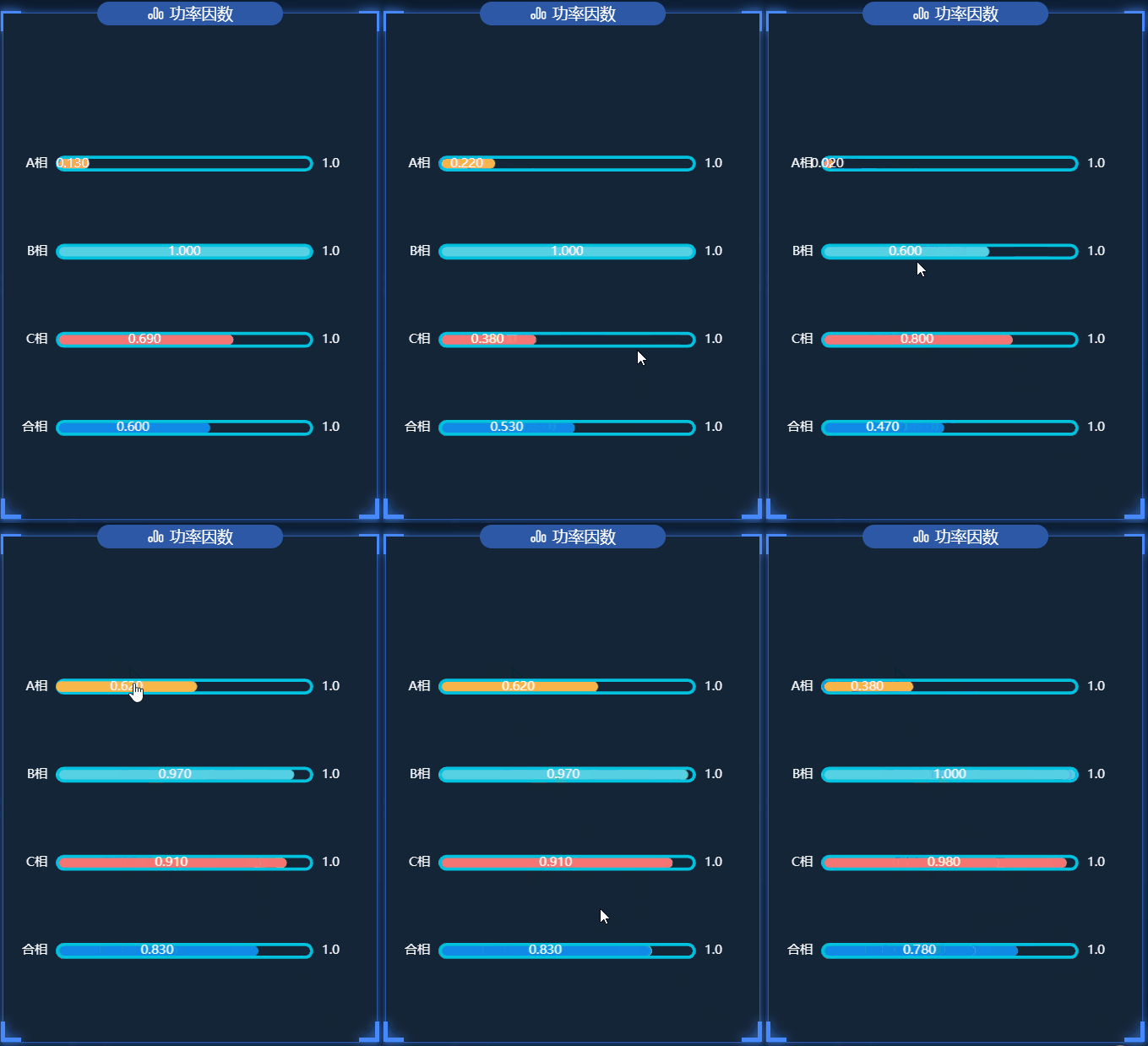
.vue文件代码如下:<template> <div class="powerFactor"> <charts :title="'功率因数'" :iconClass="'icon-paihangbang'"> <template slot="detail"> <div id="powerFactor" ref="powerFactor"></div> </template> </charts> </div> </template> <script> import { getPowerFactor } from "@/api/surgey"; export default { name: "powerFactor", data() { return { chartInstance: null, myColor: [ "rgb(248,180,72)", "rgb(86,208,227)", "rgb(245,116,116)", "rgb(16,137,231)", ], allData: [], arr_sub: [], titlename: ["A相", "B相", "C相", "合相"], valdata: [1.0, 1.0, 1.0, 1.0], idx: 0, arr6: [], }; }, mounted() { this.initChart(); this.getData(); this.getDataTimer = setInterval(() => { this.getData(); }, 60000); }, methods: { initChart() { this.chartInstance = this.$echarts.init(this.$refs.powerFactor, "saibei"); var option = { grid: { left: "5%", top: "21%", right: "10%", bottom: "5%", containLabel: true, }, // 不显示x轴的相关信息 xAxis: { show: false, }, yAxis: [ { type: "category", inverse: true, data: this.titlename, // 不显示y轴的线 axisLine: { show: false, }, // 不显示刻度 axisTick: { show: false, }, }, { data: ["1.0", "1.0", "1.0", "1.0"], inverse: true, // 不显示y轴的线 axisLine: { show: false, }, // 不显示刻度 axisTick: { show: false, }, }, ], series: [ { name: "条", type: "bar", data: [0.7112, 0.3424, 0.6054, 0.7858], yAxisIndex: 0, // 修改第一组柱子的圆角 itemStyle: { borderRadius: 20, color: (params) => { return this.myColor[params.dataIndex]; }, }, // 柱子之间的距离 // barCategoryGap: 50, //柱子的宽度 barWidth: 10, // 显示柱子内的文字 label: { show: true, position: "inside", color: "white", }, }, { name: "框", type: "bar", // barCategoryGap: 50, barWidth: 15, yAxisIndex: 1, data: this.valdata, itemStyle: { color: "none", borderColor: "#00c1de", borderWidth: 3, borderRadius: 15, }, }, ], }; option && this.chartInstance.setOption(option); this.startInterval(); // 让图表跟随屏幕自动的去适应 window.addEventListener("resize", this.chartResize); }, async getData() { let res = await getPowerFactor({}); if (res.code === 200) { this.allData = res.data.cositems; // this.updateChart(); var arr6 = []; var idx = 0; var arr_sub = []; for (var i = 0; i < this.allData.length; i++) { arr6.push(this.allData[i].fcosa.toFixed(3)); arr6.push(this.allData[i].fcosb.toFixed(3)); arr6.push(this.allData[i].fcosc.toFixed(3)); arr6.push(this.allData[i].fcos.toFixed(3)); } for (var i = 0; i < 4; i++) { arr_sub.push(arr6[4 * idx + i]); } this.arr_sub = arr_sub; this.arr6 = arr6; this.idx = idx; } else { this.$message({ message: res.msg, type: "warning", }); } }, startInterval() { this.timer = setInterval(() => { this.idx++; if (this.idx >= this.allData.length) { this.idx = 0; } for (var i = 0; i < 4; i++) { this.arr_sub.shift(); this.arr_sub.push(this.arr6[4 * this.idx + i]); } this.updateChart(); }, 2000); }, updateChart() { var option = { series: [ { data: this.arr_sub, }, ], }; this.chartInstance && this.chartInstance.setOption(option); }, // 让图表跟随屏幕自动的去适应 chartResize() { this.chartInstance.resize(); }, }, beforeDestroy() { clearInterval(this.timer); clearInterval(this.getDataTimer); window.removeEventListener("resize", this.chartResize); }, }; </script> <style lang="less" scoped> #powerFactor { width: 100%; height: 100%; } </style>- 1
- 2
- 3
- 4
- 5
- 6
- 7
- 8
- 9
- 10
- 11
- 12
- 13
- 14
- 15
- 16
- 17
- 18
- 19
- 20
- 21
- 22
- 23
- 24
- 25
- 26
- 27
- 28
- 29
- 30
- 31
- 32
- 33
- 34
- 35
- 36
- 37
- 38
- 39
- 40
- 41
- 42
- 43
- 44
- 45
- 46
- 47
- 48
- 49
- 50
- 51
- 52
- 53
- 54
- 55
- 56
- 57
- 58
- 59
- 60
- 61
- 62
- 63
- 64
- 65
- 66
- 67
- 68
- 69
- 70
- 71
- 72
- 73
- 74
- 75
- 76
- 77
- 78
- 79
- 80
- 81
- 82
- 83
- 84
- 85
- 86
- 87
- 88
- 89
- 90
- 91
- 92
- 93
- 94
- 95
- 96
- 97
- 98
- 99
- 100
- 101
- 102
- 103
- 104
- 105
- 106
- 107
- 108
- 109
- 110
- 111
- 112
- 113
- 114
- 115
- 116
- 117
- 118
- 119
- 120
- 121
- 122
- 123
- 124
- 125
- 126
- 127
- 128
- 129
- 130
- 131
- 132
- 133
- 134
- 135
- 136
- 137
- 138
- 139
- 140
- 141
- 142
- 143
- 144
- 145
- 146
- 147
- 148
- 149
- 150
- 151
- 152
- 153
- 154
- 155
- 156
- 157
- 158
- 159
- 160
- 161
- 162
- 163
- 164
- 165
- 166
- 167
- 168
- 169
- 170
- 171
- 172
- 173
- 174
- 175
- 176
- 177
- 178
- 179
- 180
- 181
- 182
- 183
- 184
- 185
- 186
- 187
- 188
- 189
- 190
- 191
- 192
- 193
- 194
- 195
⭐️三相温度
在这个图表中,大家可以学会visualMap属性的使用,以及图表内容文字的格式化

.vue文件代码如下:
<template> <div class="tPhaseTemperature"> <charts :title="'三相温度'" :iconClass="'icon-tongji'"> <template slot="detail"> <div id="tPhaseTemperature" ref="tPhaseTemperature"></div> </template> </charts> </div> </template> <script> import { getTPhaseTemperature } from "@/api/surgey"; export default { name: "tPhaseTemperature", data() { return { currentIndex: 0, chartInstance: null, allData: null, //从服务器中获取的所有的数据 }; }, mounted() { this.initChart(); this.getData(); this.getDataTimer = setInterval(() => { this.getData(); }, 60000); }, methods: { initChart() { this.chartInstance = this.$echarts.init( this.$refs.tPhaseTemperature, "saibei" ); var option = { //设置悬浮框 tooltip: { show: true, trigger: "axis", axisPointer: { type: "shadow", }, backgroundColor: "rgba(0,0,0,.4)", borderWidth: 0, textStyle: { color: "#fff", }, }, xAxis: [ { name: "(时)", type: "category", data: ["00-06", "06-12", "12-18", "18-24"], axisLabel: { fontSize: 14, }, }, ], yAxis: [ { type: "value", name: "°C", nameLocation: "end", max: "50", nameTextStyle: { padding: [0, 10, 0, 0], align: "center", }, //坐标轴刻度相关设置 axisTick: { show: true, lineStyle: { color: "#fff", }, }, axisLine: { show: true, lineStyle: { color: "white", }, }, splitLine: { show: true, lineStyle: { color: "rgb(67,81,95)", }, }, }, ], legend: { top: "8%", // data: ["2022-4-2", "2022-4-3"], textStyle: { fontSize: "14", }, }, grid: { left: "2%", top: "21%", right: "15%", bottom: "5%", containLabel: true, }, series: [ { name: "A相温度", data: [31, 32, 34, 36], type: "bar", barWidth: 15, itemStyle: { borderRadius: 20, color: new this.$echarts.graphic.LinearGradient(0, 0, 0, 1, [ { offset: 0, color: "#fccb05", }, { offset: 1, color: "#f5804d", }, ]), }, emphasis: { focus: "series", }, }, { name: "B相温度", data: [25, 35, 25, 28], type: "bar", barWidth: 15, itemStyle: { borderRadius: 20, color: new this.$echarts.graphic.LinearGradient(0, 0, 0, 1, [ { offset: 0, color: "#8bd46e", }, { offset: 1, color: "#09bcb7", }, ]), }, emphasis: { focus: "series", }, }, { name: "C相温度", data: [26, 34, 38, 30], type: "bar", barWidth: 15, itemStyle: { borderRadius: 20, color: new this.$echarts.graphic.LinearGradient(0, 0, 0, 1, [ { offset: 0, color: "#F57474", }, { offset: 1, color: "#F57474", }, ]), }, emphasis: { focus: "series", }, }, ], }; option && this.chartInstance.setOption(option); this.startInterval(); // 让图表跟随屏幕自动的去适应 window.addEventListener("resize", this.chartResize); }, // 从服务器获取数据 async getData() { let res = await getTPhaseTemperature({}); if (res.code === 200) { this.allData = res.data.temperature; this.updateChart(); } else { this.$message({ message: res.msg, type: "warning", }); } }, startInterval() { this.timer = setInterval(() => { // var dataLen = option.series[0].data.length; /* 取消之前高亮的图形 */ // this.chartInstance.dispatchAction({ // type: "downplay", // seriesIndex: [0, 1, 2], // dataIndex: this.currentIndex, // }); /* 显示 tooltip */ this.chartInstance.dispatchAction({ type: "showTip", seriesIndex: 2, //指定哪一系列的数据,即seriesIndex.data[0] dataIndex: this.currentIndex, }); /* 高亮当前图形 */ this.chartInstance.dispatchAction({ type: "highlight", seriesIndex: [0, 1, 2], dataIndex: this.currentIndex, }); this.currentIndex = (this.currentIndex + 1) % 4; }, 2000); }, updateChart() { var atemperature = this.allData.map((item) => item.fta); var btemperature = this.allData.map((item) => item.ftb); var ctemperature = this.allData.map((item) => item.ftc); var option = { series: [ { data: atemperature, }, { data: btemperature, }, { data: ctemperature, }, ], }; this.chartInstance.setOption(option); }, // 让图表跟随屏幕自动的去适应 chartResize() { this.chartInstance.resize(); }, }, beforeDestroy() { clearInterval(this.timer); clearInterval(this.getDataTimer); window.removeEventListener("resize", this.chartResize); }, }; </script> <style lang="less" scoped> #tPhaseTemperature { width: 100%; height: 100%; } </style>- 1
- 2
- 3
- 4
- 5
- 6
- 7
- 8
- 9
- 10
- 11
- 12
- 13
- 14
- 15
- 16
- 17
- 18
- 19
- 20
- 21
- 22
- 23
- 24
- 25
- 26
- 27
- 28
- 29
- 30
- 31
- 32
- 33
- 34
- 35
- 36
- 37
- 38
- 39
- 40
- 41
- 42
- 43
- 44
- 45
- 46
- 47
- 48
- 49
- 50
- 51
- 52
- 53
- 54
- 55
- 56
- 57
- 58
- 59
- 60
- 61
- 62
- 63
- 64
- 65
- 66
- 67
- 68
- 69
- 70
- 71
- 72
- 73
- 74
- 75
- 76
- 77
- 78
- 79
- 80
- 81
- 82
- 83
- 84
- 85
- 86
- 87
- 88
- 89
- 90
- 91
- 92
- 93
- 94
- 95
- 96
- 97
- 98
- 99
- 100
- 101
- 102
- 103
- 104
- 105
- 106
- 107
- 108
- 109
- 110
- 111
- 112
- 113
- 114
- 115
- 116
- 117
- 118
- 119
- 120
- 121
- 122
- 123
- 124
- 125
- 126
- 127
- 128
- 129
- 130
- 131
- 132
- 133
- 134
- 135
- 136
- 137
- 138
- 139
- 140
- 141
- 142
- 143
- 144
- 145
- 146
- 147
- 148
- 149
- 150
- 151
- 152
- 153
- 154
- 155
- 156
- 157
- 158
- 159
- 160
- 161
- 162
- 163
- 164
- 165
- 166
- 167
- 168
- 169
- 170
- 171
- 172
- 173
- 174
- 175
- 176
- 177
- 178
- 179
- 180
- 181
- 182
- 183
- 184
- 185
- 186
- 187
- 188
- 189
- 190
- 191
- 192
- 193
- 194
- 195
- 196
- 197
- 198
- 199
- 200
- 201
- 202
- 203
- 204
- 205
- 206
- 207
- 208
- 209
- 210
- 211
- 212
- 213
- 214
- 215
- 216
- 217
- 218
- 219
- 220
- 221
- 222
- 223
- 224
- 225
- 226
- 227
- 228
- 229
- 230
- 231
- 232
- 233
- 234
- 235
- 236
- 237
- 238
- 239
- 240
- 241
- 242
- 243
- 244
- 245
- 246
- 247
- 248
- 249
- 250
- 251
- 252
- 253
✨✨✨水球图
⭐️年月日负荷率图
在这个图表中,大家可以学会如何绘制水球图
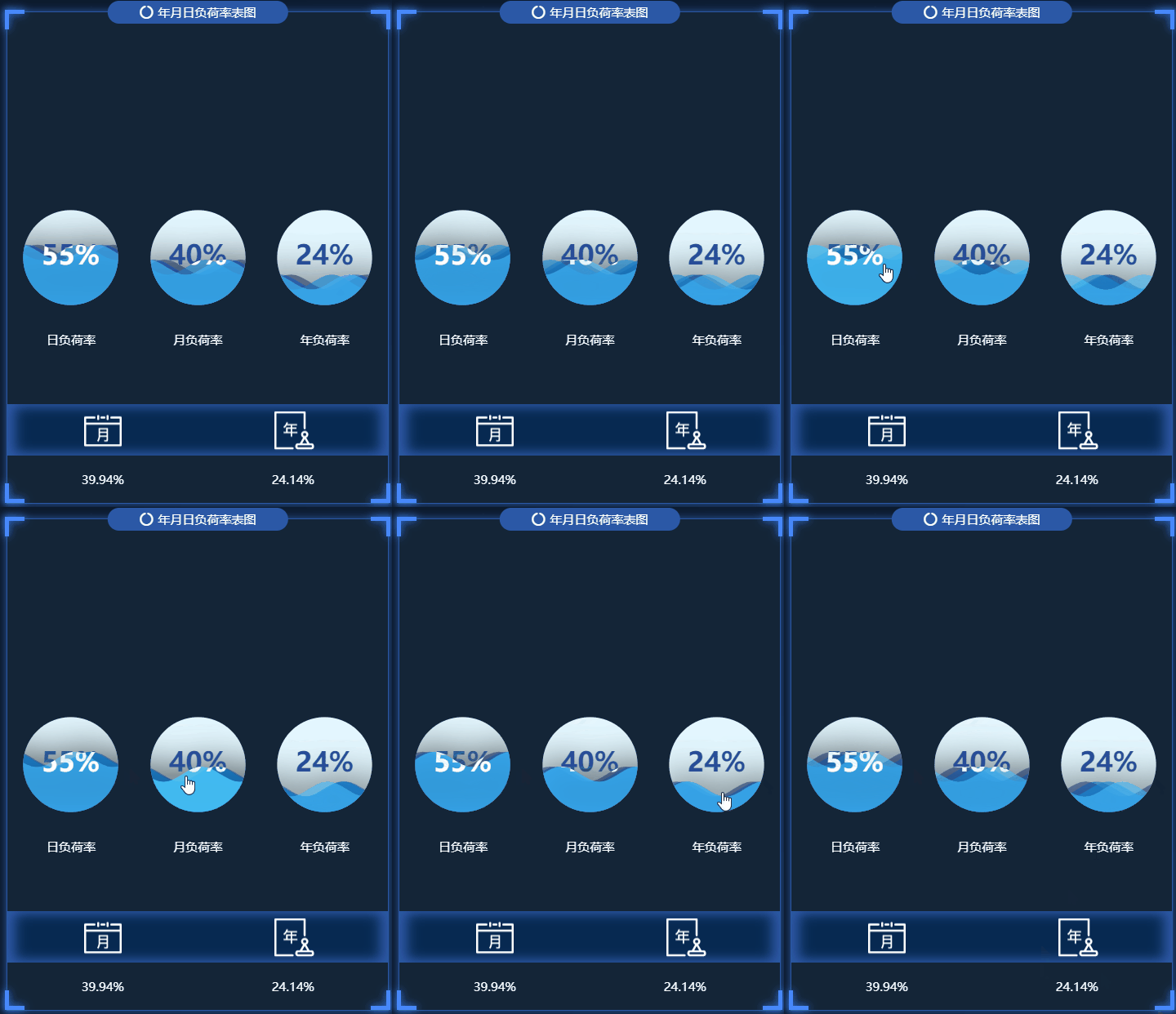
.vue文件代码如下:<template> <div class="loadRate"> <charts :title="'年月日负荷率表图'" :iconClass="'icon-yuanquanquan'"> <template slot="detail"> <div class="ymdLoadRate"> <div id="dayLoadRate" ref="dayLoadRate"></div> <div id="mouthLoadRate" ref="mouthLoadRate"></div> <div id="yearLoadRate" ref="yearLoadRate"></div> </div> <div class="desc"> <div class="descItem">日负荷率</div> <div class="descItem">月负荷率</div> <div class="descItem">年负荷率</div> </div> <div class="detail"> <div class="img"> <img src="@/assets/images/survey_images/survey/month.png" alt="月" /> <img src="@/assets/images/survey_images/survey/year.png" alt="年" /> </div> <div class="data"> <div v-if="allData" class="today"> {{ allData.loadrate.month_load_rate }}% </div> <div v-if="allData" class="yesterday"> {{ allData.loadrate.year_load_rate }}% </div> </div> </div> </template> </charts> </div> </template> <script> // import "@/assets/js/echarts-liquidfill"; import "@/assets/js/echarts-liquidfill.min.js"; import { getLoadRate } from "@/api/surgey"; export default { name: "loadRate", data() { return { chartInstanceD: null, chartInstanceM: null, chartInstanceL: null, allData: null, //从服务器中获取的所有的数据 }; }, mounted() { this.initChart(); this.getData(); this.timer = setInterval(() => { this.getData(); }, 60000); }, methods: { // 初始化图表 initChart() { this.chartInstanceD = this.$echarts.init(this.$refs.dayLoadRate); this.chartInstanceM = this.$echarts.init(this.$refs.mouthLoadRate); this.chartInstanceL = this.$echarts.init(this.$refs.yearLoadRate); const initOption = {}; this.chartInstanceD.setOption(initOption); this.chartInstanceM.setOption(initOption); this.chartInstanceL.setOption(initOption); window.addEventListener("resize", () => { this.chartInstanceD.resize(); this.chartInstanceM.resize(); this.chartInstanceL.resize(); }); }, // 从服务器获取数据 async getData() { let res = await getLoadRate({}); if (res.code == 200) { this.allData = { ...res.data }; this.updateChart(); } else { this.$message({ message: res.msg, type: "warning", }); } }, //更新数据 updateChart() { var optionD = { series: [ { radius: "75%", type: "liquidFill", // data: [0.113, 0.12, 0.1, 0.11], name: "日负荷率", itemStyle: { opacity: 0.6, }, emphasis: { itemStyle: { opacity: 0.9, }, }, outline: { show: false, }, label: { fontSize: 33, }, tooltip: { show: true, }, }, ], }; var optionM = { series: [ { radius: "75%", type: "liquidFill", // data: [0.61, 0.62, 0.6, 0.61], itemStyle: { opacity: 0.6, }, name: "日负荷率", emphasis: { itemStyle: { opacity: 0.9, }, }, outline: { show: false, }, label: { fontSize: 33, }, tooltip: { show: true, }, }, ], }; var optionL = { series: [ { radius: "75%", type: "liquidFill", // data: [0.8, 0.81, 0.79, 0.8], itemStyle: { opacity: 0.6, }, name: "日负荷率", emphasis: { itemStyle: { opacity: 0.9, }, }, outline: { show: false, }, label: { fontSize: 33, }, tooltip: { show: true, }, }, ], }; var value1 = this.allData.loadrate.day_load_rate / 100; var value2 = this.allData.loadrate.month_load_rate / 100; var value3 = this.allData.loadrate.year_load_rate / 100; var data1 = [value1, value1, value1, value1]; var data2 = [value2, value2, value2, value2]; var data3 = [value3, value3, value3, value3]; optionD.series[0].data = data1; optionM.series[0].data = data2; optionL.series[0].data = data3; this.chartInstanceD.setOption(optionD); this.chartInstanceM.setOption(optionM); this.chartInstanceL.setOption(optionL); }, }, beforeDestroy() { clearInterval(this.timer); }, }; </script> <style lang="less" scoped> .loadRate { margin-top: 0.1842rem; background-color: rgb(20, 37, 55); .ymdLoadRate { width: 100%; height: 3.1579rem; display: flex; #dayLoadRate { flex: 1; } #mouthLoadRate { flex: 1; } #yearLoadRate { flex: 1; } } .desc { width: 100%; position: absolute; top: 65%; left: 0; display: flex; align-items: center; justify-content: space-around; color: white; } .detail { position: absolute; height: 0.5263rem; bottom: 0.1133rem; left: 0; width: 100%; font-size: 0.1rem; color: white; background-color: rgb(20, 37, 55); .img { display: flex; justify-content: space-around; background-color: #072951; box-shadow: -0.0526rem 0px 0.0789rem #2c58a6 inset, /*左边阴影*/ 0.0526rem 0px 0.0789rem #2c58a6 inset; img { display: block; width: 0.3333rem; height: 0.3333rem; } } .data { display: flex; justify-content: space-around; margin-top: 0.1rem; } } } </style>- 1
- 2
- 3
- 4
- 5
- 6
- 7
- 8
- 9
- 10
- 11
- 12
- 13
- 14
- 15
- 16
- 17
- 18
- 19
- 20
- 21
- 22
- 23
- 24
- 25
- 26
- 27
- 28
- 29
- 30
- 31
- 32
- 33
- 34
- 35
- 36
- 37
- 38
- 39
- 40
- 41
- 42
- 43
- 44
- 45
- 46
- 47
- 48
- 49
- 50
- 51
- 52
- 53
- 54
- 55
- 56
- 57
- 58
- 59
- 60
- 61
- 62
- 63
- 64
- 65
- 66
- 67
- 68
- 69
- 70
- 71
- 72
- 73
- 74
- 75
- 76
- 77
- 78
- 79
- 80
- 81
- 82
- 83
- 84
- 85
- 86
- 87
- 88
- 89
- 90
- 91
- 92
- 93
- 94
- 95
- 96
- 97
- 98
- 99
- 100
- 101
- 102
- 103
- 104
- 105
- 106
- 107
- 108
- 109
- 110
- 111
- 112
- 113
- 114
- 115
- 116
- 117
- 118
- 119
- 120
- 121
- 122
- 123
- 124
- 125
- 126
- 127
- 128
- 129
- 130
- 131
- 132
- 133
- 134
- 135
- 136
- 137
- 138
- 139
- 140
- 141
- 142
- 143
- 144
- 145
- 146
- 147
- 148
- 149
- 150
- 151
- 152
- 153
- 154
- 155
- 156
- 157
- 158
- 159
- 160
- 161
- 162
- 163
- 164
- 165
- 166
- 167
- 168
- 169
- 170
- 171
- 172
- 173
- 174
- 175
- 176
- 177
- 178
- 179
- 180
- 181
- 182
- 183
- 184
- 185
- 186
- 187
- 188
- 189
- 190
- 191
- 192
- 193
- 194
- 195
- 196
- 197
- 198
- 199
- 200
- 201
- 202
- 203
- 204
- 205
- 206
- 207
- 208
- 209
- 210
- 211
- 212
- 213
- 214
- 215
- 216
- 217
- 218
- 219
- 220
- 221
- 222
- 223
- 224
- 225
- 226
- 227
- 228
- 229
- 230
- 231
- 232
- 233
- 234
- 235
- 236
- 237
- 238
- 239
- 240
- 241
- 242
- 243
- 244
- 245
- 246
- 247
✨✨✨散点图
⭐️三相平衡
在这个图表中,大家可以学会visualMap属性的使用,以及图表内容文字的格式化

.vue文件代码如下:<template> <div class="tPhaseBalance"> <charts :title="'三相平衡'" :iconClass="'icon-fuhekongzhizhongduan'"> <template slot="detail"> <div id="tPhaseBalance" ref="tPhaseBalance"></div> </template> </charts> </div> </template> <script> import { getTPhaseBalance } from "@/api/surgey"; export default { name: "tPhaseBalance", data() { return { chartInstance: null, allData: null, //从服务器中获取的所有的数据 myColor: [ "rgb(248,180,72)", "rgb(86,208,227)", "rgb(245,116,116)", "rgb(16,137,231)", ], }; }, mounted() { this.initChart(); this.getData(); this.timer = setInterval(() => { this.getData(); }, 60000); }, methods: { // 初始化图表 initChart() { this.chartInstance = this.$echarts.init( this.$refs.tPhaseBalance, "saibei" ); const initOption = {}; this.chartInstance.setOption(initOption); // 让图表跟随屏幕自动的去适应 window.addEventListener("resize", () => { this.chartInstance.resize(); }); }, // 从服务器获取数据 async getData() { let res = await getTPhaseBalance({}); if (res.code === 200) { this.allData = res.data; this.updateChart(); } else { this.$message({ message: res.msg, type: "warning", }); } }, //更新数据 updateChart() { var arr = []; for (var i = 0; i < this.allData.length; i++) { var arrItem = {}; arrItem.name = this.allData[i].devname; arrItem.sales = this.allData[i].unbalancefi; arrItem.services = this.allData[i].unbalancefu; arr.push(arrItem); } var arrItem = {}; arrItem.name = " "; arrItem.sales = 150; arrItem.services = 15; arr.push(arrItem); var sourceData = arr; var seriesData = sourceData.map(function (item, index, array) { return { name: item["name"], value: [item["sales"], item["services"]], }; }); var computeServicesAvgLine = function () { let sum = 0; sourceData.forEach(function (item) { sum += item["services"]; }); // return sum / sourceData.length; return 10; }; var computeSalesAvgLine = function () { let sum = 0; sourceData.forEach(function (item) { sum += item["sales"]; }); // return sum / sourceData.length; return 110; }; var avg = { servicesAvgLine: computeServicesAvgLine(), salesAvgLine: computeSalesAvgLine(), }; var option = { grid: { left: "5%", top: "20%", right: "9%", bottom: "5%", containLabel: true, }, tooltip: { trigger: "item", axisPointer: { show: true, type: "cross", lineStyle: { type: "dashed", width: 1, }, }, backgroundColor: "rgba(0,0,0,.4)", borderColor: "rgba(0,0,0,.4)", textStyle: { color: "#fff", }, formatter: function (obj) { if (obj.componentType == "series") { return ( '' + obj.name + "" + "" + "电流不平衡" + "" + " : " + obj.data.value[0] + "%" + "
" + "" + "电压不平衡" + "" + " : " + obj.data.value[1] + "%" ); } }, }, xAxis: { name: "电流", type: "value", scale: true, //脱离 0 值比例 axisLabel: { color: "#fff", formatter: "{value}", }, //分割线不显示 splitLine: { show: false, }, // x轴的轴线的样式 axisLine: { show: true, lineStyle: { color: "#3259B8", }, }, //刻度的显示 axisTick: { show: true, }, }, yAxis: { name: "电压", type: "value", scale: true, axisLabel: { color: "#fff", formatter: "{value}", }, splitLine: { show: false, }, axisLine: { show: true, lineStyle: { color: "#3259B8", }, }, //刻度的显示 axisTick: { show: true, }, }, toolbox: { show: false, feature: { dataZoom: {}, }, }, visualMap: { /*min: 0, max: 800,*/ /*dimension: 0,*/ show: true, //默认为true,控制长条的显示与隐藏 padding: [50, 20], //选择框是水平的还是数值的 orient: "horizontal", left: "35%", top: "2%", text: ["高", "低"], //两端的文字 calculable: true, //是否显示拖拽的文本 itemWidth: 18, //长条的宽度 itemHeight: 160, //长条的高度 textStyle: { color: "#fff", height: 56, fontSize: 11, lineHeight: 60, }, //在选中范围中的视觉元素 inRange: { color: ["#7AB7F7", "#b45ef7"], }, }, series: [ { type: "scatter", data: seriesData, symbolSize: 20, markLine: { //鼠标移动到图形上时的显示内容 label: { show: true, formatter: function (params) { if (params.dataIndex == 0) { return params.value + "A"; } else if (params.dataIndex == 1) { return params.value + "U"; } return params.value; }, }, //线条的样式 lineStyle: { color: "#626c91", type: "solid", width: 1, }, //线条高亮时的样式 emphasis: { lineStyle: { color: "#fff", }, }, data: [ { xAxis: avg.salesAvgLine, name: "电流平均线", label: { color: "#b84a58", }, }, { yAxis: avg.servicesAvgLine, name: "电压平均线", label: { color: "#b84a58", }, }, ], }, markArea: { silent: true, data: [ [ { name: "异常", itemStyle: { color: "transparent", }, label: { show: true, position: "insideTopLeft", fontStyle: "normal", color: "#409EFF", fontSize: 20, }, coord: [avg.salesAvgLine, avg.servicesAvgLine], }, { coord: [Number.MAX_VALUE, 0], }, ], [ { name: "安全", itemStyle: { color: "transparent", }, label: { show: true, position: "insideTopRight", fontStyle: "normal", color: "#409EFF", fontSize: 20, }, coord: [0, 0], }, { coord: [avg.salesAvgLine, avg.servicesAvgLine], }, ], [ { name: "危险", itemStyle: { color: "transparent", }, label: { show: true, position: "insideBottomLeft", fontStyle: "normal", color: "#409EFF", fontSize: 20, }, coord: [avg.salesAvgLine, avg.servicesAvgLine], }, { coord: [Number.MAX_VALUE, Number.MAX_VALUE], }, ], [ { name: "异常", itemStyle: { color: "transparent", }, label: { show: true, position: "insideBottomRight", fontStyle: "normal", color: "#409EFF", fontSize: 20, }, coord: [0, Number.MAX_VALUE], }, { coord: [avg.salesAvgLine, avg.servicesAvgLine], }, ], ], }, label: { show: true, position: "bottom", formatter: function (params) { return params.name; }, }, }, ], }; this.chartInstance.setOption(option); }, }, beforeDestroy() { clearInterval(this.timer); }, }; </script> <style lang="less" scoped> #tPhaseBalance { width: 100%; height: 100%; } </style>- 1
- 2
- 3
- 4
- 5
- 6
- 7
- 8
- 9
- 10
- 11
- 12
- 13
- 14
- 15
- 16
- 17
- 18
- 19
- 20
- 21
- 22
- 23
- 24
- 25
- 26
- 27
- 28
- 29
- 30
- 31
- 32
- 33
- 34
- 35
- 36
- 37
- 38
- 39
- 40
- 41
- 42
- 43
- 44
- 45
- 46
- 47
- 48
- 49
- 50
- 51
- 52
- 53
- 54
- 55
- 56
- 57
- 58
- 59
- 60
- 61
- 62
- 63
- 64
- 65
- 66
- 67
- 68
- 69
- 70
- 71
- 72
- 73
- 74
- 75
- 76
- 77
- 78
- 79
- 80
- 81
- 82
- 83
- 84
- 85
- 86
- 87
- 88
- 89
- 90
- 91
- 92
- 93
- 94
- 95
- 96
- 97
- 98
- 99
- 100
- 101
- 102
- 103
- 104
- 105
- 106
- 107
- 108
- 109
- 110
- 111
- 112
- 113
- 114
- 115
- 116
- 117
- 118
- 119
- 120
- 121
- 122
- 123
- 124
- 125
- 126
- 127
- 128
- 129
- 130
- 131
- 132
- 133
- 134
- 135
- 136
- 137
- 138
- 139
- 140
- 141
- 142
- 143
- 144
- 145
- 146
- 147
- 148
- 149
- 150
- 151
- 152
- 153
- 154
- 155
- 156
- 157
- 158
- 159
- 160
- 161
- 162
- 163
- 164
- 165
- 166
- 167
- 168
- 169
- 170
- 171
- 172
- 173
- 174
- 175
- 176
- 177
- 178
- 179
- 180
- 181
- 182
- 183
- 184
- 185
- 186
- 187
- 188
- 189
- 190
- 191
- 192
- 193
- 194
- 195
- 196
- 197
- 198
- 199
- 200
- 201
- 202
- 203
- 204
- 205
- 206
- 207
- 208
- 209
- 210
- 211
- 212
- 213
- 214
- 215
- 216
- 217
- 218
- 219
- 220
- 221
- 222
- 223
- 224
- 225
- 226
- 227
- 228
- 229
- 230
- 231
- 232
- 233
- 234
- 235
- 236
- 237
- 238
- 239
- 240
- 241
- 242
- 243
- 244
- 245
- 246
- 247
- 248
- 249
- 250
- 251
- 252
- 253
- 254
- 255
- 256
- 257
- 258
- 259
- 260
- 261
- 262
- 263
- 264
- 265
- 266
- 267
- 268
- 269
- 270
- 271
- 272
- 273
- 274
- 275
- 276
- 277
- 278
- 279
- 280
- 281
- 282
- 283
- 284
- 285
- 286
- 287
- 288
- 289
- 290
- 291
- 292
- 293
- 294
- 295
- 296
- 297
- 298
- 299
- 300
- 301
- 302
- 303
- 304
- 305
- 306
- 307
- 308
- 309
- 310
- 311
- 312
- 313
- 314
- 315
- 316
- 317
- 318
- 319
- 320
- 321
- 322
- 323
- 324
- 325
- 326
- 327
- 328
- 329
- 330
- 331
- 332
- 333
- 334
- 335
- 336
- 337
- 338
- 339
- 340
- 341
- 342
- 343
- 344
- 345
- 346
- 347
- 348
- 349
- 350
- 351
- 352
- 353
- 354
- 355
- 356
- 357
- 358
- 359
- 360
- 361
- 362
- 363
- 364
- 365
- 366
- 367
- 368
- 369
- 370
- 371
- 372
- 373
- 374
- 375
- 376
- 377
- 378
- 379
- 380
-
相关阅读:
PCB设计中的邮票孔封装如何制作?
【C++】智能指针【内存泄漏|智能指针原理及使用|RAII】
Ceph入门到精通-ceph pool 删除导致 misplaced 的原因
jwt的基本介绍
阿里开源数据同步神器DataX异构数据源间数据同步同步MySQL与HDFS相互实战
SpringBoot-简介和入门案例
NAND存储器转储分析 - 使用ECC修复位错误与UBI镜像固件分析
拒绝加班:巧用前端电子表格中构建公式树
渗透流程
Node详细解释[带你快速入门Node](2)
- 原文地址:https://blog.csdn.net/ksjdbdh/article/details/126040839
