-
【R语言】【2】绘图base和lattice和ggplot2库
前言
本来觉得r语言的library装起来很方便,要么是运行后有提示某个包没有,直接有install的选项,要么是用install.package(“包名”)也可以装上。问题是缺的包也太多了吧,好不容易装上gganimate,又提示已经被deprecated了。R语言在一两年前又有大更新,毕竟VSCode运行R.exe变成运行Python包的radian.exe了。能用的绘图函数可难找。
\;\\\;\\\;
数据集mtcars
32辆汽车(1973-74款)的油耗和10个方面的汽车设计和性能
- mtcars$mpg :每加仑油能跑多少英里
- mtcars$cyl :气缸的个数
- mtcars$disp :车的排量
- mtcars$hp :总马力
- mtcars$drat :后轴比
- mtcars$wt :重量
- mtcars$qsec :衡量启动加速能力
- mtcars$vs :引擎类型
- mtcars$am :传动方式,自动变速0、手动变速1
- mtcars$gear :前进齿轮数
- mtcars$carb :化油器个数
\;\\\;\\\;
base
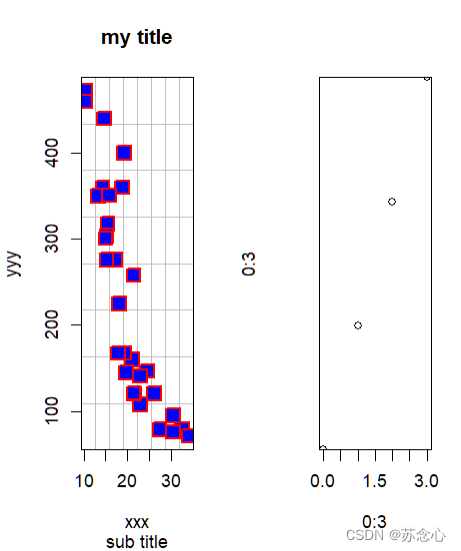
plot 散点图
#加载数据 #32辆汽车(1973-74款)的油耗和10个方面的汽车设计和性能 #data('mtcars') # mtcars <- mtcars #图为一行一列 # par(mfrow=c(1,1)) #图为一行两列 par(mfrow=c(1,2)) #散点图 plot(x=mtcars$mpg,y=mtcars$disp, type='p', #散点图p,不显示n,折线图l,间断折线c #散点+间断折线b,散点+连续折线o #垂直于x轴h,楼梯s,反楼梯S main='my title', #标题 sub='sub title', #副标题 xlab='xxx', ylab='yyy', cex=2, #点的大小 lwd=2, #边框线粗 pch=22, #点的形状,填充正方体22 col='red', #点的颜色 bg='blue', #填充颜色 panel.first = grid(8,8,col='grey',lty=1), frame.plot = T ) plot(0:3,0:3, ann=T, #正常显示标题和坐标轴标签T,不显示F axes=T, #不显示边框F,显示边框T xaxs='r', #x轴延伸r yaxs='i', #y轴不延伸i xaxt='s', #x轴数据显示s yaxt='n', #y轴数据不显示n # log='xy' #xy都取对数 ) #额外的橙色网格 # grid(col='orange',lty=1)- 1
- 2
- 3
- 4
- 5
- 6
- 7
- 8
- 9
- 10
- 11
- 12
- 13
- 14
- 15
- 16
- 17
- 18
- 19
- 20
- 21
- 22
- 23
- 24
- 25
- 26
- 27
- 28
- 29
- 30
- 31
- 32
- 33
- 34
- 35
- 36
- 37
- 38
- 39
- 40
- 41
- 42
- 43
- 44
- 45
- 46
\;\\\;\\\;
pch点的形状

\;\\\;\\\;
hist 直方图
#正太分布100个,平均30,方差3 a <- rnorm(100,30,3) #1x2 par(mfrow=c(1,2)) hist(a, main="(1)", xlab="xxx", ylab="yyy", xlim=c(10,50), #x轴范围 ylim=c(0,25), #y轴范围 col='red', #填充色 # border='blue', #边框色 # breaks=30, #分组组数 breaks=function(x)length(x)/10, #分组组数 freq=T #T显示频数,F显示概率密度 ) hist(a, main="(2)", axes=T, #显示坐标轴 breaks=seq(10,50,by=4), #(10,14) (14,18) ... freq=F, #probability参数和freq意思相反,就忽略这个参数了 label=T #标签显示 )- 1
- 2
- 3
- 4
- 5
- 6
- 7
- 8
- 9
- 10
- 11
- 12
- 13
- 14
- 15
- 16
- 17
- 18
- 19
- 20
- 21
- 22
- 23
- 24
- 25
- 26
- 27

\;\\\;\\\;
breaks意思
breaks的意思,是建议的分组组数
- 为一个 数 时,就是规定了横坐标自变量的个数
- 为一个矢量 c() 或者序列 seq() 时,向量的元素值就是各个横坐标自变量
- 为一个函数 function() 时,函数值表示分组组数,x表示总的数据个数,因此这里的breaks绘图前就固定不变了
\;\\\;\\\;
boxplot 箱形图
以自变量进行分组,每个分组的因变量有一个范围,因此有最大、最小、平均、1/4和3/4,这些数据组成了一个个箱子
另外,限定了ylim值范围后,会出现异常值,为圆圈 ◯ \textcircled{} ◯,在min下面或者max上面
age <- c(12 ,13 ,14 ,13 ,12 ,14 ,12 ,13 ,14 ,15 ,16) height <- c(157,162,160,162,165,172,170,162,159,175,179) #有大小写之分,因为都是字符串 gender <- c('f','f','m','m','f','f','f','f','m','f','m') #分组数据 #max. #3rd Qu. 所有数值由小到大排列后第75%的数字 #mean #1st Qu. 所有数值由小到大排列后第25%的数字 #min. par(mfrow=c(1,2)) boxplot( height~age, col='lightgray' ) boxplot( height~gender, col=c('green','blue') # width=c(1,2), #宽度设置 # notch=T, #有凹口 # horizontal = T #水平绘制 )- 1
- 2
- 3
- 4
- 5
- 6
- 7
- 8
- 9
- 10
- 11
- 12
- 13
- 14
- 15
- 16
- 17
- 18
- 19
- 20
- 21
- 22
- 23
- 24
- 25
- 26
- 27
- 28

\;\\\;\\\;
lattice
xyplot 散点图
library(lattice) g <- factor( mtcars$gear, levels=c(3,4,5), labels=c("3 gears","4 gears",'5 gears') ) xyplot( mtcars$mpg ~ mtcars$wt | mtcars$cyl * g, main="title" # xlab='xxx', # ylab='yyy' )- 1
- 2
- 3
- 4
- 5
- 6
- 7
- 8
- 9
- 10
- 11
- 12
- 13
- 14

\;\\\;\\\;
histogram 直方图
library(lattice) h <- c(21,20,27, 25,25,24,30,27, 27, 28, 29,27, 25, 25, 28, 26, 28, 26, 28, 31, 30, 26, 26) histogram( h, col='yellow', border='red' )- 1
- 2
- 3
- 4
- 5
- 6
- 7
- 8
- 9

\;\\\;\\\;
bwplot 箱型图
library(lattice) age <- c(12 ,13 ,14 ,13 ,12 ,14 ,12 ,13 ,14 ,15 ,16) weight <- c( 50,52 , 54,60 , 66, 49, 52, 55,55 , 54, 60) bwplot( weight~age, horizontal=F, #是否横向显示 cex=2, #点的大小 pch=16, #点的形状 box.ratio=0.9, box.width=0.9 )- 1
- 2
- 3
- 4
- 5
- 6
- 7
- 8
- 9
- 10
- 11
- 12
- 13

\;\\\;\\\;
ggplot2
ggplot + geom_point 散点图
library(ggplot2) gear <- as.factor(mtcars$gear) ggplot(mtcars, aes(mtcars$wt,mtcars$mpg,fill=gear)) + #aes()映射 fill填充颜色 geom_point( size=6,shape=22 #shape和pch一样,是点的形状 )- 1
- 2
- 3
- 4
- 5
- 6
- 7
- 8
- 9
- 10

\;\\\;\\\;
ggplot + geom_bar 直方图
library(ggplot2) library(tidyverse) data.frame( x=c('A','B','C'), y=c(rep('negative',7) ,rep('positive',11) ) ) %>% ggplot( aes(x=x,fill=y) ) + geom_bar() + #只需要x annotate( 'text', x=1,y=3, label='50%', colour='white', fontface='bold')+ annotate( 'text', x=2,y=4, label='67%', colour='white', fontface='bold' )+ annotate( 'text', x=3,y=4, label='67%', colour='white', fontface='bold' )- 1
- 2
- 3
- 4
- 5
- 6
- 7
- 8
- 9
- 10
- 11
- 12
- 13
- 14
- 15
- 16
- 17
- 18
- 19
- 20
- 21
- 22
- 23
- 24
- 25
- 26
- 27
- 28
- 29
- 30

library(ggplot2) library(tidyverse) ggplot( diamonds, aes(price,fill=cut) )+ geom_bar(stat='bin') #只需要x- 1
- 2
- 3
- 4
- 5
- 6
- 7
- 8
- 9

\;\\\;\\\;
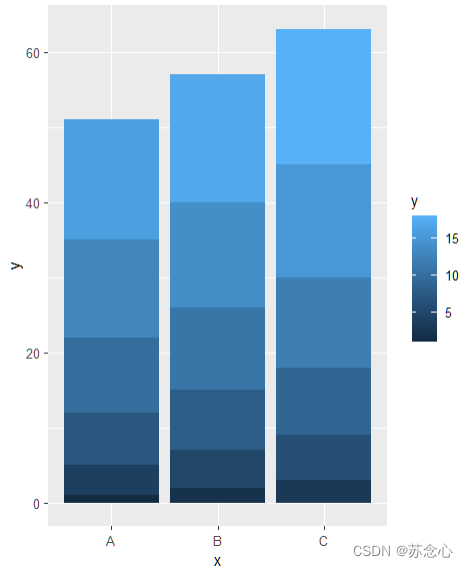
ggplot + geom_col 直方图
library(ggplot2) library(tidyverse) data.frame( x=c('A','B','C'), y=1:18 ) %>% ggplot( aes(x=x,y=y,fill=y) )+ geom_col() #需要xy- 1
- 2
- 3
- 4
- 5
- 6
- 7
- 8
- 9
- 10
- 11
- 12
\;\\\;\\\;
ggplot + geom_histogram 直方图
library(ggplot2) library(tidyverse) age <- c(12,13 ,13 ,13 ,13 ,12 ,14 ,12 ,16 ,14 ,15 ,16) weight <- c(51, 50,52 , 55,55 , 66, 49, 52, 55,55 , 54, 60) data.frame( x=age, y=weight ) %>% ggplot( aes(x=x,fill=y) ) + geom_histogram( breaks=seq(as.factor(weight)) + xlim(45,70) )- 1
- 2
- 3
- 4
- 5
- 6
- 7
- 8
- 9
- 10
- 11
- 12
- 13
- 14
- 15
- 16
- 17

\;\\\;\\\;
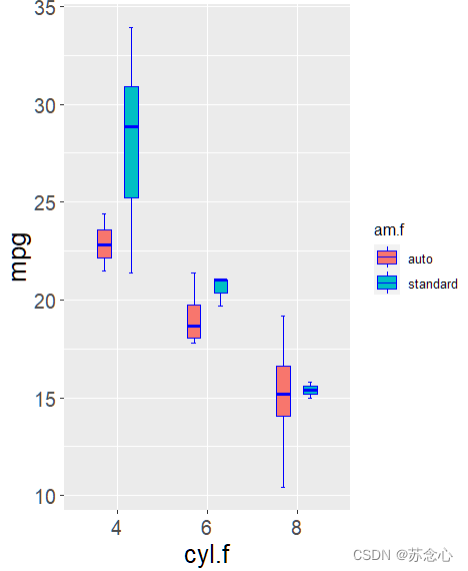
ggplot + geom_boxplot 箱型图
library(ggplot2) cyl.f <- factor( mtcars$cyl,levels=c(4,6,8),labels=c('4','6','8') ) am.f <- factor( mtcars$am,levels=c(0,1),labels=c('auto','standard') ) ggplot( mtcars, aes(cyl.f,mpg) ) + stat_boxplot( aes(fill=am.f), # geom='errorbar', # width=0.1, # size=0.5, # position=position_dodge(0.6), # color='blue' # ) + geom_boxplot( aes(fill=am.f), # position=position_dodge(0.6), # size=0.5, # width=0.3, # color='blue', # outlier.color = 'blue', # outlier.fill = 'red', # outlier.shape = 19, # outlier.size = 1.5, # outlier.stroke = 0.5, # outlier.alpha = 45, # notch=F, #无凹口 notchwidth = 0.5 # )+ theme( axis.title = element_text(size=18), #坐标轴字体大小 axis.text = element_text(size=14) #坐标轴字体大小 )- 1
- 2
- 3
- 4
- 5
- 6
- 7
- 8
- 9
- 10
- 11
- 12
- 13
- 14
- 15
- 16
- 17
- 18
- 19
- 20
- 21
- 22
- 23
- 24
- 25
- 26
- 27
- 28
- 29
- 30
- 31
- 32
- 33
- 34
- 35
- 36
- 37
- 38
- 39
- 40
- 41
- 42
- 43
- 44
- 45
- 46
\;\\\;\\\;
参考:
《R语言编程与绘图基础》
R语言 柱状图 geom_col 与 geom_bar 与geom_histogram(直方图)
R语言绘图基础篇-箱型图 -
相关阅读:
Spring IOC之ImportSelector接口
MySQL实现的一点总结(一)
【JAVA】关于抽象类的概念
Copy & Deepcopy
顺序栈(数组模拟)
大模型在数据分析场景下的能力评测
【面经】Thoughtworks 大数据开发面经
总结vue 需要掌握的知识点
QT实现人脸识别
Oracle/PLSQL: Atan Function
- 原文地址:https://blog.csdn.net/weixin_41374099/article/details/126051561
