-
openresty+consul配置实现原理
部署:consul
解压consul_1.4.4_linux_amd64.zip文件
unzip consul_1.4.4_linux_amd64.zip
单机开发模式启动
consul agent -dev
nginx配置
[root@k8smaster01 conf]# more nginx.conf
worker_processes 2;
events {
worker_connections 1024;
}
http {
include mime.types;
log_format main '$remote_addr - $remote_user [$time_local] "$request" ' '$status $body_bytes_sent "$http_referer" ' '"$http_user_agent" "$http_x_for
warded_for" "$upstream_addr" "$request_body"';
sendfile on;
keepalive_timeout 65;upstream test {
sticky name=test_1 path=/;
# upsync 127.0.0.1:2379/v2/keys/upstreams/test upsync_timeout=6m upsync_interval=500ms upsync_type=etcd strong_dependency=off;
# upsync 192.168.23.1:8000/encode/etcd/upstreams/test upsync_timeout=6m upsync_interval=500ms upsync_type=etcd strong_dependency=off;
upsync 127.0.0.1:8500/v1/kv/upstreams/test upsync_timeout=6m upsync_interval=500ms upsync_type=consul strong_dependency=off;
upsync_dump_path /data/soft/openresty-1.13.6.1/nginx/conf/servers_test.conf;
include /data/soft/openresty-1.13.6.1/nginx/conf/servers_test.conf;check interval=1000 rise=2 fall=2 timeout=3000 type=http default_down=false;
check_http_send "HEAD / HTTP/1.0\r\n\r\n";
check_http_expect_alive http_2xx http_3xx;
}
server {
listen 8888;
location /test {
proxy_pass http://test;
}
location /upstream_show {
upstream_show;
}
location /upstream_status {
check_status;
access_log off;
}location / {
default_type 'text/html';
content_by_lua 'ngx.say("hello world")';
}
error_page 500 502 503 504 /50x.html;
location = /50x.html {
root html;
}
}
}验证
1、往consul写入数据

[root@k8smaster01 logs]# curl -X PUT -d '' http://127.0.0.1:8500/v1/kv/upstreams/test/192.168.23.101:80
true
[root@k8smaster01 logs]#
[root@k8smaster01 logs]# curl -X PUT -d '' http://127.0.0.1:8500/v1/kv/upstreams/test/192.168.23.102:80
true
[root@k8smaster01 logs]#2、浏览器查看upstream是否动态更新

抓包查看底层原理
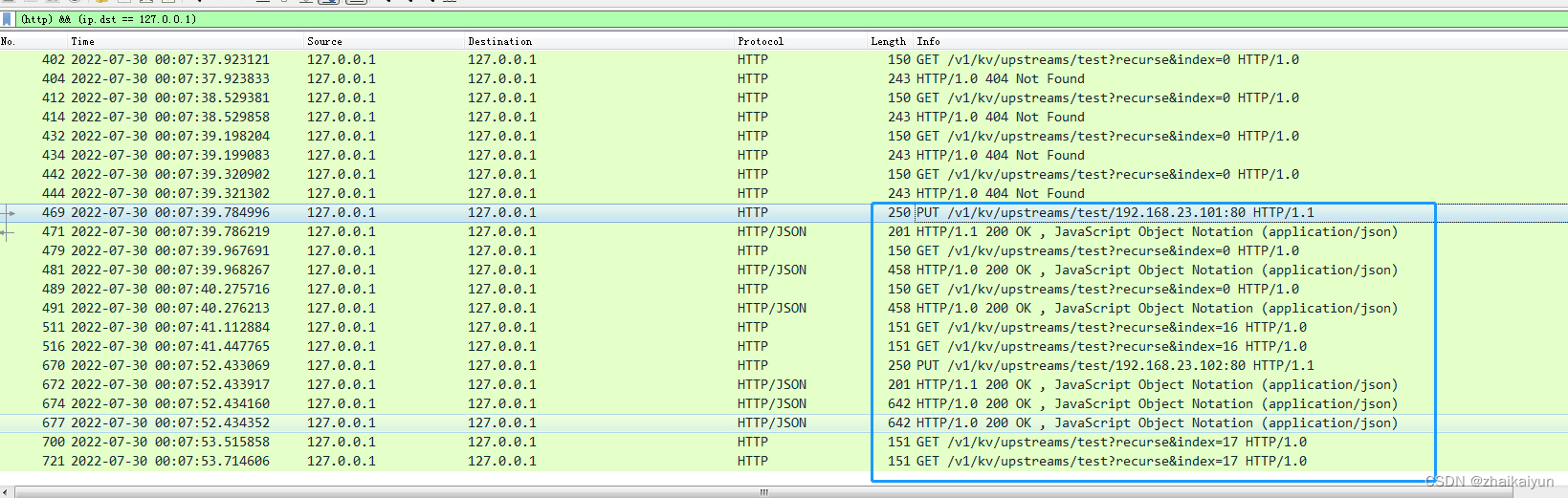
1、手工写入数据

PUT /v1/kv/upstreams/test/192.168.23.101:80 HTTP/1.1
User-Agent: curl/7.29.0
Host: 127.0.0.1:8500
Accept: */*
Content-Length: 0
Content-Type: application/x-www-form-urlencodedHTTP/1.1 200 OK
Content-Type: application/json
Vary: Accept-Encoding
Date: Fri, 29 Jul 2022 16:07:39 GMT
Content-Length: 5
true2、openresty监听consul的变化,变化后拉取数据到本地内存

GET /v1/kv/upstreams/test?recurse&index=0 HTTP/1.0
Host: 127.0.0.1
Accept: */*HTTP/1.0 200 OK
Content-Type: application/json
Vary: Accept-Encoding
X-Consul-Index: 16
X-Consul-Knownleader: true
X-Consul-Lastcontact: 0
Date: Fri, 29 Jul 2022 16:07:39 GMT
Content-Length: 187[
{
"LockIndex": 0,
"Key": "upstreams/test/192.168.23.101:80",
"Flags": 0,
"Value": null,
"CreateIndex": 16,
"ModifyIndex": 16
}
]3、总结:nginx启动后,一直监听consul上的upstream节点的变化,如果节点发送变化,监听直接返回全量信息,更新nginx对应的upstream的值到内存中。
-
相关阅读:
安装NodeJS并使用yarn下载前端依赖
Linux系统换源
Java 8 引进的一个新特性 Optional
【ShardingSphere】水平分库分表配置方法
eltable el-tooltip__popper 换行、字体、颜色等调整
map集合
数据集笔记:GeoLife GPS 数据 (user guide)
AIGC|从革新内容创作到社会共识建立,迎接全新技术维度
【Python学习笔记】Optuna + Transformer B站视频实践
Spark Streaming 基本操作
- 原文地址:https://blog.csdn.net/zhaikaiyun/article/details/126058559