-
PyQt5快速开发与实战 6.5 QGridLayout(网格布局)
PyQt5快速开发与实战
6. 第6章 PyQt5 布局管理
6.5 QGridLayout(网格布局)
QGridLayout(网格布局)是将窗口分隔成行和列的网格来进行排列。
通常可以使用函数addWidget()将被管理的控件(Widget)添加到窗口中,或者使用addLayout()函数将布局(Layout)添加到窗口中。也可以通过addWidget()函数对所添加的控件设置行数和列数的跨越,最后实现网格占据多个窗格。
QGridLayout类中的常用方法:
方法 描述 addWidget( QWidget widget,int row, int col,int alignment= 0) 给网格布局添加控件,设置指定的行和列。起始位置(top-left position)的默认值是(0,0) ;widget:所添加的控件; row:控件的行数,默认从0开始;column:控件的列数,默认从0开始;alignment:对齐方式 addWidget(QWidget widget,int fromRow,int fromColumn, int rowSpan, int columnSpan,Qt.Alignment alignment= 0) 所添加的控件跨越很多行或者列时,使用这个函数。widget:所添加的控件;fromRow:控件的起始行数;fromColumn:控件的起始列数;rowSpan:控件跨越的行数;columnSpan:控件跨越的列数;alignment:对齐方式 setSpacing(int spacing) 设置控件在水平和垂直方向的间隔 QGridLayout类的继承结构:
QObject → QLayout → QGridLayout
6.5.1 单一的网格单元格
import sys from PyQt5.QtWidgets import QApplication, QWidget, QGridLayout, QPushButton class Winform(QWidget): def __init__(self, parent=None): super(Winform, self).__init__(parent) self.initUI() def initUI(self): # 1 grid = QGridLayout() self.setLayout(grid) # 2 names = ['Cls', 'Back', '', 'Close', '7', '8', '9', '/', '4', '5', '6', '*', '1', '2', '3', '-', '0', '.', '=', '+'] # 3 positions = [(i, j) for i in range(5) for j in range(4)] # 4 for position, name in zip(positions, names): if name == '': continue button = QPushButton(name) grid.addWidget(button, *position) self.move(300, 150) self.setWindowTitle('网格布局管理例子') if __name__ == "__main__": app = QApplication(sys.argv) form = Winform() form.show() sys.exit(app.exec_())- 1
- 2
- 3
- 4
- 5
- 6
- 7
- 8
- 9
- 10
- 11
- 12
- 13
- 14
- 15
- 16
- 17
- 18
- 19
- 20
- 21
- 22
- 23
- 24
- 25
- 26
- 27
- 28
- 29
- 30
- 31
- 32
- 33
- 34
- 35
- 36
- 37
- 38
- 39
- 40
- 41

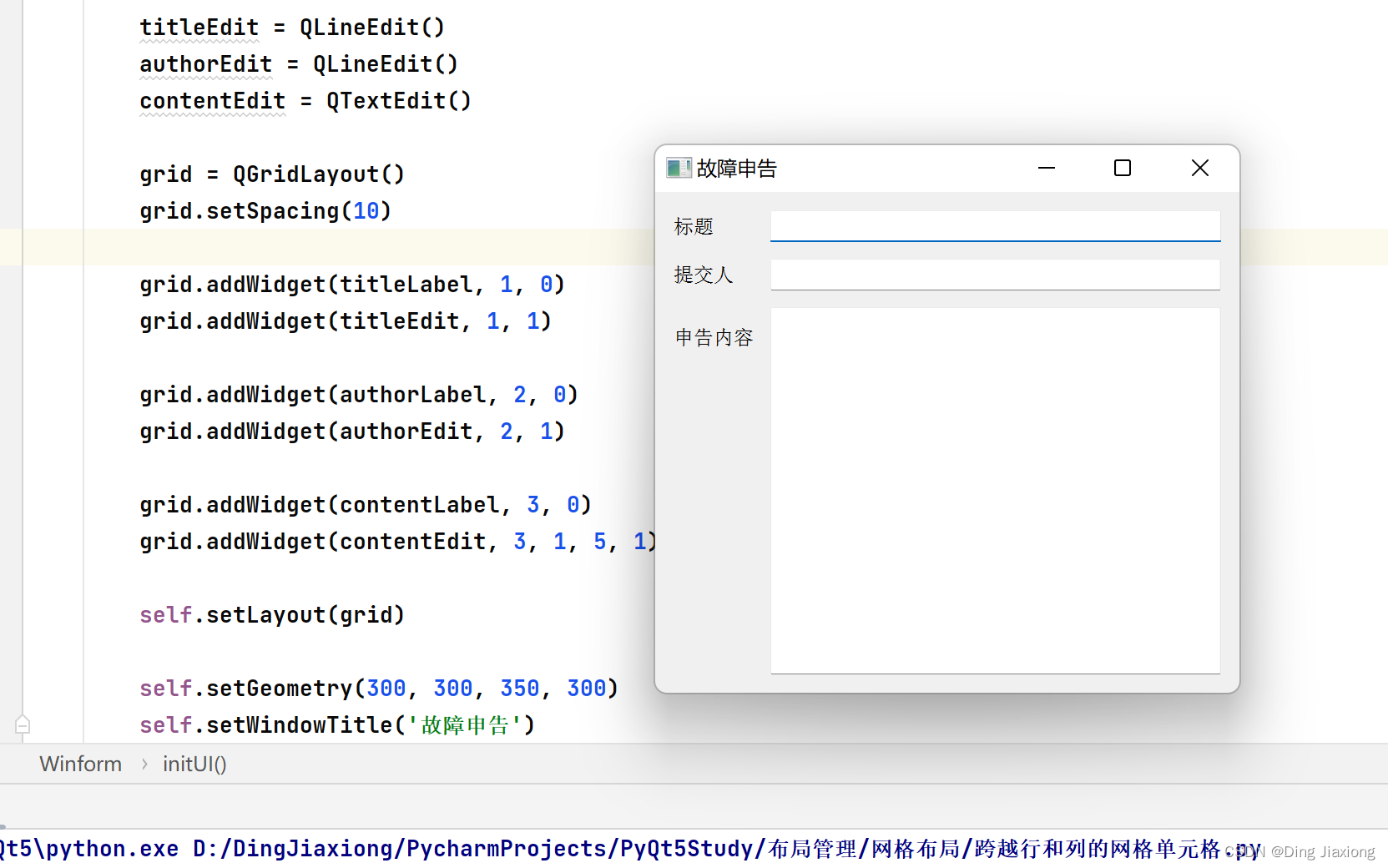
6.5.2 跨越行和列的网格单元格
import sys from PyQt5.QtWidgets import (QWidget, QLabel, QLineEdit, QTextEdit, QGridLayout, QApplication) class Winform(QWidget): def __init__(self, parent=None): super(Winform, self).__init__(parent) self.initUI() def initUI(self): titleLabel = QLabel('标题') authorLabel = QLabel('提交人') contentLabel = QLabel('申告内容') titleEdit = QLineEdit() authorEdit = QLineEdit() contentEdit = QTextEdit() grid = QGridLayout() grid.setSpacing(10) grid.addWidget(titleLabel, 1, 0) ## 把titleLabel放在第1行第0列 grid.addWidget(titleEdit, 1, 1) # 把titleEdit放在第1行第1列 grid.addWidget(authorLabel, 2, 0) grid.addWidget(authorEdit, 2, 1) grid.addWidget(contentLabel, 3, 0) grid.addWidget(contentEdit, 3, 1, 5, 1) # 放在第3行第1列,跨越5行+1列 self.setLayout(grid) self.setGeometry(300, 300, 350, 300) self.setWindowTitle('故障申告') if __name__ == "__main__": app = QApplication(sys.argv) form = Winform() form.show() sys.exit(app.exec_())- 1
- 2
- 3
- 4
- 5
- 6
- 7
- 8
- 9
- 10
- 11
- 12
- 13
- 14
- 15
- 16
- 17
- 18
- 19
- 20
- 21
- 22
- 23
- 24
- 25
- 26
- 27
- 28
- 29
- 30
- 31
- 32
- 33
- 34
- 35
- 36
- 37
- 38
- 39
- 40
- 41
-
相关阅读:
SSM学习33:Spring整合MyBatis(重点)
LabVIEW使用VI Package Manager(VIPM)下载和管理附加组件
如何通过 Chainlink Price Feeds获得加密资产的历史价格
使用OneDNS完美解决办公网络优化问题
从零开始之了解电机及其控制(10)空间矢量理论
Excel_VBA编程
kubernetes之crontab
C#实现 javascript中的 charCodeAt
机器学习算法——聚类1(性能度量——外部指标Jaccard系统,FM指数,Rand指数;内部指标:DB指数,Dunn指数)
耐酸碱腐蚀PFA冷凝回流装置进口透明聚四氟材质PFA梨形漏斗特氟龙圆底烧瓶
- 原文地址:https://blog.csdn.net/weixin_44226181/article/details/126048413
