-
Hibernate 环境搭建
导入依赖
项目中所有使用到的依赖如下:
<dependencies> <dependency> <groupId>antlrgroupId> <artifactId>antlrartifactId> <version>2.7.7version> dependency> <dependency> <groupId>com.mchangegroupId> <artifactId>c3p0artifactId> <version>0.9.2.1version> dependency> <dependency> <groupId>dom4jgroupId> <artifactId>dom4jartifactId> <version>1.6.1version> dependency> <dependency> <groupId>net.sf.ehcachegroupId> <artifactId>ehcache-coreartifactId> <version>2.4.3version> dependency> <dependency> <groupId>org.hamcrestgroupId> <artifactId>hamcrest-coreartifactId> <version>1.3version> <scope>testscope> dependency> <dependency> <groupId>junitgroupId> <artifactId>junitartifactId> <version>4.12version> dependency> <dependency> <groupId>org.hibernategroupId> <artifactId>hibernate-c3p0artifactId> <version>4.2.4.Finalversion> dependency> <dependency> <groupId>org.hibernate.commongroupId> <artifactId>hibernate-commons-annotationsartifactId> <version>4.0.2.Finalversion> dependency> <dependency> <groupId>org.hibernategroupId> <artifactId>hibernate-coreartifactId> <version>4.2.4.Finalversion> dependency> <dependency> <groupId>org.hibernategroupId> <artifactId>hibernate-ehcacheartifactId> <version>4.2.4.Finalversion> dependency> <dependency> <groupId>org.hibernate.javax.persistencegroupId> <artifactId>hibernate-jpa-2.0-apiartifactId> <version>1.0.1.Finalversion> dependency> <dependency> <groupId>org.javassistgroupId> <artifactId>javassistartifactId> <version>3.15.0-GAversion> dependency> <dependency> <groupId>org.jboss.logginggroupId> <artifactId>jboss-loggingartifactId> <version>3.1.0.GAversion> dependency> <dependency> <groupId>org.jboss.spec.javax.transactiongroupId> <artifactId>jboss-transaction-api_1.1_specartifactId> <version>1.0.1.Finalversion> dependency> <dependency> <groupId>org.projectlombokgroupId> <artifactId>lombokartifactId> <version>1.18.20version> dependency> <dependency> <groupId>com.mchangegroupId> <artifactId>mchange-commons-javaartifactId> <version>0.2.3.4version> dependency> <dependency> <groupId>mysqlgroupId> <artifactId>mysql-connector-javaartifactId> <version>5.1.47version> dependency> <dependency> <groupId>org.slf4jgroupId> <artifactId>slf4j-apiartifactId> <version>1.6.1version> dependency> dependencies> <build> <resources> <resource> <directory>src/main/javadirectory> <includes> <include>**/*.propertiesinclude> <include>**/*.xmlinclude> includes> <filtering>falsefiltering> resource> resources> build>- 1
- 2
- 3
- 4
- 5
- 6
- 7
- 8
- 9
- 10
- 11
- 12
- 13
- 14
- 15
- 16
- 17
- 18
- 19
- 20
- 21
- 22
- 23
- 24
- 25
- 26
- 27
- 28
- 29
- 30
- 31
- 32
- 33
- 34
- 35
- 36
- 37
- 38
- 39
- 40
- 41
- 42
- 43
- 44
- 45
- 46
- 47
- 48
- 49
- 50
- 51
- 52
- 53
- 54
- 55
- 56
- 57
- 58
- 59
- 60
- 61
- 62
- 63
- 64
- 65
- 66
- 67
- 68
- 69
- 70
- 71
- 72
- 73
- 74
- 75
- 76
- 77
- 78
- 79
- 80
- 81
- 82
- 83
- 84
- 85
- 86
- 87
- 88
- 89
- 90
- 91
- 92
- 93
- 94
- 95
- 96
- 97
- 98
- 99
- 100
- 101
- 102
- 103
- 104
- 105
- 106
- 107
- 108
- 109
- 110
- 111
- 112
- 113
- 114
- 115
- 116
- 117
- 118
- 119
- 120
开发流程
使用 Hibernate 需要这么几步:
- 创建 Hibernate 的配置文件
- 创建持久化类
- 创建对象-关系的映射文件
- 通过 Hibernate 的 API 进行开发
Hibernate 的配置文件
Hibernate 的配置文件类型有两种,xml 和 properties。推荐使用 xml。而 xml 对应的默认配置文件名为 hibernate.cfg.xml。
最基本的 hibernate.cfg.xml 如下:DOCTYPE hibernate-configuration PUBLIC "-//Hibernate/Hibernate Configuration DTD 3.0//EN" "http://hibernate.sourceforge.net/hibernate-configuration-3.0.dtd"> <hibernate-configuration> <session-factory> session-factory> hibernate-configuration>- 1
- 2
- 3
- 4
- 5
- 6
- 7
- 8
- 9
和数据库打交道,首先四大连接配置肯定要配,一般还可以配置数据库连接池的属性。而在 Hibernate 中,还有些特有的配置。
一个较为完整的 hibernate.cfg.xml 配置如下:DOCTYPE hibernate-configuration PUBLIC "-//Hibernate/Hibernate Configuration DTD 3.0//EN" "http://hibernate.sourceforge.net/hibernate-configuration-3.0.dtd"> <hibernate-configuration> <session-factory> <property name="connection.url">jdbc:mysql://localhost:3307/hibernateproperty> <property name="connection.driver_class">com.mysql.jdbc.Driverproperty> <property name="connection.username">rootproperty> <property name="connection.password">rootproperty> <property name="hibernate.dialect">org.hibernate.dialect.MySQL5Dialectproperty> <property name="show_sql">trueproperty> <property name="format_sql">trueproperty> <property name="hbm2ddl.auto">updateproperty> <mapping resource="com/zxb/hibernate/entity/News.hbm.xml"/> session-factory> hibernate-configuration>- 1
- 2
- 3
- 4
- 5
- 6
- 7
- 8
- 9
- 10
- 11
- 12
- 13
- 14
- 15
- 16
- 17
- 18
- 19
- 20
- 21
- 22
- 23
- 24
上面的配置中,需要将数据库相关配置改成你对应的。另外,如果你使用 MYSQL 8.x 的版本,则在数据库方言的配置中,数据库方言也需要修改。
注: hibernate.cfg.xml 需要放在类路径下。
创建实体类及关系映射文件
这里创建一个实体类 News。
@Data public class News { private Integer id; private String title; private String author; private Date date; public News(){ } public News(String title, String author, Date date) { this.title = title; this.author = author; this.date = date; } }- 1
- 2
- 3
- 4
- 5
- 6
- 7
- 8
- 9
- 10
- 11
- 12
- 13
- 14
- 15
- 16
接下来,需要创建对象–关系的映射配置文件,默认名为 实体类.hbm.xml。其中 hbm 是 HIbernate Mapping 的缩写。
News.hbm.xml 配置如下:DOCTYPE hibernate-mapping PUBLIC "-//Hibernate/Hibernate Mapping DTD 3.0//EN" "http://www.hibernate.org/dtd/hibernate-mapping-3.0.dtd"> <hibernate-mapping> <class name="com.zxb.hibernate.entity.News" table="NEWS"> <id name="id" type="java.lang.Integer"> <column name="ID"/> <generator class="native"/> id> <property name="title" type="java.lang.String"> <column name="TITLE"/> property> <property name="author" type="java.lang.String"> <column name="AUTHOR"/> property> <property name="date" type="java.sql.Date"> <column name="DATE"/> property> class> hibernate-mapping>- 1
- 2
- 3
- 4
- 5
- 6
- 7
- 8
- 9
- 10
- 11
- 12
- 13
- 14
- 15
- 16
- 17
- 18
- 19
- 20
- 21
- 22
- 23
- 24
- 25
在 idea 中,如果这里的 table = “NEWS” 以及 column name = “XXX” 都是会报红的,那时因为你在 idea 中集成了 Database,而数据库中就没有 NEWS 表,因此会匹配不上,这是没关系的。
配置好关系映射文件后,还有一步,就是将该关系映射文件注册到 Hibernate 的配置文件中,类似于微服务注册到注册中心一样。
需要在 Hibernate 的配置文件中通过 mapping 标签来引入关系映射文件。DOCTYPE hibernate-configuration PUBLIC "-//Hibernate/Hibernate Configuration DTD 3.0//EN" "http://hibernate.sourceforge.net/hibernate-configuration-3.0.dtd"> <hibernate-configuration> <session-factory> <mapping resource="com/zxb/hibernate/entity/News.hbm.xml"/> session-factory> hibernate-configuration>- 1
- 2
- 3
- 4
- 5
- 6
- 7
- 8
- 9
- 10
- 11
注:这里的 resource 路径分隔符是 / ,而不是 . ‘
最终目录结构如下所示:

测试
前置工作都已经做好,现在来写个测试类测试一下。
注意:此时数据库中是没有 News 这张表的。package com.zxb.hibernate.test; import com.zxb.hibernate.entity.News; import org.hibernate.Session; import org.hibernate.SessionFactory; import org.hibernate.Transaction; import org.hibernate.cfg.Configuration; import org.hibernate.service.ServiceRegistry; import org.hibernate.service.ServiceRegistryBuilder; import org.junit.Test; import java.sql.Date; /** * @author zxb 2022/7/28 23:47 */ public class HibernateTest { @Test public void test() { // 1、创建 SessionFactory 对象 SessionFactory sessionFactory = null; // 1). 创建 Configuration 对象: 对应 Hibernate 的基本配置信息和对象关系映射信息 Configuration configuration = new Configuration().configure(); // 2). 创建一个 ServiceRegistry 对象: hibernate 4.x 新添加的对象 // hibernate 的任何配置和服务都需要在该对象中注册后才能有效. ServiceRegistry serviceRegistry = new ServiceRegistryBuilder() .applySettings(configuration.getProperties()) .buildServiceRegistry(); sessionFactory = configuration.buildSessionFactory(serviceRegistry); // 2、创建一个 Session 对象 Session session = sessionFactory.openSession(); // 3、开启事务 Transaction transaction = session.beginTransaction(); // 4、执行操作 News news = new News("JAVA", "James Gosling", new Date(new java.util.Date().getTime())); session.save(news); // 5、提交事务 transaction.commit(); // 6、关闭 Session session.close(); // 7、关闭 SessionFactory sessionFactory.close(); } }- 1
- 2
- 3
- 4
- 5
- 6
- 7
- 8
- 9
- 10
- 11
- 12
- 13
- 14
- 15
- 16
- 17
- 18
- 19
- 20
- 21
- 22
- 23
- 24
- 25
- 26
- 27
- 28
- 29
- 30
- 31
- 32
- 33
- 34
- 35
- 36
- 37
- 38
- 39
- 40
- 41
- 42
- 43
- 44
- 45
- 46
执行完上述代码后,对应数据库中自动生成 NEWS 表,并且向其中插入了一条记录。
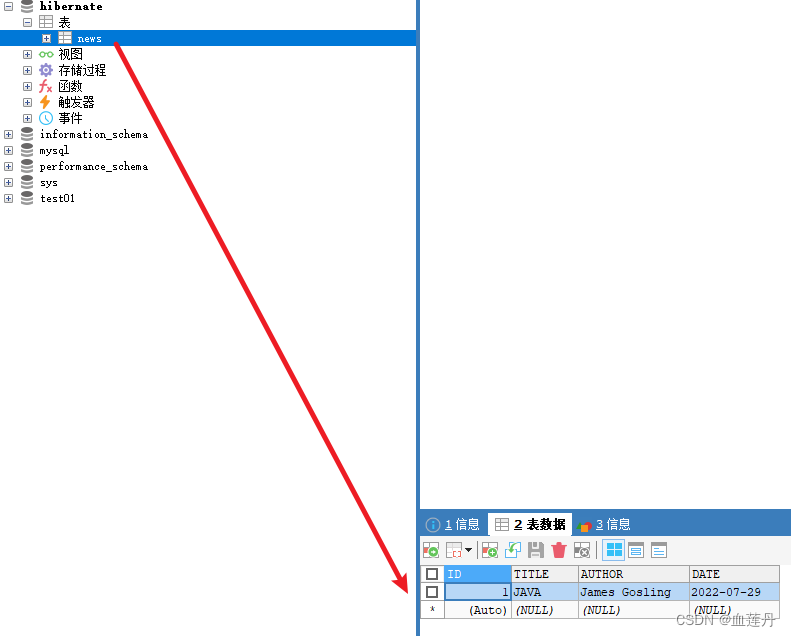
环境搭建完成。 -
相关阅读:
ajax教程
【谢希尔 计算机网络】第2章 物理层
大学生抗疫逆行者网页作业 感动人物HTML网页代码成品 最美逆行者dreamweaver网页模板 致敬疫情感动人物网页设计制作
【附源码】计算机毕业设计SSM社区新冠疫苗接种管理系统
在 KubeSphere 部署 Wiki 系统 wiki.js 并启用中文全文检索
csdn涨薪技术-Selenium自动化测试全栈总结
JSR303是啥?有啥用处?
Manjaro如果yay使用了aur的清华源,出现报错,解决方法
Zabbix如何监控腾讯云NAT网关
物联网平台在AIoT领域8大场景应用
- 原文地址:https://blog.csdn.net/weixin_44061521/article/details/126046082
