问题描述
在上一篇博文(https://www.cnblogs.com/lulight/p/16525902.html)中,我们成功的以VM作为Kafka服务器运行,并且验证了从其他机器中远程访问。在本文中,将使用Visual Studio 2022创建Azure Function 作为生产者和消费者在本地进行验证
- 生产者:使用HTTP Trigger函数,以 kafka output 作为输出
- 消费者:使用Kafka Trigger函数
解题步骤
1:打开VS 2022,开始创建Azure Funciton工程
2:选择 Azure Function模板,并使用.NET 6.0作为运行时,然后选择 Kafka Trigger。其他值保持默认即可。保存。
3: 把BorkerList添加到本地配置文件中( local.settings.json ),然后修改正确的topic名称。因为Kafka服务器没有启用SSL和Password,所以这里 Protocol 和 AuthenticationMode 都需要修改为 NotSet。
local.setting.json 配置文件:

{
    "IsEncrypted": false,
  "Values": {
    "AzureWebJobsStorage": "UseDevelopmentStorage=true",
    "FUNCTIONS_WORKER_RUNTIME": "dotnet",
    "BrokerList": "xxx.xxx.xxx.xxx:9092",
    "KafkaPassword": "",
    "ConnectionString": ""
  }
}
KafkaTrigger Function代码:
using Microsoft.Azure.WebJobs;
using Microsoft.Azure.WebJobs.Extensions.Kafka;
using Microsoft.Extensions.Logging;

namespace FunctionApp2
{
    public class Function1
    {
        // KafkaTrigger sample
        // Consume the message from "topic" on the LocalBroker.
        // Add `BrokerList` and `KafkaPassword` to the local.settings.json
        // For EventHubs
        // "BrokerList": "{EVENT_HUBS_NAMESPACE}.servicebus.windows.net:9093"
        // "KafkaPassword":"{EVENT_HUBS_CONNECTION_STRING}
        [FunctionName("Function1")]
        public void Run(
            [KafkaTrigger("BrokerList",
                          "test_topic",
                          Username = "$ConnectionString",
                          Password = "%KafkaPassword%",
                          Protocol = BrokerProtocol.NotSet,
                          AuthenticationMode = BrokerAuthenticationMode.NotSet,
                          ConsumerGroup = "$Default")] KafkaEventData<string>[] events,
            ILogger log)
        {
            foreach (KafkaEventData<string> eventData in events)
            {
                log.LogInformation($"C# Kafka trigger function processed a message: {eventData.Value}");
            }
        }
    }
}
4:同样,继续添加一个 Kafka output 的Function, (与第二步相同)。其他值保持默认即可。保存。
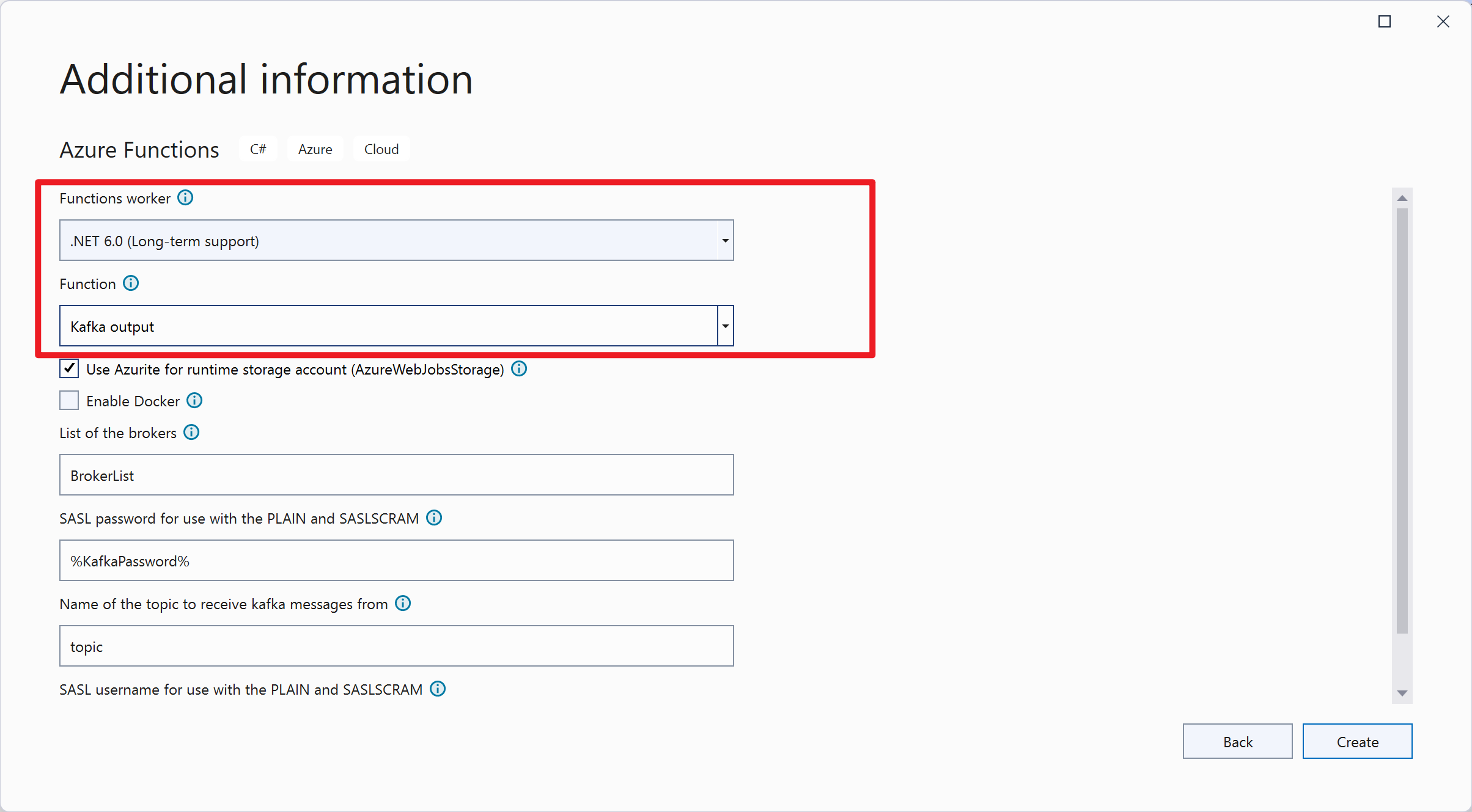
5:与第三步相同,修改正确的topic名称。因为Kafka服务器没有启用SSL和Password,所以这里 Protocol 和 AuthenticationMode 都需要修改为 NotSet。
using Microsoft.AspNetCore.Http;
using Microsoft.AspNetCore.Mvc;
using Microsoft.Azure.WebJobs;
using Microsoft.Azure.WebJobs.Extensions.Http;
using Microsoft.Azure.WebJobs.Extensions.Kafka;
using Microsoft.Extensions.Logging;

namespace FunctionApp2
{
    public class Function2
    {
        // KafkaOutputBinding sample
        // This KafkaOutput binding will create a my_topic "my_topic" on the LocalBroker if it doesn't exists.
        // Call this function then the KafkaTrigger will be trigged.
        [FunctionName("Function2")]
        public IActionResult Output(
            [HttpTrigger(AuthorizationLevel.Anonymous, "get", Route = null)] HttpRequest req,
            [Kafka("BrokerList",
                   "test_topic",
                   Username = "$ConnectionString",
                   Password = "%KafkaPassword%",
                   Protocol = BrokerProtocol.NotSet,
                   AuthenticationMode = BrokerAuthenticationMode.NotSet
            )] out string eventData,
            ILogger log)
        {
            log.LogInformation("C# HTTP trigger function processed a request.");

            string message = req.Query["message"];

            string responseMessage = string.IsNullOrEmpty(message)
                ? "This HTTP triggered function executed successfully. Pass a message in the query string"
                : $"Message {message} sent to the broker. This HTTP triggered function executed successfully.";
            eventData = $"Received message: {message}";

            return new OkObjectResult(responseMessage);
        }
    }
}
6:F5运行Function Project,使用HTTP Trigger的URL发送消息,然后用Kafka Trigger的函数接受消息。

整个步骤的示例动画:

参考文档
适用于 Azure Functions 的 Apache Kafka 绑定概述:https://docs.azure.cn/zh-cn/azure-functions/functions-bindings-kafka?tabs=in-process%2Cportal&pivots=programming-language-csharp
【END】