-
element table多级表头
首先定义column组件
直接上代码
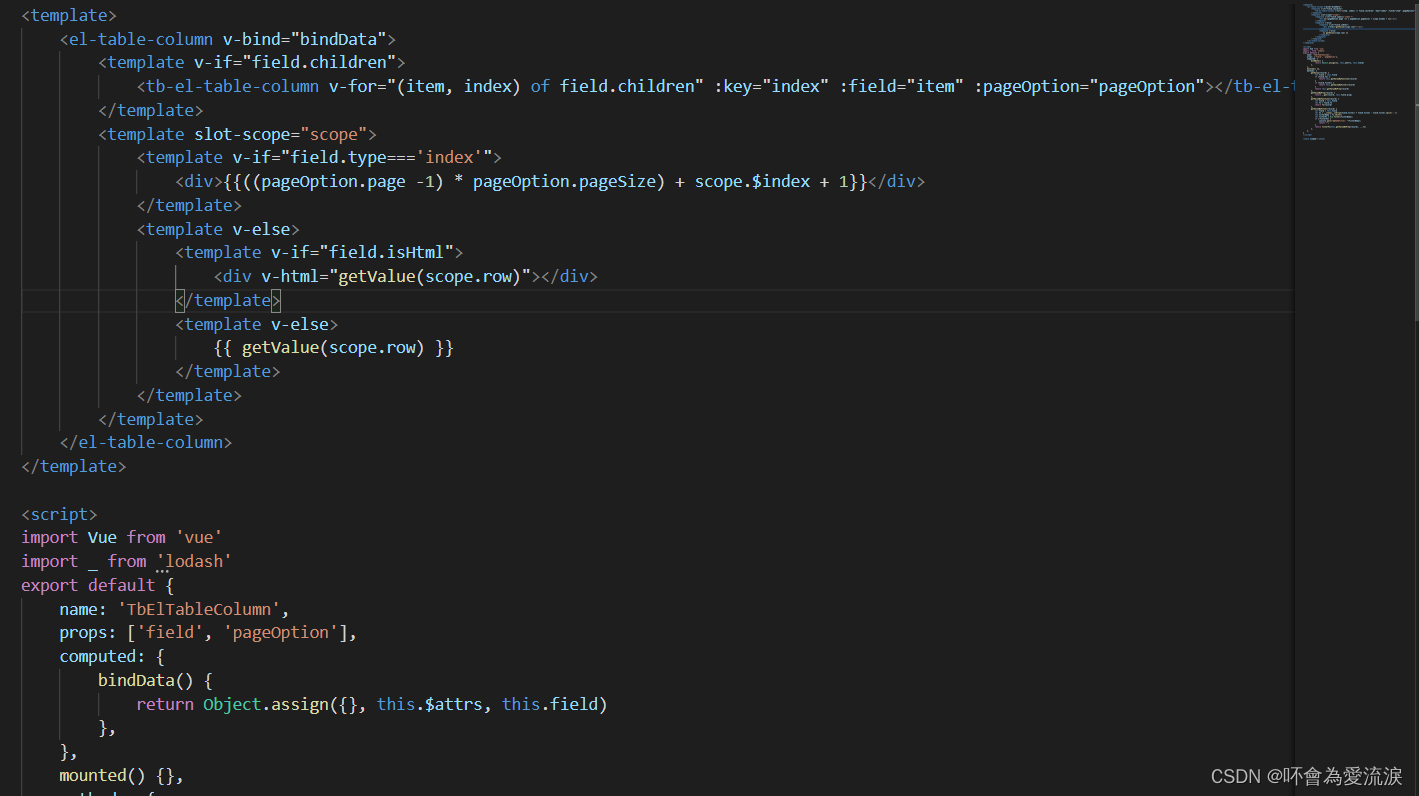

父组件使用

fileds部分代码
- {
- prop: 'a1', label: '政采信息化系统管理台账',align: 'center',
- children: [
- {
- prop: 'a2', label: '关键指标 合同金额 总合同付款金额 总合同付款比例 年度新增合同额 年度付款金额 年度付款比例',align: 'center',
- children:[
- {label: '序号', type:"index"},
- {
- label:'项目基本情况',align: 'center', prop: 'a',
- children: [
- { prop: 'fullName', label: '系统简称', className: 'font-bold', align: 'left', width: 200, fixed: true },
- { prop: 'cnName', label: '系统全称', className: 'font-bold', align: 'left', width: 250},
- { prop: "dataProviderUnitInfo.shortName", label: "所属单位名称", width: 120 },
- { prop: "developer", label: "开发单位名称", width: 180 },
- { prop: "developerContact", label: "负责人", width: 100 },
- { prop: "developerPhone", label: "联系方式", width: 100 },
- { prop: 'dockingType', label: '对接方式', width: 100, filter: "projectDockingType" }
- ]
- },
- {
- label:'数据对接情况',align: 'center',prop: 'b',
- children: [
- { prop: 'status', label: '系统状态', width: 100, filter: "projectStatus" },
- { prop: 'technicalDirector', label: '对接负责人', width: 110 },
- { prop: 'dataSourceCount',label: '数据源', width: 80, className: 'cell-bg-primary-5' },
- { prop: 'storeLayerCount', label: '数据表数量', width: 100 },
- { prop: 'projectDockingStatus', label: '对接状态', width: 100, filter: "projectDockingStatus" },
- { prop: 'projectDockingTime', label: '对接日期', width: 140, filter: ['date', 'YYYY-M-D'] },
- { prop: 'dataLastUpdateTime', label: '数据更新日期', width: 150 }
- ]
- },
- {
- label:'合同及付款信息',align: 'center',prop: 'c',
- children: [
- {
- prop: '', label: '合同名称', width: 150,isHtml: true,align:'left',
- fn(r) {
- if(!r.contractList) return
- let htmlStr = ''
- _.forEach(r.contractList, (o,id)=> {
- htmlStr += ''+''+ (id+1)+ '.' + '' + o.name + ''
- })
- return htmlStr
- }
- },
显示效果如下

-
相关阅读:
docker 容器命令
Markdown使用emoji图标【美化你的文章】
CJSON库的学习
基于Asp.Net Mvc开发的个人博客系统
Flink的基于两阶段提交协议的事务数据汇实现
MT6785(Helio G95)安卓核心板_联发科4G高能低耗安卓主板开发板
Django笔记十二之defer、only指定返回字段
QT时间日期定时器类(6.QT延时操作)【QT基础入门 Demo篇】
点餐小程序实战教程07-点餐功能开发
【SA8295P 源码分析 (四)】21 - Android GVM 虚拟网络 vlan 配置
- 原文地址:https://blog.csdn.net/gu19880609/article/details/126040138
