• mybatis详解(全)


    mybatis

    持久层技术解决方案有几种?

    mybatis持久层框架

    测试用例搭建

    mybatis主配置文件

    mybatis映射文件

    mybatis分页

    mybatis逆向工程

    持久层技术解决方案有几种

    1.JDBC技术–>Connection、PreparedStatement、ResultSet

    2.Spring的JdbcTemplate–>Spring中对Jdbc的简单封装

    3.Apache的DBUtils–>它和Spring的JdbcTemplate很像,也是对Jdbc的简单封装

    以上这些都不是框架(JDBC是规范、Spring的JdbcTemplate和Apache的DBUtils都只是工具类)

    mybatis持久层框架

    mybatis是一个用Java编写的持久层框架,它使用ORM实现了结果集的封装。

    ORM是Object Relational Mapping 对象关系映射。简单来说,就是把数据库表和实体类及实体类的属性对应起来,让开发者操作实体类就实现操作数据库表。
    它封装了jdbc操作的很多细节,使开发者只需要关注sql语句本身,而无需关注注册驱动,创建连接等烦杂过程

    测试用例搭建

    搭建环境流程如下四点:

    1. 创建maven工程并导入坐标


      	           org.mybatis
      	           mybatis
      	           3.4.5
      	       
      	       
      	           mysql
      	           mysql-connector-java
      	           5.1.43


      	           log4j
      	           log4j
      	           1.2.12


      	           junit
      	           junit
      	           4.10


      • 1
      • 2
      • 3
      • 4
      • 5
      • 6
      • 7
      • 8
      • 9
      • 10
      • 11
      • 12
      • 13
      • 14
      • 15
      • 16
      • 17
      • 18
      • 19
      • 20
      • 21
      • 22
      • 23
      • 24
      • 25
      • 26
    2. 创建实体类和Mapper的接口

      public class User implements Serializable {
      		
      	private int id ;
      	private String username;
      	......
      }
      
      
      public interface IUserMapper {
      	/**
      	* 查询所有操作
      	* @return
      	*/
      	List findAll();
      }
      
      • 1
      • 2
      • 3
      • 4
      • 5
      • 6
      • 7
      • 8
      • 9
      • 10
      • 11
      • 12
      • 13
      • 14
      • 15
    3. 创建mybatis的主配置文件


      • 1
      • 2
      • 3
      • 4
      • 5
      • 6
      • 7
      • 8
      • 9
      • 10
      • 11
      • 12
      • 13
      • 14
      • 15
      • 16
      • 17
      • 18
      • 19
      • 20
      • 21
      • 22
      • 23
    4. 创建映射配置文件


      • 1
      • 2
      • 3
      • 4
      • 5

      测试方法

      ......
      
      InputStream in = Resources.getResourceAsStream("mybatis/MapperConfig.xml");
      //创建SqlSessionFactory工厂
      SqlSessionFactoryBuilder builder = new SqlSessionFactoryBuilder();
      SqlSessionFactory factory = builder.build(in);
      //使用工厂生产SqlSession对象
      SqlSession session = factory.openSession();
      //使用SqlSession创建Mapper接口的代理对象
      UserMapper userMapper = session.getMapper(UserMapper.class);
      //使用代理对象执行方法
      List users = userMapper.findAll();
      for (mybatis_user muser : users){
          System.out.println(muser);
      }
      session.close();
      in.close();
      
      ......
      
      • 1
      • 2
      • 3
      • 4
      • 5
      • 6
      • 7
      • 8
      • 9
      • 10
      • 11
      • 12
      • 13
      • 14
      • 15
      • 16
      • 17
      • 18
      • 19

    mybatis主配置文件

    mybatis的配置文件推荐为命名mybatis-config.xml,其内容包含了会深深影响mybatis行为的设置和属性信息。以下是全配置文件列表:
    使用者掌握方面有properties、settings、typeAliases、enveronments、mappers
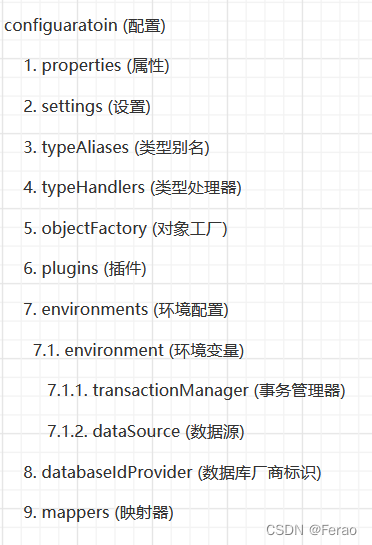
    在这里插入图片描述
    具体各个配置内容如下:

    1. properties 标签

      开发者可通过properties属性来实现引用配置文件。这些属性都是可外部配置且可动态替换的
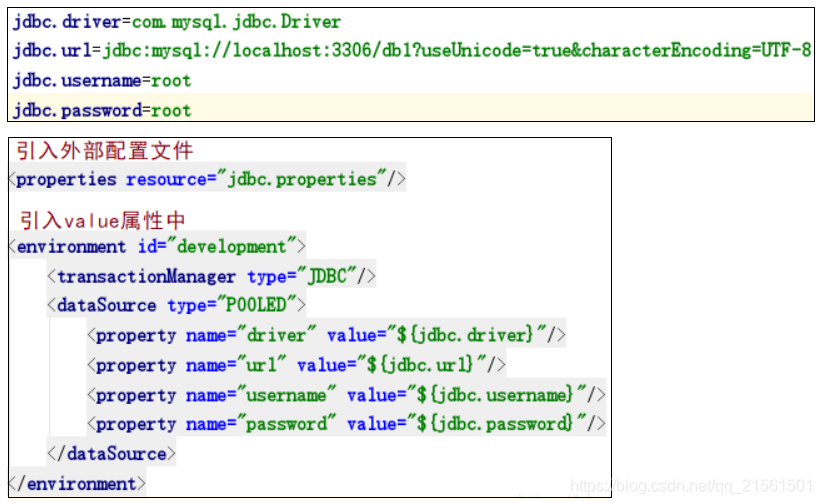
      在这里插入图片描述 [注]
      1.如果两个配置文件有同一个字段,优先使用外部配置文件的
      2.可以直接引入外部配置文件,properties子元素中可以增加一些属性配置

      在这里插入图片描述

    2. typeAliases 标签

      typeAliases类型别名是为java类型设置一个短的名字,存在的意义仅在于用来减少类完全限定名的冗余。java内置内建类型别名它们都不区分大小写,注意对基本类型名称重复采用的特殊命名风格。

      别名

      映射的类型

      _byte

      byte

      _long

      long

      _int

      int

      _integer

      int

      _double

      double

      _float

      float

      _boolean

      boolean

      string

      String

      byte

      Byte

      long

      Long

      short

      Short

      int

      Integer

      Integer

      Integer

      double

      Double

      float

      Float

      boolean

      Boolean

      date

      Date

      object

      Object

      map

      Map

      hashmap

      HashMap

      list

      List

      arraylist

      ArrayList

      在这里插入图片描述 [注]
      方法二中,每一个在包中的Java bean,在没有注解的情况下,会使用bean的首字母小写的非限定类名来作为它的别名。若有注解,则别名为其注解值。(实体类上使用注解:@Alias(“user”))

    3. setting 标签

      setting设置标签,这是Mybatis中极为重要的调整设置,它们会改变Mybatis的运行时行为

      在这里插入图片描述

    4. dataSource 标签

      我们在实际开发中都会使用连接池,因为它可以减少我们获取连接所消耗的时间,在mybatis中连接池提供了3种方式的配置

      在这里插入图片描述
      [注]主配置文件的dataSource标签,type属性就是表达采用何种连接池方式

      1)POOLED 方式

      *采用传统的javax.sql.DataSource规范中的连接池,mybatis中有针对规范的实现

      在这里插入图片描述
      [注]观察出POOLED它是从池中获取一个连接来用

      2)UNPOOLED 方式

      *采用传统的获取连接的方式,虽然也实现javax.sql.DataSource接口,但是并没有使用连接池技术

      在这里插入图片描述

      [注]UNPOOLED每次创建一个新的连接来用

      3)JNDI 方式

      *采用服务器提供的JNDI技术实现,来获取DataSource对象,不同的服务器所能拿到DataSource是不一样的

      [注]如果不是web或者maven的war工程,是不能使用的

    5. mappers 属性

      mappers映射器属性,MapperRegistry:注册绑定我们的Mapper文件。有三种方式如下:


      • 1
      • 2
      • 3


      • 1
      • 2
      • 3

      [注]
      使用class文件绑定注册,接口和它的Mapper配置文件必须同名且接口且它的Mapper配置文件必须在同一个包下


      • 1
      • 2
      • 3

      [注]
      扫描包进行注入绑定方式,接口和它的Mapper配置文件必须同名且接口和它的Mapper配置文件必须在同一个包下

    mybatis映射文件

    映射配置文件里的参数信息如下:

    1. parameterType(输入类型)

      可输入的类型有三种:简单类型、pojo对象、pojo包装对象

      1)简单类型

      2)pojo对象

      mybaits使用OGNL表达式解析对象字段的值,#{}或者${}括号中的值为pojo属性名称

      [注]OGNL表达式:object Graphic Navigation Language (对象图导航语言),它是通过对象的取值方法来获取数据。在写法上把gat给省略了。比如:我们获取用户的名称类中的写法:user.getUsername();
      OGNL表达式写法:user.username
      那么,mybatis中为什么能直接写username,而不用user呢?因为在parameterType中已经提供了属性所属的类,所以此时不需要写对象名

      3)pojo包装对象

      开发中通过pojo传递查询条件,查询条件是综合的查询条件,不仅包括用户查询条件还包括其他的查询条件(比如将用户购买商品消息也作为查询条件),这时可以使用包装对象传递输入pojo类参数中包含pojo。

    2. resultType(输出类型)

      可输出的类型有四种:返回一般数据类型(单条)、JavaBean 类型(单条)、List类型(多条)、Map类型

      1)一般数据类型(单条)

      比如要根据Id属性获得数据库中的某个字段值,示例:

      ①mapper(dao)接口

      String getStuNameById(Integer id);
      
      • 1

      ②Mapper.xml 映射文件


      • 1
      • 2
      • 3

      2)JavaBean 类型(单条)

      比如根据某个字段获得数据库中的信息,把查询的结果信息封装成某个javaBean类型的数据

      ①mapper(dao)接口

      Student getStuById(Integer id);
      
      • 1

      ②Mapper.xml 映射文件


      • 1
      • 2
      • 3

      3)List类型(多条)

      有时候开发者查询的数据不止一条,比如,模糊查询,全表查询等,这时候返回的数据可能不止一条数据,对于多数据的处理可以存放在List集合中

      ①mapper(dao)接口

      List getAllStus();
      
      • 1

      ②Mapper.xml 映射文件


      • 1
      • 2
      • 3
      • 4

      4)Map类型

      mybatis支持将查询的数据封装成Map。

      如果查询的结果是一条,开发者可以把查询的数据以(表字段名,对应的值)方式存入到map中

      ①mapper(dao)接口

      Map getStuAsMapById(Integer id);
      
      • 1

      ②Mapper.xml 映射文件


      • 1
      • 2
      • 3
      • 4

      如果查询的结果是多条数据,我们也可以把查询的数据以{表中某一字段名, JavaBean}方式来封装成Map

      ①mapper(dao)接口

      // 查询所有学生的信息,把数据库中的 'id' 字段作为 key,对应的 value 封装成 Student 对象
      // @MapKey 中的值表示用数据库中的哪个字段名作 key
      @MapKey("id")
      Map getAllStusAsMap();
      
      • 1
      • 2
      • 3
      • 4

      ②Mapper.xml 映射文件


      • 1
      • 2
      • 3
      • 4

      返回map集合时返回的类型是List>

      ①mapper(dao)接口

      List> getAllStuAsMapById(Integer id);
      
      • 1

      ②Mapper.xml 映射文件


      • 1
      • 2
      • 3
      • 4
    3. resultMap(映射实体类)

      数据库字段名和实体类属性不相同时,无法映射到值,输出为Null。这是因为mybatis会根据这些从数据库中查询到的列名,将列名转化为小写(数据库不区分大小写)去对应实体类中查询相应列名的set方法设值,由于找不到setUserName(),所以会返回Null值。

      在这里插入图片描述

      要明确与Java对象对应的列不是数据库中表的列名,而是查询后结果集的列名
      解决方案有两种:
      1)为列名指定别名,别名和Java实体类的属性名一致
      2)使用结果集映射ResultMap [推荐]

      resultMap的作用是建立sql查询结果字段与实体属性的映射关系信息,将查询的结果集转换为java对象,方便进一步操作,即结果集中的列与Java对象中的属性对应起来并值填充进去

      resultMap 属性全内容如下:


      • 1
      • 2
      • 3
      • 4
      • 5
      • 6
      • 7
      • 8
      • 9
      • 10
      • 11
      • 12
      • 13
      • 14
      • 15
      • 16
      • 17

      接下来对各标签属性进行简单介绍:

      1)resultMap 标签

      type属性:指开发者需要映射到的类对象

      id属性:表示reslutMap在select标签中使用时,id的名称

      2)id标签

      	方案一 -->为列名指定别名,别名和Java实体类的属性名一致 


      	方案二 --> 使用结果集映射ResultMap [推荐]


      	===========================标签描述====================================
      
      
      	--> 
      		
      		column   --> 表的主键字段,或者可以为查询语句中的别名字段
      		jdbcType --> 字段类型
      		property --> 映射pojo对象的主键属性
      	
      	result标签 --> 属性用于配置映射关系时使用
      
      		column   --> 表的一个字段(可以为任意表的一个字段)
      		jdbcType --> 字段类型
      		property --> 映射到pojo对象的一个属性(须为type定义的pojo对象中的一个属性)
      
      	association标签 --> 
      
      		property --> pojo的一个对象属性
      		javaType --> pojo关联的pojo对象
      
      		id标签--> 
      		
      			column   --> 关联pojo对象对应表的主键字段
      			jdbcType --> 字段类型
      			property --> 关联pojo对象的主席属性	
      
      		result标签 -->
      		
      			column   --> 任意表的字段
      			jdbcType --> 字段类型
      			property --> 关联pojo对象的属性
      						
      		select   -->表示所需要的哪个类的查询语句
      		column   -->从resultMap中传过去用作查询参数
      		ofType   -->集合属性中的对象(可以不写)
      
      	collection标签 -->
      	
      		property --> 表示pojo类集合中的属性
      		select   -->表示所需要的哪个类的查询语句
      		column   -->从resultMap中传过去用作查询的参数
      		ofType   -->集合属性中的对象(可以不写)
      
      	===========================标签细节====================================
      
      	id & result
      
      		示例


      		含义
      		
      			这些是结果映射最基本的内容,id和result都将一个列的值映射到一个简单的数据类型
      
      			的属性或字段。这两者之间的唯一不同是,id表示的结果将是对象的标识属性,这些在
      
      			比较对象实例时用到,这样可以提高整体的性能,尤其是缓存和嵌套结果映射的时候
      	```
      
      • 1
      • 2
      • 3
      • 4
      • 5
      • 6
      • 7
      • 8
      • 9
      • 10
      • 11
      • 12
      • 13
      • 14
      • 15
      • 16
      • 17
      • 18
      • 19
      • 20
      • 21
      • 22
      • 23
      • 24
      • 25
      • 26
      • 27
      • 28
      • 29
      • 30
      • 31
      • 32
      • 33
      • 34
      • 35
      • 36
      • 37
      • 38
      • 39
      • 40
      • 41
      • 42
      • 43
      • 44
      • 45
      • 46
      • 47
      • 48
      • 49
      • 50
      • 51
      • 52
      • 53
      • 54
      • 55
      • 56
      • 57
      • 58
      • 59
      • 60
      • 61
      • 62
      • 63
      • 64
      • 65
      • 66
      • 67
      • 68
      • 69
      • 70
      • 71
      • 72
      • 73
      • 74
      • 75
      • 76
      • 77
      • 78
      • 79
      • 80
    4. 动态sql(动态查询)

      动态sql根据不同的条件生成不同的sql语句.所谓的动态sql,本质还是sql语句,只是开发者可以在sql层面,去执行一个逻辑代码

    5. 基础内容

      mapper接口
      
          List queryUser(Map map);
      
      • 1
      • 2
      • 3
    6. if 语句


      • 1
      • 2
      • 3
      • 4
      • 5
      • 6
      • 7
      • 8
      • 9
      • 10
      • 11
      • 12
      • 13
      • 14
      • 15
      • 16
      • 17
    7. where 语句


      • 1
      • 2
      • 3
      • 4
      • 5
      • 6
      • 7
      • 8
      • 9
      • 10
      • 11
      • 12
      • 13
      • 14
      • 15
      • 16
      • 17
      • 18
      • 19
      • 20
      • 21

      [注]
      where 元素只会在至少有一个子元素的条件返回sql子句的情况下,才去插入"where" 子句,而且,若语句的开头为"and" 或"or",where 元素会将它们去除

    8. choose,when,otherwise


      • 1
      • 2
      • 3
      • 4
      • 5
      • 6
      • 7
      • 8
      • 9
      • 10
      • 11
      • 12
      • 13
      • 14
      • 15
      • 16
      • 17
      • 18
      • 19
      • 20
      • 21
      • 22
      • 23
      • 24
      • 25
      • 26
      • 27
      • 28
      • 29
      • 30
      • 31

      [注]
      有时不想应用到所有的条件语句,而只想从中择其一项,针对这种情况,Mybatis提供了choose元素,它有点像java中的switch语句

    9. set 语句


      		update usr


      		            username =#{username}


      		where id = #{id}


      • 1
      • 2
      • 3
      • 4
      • 5
      • 6
      • 7
      • 8
      • 9
      • 10
      • 11
      • 12
      • 13
      • 14
      • 15
      • 16
      • 17

      [注]
      这里set元素会动态前置set关键字,同时也会删除掉无关的逗号,因为用了条件语句之后很可能就会生成的sql后面留下这些逗号(因为用的是if元素,若最后一个if没有匹配上而前面的匹配上,sql语句的最后就会有一个逗号遗留)

    10. 拓展标签

    1.  基础内容
        
            -含义
            
            	定义常量及作用于引用
            
            -场景
            
            	当多种类型的查询语句的查询字段或者查询条件形同时,可以将其定义为常量,方便调用。
            	
            	为求
            	    SELECT
            	    
            	    FROM student


            	    DELETE FROM student


            -对应标签
            
            	include
            
            -含义
            
            	用于引用定义的常量
    
    • 1
    • 2
    • 3
    • 4
    • 5
    • 6
    • 7
    • 8
    • 9
    • 10
    • 11
    • 12
    • 13
    • 14
    • 15
    • 16
    • 17
    • 18
    • 19
    • 20
    • 21
    • 22
    • 23
    • 24
    • 25
    • 26
    • 27
    • 28
    • 29
    • 30
    • 31
    • 32
    • 33
    • 34
    • 35
    • 36
    • 37
    • 38
    • 39
    • 40
    • 41
    • 42
    • 43
    • 44
    • 45
    • 46
    • 47
    • 48
    • 49
    • 50
    • 51
    • 52
    • 53
    • 54
    • 55
    • 56
    • 57
    • 58
    • 59
    • 60
    • 61
    • 62
    • 63
    • 64
    • 65
    • 66
    • 67
    • 68
    • 69
    • 70
    • 71
    • 72
    • 73
    • 74
    • 75
    • 76
    • 77
    • 78
    • 79
    • 80
    • 81
    • 82
    • 83
    • 84
    • 85
    • 86
    • 87
    • 88
    • 89
    • 90
    • 91
    • 92
    • 93
    • 94
    • 95

    mybatis分页

    mybatis分页可以减少数据的处理量,分页的方式有两种:limit分页、PageHelper分页插件

    1. limit分页

      首先知道这两句SQL语法

      select * from user limit startIndex,pageSize;
      
      select * from user limit 3;   #[0,n]	
      
      • 1
      • 2
      • 3

      在这里插入图片描述

    2. PageHelper分页插件

      1)引入依赖

      
      	com.github.pagehelper
      	pagehelper
      	4.0.0
      	
      
      • 1
      • 2
      • 3
      • 4
      • 5

      [注]由于使用了sql 解析工具,所以maven也引入了 jsqlparser.jar

      2)myBatis-config.xml配置拦截器插件


      • 1
      • 2
      • 3
      • 4
      • 5

      [注]配置拦截器细节
      a. 新版拦截器是 com.github.pagehelper.PageInterceptor。而com.github.pagehelper.PageHelper 现在是一个特殊的 dialect 实现类,是分页插件的默认实现类,提供了和以前相同的用法
      b. 设置数据库类型 Oracle,Mysql,MariaDB,SQLite,Hsqldb,PostgreSQL 六种数据库
      c. dialect默认情况下会使用 PageHelper 方式进行分页

      测试方法
      在这里插入图片描述

      [注]
      a.只有紧跟在PageHelper.startPage方法后的第一个Mybatis的查询(Select)方法会被分页
      b.对于带有for update的sql,会抛出运行时异常,对于这样的sql建议手动分页,毕 竟这样的sql需要重视
      c.分页插件不支持嵌套结果映射,由于嵌套结果方式会导致结果集被折叠,因此分页查询 的结果在折叠后总数会减少,所以无法保证分页结果数量正确。

    mybatis逆向工程

    MyBatis Generator(简称MBG),如果实际开发中数据库的表特别多,那么我们需要手动去写每一张表的po类,xxxMapper.xml,xxxMapper.java文件,这显然需要花费巨大的精力,而且可能由于表字段太多,写错了而不知道也是可能的。
    所以我们在实际开发中,一般使用逆向工程方式来自动生成所需的文件。

    mybatis是目前很流行的持久层框架,其逆向工程更是大大缩减了我们的开发时间。所谓mybatis逆向工程,就是mybatis通过相应插件,根据我们设计好的数据表,针对单表自动生成pojo、mapper以及mapper.xml。

    插件名称是mybatis-generator-core,获取可直接在https://mvnrepository.com/搜索 mybatis ,找到 MyBatis Generator Core

    插件的使用流程如下:

    1. 添加maven依赖


      	org.mybatis.generator
      	mybatis-generator-core
      	1.3.7
      			
      
      • 1
      • 2
      • 3
      • 4
      • 5
      • 6
    2. 新增generatorConfig.xml文件

      a.连接数据库的配置,包括数据名称,数据库用户名密码等配置

      b.指定要生成代码的包名,包括实体类po的包名,mapper的包名等

      c.指定数据库中哪些表需要生成文件


      • 1
      • 2
      • 3
      • 4
      • 5
      • 6
      • 7
      • 8
      • 9
      • 10
      • 11
      • 12
      • 13
      • 14
      • 15
      • 16
      • 17
      • 18
      • 19
      • 20
      • 21
      • 22
      • 23
      • 24
      • 25
      • 26
      • 27
      • 28
      • 29
      • 30
      • 31
      • 32
      • 33
      • 34
      • 35
      • 36
      • 37
      • 38
      • 39
      • 40
      • 41
      • 42
      • 43
      • 44
      • 45
      • 46
      • 47
      • 48
      • 49
      • 50
      • 51
      • 52
      • 53
      • 54
      • 55
      • 56
      • 57
      • 58
      • 59
      • 60
      • 61
      • 62
      • 63
      • 64
      • 65
      • 66
      • 67
      • 68
      • 69
      • 70
      • 71
      • 72
      • 73
      • 74
      • 75
      • 76
      • 77
      • 78
      • 79
      • 80
      • 81
      • 82
      1. 自定义生成的文件名字

        含义
        
        	把 MyBatisGenerator  生成的 dao、model、mapper的文件 的后缀名进行更改
        	比如 , dao文件 “BrandMapper.java”  改成  “BrandDao.java”
        
        配置内容


        注意点
        
        	RenameExampleClassPlugin、RenameSqlMapperPlugin、RenameJavaMapperPlugin
        
        	这三个插件中 RenameExampleClassPlugin这个插件是  org.mybatis.generator 自带的 ,
        
        	其他两个(RenameSqlMapperPlugin、RenameJavaMapperPlugin) 
        
        	得根据 “RenameExampleClassPlugin” 这个例子自己写一下 , 
        
        	放到“srcmainjava” 目录下。				
        
        • 1
        • 2
        • 3
        • 4
        • 5
        • 6
        • 7
        • 8
        • 9
        • 10
        • 11
        • 12
        • 13
        • 14
        • 15
        • 16
        • 17
        • 18
        • 19
        • 20
        • 21
        • 22
        • 23
        • 24
        • 25
        • 26
        • 27
        • 28
        • 29
        • 30
        • 31
        • 32
        • 33
        • 34
        • 35
        • 36
        • 37
      2. 执行generatorConfig.xml文件,生成代码

        方式
        
          【方式一】java代码
        
          【方式二】安装插件	
        
        注意点
        
        	使用逆向工程时,最好新建一个工程,如果你在原来的工程中使用,那也可以,
        
        	但是有一定的风险,因为mybatis是根据配置文件中配置的路径来生成的文件的,
        
        	如果你工程中有相同名字的文件,那么就会被新生成的文件所覆盖。所以实际开发中,
        
        	我们一般新建一个工程,将生成的文件复制到自己的所需的工程中。			
        
        • 1
        • 2
        • 3
        • 4
        • 5
        • 6
        • 7
        • 8
        • 9
        • 10
        • 11
        • 12
        • 13
        • 14
        • 15
        1. 【方式一】java代码

          package com.etc.test;
          
          import org.mybatis.generator.api.MyBatisGenerator;
          import org.mybatis.generator.config.Configuration;
          import org.mybatis.generator.config.xml.ConfigurationParser;
          import org.mybatis.generator.internal.DefaultShellCallback;
          
          import java.io.File;
          import java.util.ArrayList;
          import java.util.List;
          
          public class GeneratorTest {
              public void testGenerator() throws Exception {
                  List warnings = new ArrayList<>();
                  boolean overwrite = true;
                  //指定逆向工程配置文件
                  File configFile = new File(GeneratorTest.class.getResource("/generatorConfig.xml").getFile());
                  ConfigurationParser cp = new ConfigurationParser(warnings);
                  Configuration config = cp.parseConfiguration(configFile);
                  DefaultShellCallback callback = new DefaultShellCallback(overwrite);
                  MyBatisGenerator myBatisGenerator = new MyBatisGenerator(config,callback,warnings);
                  myBatisGenerator.generate(null);
              }
          
              public static void main(String[] args) throws Exception {
                  GeneratorTest generator = new GeneratorTest();
                  generator.testGenerator();
              }
          }	
          
          • 1
          • 2
          • 3
          • 4
          • 5
          • 6
          • 7
          • 8
          • 9
          • 10
          • 11
          • 12
          • 13
          • 14
          • 15
          • 16
          • 17
          • 18
          • 19
          • 20
          • 21
          • 22
          • 23
          • 24
          • 25
          • 26
          • 27
          • 28
          • 29

          在这里插入图片描述

        2. 【方式二】安装插件


                  org.mybatis.generator
                  mybatis-generator-maven-plugin
                  1.3.2
                  
                    
                      mysql
                      mysql-connector-java
                      ${mysql.version}
                    
                    
                      org.slf4j
                      log4j-over-slf4j
                      1.7.25
                      
                        
                          org.slf4j
                          slf4j-api


                    ${basedir}/src/generate/generatorConfig.xml
                    true
                    true


          	点击菜单run中Configurations(图)
          
          	点击加号,并选择maven(图)
          
          	在name和Commond line分别填上如上图所示,apply和ok(图)
          
          	点击如下运行(图)
          	
          	生成示例(图)	
          
          • 1
          • 2
          • 3
          • 4
          • 5
          • 6
          • 7
          • 8
          • 9
          • 10
          • 11
          • 12
          • 13
          • 14
          • 15
          • 16
          • 17
          • 18
          • 19
          • 20
          • 21
          • 22
          • 23
          • 24
          • 25
          • 26
          • 27
          • 28
          • 29
          • 30
          • 31
          • 32
          • 33
          • 34
          • 35
          • 36
          • 37
          • 38
          • 39
          • 40
          • 41
          • 42
          • 43
          • 44

          在这里插入图片描述在这里插入图片描述
          在这里插入图片描述

    3. XxxExample类的使用

      1. 含义

        mybatis的逆向工程中会生成实例及实例对应的example,
        
        这个类是专门用来对单表查询的类,即该类相当where后面的部分 
        
        对该单表的CURD操作是脱离sql性质的
        
        (已经通过逆向工程生成相应的sql),直接在service层就可以完成相应操作。
        
         逆向工程生成的文件XxxExample.java中包含一个static 的内部类 Criteria ,
        
        在Criteria中有很多方法,主要是定义SQL 语句where后的查询条件。
        
        • 1
        • 2
        • 3
        • 4
        • 5
        • 6
        • 7
        • 8
        • 9
        • 10
        • 11

        在这里插入图片描述
        注意 : 图片中userCriteria未进行自定义名称前,名称是userExample

      2. 三个成员变量

        (打开一个Example类我们会看到该类的三个成员变量)
        
        orderByClause		字段用于指定ORDER BY条件,这个条件没有构造方法,直接通过传递字符串值指定。
        
        distinct			字段用于指定DISTINCT查询。
        	
        oredCriteria		字段用于自定义查询条件。	
        
        赋值=======
        
        new xxxExample().setOrderByClause(“字段名 ASC”);		添加升序排列条件,DESC为降序
        
        new xxxExample().setDistinct(false);				去除重复,boolean型,true为选择不重复的记录。			
        
        • 1
        • 2
        • 3
        • 4
        • 5
        • 6
        • 7
        • 8
        • 9
        • 10
        • 11
        • 12
        • 13
      3. 内部类Criteria

        含义
        
        	在mybatis逆向工程生成的XxxExample中,包含一个static的内部类Criteria,,
        
        	Criteria中的方法是定义SQL 语句where后的查询条件。
        
        创建
        
        	Criteria criteria = new xxxExample().createCriteria();
        
        方法
        
        	criteria.andXxxIsNull				添加字段xxx为null的条件	
        
        	criteria.andXxxIsNotNull			添加字段xxx不为null的条件
        
        	criteria.andXxxEqualTo(value)		添加xxx字段等于value条件
        
        	criteria.andXxxNotEqualTo(value)	添加xxx字段不等于value条件
        
        	criteria.andXxxGreaterThan(value)	添加xxx字段大于value条件
        
        	criteria.andXxxGreaterThanOrEqualTo(value)
        										添加xxx字段大于等于value条件
        
        	criteria.andXxxLessThan(value)		添加xxx字段小于value条件
        
        	criteria.andXxxLessThanOrEqualTo(value)	
        										添加xxx字段小于等于value条件
        
        	criteria.andXxxIn(List<?>) 		添加xxx字段值在List<?>条件
        
        	criteria.andXxxNotIn(List<?>) 		添加xxx字段值不在List<?>条件
        
        	criteria.andXxxLike(“%”+value+”%”) 
        										添加xxx字段值为value的模糊查询条件
        
        	criteria.andXxxNotLike(“%”+value+”%”) 	
        										添加xxx字段值不为value的模糊查询条件
        
        	criteria.andXxxBetween(value1,value2) 	
        										添加xxx字段值在value1和value2之间条件
        
        	criteria.andXxxNotBetween(value1,value2) 	
        										添加xxx字段值不在value1和value2之间条件
        
        • 1
        • 2
        • 3
        • 4
        • 5
        • 6
        • 7
        • 8
        • 9
        • 10
        • 11
        • 12
        • 13
        • 14
        • 15
        • 16
        • 17
        • 18
        • 19
        • 20
        • 21
        • 22
        • 23
        • 24
        • 25
        • 26
        • 27
        • 28
        • 29
        • 30
        • 31
        • 32
        • 33
        • 34
        • 35
        • 36
        • 37
        • 38
        • 39
        • 40
        • 41
        • 42
        • 43
        • 44
        • 45
      4. mapper接口方法

        int countByExample(UserExample example) 		按条件计数
        
        int deleteByPrimaryKey(Integer id)  			按主键删除
        
        int deleteByExample(UserExample example) 		按条件查询
        																										
        String/Integer insert(User record) 				插入数据(返回值为ID)
        
        User selectByPrimaryKey(Integer id)				按主键查询
        																										
        List selectByExample(UserExample example) 		按条件查询
        
        List selectByExampleWithBLOGs(UserExample example) 
        												按条件查询(包括BLOB字段)。只有当数据表中的字段类型有为二进制的才会产生。
        												
        int updateByPrimaryKey(User record)	 			按主键更新
        
        int updateByPrimaryKeySelective(User record)  	按主键更新值不为null的字段
        
        int updateByExample(User record, UserExample example)
        												按条件更新
        												
        int updateByExampleSelective(User record, UserExample example) 
        												按条件更新值不为null的字段
        
        • 1
        • 2
        • 3
        • 4
        • 5
        • 6
        • 7
        • 8
        • 9
        • 10
        • 11
        • 12
        • 13
        • 14
        • 15
        • 16
        • 17
        • 18
        • 19
        • 20
        • 21
        • 22
        • 23
        • 24
      5. 应用示例

        根据主键查询:
        
        		selectByPrimaryKey()
        
        示例
        
        		XxxMapper.selectByPrimaryKey(100);	
        
        		//相当于select * from user where id = 100
        
        
        根据where后条件查询
        
        	selectByExample()
        
        示例
        
        	UserCriteria criteria = new UserCriteria();
        
        	criteria.createCriteria().andUsernameEqualTo("wyw")..andUsernameIsNull();
        
        	criteria.setOrderByClause("username asc,email desc");
        
        	Listlist = XxxMapper.selectByExample(criteria);
        
        	//相当于:select * from user where username = 'wyw' and  username is null order by username asc,email desc
        
        • 1
        • 2
        • 3
        • 4
        • 5
        • 6
        • 7
        • 8
        • 9
        • 10
        • 11
        • 12
        • 13
        • 14
        • 15
        • 16
        • 17
        • 18
        • 19
        • 20
        • 21
        • 22
        • 23
        • 24
        • 25
        • 26

        createCriteria(),创建查询条件

        插入
        
        	insert()
        
        示例
        
        	User user = new User();
        	user.setId("dsfgsdfgdsfgds");
        	user.setUsername("admin");
        	user.setPassword("admin")
        	user.setEmail("wyw@163.com");
        	XxxMapper.insert(user);
        	//相当于:insert into user(ID,username,password,email) values ('dsfgsdfgdsfgds','admin','admin','wyw@126.com');


        更新数据
        
        	updateByPrimaryKey()
        
        示例1
        	
        	User user =new User();
        	user.setId("dsfgsdfgdsfgds");
        	user.setUsername("wyw");
        	user.setPassword("wyw");
        	user.setEmail("wyw@163.com");
        	XxxMapper.updateByPrimaryKey(user);
        	//相当于:update user set username='wyw', password='wyw', email='wyw@163.com' where id='dsfgsdfgdsfgds'		
        
        示例2
        
        	User user = new User();
        	user.setId("dsfgsdfgdsfgds");
        	user.setPassword("wyw");
        	XxxMapper.updateByPrimaryKey(user);
        	//相当于:update user set password='wyw' where id='dsfgsdfgdsfgds'		
        
        
        复杂更新
        
        	updateByPrimaryKeySelective()
        
        示例
        
        	UserCriteria criteria = new UserCriteria();
        	criteria .createCriteria().andUsernameEqualTo("admin");
        	
        	User user = new User();
        	user.setPassword("wyw");
        	
        	XxxMapper.updateByPrimaryKeySelective(user,example);
        	//相当于:update user set password='wyw' where username='admin'		
        
        • 1
        • 2
        • 3
        • 4
        • 5
        • 6
        • 7
        • 8
        • 9
        • 10
        • 11
        • 12
        • 13
        • 14
        • 15
        • 16
        • 17
        • 18
        • 19
        • 20
        • 21
        • 22
        • 23
        • 24
        • 25
        • 26
        • 27
        • 28
        • 29
        • 30
        • 31
        • 32
        • 33
        • 34
        • 35
        • 36
        • 37
        • 38
        • 39
        • 40
        • 41
        • 42
        • 43
        • 44
        • 45
        • 46
        • 47
        • 48
        • 49
        • 50
        • 51
        • 52
        • 53
    4. 总结

      mybatis的逆向工程实现起来其实是非常简单的,但是在不同情况下,要特别注意文件路径的问题。
      
      其中,XxxExample.java只能实现简单条件增删改查,复杂的功能还需要自己编写sql代码来实现。
      
      注意,在配置文件中配置对应生成文件的所在目录时,最好使用绝对路径
      
      (若不是用maven聚合搭建的项目则不用修改)	
      
      • 1
      • 2
      • 3
      • 4
      • 5
      • 6
      • 7
    5. 完整配置


      • 1
      • 2
      • 3
      • 4
      • 5
      • 6
      • 7
      • 8
      • 9
      • 10
      • 11
      • 12
      • 13
      • 14
      • 15
      • 16
      • 17
      • 18
      • 19
      • 20
      • 21
      • 22
      • 23
      • 24
      • 25
      • 26
      • 27
      • 28
      • 29
      • 30
      • 31
      • 32
      • 33
      • 34
      • 35
      • 36
      • 37
      • 38
      • 39
      • 40
      • 41
      • 42
      • 43
      • 44
      • 45
      • 46
      • 47
      • 48
      • 49
      • 50
      • 51
      • 52
      • 53
      • 54
      • 55
      • 56
      • 57
      • 58
      • 59
      • 60
      • 61
      • 62
      • 63
      • 64
      • 65
      • 66
      • 67
      • 68
      • 69
      • 70
      • 71
      • 72
      • 73
      • 74
      • 75
      • 76
      • 77
      • 78
      • 79
      • 80
      • 81
      • 82
      • 83
      • 84
      • 85
      • 86
      • 87
      • 88
      • 89
      • 90
      • 91
      • 92
      • 93
      • 94
      • 95
      • 96
      • 97
      • 98
      • 99
      • 100
      • 101
      • 102
      • 103
      • 104
      • 105
      • 106
      • 107
      • 108
      • 109
      • 110
      • 111
      • 112
      • 113
      • 114
      • 115
      • 116
      • 117
      • 118
      • 119
      • 120
      • 121
      • 122
      • 123
      • 124
      • 125
      • 126
      • 127
      • 128
      • 129
      • 130
      • 131
      • 132
      • 133
      • 134
      • 135
      • 136
      • 137
      • 138
      • 139
      • 140
      • 141
      • 142
      • 143
      • 144
      • 145
      • 146
      • 147
      • 148
      • 149
      • 150
      • 151
      • 152
      • 153
      • 154
      • 155
      • 156
      • 157
      • 158
      • 159
      • 160
      • 161
      • 162
      • 163
      • 164
      • 165
      • 166
      • 167
      • 168
      • 169
      • 170
      • 171
      • 172
      • 173
      • 174
      • 175
      • 176
      • 177
      • 178
      • 179
      • 180
      • 181
      • 182
      • 183
      • 184
      • 185
      • 186
      • 187
      • 188
      • 189
      • 190
      • 191
      • 192
      • 193
      • 194
      • 195
      • 196
      • 197
      • 198
      • 199
      • 200
      • 201
      • 202
      • 203
      • 204
      • 205
      • 206
      • 207
      • 208
      • 209
      • 210
      • 211
      • 212
      • 213
      • 214
      • 215
      • 216
      • 217
      • 218
      • 219
      • 220
      • 221
      • 222
      • 223
      • 224
      • 225
      • 226
      • 227
      • 228
      • 229
      • 230
      • 231
      • 232
      • 233
      • 234
      • 235
      • 236
      • 237
      • 238
      • 239
      • 240
      • 241
      • 242
      • 243
      • 244
      • 245
      • 246
      • 247
      • 248
      • 249
      • 250
      • 251
      • 252
      • 253
      • 254
      • 255
      • 256
      • 257
      • 258
      • 259
      • 260
      • 261
      • 262
      • 263
      • 264
      • 265
      • 266
      • 267
      • 268
      • 269
      • 270
      • 271
      • 272
      • 273
      • 274
      • 275
      • 276
      • 277
      • 278
      • 279
      • 280
      • 281
      • 282
      • 283

    mybatis缓存

    须知
    
    	缓存
    	
    		1.存在内存中的临时数据
    	
    		2.将用户经常查询的数据放在缓存(内存)中,用户去查询数据就不用从磁盘上(关系型数据库数据文件)
    
    		  查询,从缓存中查询,从而提高查询效率,解决了高并发系统的性能问题
    
    	优点
    
    		减少和数据库的交互次数,减少系统开销,提高系统效率
    
    	使用前提
    
    		经常查询并且不经常改变的数据
    
    	mybatis缓存
    
    		mybatis包含一个非常强大的查询缓存特性,它可以非常方便地定制和配置缓存。缓存可以极大的提升
    
    		查询效率。
    
    		mybatis系统中默认定义了两级缓存:一级缓存和二级缓存。
    
    		-默认情况下,只有一级缓存开启(sqlSession级别的缓存,也称为本地缓存)
    
    		-二级缓存需要手动开启和配置,它是基于namespace级别的缓存。
    
    		-为了提高扩展性,Mybatis定义了缓存接口Cache。操作者可以通过实现Cache接口来自定义二级缓存
    
    	一级缓存
    
    		含义
    
    			一级缓存也叫本地缓存:
    
    		内容
    
    			与数据库同一次会话期间查询到的数据会放在本地缓存中
    
    			以后如果需要获取相同的数据,直接从换缓存中拿,没必须再去查询数据库
    
    • 1
    • 2
    • 3
    • 4
    • 5
    • 6
    • 7
    • 8
    • 9
    • 10
    • 11
    • 12
    • 13
    • 14
    • 15
    • 16
    • 17
    • 18
    • 19
    • 20
    • 21
    • 22
    • 23
    • 24
    • 25
    • 26
    • 27
    • 28
    • 29
    • 30
    • 31
    • 32
    • 33
    • 34
    • 35
    • 36
    • 37
    • 38
    • 39
    • 40
    • 41
    • 42
    • 43
  • 相关阅读:
    spring
    软件工程理论与实践 (吕云翔) 第八章 软件体系结构与设计模式课后习题及其答案解析
    10.3 单源负权D’Esopo-Pape
    使用git将本地文件上传到仓库+git常用指令
    贺同学 9 月总结
    伺服第二编码器数值链接到倍福PLC的NC虚拟轴做显示
    Vue中Vue router和axios的封装使用。
    DDD-领域驱动设计简谈
    关于Ajax的异步同步说明,及Ajax结果函数中赋值全局变量
    计算机网络(七)——TCP(下)
  • 原文地址:https://blog.csdn.net/m0_67391401/article/details/126035294