-
LayUI之增加和查询
前两期的文章里,都使用了LayUI搭建了界面并制作了一些功能:
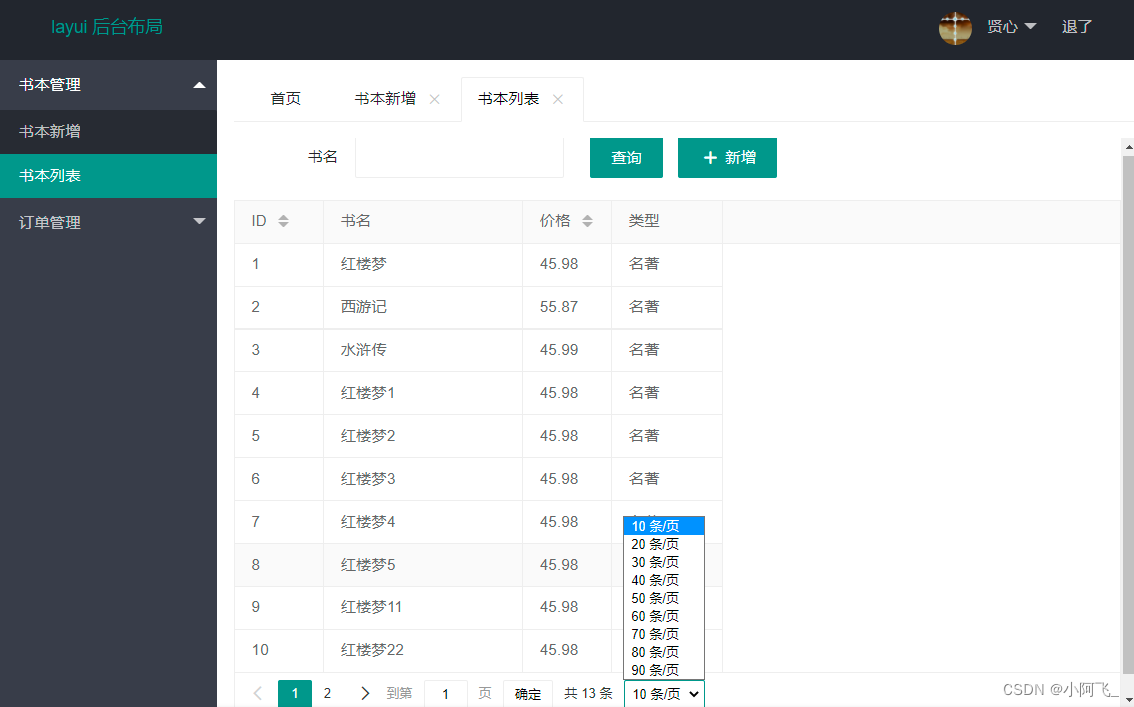
本期精彩:也使用LayUI搭建主界面和增加界面,结合之前封装好了的MVC的jar包,在界面中实现数据库中数据的遍历查询和增加功能
先一起来看看最终效果叭O(∩_∩)O


1、数据库建表语句
- CREATE TABLE t_book (
- id INT(11) NOT NULL AUTO_INCREMENT COMMENT '书本编号',
- bookname VARCHAR(20) NOT NULL COMMENT '书本名称',
- price FLOAT DEFAULT '0' COMMENT '书本价格',
- booktype VARCHAR(20) NOT NULL COMMENT '书本类型',
- PRIMARY KEY (`id`)
- ) COMMENT='书本信息表';
项目使用到的jar包👇

2、后台具体代码实现
Book实体类
注:由于我使用了MVC封装的代码,所以Book实体类中的属性要和数据库中的字段名一致
- @Table("t_book")
- public class Book {
- @Key
- @AutoIncrement
- private Integer id;
- private String bookname;
- private BigDecimal price;
- private String booktype;
- public Integer getId() {
- return id;
- }
- public void setId(Integer id) {
- this.id = id;
- }
- public String getBookname() {
- return bookname;
- }
- public void setBookname(String bookname) {
- this.bookname = bookname;
- }
- public BigDecimal getPrice() {
- return price;
- }
- public void setPrice(BigDecimal price) {
- this.price = price;
- }
- public String getBooktype() {
- return booktype;
- }
- public void setBooktype(String booktype) {
- this.booktype = booktype;
- }
- @Override
- public String toString() {
- return "Book [id=" + id + ", bookname=" + bookname + ", price=" + price + ", booktype=" + booktype + "]";
- }
- }
Dao层代码
IBookDao接口👇
- public interface IBookDao {
- List
listBooks(String bookname, PageBean pageBean); - /**
- * 增加书本信息
- * @param book 传入的参数
- * @see com.zking.layuit278.model.Book
- */
- void addBook(Book book);
- }
BookDao实现类👇
- public class BookDao implements IBookDao {
- @Override
- public List
listBooks(String bookname, PageBean pageBean) { - String sql = "select * from t_book ";
- List
- if(bookname != null && !"".equals(bookname)) {
- sql += "where bookname like ?";
- param.add(bookname+"%");
- }
- return DbTemplate.query(sql, param.toArray(), pageBean, Book.class);
- }
- @Override
- public void addBook(Book book) {
- /*String sql = "insert into t_book(bookname, price, booktype) values(?,?,?)";
- DbTemplate.update(sql, new Object[] {book.getBookname(),book.getPrice(),book.getBooktype()});*/
- DbTemplate.save(book);
- }
- public static void main(String[] args) {
- BookDao dao = new BookDao();
- List
list = dao.listBooks("红",null); - list.forEach(t -> System.out.println(t));
- }
- }
Service层
IBookService接口👇
- public interface IBookService {
- List
listBooks(String bookname, PageBean pageBean); - void addBook(Book book);
- }
BookService接口实现类👇
- public class BookService implements IBookService {
- private IBookDao dao = new BookDao();
- @Override
- public List
listBooks(String bookname, PageBean pageBean) { - return dao.listBooks(bookname, pageBean);
- }
- @Override
- public void addBook(Book book) {
- dao.addBook(book);
- }
- }
BookAction类代码👇
- public class BookAction extends AbstractDispatchAction implements ModelDrive {
- private Book book = new Book();
- @Override
- public Object getModel() {
- return book;
- }
- private IBookService service = new BookService();
- public void listBooks(HttpServletRequest req, HttpServletResponse resp) {
- PageBean pageBean = new PageBean();
- pageBean.setRequest(req);
- try {
- List
books = service.listBooks(book.getBookname(), pageBean); - CommonUtils.toJson(0, pageBean.getTotal(), books, resp);
- } catch (Exception e) {
- e.printStackTrace();
- CommonUtils.toJson(-1, "操作失败", resp);
- }
- }
- public void addBook(HttpServletRequest req, HttpServletResponse resp) {
- try {
- service.addBook(book);
- CommonUtils.toJson(0, "操作成功", resp);
- } catch (Exception e) {
- e.printStackTrace();
- CommonUtils.toJson(-1, "操作失败", resp);
- }
- }
- }
3、JSP页面具体代码实现
主界面👇
- <%@ page language="java" contentType="text/html; charset=UTF-8"
- pageEncoding="UTF-8"%>
- html>
- <html>
- <head>
- <meta charset="utf-8">
- <meta name="viewport" content="width=device-width, initial-scale=1, maximum-scale=1">
- <title>layout 后台大布局 - Layuititle>
- <%@ include file="common/head.jsp" %>
- <style>
- #homePage i {
- display: none;
- }
- style>
- <script>
- let element, $;
- layui.use(['jquery','element'], function(){
- $ = layui.jquery;
- element = layui.element;
- $.ajax({
- url: ctx+"/loginAction.action?methodName=getModules",
- type: 'get',
- dataType: 'json',
- success: function(resp) {
- console.log(resp);
- if(resp.code == 1) {
- $.each(resp.data, function(index, node) {
- //layui-nav-itemed
- let opened = index == 0 ? 'layui-nav-itemed' : '';
- let li = $('
- '">
'); - let dl = $('
- $.each(node.children, function(i,n) {
- })
- li.append(dl);
- $("#menu").append(li);
- });
- element.render('menu');
- }
- }
- })
- });
- function openFuncTab(name, id,url) {
- let exits = $("#funcTabs li[lay-id="+id+"]").length;
- //alert(exits);
- if(exits == 0) {
- element.tabAdd('funcTabs', {
- title: name, //用于演示
- content: '',
- id: id //实际使用一般是规定好的id,这里以时间戳模拟下
- });
- }
- element.tabChange('funcTabs', id);
- setIframeHeight();
- $(window).resize(function() {
- setIframeHeight();
- });
- }
- function setIframeHeight() {
- let h = $(".layui-body").height();
- $(".myiframe").css("height", (h-70)+'px');
- }
- script>
- head>
- <body class="layui-layout-body">
- <div class="layui-layout layui-layout-admin">
- <div class="layui-header">
- <div class="layui-logo">layui 后台布局div>
- <ul class="layui-nav layui-layout-right">
- <li class="layui-nav-item">
- <a href="javascript:;">
- <img src="http://t.cn/RCzsdCq" class="layui-nav-img">
- 贤心
- a>
- <dl class="layui-nav-child">
- <dd><a href="">基本资料a>dd>
- <dd><a href="">安全设置a>dd>
- dl>
- li>
- <li class="layui-nav-item"><a href="">退了a>li>
- ul>
- div>
- <div class="layui-side layui-bg-black">
- <div class="layui-side-scroll">
- <ul class="layui-nav layui-nav-tree" id="menu" lay-filter="test">
- ul>
- div>
- div>
- <div class="layui-body">
- <div style="padding-left: 15px; padding-top: 5px;">
- <div class="layui-tab" lay-filter="funcTabs" id="funcTabs" lay-allowclose="true">
- <ul class="layui-tab-title">
- <li class="layui-this" id="homePage" lay-id="11">首页li>
- ul>
- <div class="layui-tab-content">
- <div class="layui-tab-item layui-show">首页内容div>
- div>
- div>
- div>
- div>
- <div class="layui-footer">
- © layui.com - 底部固定区域
- div>
- div>
- body>
- html>
- <%@ page language="java" contentType="text/html; charset=UTF-8"
- pageEncoding="UTF-8"%>
- html>
- <html>
- <head>
- <meta http-equiv="Content-Type" content="text/html; charset=UTF-8">
- <%@include file="/common/head.jsp" %>
- <title>Insert title heretitle>
- <script>
- let table,$;
- layui.use(['table'], function(){
- table = layui.table;
- $ = layui.$;
- $("#btn-qry-book").click(function() {
- loadBooks();
- })
- loadBooks();
- $("#btn_add").click(function() {
- layer.open({
- type: 2, //layer提供了5种层类型。可传入的值有:0(信息框,默认)1(页面层)2(iframe层)3(加载层)4(tips层)
- title:'增加书本信息',
- area: ['660px', '350px'], //宽高
- skin: 'layui-layer-rim', //样式类名
- content: ctx+'/jsp/book/addBook.jsp' //书本编辑页面
- });
- });
- });
- function loadBooks() {
- table.render({
- elem: '#test',
- url: ctx + '/bookAction.action?methodName=listBooks',
- cols: [[
- {field:'id', width:80, title: 'ID', sort: true}
- ,{field:'bookname', width:180, title: '书名'}
- ,{field:'price', width:80, title: '价格', sort: true}
- ,{field:'booktype', width:100, title: '类型'}
- ]],
- page: true,
- method: 'post',
- where: {
- bookname: $("#bookname").val()
- },
- request: {
- pageName: 'page',
- limitName: 'rows'
- },
- loading: true
- });
- }
- script>
- head>
- <body>
- <div class="layui-form-item">
- <div class="layui-inline">
- <label class="layui-form-label">书名label>
- <div class="layui-input-inline">
- <input type="tel" id="bookname" name="bookname"
- lay-verify="required|phone" autocomplete="off"
- class="layui-input">
- div>
- div>
- <div class="layui-inline">
- <button class="layui-btn" id="btn-qry-book" lay-submit="" lay-filter="demo1">查询button>
- <button id="btn_add" type="button" class="layui-btn"><i class="layui-icon layui-icon-add-1">i> 新增button>
- div>
- div>
- <table class="layui-hide" id="test">table>
- body>
- html>
增加界面👇
- <%@ page language="java" contentType="text/html; charset=UTF-8"
- pageEncoding="UTF-8"%>
- html>
- <html>
- <head>
- <meta http-equiv="Content-Type" content="text/html; charset=UTF-8">
- <%@include file="/common/head.jsp" %>
- <title>Insert title heretitle>
- <script type="text/javascript">
- let form, $;
- layui.use(['form'], function(){
- form = layui.form;
- $ = layui.$;
- //监听提交
- form.on('submit(book)', function(data){
- $.ajax({
- url: ctx + '/bookAction.action?methodName=addBook',
- data: data.field,
- type: 'post',
- dataType: 'JSON',
- success: function(resp) {
- if(resp.code == 0) {
- layer.alert('添加成功', {icon: 1}, function() {
- var index = parent.layer.getFrameIndex(window.name); //先得到当前iframe层的索引
- parent.layer.close(index);
- parent.loadBooks();
- });
- } else {
- layer.alert('添加不成功', {icon: 5});
- }
- }
- })
- return false;
- });
- });
- script>
- head>
- <body>
- <form id="book" class="layui-form layui-form-pane">
- <div class="layui-form-item">
- <label class="layui-form-label">书本名称label>
- <div class="layui-input-block">
- <input type="text" name="bookname" lay-verify="required" autocomplete="off" placeholder="请输入书本名称" class="layui-input">
- div>
- div>
- <div class="layui-form-item">
- <label class="layui-form-label">书本类型label>
- <div class="layui-input-block">
- <input type="text" name="booktype" lay-verify="required" autocomplete="off" placeholder="请输入书本类型" class="layui-input">
- div>
- div>
- <div class="layui-form-item">
- <label class="layui-form-label">书本价格label>
- <div class="layui-input-block">
- <input type="text" name="price" lay-verify="required|number" autocomplete="off" placeholder="请输入书本价格" class="layui-input">
- div>
- div>
- <div class="layui-form-item" style="text-align:center;">
- <button type="button" lay-submit="" lay-filter="book" class="layui-btn layui-btn-normal">保存button>
- <button type="reset" class="layui-btn">重置button>
- div>
- form>
- body>
- html>
-
相关阅读:
基于JAVA的物流信息管理平台【数据库设计、源码、开题报告】
VictoriaMetrics时序数据库(TSDB)的使用
3--Linux:基础命令2
【SpringBoot教程】配置文件详细总结
全面讲解,使用Python搭建自己的后端服务(FastAPI),并提供API接口
Nginx重定向
ubuntu18.04 RTX3060 rangnet++训练 bonnetal语义分割
C语言之文件操作(万字详解)
Maven多模块快速升级超好用Idea插件-MPVP
亚马逊创建eks
- 原文地址:https://blog.csdn.net/yifei_345678/article/details/126014974
