-
QT 消息对话框
消息对话框分为6种
1.information 消息对话框
2.critical 错误对话框
3.question 问题对话框
4.warning 对话框
5.about 对话框
他们的图标不同 按键不同
QMessageBox消息对话框的使用
成员方法 使用 void QMessageBox::setWindowTitle(constQString &title) 设置对话框的标题. void setText(const QString &text) 设置对话框中要显示的文本。 void setlconPixmap(const QPixmap &pixmap) 设置对话框中使用的图片。 QAbstractButton*QMessageBox::clickedButton() consto- 返回用户点击的按钮。 QPushButton*QMessageBox:addButton(const QString&text, ButtonRole role) 向对话框中添加按钮,text为按钮的文本,role是 QMessageBox::ButtonRole枚举类型的变量,用于描述按钮扮演的角色,它的可选值有QMessageBox::AcceptRole (同OK按钮)、QMessageBox::RejectRole (同Cancel按钮)等。 int QMessageBox::exec() 使当前对话框弹出,除非用户关闭对话框,否则对话框将一直存在。此外,当对话框中使用的都是Qt提供的按钮时,该方法可以监听用户点击的是哪个按钮,并将该按钮对应的枚举值返回;如果对话框中包含自定义按钮,需要借助clickedButton()方法确定用户点击的按钮。 信号和槽很少使用 这里就不介绍了
- QMessageBox::StandardButton st= QMessageBox::question(&w,"按y弹出消息对话框","按n弹出错误对话框");//默认是模态的
- if(st==QMessageBox:: Yes)
- {
- QMessageBox::information(&w,"提示","hello");//默认是模态的
- }
- else
- {
- QMessageBox::critical(&w,"错误","wrong");//默认是模态的
- }
完整代码如下
- #include "widget.h"
- #include
- #include
- int main(int argc, char *argv[])
- {
- QApplication a(argc, argv);
- Widget w;
- //QMessageBox mb(QMessageBox::NoIcon,"提示","按一下",QMessageBox::Yes|QMessageBox::No,&w);
- QMessageBox mb(&w);
- mb.setWindowTitle("提示");
- mb.setText("按一下");
- /*QPushButton *but1=*/mb.addButton("提示",QMessageBox ::AcceptRole);
- /*QPushButton *but2=*/mb.addButton("提示",QMessageBox ::RejectRole);
- w.show();
- int but= mb.exec();
- switch(but)
- {
- case QMessageBox::AcceptRole:
- QMessageBox::information(&w,"提示","hello");//默认是模态的
- break;
- case QMessageBox::RejectRole:
- QMessageBox::critical(&w,"错误","wrong");//默认是模态的
- break;
- }
- //mb默认就是模态的 即使mb.show也是模态的
- // QMessageBox::StandardButton st= QMessageBox::question(&w,"按y弹出消息对话框","按n弹出错误对话框");//默认是模态的
- // if(st==QMessageBox:: Yes)
- // {
- // QMessageBox::information(&w,"提示","hello");//默认是模态的
- // }
- // else
- // {
- // QMessageBox::critical(&w,"错误","wrong");//默认是模态的
- // }
- // QMessageBox::warning(&w,"警告","警告");//默认是模态的
- return a.exec();
- }
执行 按提示

显示

按错误
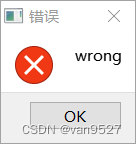
显示
-
相关阅读:
4、paxos协议
通过Forcebot压测实践简述“并发模式”与“RPS模式”两种模式的区别
513.找树左下角的值
Bootstrap(一)
论文阅读NAM:Normalization-based Attention Module
【博客545】从交换机视角看四种报文:广播、组播、未知单播、已知单播
《七月集训》第二十八日——动态规划
vue3---组件基础(上)保姆级篇
Linux下安装Redis(单机版)
数据挖掘实战应用案例精讲-【概念篇】数据仓库(补充篇)(附实战应用案例)
- 原文地址:https://blog.csdn.net/van9527/article/details/126007681
