-
直播课堂系统07-讲师管理模块前端
讲师修改-数据回显
修改数据有两步:1.数据回显,即前端页面展示修改内容 2.数据库中修改内容
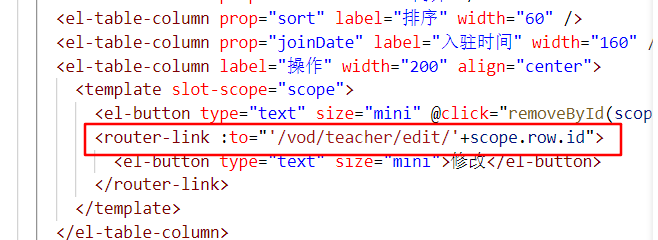
数据回显:1.点击修改后,首先要根据点击的人的ID传到其添加讲师的页面去修改它的消息,因为要跳转,所以需要隐藏路由,还记得之前的,都是到vod里的form去

此时原本修改的地方会跳转到对应id的form界面(此为list.vue)的截图
此刻还需要表单中出现对应id讲师的信息,所以要开始进行数据回显,步骤如下:定义api
getById(id){ return request({ //根据id获取讲师 url:`${api_name}/get/${id}`, method:`get` }) },- 1
- 2
- 3
- 4
- 5
- 6
- 7
组件中调用api
methods中定义fetchDataById,将调用获得的值赋给自己的teacher对象
fetchDataById(id){ teacherApi.getById(id).then(response => { this.teacher = response.data }) },- 1
- 2
- 3
- 4
- 5
因为后端写的也是返回讲师

页面渲染前调用
如果页面渲染前已经有ID了,那么说明需要读取这个讲师的信息
// 页面渲染成功 created() { if (this.$route.params.id) { this.fetchDataById(this.$route.params.id) } },- 1
- 2
- 3
- 4
- 5
- 6
效果
讲师修改-更新
现在进行后台数据库的更新
定义api
和后端代码统一
updateById(teacher) { return request({ url: `${api_name}/update`, method: `put`, data: teacher }) },- 1
- 2
- 3
- 4
- 5
- 6
- 7
组件调用api
在form.vue中的methods里定义updateData
注意是直接传入一个对象,后端也是这么写的// 根据id更新记录 updateData() { // teacher数据的获取 teacherApi.updateById(this.teacher).then(response => { this.$message({ type: 'success', message: response.message }) this.$router.push({ path: '/vod/teacher/list' }) }) },- 1
- 2
- 3
- 4
- 5
- 6
- 7
- 8
- 9
- 10
- 11
完善saveOrUpdate方法
看teacher里面有id,就是修改,否则就是保存
saveOrUpdate() { // 禁用保存按钮 this.saveBtnDisabled = true //意思是teacher里面有id,即是否包含这个属性 if (!this.teacher.id) { this.saveData() } else { this.updateData() } },- 1
- 2
- 3
- 4
- 5
- 6
- 7
- 8
- 9
- 10
讲师批量删除
定义api
batchRemove(idList){ return request({ url:`${api_name}/batchRemove`, method:`delete`, data:idList }) },- 1
- 2
- 3
- 4
- 5
- 6
- 7
初始化组件
在table组件上添加批量删除按钮,里面有添加和批量删除。
<!-- 工具按钮 --> <el-card class="operate-container" shadow="never"> <i class="el-icon-tickets" style="margin-top: 5px"></i> <span style="margin-top: 5px">数据列表</span> <el-button class="btn-add" @click="add()" style="margin-left: 10px;">添加</el-button> <el-button class="btn-add" @click="batchRemove()" >批量删除</el-button> </el-card>- 1
- 2
- 3
- 4
- 5
- 6
- 7
在table组件上添加复选框
复选框发生变化时,无论选不选中,都要调用handleSelectionChange
<!-- 表格 --> <el-table :data="list" border stripe @selection-change="handleSelectionChange"> <el-table-column type="selection"/>- 1
- 2
- 3
- 4
- 5
- 6
- 7
实现功能
首先在数据模型里面定义一行:
multipleSelection: []// 批量删除选中的记录列表完善方法
首先在调用handleSelectionChange方法的时候,需要将其赋给自己的数据模型。
handleSelectionChange(selection){ console.log(selection) this.multipleSelection = selection },- 1
- 2
- 3
- 4
最后完善方法
batchRemove(){ if (this.multipleSelection.length === 0) { this.$message.warning('请选择要删除的记录!') return } this.$confirm('此操作将永久删除记录,是否继续?','提示',{ confirmButtonText: '确定', cancelButtonText: '取消', type: 'warning' }).then(()=>{ //点击确定的话 调用ajax //遍历selection 将id取出放入列表 var idList = [] this.multipleSelection.forEach(item => { idList.push(item.id) }) //调用api return teacherApi.batchRemove(idList) }).then((response) => { this.fetchData(); this.$message.success(response.message) }).catch(error => { if(error == 'cancel'){ this.$message.info('取消删除') } }) },- 1
- 2
- 3
- 4
- 5
- 6
- 7
- 8
- 9
- 10
- 11
- 12
- 13
- 14
- 15
- 16
- 17
- 18
- 19
- 20
- 21
- 22
- 23
- 24
- 25
- 26
- 27
-
相关阅读:
蓝桥杯软件赛Java研究生组/A组)第二章基础算法-第三节:倍增
美团二面:为什么Redis会有哨兵?
redis复制机制
各种字符串Hash函数比较
算法炼狱线段树 —— 一个细节没掌握好,三个小时过去了
新品发布怎样让媒体报道宣传?企业官网如何推广比较有限?
ai批量剪辑矩阵无人直播一站式托管系统源头技术开发
全国CDGA/CDGP数据治理认证11月5日全面开班啦!
114、数据库,核心价值是持久层和数据准确性,复杂的事情不要干
Linux基础(yum,vim,gcc,gdb)
- 原文地址:https://blog.csdn.net/z754916067/article/details/126015452
