-
JavaEE:Spring Cloud Alibaba-Nacos与Feign使用
Nacos服务器安装(单):
JavaEE:CentOS 7中安装Nacos_無_爲的博客-CSDN博客
一、添加Spring Cloud与Spring Cloud Alibaba依赖:
1.在工程根目录pom.xml中:
- <project ...>
- ...
- <properties>
- <spring-cloud-alibaba.version>2021.0.1.0spring-cloud-alibaba.version>
- <spring-cloud.version>2021.0.3spring-cloud.version>
- properties>
- <dependencies>
- <dependency>
- <groupId>org.springframework.bootgroupId>
- <artifactId>spring-boot-starter-webartifactId>
- dependency>
- <dependency>
- <groupId>org.springframework.cloudgroupId>
- <artifactId>spring-cloud-starter-loadbalancerartifactId>
- dependency>
- dependencies>
- <dependencyManagement>
- <dependencies>
- <dependency>
- <groupId>org.springframework.cloudgroupId>
- <artifactId>spring-cloud-dependenciesartifactId>
- <version>${spring-cloud.version}version>
- <type>pomtype>
- <scope>importscope>
- dependency>
- <dependency>
- <groupId>com.alibaba.cloudgroupId>
- <artifactId>spring-cloud-alibaba-dependenciesartifactId>
- <version>${spring-cloud-alibaba.version}version>
- <type>pomtype>
- <scope>importscope>
- dependency>
- dependencies>
- dependencyManagement>
- project>
二、微服务Module发布服务:
1.添加Nacos依赖,在模块工程pom.xml中:
- <dependencies>
- ...
- <dependency>
- <groupId>com.alibaba.cloudgroupId>
- <artifactId>spring-cloud-starter-alibaba-nacos-discoveryartifactId>
- dependency>
- dependencies>
2.注册服务,在application.yml中:
- ...
- spring:
- ...
- application:
- name: nacos #配置微服务的名称
- cloud:
- nacos:
- discovery:
- server-addr: http://192.168.83.129:8848 #Nacos服务器地址
- management:
- endpoints:
- web:
- exposure:
- include: '*'
3.启动类中加@EnableDiscoveryClient:
- @EnableDiscoveryClient
- @SpringBootApplication
- public class NacosApplication {
- public static void main(String[] args) {
- SpringApplication.run(NacosApplication.class, args);
- }
- }
4.提供服务接口:
- @Controller
- @RequestMapping
- public class UserController {
- @RequestMapping(value = "/userList")
- @ResponseBody
- public String userList() {
- ...
- }
- }
三、Web应用Module调用服务:
1.添加Feign与Nacos依赖,在模块工程pom.xml中:
- <dependencies>
- ...
- <dependency>
- <groupId>org.springframework.cloudgroupId>
- <artifactId>spring-cloud-starter-openfeignartifactId>
- dependency>
- <dependency>
- <groupId>com.alibaba.cloudgroupId>
- <artifactId>spring-cloud-starter-alibaba-nacos-discoveryartifactId>
- dependency>
- dependencies>
2.发现服务,在application.yml中:
- ...
- spring:
- ...
- cloud:
- nacos:
- discovery:
- server-addr: http://192.168.83.129:8848 #Nacos服务器地址
3.启动类中加@EnableFeignClients与@EnableDiscoveryClient:
- @EnableFeignClients
- @EnableDiscoveryClient
- @SpringBootApplication
- public class FeignApplication {
- public static void main(String[] args) {
- SpringApplication.run(FeignApplication.class, args);
- }
- }
4.调用服务接口:
(1)定义Feign调用接口:
- @FeignClient(name = "nacos"/*, fallback = */) //被调用的微服务名,fallback可配置降级处理类
- public interface UserServiceClient {
- @RequestMapping(value = "/userList")
- String userList();
- }
(2)测试例子:
- @Controller
- @RequestMapping
- public class UserApi {
- @Autowired
- private UserServiceClient userServiceClient;
- @RequestMapping(value = "/getUserList")
- @ResponseBody
- public String getUserList() {
- System.out.println("Web应用被调用");
- return userServiceClient.userList();
- }
- }
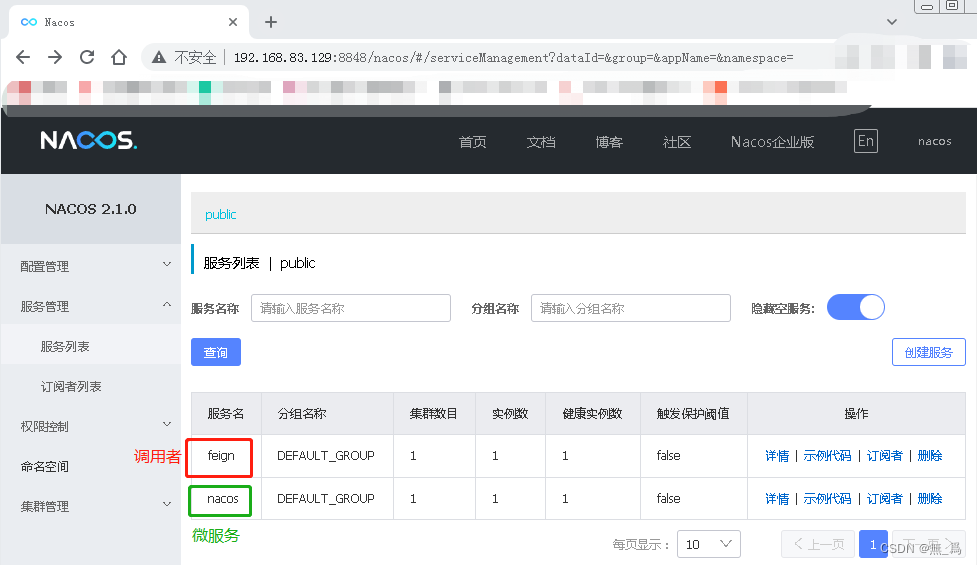
5.查看服务列表:
-
相关阅读:
“阿里爸爸”最新 Java 面试指南,基础 + 框架 + 数据库 + 系统设计 + 算法
听GPT 讲Istio源代码--cni
当用get请求,接到前端传的字符串数组列表的时候,用split 分割的方式
Leetcode105. 从前序与中序遍历序列构造二叉树
19. Remove Nth Node From End of List
408考研科目《数据结构》第三章第三节:特殊矩阵的压缩存储
013. N 皇后
ElasticSearch Client体验
SpringBoot整合Junit
蓝桥杯物联网竞赛_STM32L071_19_输出方波信号(PWM)
- 原文地址:https://blog.csdn.net/a526001650a/article/details/126018660
