-
ubuntu上手指南(更新阿里源、安装ssh、安装chrome、安装搜狗输入法、设置固定IP)
ubuntu上手指南(更新阿里源、安装ssh、安装chrome、安装搜狗输入法、设置固定IP)
一、更新并安装基础软件
#切换root用户 sudo su - #更新 apt update #升级 apt upgrade #install vim apt install vim #install net-tools apt install net-tools #将PermitRootLogin的值改为yes,/搜索即可,超级简单 vim /etc/ssh/sshd_config PermitRootLogin yes- 1
- 2
- 3
- 4
- 5
- 6
- 7
- 8
- 9
- 10
- 11
- 12
- 13
- 14
- 15
- 16
- 17
- 18
二、安装ssh并设置开机自启动
#install ssh apt install openssh-server apt install openssh-client #重启ssh服务 service ssh restart vim /root/.bashrc #增加一条记录service ssh start service ssh start- 1
- 2
- 3
- 4
- 5
- 6
- 7
- 8
- 9
- 10
三、安装chrome浏览器
chrome官网下载chrome的deb安装包
#切换到下载目录 cd /home/jason/Download #install chrome dpkg -i google-chrome-stable_current_am64.deb- 1
- 2
- 3
- 4
- 5
四、设置ubuntu更新源为阿里源
#更换阿里源 vim /etc/apt/sources.list #注释掉原有的,并把下面的贴过去 deb http://mirrors.aliyun.com/ubuntu/ jammy main restricted universe multiverse deb-src http://mirrors.aliyun.com/ubuntu/ jammy main restricted universe multiverse deb http://mirrors.aliyun.com/ubuntu/ jammy-security main restricted universe multiverse deb-src http://mirrors.aliyun.com/ubuntu/ jammy-security main restricted universe multiverse deb http://mirrors.aliyun.com/ubuntu/ jammy-updates main restricted universe multiverse deb-src http://mirrors.aliyun.com/ubuntu/ jammy-updates main restricted universe multiverse deb http://mirrors.aliyun.com/ubuntu/ jammy-proposed main restricted universe multiverse deb-src http://mirrors.aliyun.com/ubuntu/ jammy-proposed main restricted universe multiverse deb http://mirrors.aliyun.com/ubuntu/ jammy-backports main restricted universe multiverse deb-src http://mirrors.aliyun.com/ubuntu/ jammy-backports main restricted universe multiverse #更新 apt update #升级 apt upgrade- 1
- 2
- 3
- 4
- 5
- 6
- 7
- 8
- 9
- 10
- 11
- 12
- 13
- 14
- 15
- 16
- 17
- 18
- 19
- 20
五、安装搜狗输入法
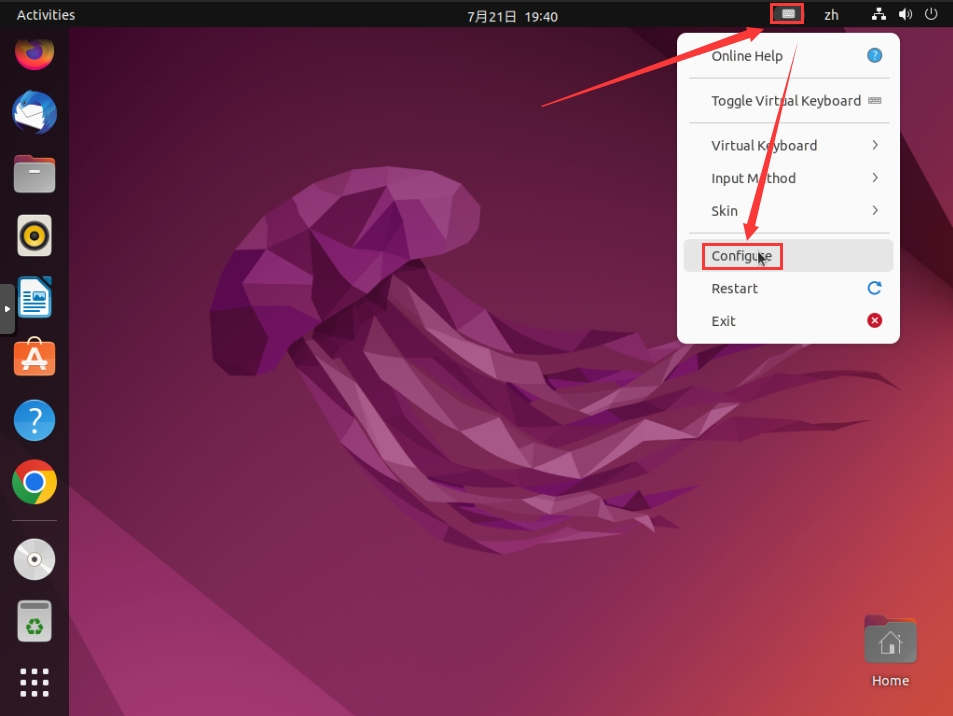
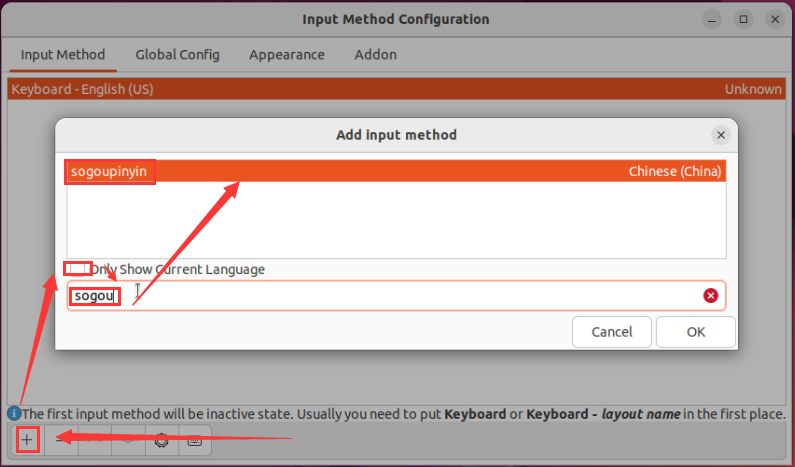
#下载输入法网址 http://pinyin.sogou.com/linux/ #安装fcitx并设置开机启动 apt install fcitx fcitx-table-wbpy cp /usr/share/applications/fcitx.desktop /etc/xdg/autostart/ #卸载ibus apt purge ibus #安装搜狗拼音 dpkg -i sogoupinyin_4.0.1.2800_x86_64.deb #安装输入法依赖 apt install libqt5qml5 libqt5quick5 libqt5quickwidgets5 qml-module-qtquick2 apt install libgsettings-qt1 #重启电脑 reboot #右上角输入法图标 -- confing -- + -- 搜索sogou- 1
- 2
- 3
- 4
- 5
- 6
- 7
- 8
- 9
- 10
- 11
- 12
- 13
- 14
- 15
- 16
- 17
- 18
- 19
- 20
六、设置固定IP
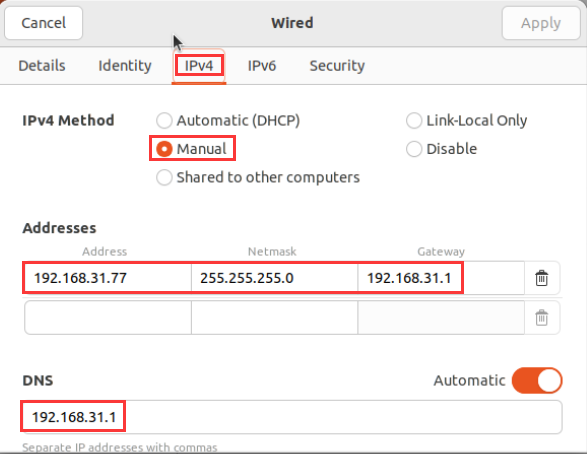
在系统设置setting中点击network,然后点击有线连接后面的设置按钮。

点击IPv4,选择手动Manual。
192.168.31.77为我们设置的固定IP。
Netmask一般都为255.255.255.0。
Gateway选择我的路由器IP,也就是192.168.31.1。
DNS也是路由器IP为192.168.31.1。
-
相关阅读:
运维笔记:流编辑器sed命令用法解析
【网络编程】
前端面试要点
强化学习代码实战(3) --- 寻找真我
MATLAB图像处理介绍
[数据结构与算法] 线性表之单链表初始化详解
容器环境下php进程与bash进程树关系
微信小程序 ---- 慕尚花坊 购物车
Kubeadm安装k8s高可用集群实战
Java泛型的总结
- 原文地址:https://blog.csdn.net/JingLisen/article/details/125938607