-
关于Qt的位图图像进行变化后,背景变黑的问题
问题
我将
Format_MonoLSB格式的QImage,进行旋转后,发生了像素的改变。即原本白色(0xFF)的背景变成了黑色(0x00)
代码大概如下:image = image.transformed(QTransform().rotate(270), Qt::SmoothTransformation) .convertToFormat(QImage::Format_MonoLSB, Qt::AvoidDither | Qt::ThresholdDither | Qt::ThresholdAlphaDither);- 1
- 2
- 3
流程
看了下QImage的
transformed函数,当QImage::Format_XXX的值小于Format_RGB32的时候,会调用一个qt_alphaVersion的函数,此函数会默认将当前QImage的格式转为Format_ARGB32_Premultiplied。
因此可以推断出,当Format_ARGB32_Premultiplied调用convertToFormat函数,将图像格式转到MonoLSB时候,像素发生了变化。
转换的大致流程如下:背景的变化按照测试的结果,只发生在步骤2,即
调用convertToFormat。convertToFormat
convertToFormat函数实际上里面调用了
convertToFormat_helper函数: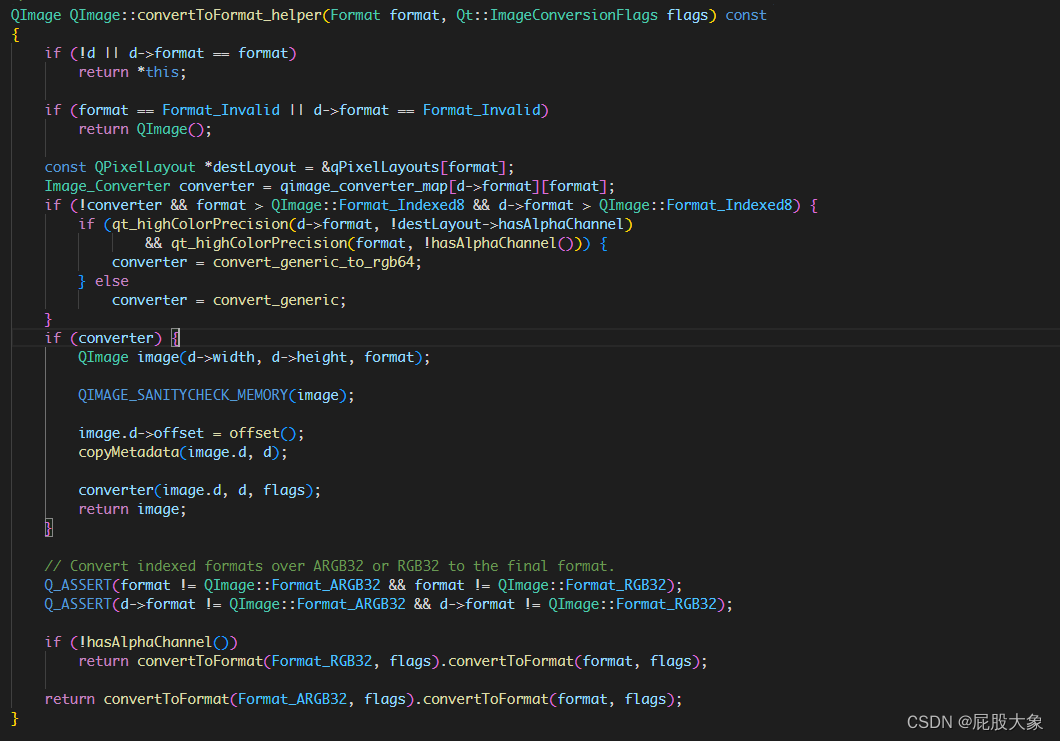
其中converter是转换函数,根据不同的格式调用的也不同,我们是Format_ARGB32_Premultiplied转为Format_MonoLSB,所以最后发生格式转换的函数定位在convert_ARGB_PM_to_Mono。原型如下:static void convert_ARGB_PM_to_Mono(QImageData *dst, const QImageData *src, Qt::ImageConversionFlags flags) { QScopedPointer<QImageData> tmp(QImageData::create(QSize(src->width, src->height), QImage::Format_ARGB32)); convert_generic(tmp.data(), src, Qt::AutoColor); dither_to_Mono(dst, tmp.data(), flags, false); }- 1
- 2
- 3
- 4
- 5
- 6
也就是像素的变化只会发生在
convert_generic和dither_to_Mono。
再次跟进,发现dither_to_Mono才是决定最终图像数据的地方。
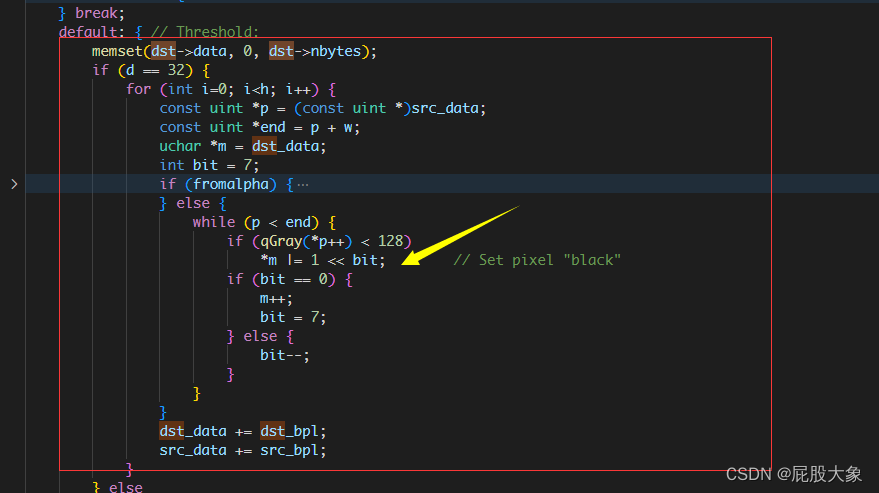
根据传入的参数,最后图像数据的填充代码位于红框部分,其中黄色箭头指的就是部分图像数据的赋值。
不难发现,当前像素灰度小于128时候,像素值会被赋值为0,即黑像素。所以,原本的白色背景都变为了黑色。解决方法
把所有像素"翻转"一次就行。
QImage自带一个
invertPixels函数,可以快速实现这个像素翻转的功能。当位深小于32时,它把所有像素都异或了0xFF。

若有不对的地方,欢迎评论区指正讨论~
-
相关阅读:
gdb调试
Flink 1.13 源码解析——TaskManager启动流程概览
基于C++的Android 诊断动态库开发工程的创建
UE5.1编辑器拓展【二、脚本化资产行为,快速更改资产名字,1.直接添加前缀或后缀2.通过资产类判断添加修改前缀】
Python Random模块详解
java高级学习总结
你真的明白井字棋整个过程吗
Redis基础篇:初识Redis(认识NoSQL,单机安装Redis,配置Redis自启动,Redis客户端的基本使用)
详细了解网络通信流程、协议组成、编码方式、数据传输方式和途径、Http 协议的编码、cookie的使用和提取路径
从入门开始手把手搭建千万级Java算法测试-计数排序与快速排序的比较(常规快排)比较
- 原文地址:https://blog.csdn.net/t13506920069/article/details/125993212