-
ubuntu 16.04成功安装meteor
一。 初装篇
反复装了十多遍,每次都是返回:
Unexpected mongo exit code null. Restarting...
Can't start Mongodb.
从一开始以为是已经安装了mongo或者其他软件,导致冲突,到后来干脆使用干净的os,可是始终都是这个报错。国内国外看了一堆解决问题的帖子,全都尝试了一遍,还是不行。
所以最后猜得原因就是meteor版本跟os不匹配。
安装了meteor最新版,npm,node都安装了最新版,还是报这个错。
后来把meteor版本回到2.0,其他什么都没做,......,终于看到meteor成功启动了,哈哈哈
test@ubuntu:/test/mymeteor/test1$ meteor
[[[[[ /test/mymeteor/test1 ]]]]]=> Started proxy.
=> Started HMR server.
=> Started MongoDB.
=> Started your app.=> App running at: http://localhost:3000/
以下为完整步骤:
1。下载, curl https://install.meteor.com > meteor.sh,
修改 “RELEASE="2.7.3" ”为 “RELEASE="2.0"”
2。下载安装包
https://d3sqy0vbqsdhku.cloudfront.net/packages-bootstrap/2.0/meteor-bootstrap-os.linux.x86_64.tar.gz
3。安装,注意安装用户不要用root,目录权限全改为当前用户
./meteor.sh
4. 创建meteor项目
meteor create test1
cd test1
meteor5。成功
二。使用篇:
在meteor默认工程上,加入自己的数据和页面展示
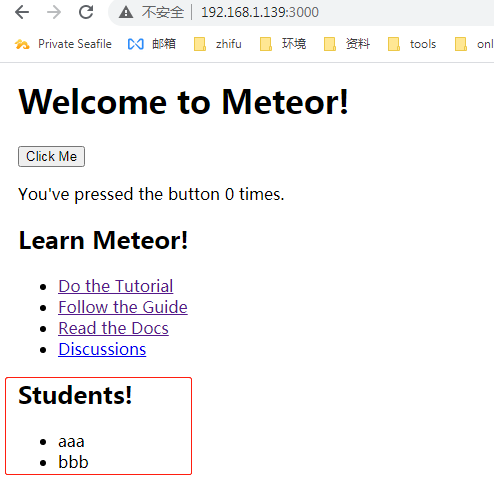
1。title在clients/main.html中修改
2。 数据在server\main.js中添加:
import { StuCollection } from '/imports/api/links';
function insertStu({ name, age }) {
StuCollection.insert({name, age, createdAt: new Date()});
}
Meteor.startup(() => {
// If the Links collection is empty, add some data.
if (LinksCollection.find().count() === 0) {
insertLink({
title: 'Do the Tutorial',
url: 'https://www.meteor.com/tutorials/react/creating-an-app'
});insertLink({
title: 'Follow the Guide',
url: 'http://guide.meteor.com'
});insertLink({
title: 'Read the Docs',
url: 'https://docs.meteor.com'
});insertLink({
title: 'Discussions',
url: 'https://forums.meteor.com'
});
}
if (StuCollection.find().count() === 0) {
insertStu({
name: 'aaa',
age: '16'
});
insertStu({
name: 'bbb',
age: '18'
});}
});3。在/imports/api/links添加:
export const StuCollection = new Mongo.Collection('student');
4。新建文件\imports\ui\stu.jsx
import React from 'react';
import { useTracker } from 'meteor/react-meteor-data';
import { StuCollection } from '../api/links';export const Stu = () => {
const student = useTracker(() => {
return StuCollection.find().fetch();
});return (
Students!
- {student.map(
{stu.name}
stu =>
)}
);
};5。在\imports\ui\App.jsx添加:
import { stu } from './stu.jsx';
export const App = () => (
Welcome to Meteor!
); -
相关阅读:
友思特应用 | 红外视角的延伸:短波红外相机的机器视觉应用
【深度学习】数据集最常见的问题及其解决方案
用 Go 访问 MySql 数据库
[附源码]Python计算机毕业设计Django贵港高铁站志愿者服务平台
apicloud影视解析APP源码 HTML
计算机网络第二章知识点回顾(自顶向下)
(一) 使用 Hugo 搭建个人博客保姆级教程(下篇)
脑影像独立成分分析(ICA)的自动化流程
Invalid bound statement (not found)出现的原因和解决方法
Gitea 与 Drone 集成实践:完全基于 Docker 搭建的轻量级 CI/CD 系统
- 原文地址:https://blog.csdn.net/zm_21/article/details/125990983