-
Spring MVC 框架学习(六)---- 返回页面+加载静态资源
Spring 框架学习(六)---- 返回页面+加载静态资源
一、返回页面
不加 @ResponseBody ,默认是返回一个网页
@RequestMapping("/getPage") public String getPage(){ return "index.html"; }- 1
- 2
- 3
- 4

二、返回非页面的数据
返回非页面的数据,必须在方法或者类上加 @ResponseBody,同时 我们返回的类型 springmvc会自动解析成对应的格式,不需要我们进行手动指定
1、返回 text/html
@RequestMapping("/getText") @ResponseBody public String getHTML(String name){ return "你好,欢迎用户:"
+name+""
; }- 1
- 2
- 3
- 4
- 5
- 6
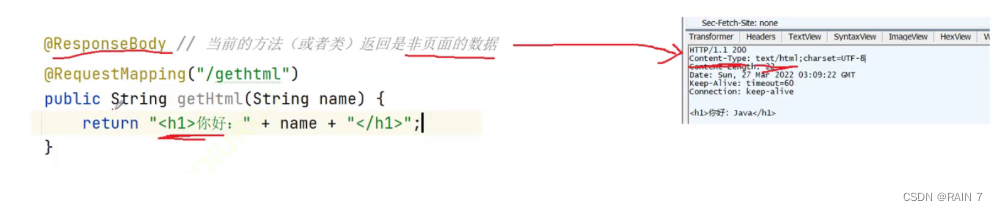
访问接口,自动解析成 html格式

通过 Fiddler 进行抓包,查看返回响应的格式为 text/html。
2、返回 application/json
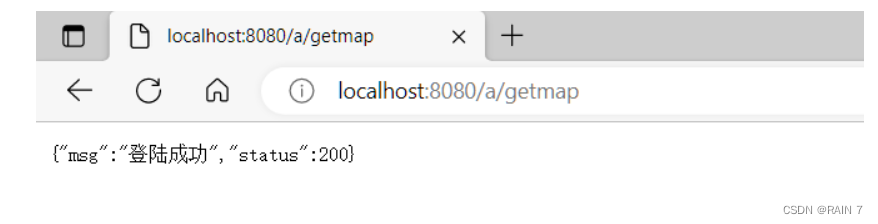
使用map存储数据,返回map
@RequestMapping("/getmap") @ResponseBody public Object getJson(){ HashMap<Object,Object> map = new HashMap<>(); map.put("msg","登陆成功"); map.put("status",200); return map; }- 1
- 2
- 3
- 4
- 5
- 6
- 7
- 8
- 9
自动解析称为 json 格式的数据
三、加载静态资源
咱们就直接定死了写的格式
在webapp目录下创建static文件夹保存 css、js、html 资源
同时在spring-mvc.xml 文件中加入 过滤静态资源、加载静态资源的配置
<mvc:default-servlet-handler/> <mvc:resources location="/static/css/" mapping="/static/css/**"/> <mvc:resources location="/static/js/" mapping="/static/js/**"/> <mvc:resources location="/static/" mapping="/static/**"/>- 1
- 2
- 3
- 4
- 5
- 6
- 7
- 8
我们来试一下访问静态资源
在wbeapp目录下创建static文件,将css/js/html等文件添加进去

web.xml 配置文件
<web-app xmlns="http://xmlns.jcp.org/xml/ns/javaee" xmlns:xsi="http://www.w3.org/2001/XMLSchema-instance" xsi:schemaLocation="http://xmlns.jcp.org/xml/ns/javaee http://xmlns.jcp.org/xml/ns/javaee/web-app_4_0.xsd" version="4.0"> <servlet> <servlet-name>springmvcservlet-name> <servlet-class>org.springframework.web.servlet.DispatcherServletservlet-class> <init-param> <param-name>contextConfigLocationparam-name> <param-value>classpath:spring-mvc.xmlparam-value> init-param> <load-on-startup>1load-on-startup> <multipart-config> <max-file-size>20848820max-file-size> <max-request-size>418018841max-request-size> <file-size-threshold>1048576file-size-threshold> multipart-config> servlet> <servlet-mapping> <servlet-name>springmvcservlet-name> <url-pattern>/url-pattern> servlet-mapping> web-app>- 1
- 2
- 3
- 4
- 5
- 6
- 7
- 8
- 9
- 10
- 11
- 12
- 13
- 14
- 15
- 16
- 17
- 18
- 19
- 20
- 21
- 22
- 23
- 24
- 25
- 26
- 27
- 28
- 29
spring-mvc.xml 配置文件
<beans xmlns="http://www.springframework.org/schema/beans" xmlns:xsi="http://www.w3.org/2001/XMLSchema-instance" xmlns:context="http://www.springframework.org/schema/context" xmlns:mvc="http://www.springframework.org/schema/mvc" xsi:schemaLocation="http://www.springframework.org/schema/beans http://www.springframework.org/schema/beans/spring-beans.xsd http://www.springframework.org/schema/context https://www.springframework.org/schema/context/spring-context.xsd http://www.springframework.org/schema/mvc http://www.springframework.org/schema/mvc/spring-mvc.xsd"> <context:component-scan base-package="com.*"/> <mvc:default-servlet-handler/> <mvc:resources location="/static/css/" mapping="/static/css/**"/> <mvc:resources location="/static/js/" mapping="/static/js/**"/> <mvc:resources location="/static/" mapping="/static/**"/> <mvc:annotation-driven> <mvc:message-converters register-defaults="true"> <bean class="org.springframework.http.converter.StringHttpMessageConverter"> <property name="supportedMediaTypes"> <list> <value>text/html;charset=UTF-8value> <value>application/json;charset=UTF-8value> list> property> bean> mvc:message-converters> mvc:annotation-driven> beans>- 1
- 2
- 3
- 4
- 5
- 6
- 7
- 8
- 9
- 10
- 11
- 12
- 13
- 14
- 15
- 16
- 17
- 18
- 19
- 20
- 21
- 22
- 23
- 24
- 25
- 26
- 27
- 28
- 29
- 30
- 31
- 32
- 33
- 34
- 35
- 36
- 37
- 38
- 39
- 40
- 41
- 42
在controller层进行访问静态html文件(经过css、js渲染)
@RequestMapping("/login") public String getLog(){ return "redirect:/static/login.html"; }- 1
- 2
- 3
- 4
四、转发和重定向
1、请求转发forword 和 重定向的区别
(1) 重定向 将请求重新定位到资源的位置,请求转发是服务器端进行转发的
(2)请求重定向url地址发生改变,请求转发地址不发生变化
(3)请求重定向于直接访问新地址的效果一样,不存在原来的外部资源不能访问,请求转发服务器端的转发可能会造成外部资源不能访问(js、css)
如果外部资源于转发访问的页面不在同一级目录下,会造成外部资源不可访问。
2、请求转发的访问资源问题演示

通过转发的请求资源都直接通过 8080:/a/login 这个接口的同一级目录下直接访问,当然找不到资源
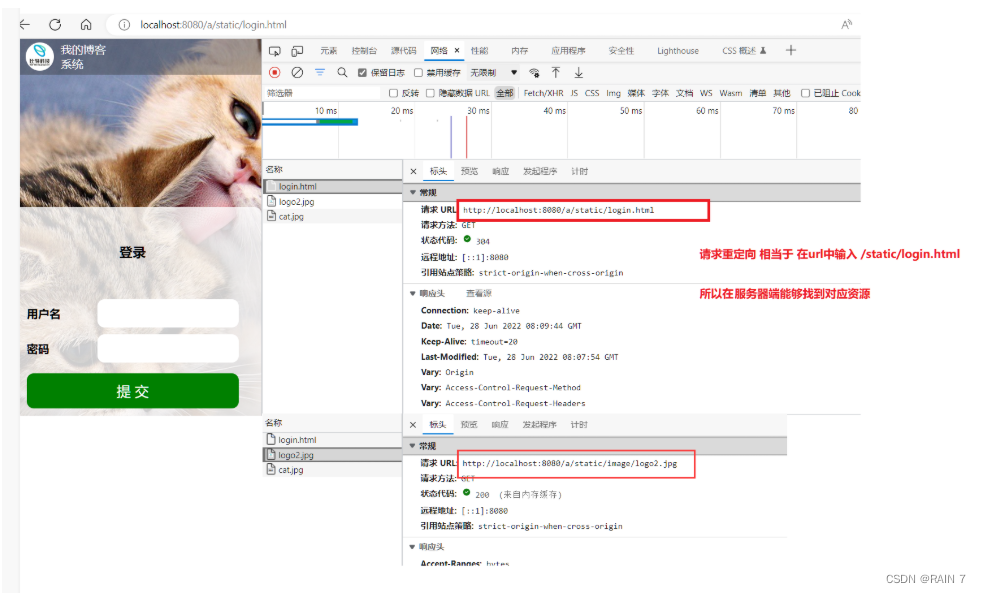
请求重定向相当于 输入的url变了,直接访问到 /static/login/html,同时附带的资源在在这一目录下能够访问到。
3、页面跳转
1、请求转发: 服务器放客户进行请求转发并将结果响应给客户端,URL是不会变的
2、请求重定向:服务器端请求重新定义到要访问的地址。URL会放生改变。
总结:
-
请求转发的URL地址不变,因为是服务器端进行转发和响应的,所以重定向URL地址会发生改变,因为服务器端直接将请求重定向到具体的地址上
-
使用请求转发那么有可能会发生资源丢失,访问不到外部资源。请求重定向是直接重定向到URL地址,所以请求重定向和直接访问目标地址的效果是一样的,所以不会存在外部资源丢失的情况。
五、组合注解
@RestController
相当于 @Controller + @ResponseBody
只能加到类上
-
相关阅读:
第七章 指针
Gitlab API调用给每个人生成一个token,操作api
学习pandas,应该选择哪本书进行学习?
星宿UI2.4资源付费变现小程序源码 支持流量主
可视化交互工具 Dreamview
Centos7 安装 Nginx及启动命令
深入剖析:正则表达式的奥秘
Mendix 开发实践指南|Mendix的核心概念
腾讯三季度财报解读:AI大模型成下个十年的新支点?
前端开发趋势:WebAR、VR与沉浸式体验
- 原文地址:https://blog.csdn.net/rain67/article/details/125504834
